

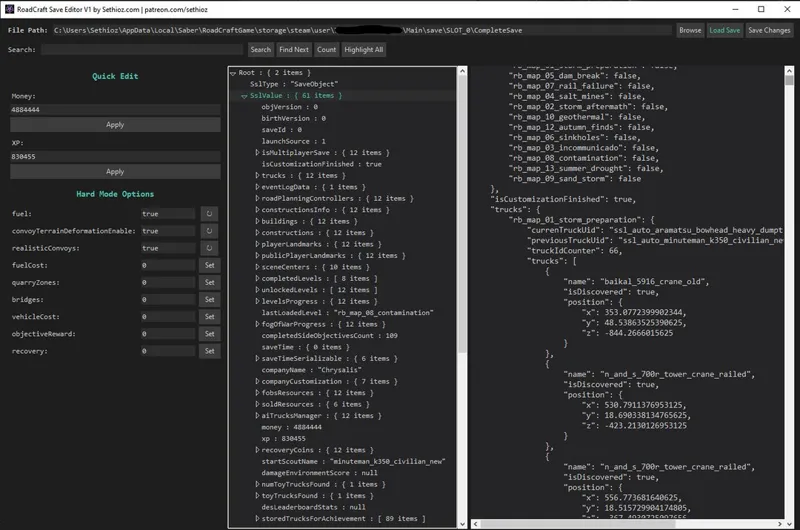

RoadCraft Complete Save Editor (DLC support)
While this is freeware, please do consider supporting my work!
I spent about 3-4 days on this tool (~30h) and programmers in EU & USA get paid 25-150+ USD per HOUR!
I made my own save editor for RoadCraft cuz i couldn't find one that supports DLC maps, there's some basic garbage that only lets you edit money, xp and couple other basic things and others i found don't even support DLC content in save (DLC maps/trucks are not displayed).
i think it's complete enough for release. I added quick edit panel for most common things as i figured those are the things that most ppl want to edit, but it decompresses + opens entire save, so you can edit raw data as you like.
everything that exists in your save, will be loaded and shown. i added search feature aswell, so you can search for specific stuff (like mission rewards, truck positions..etc).
I think this is the most complete save editor out there.
NOTE: there's NO hold-my-hand mode, if you make a mistake in editing, like some intention or other syntax error, you WILL corrupt your save! pay attention to what you're doing!
USAGE:
Run the .exe
if you have played RoadCraft from one account only, then it will default to your save:
C:\Users\your_user_name\AppData\Local\Saber\RoadCraftGame\storage\steam\user\steam_user_id\Main\save\SLOT_0\CompleteSave
if you have multiple users and/or profiles, you have to manually select correct "CompleteSave" file.
edit whatever you like, then click "save changes" button.
it will automatically make backup, renaming original to CompleteSave.bak and any further edits will make .bak1 .bak2 ..up to .bak5, then it will overwrite .bak1, but it won't overwrite .bak (original).
I suggest you backup your save manually JUST TO BE SURE nothing happens! (Simply copy CompleteSave to safe location).
KNOWN BUGS:
When clicking on the tree view and editing fields, it might appear as if changes didn't happen, but that's visible bug. you can test on money, find the money in raw save on right side (use search and search for exact amount of money), then edit it and click save changes, load your save and you will notice that difference.
You might have to DELETE "CompleteSaveBackup" located in the original save location, that file is automatic backup generated by game itself, if game detects something "odd", it might delete the CompleteSave and restore the Backup instead. so if you save changes, but don't see them in-game, then that's the cause. delete that backup (or rename or move) and then re-edit the save.
If you have any questions/issues/bug reports, message me, DO NOT use comments as i don't have notifications for comments, i only get email notifications when someone messages me.
Password for archive is "sethioz" (without quotes, all lower case).