
🥵fix
I know this is one day early, but I might be a bit busy tomorrow so I wanted to make sure I keep you updated on the progress.
New Development Tasks:
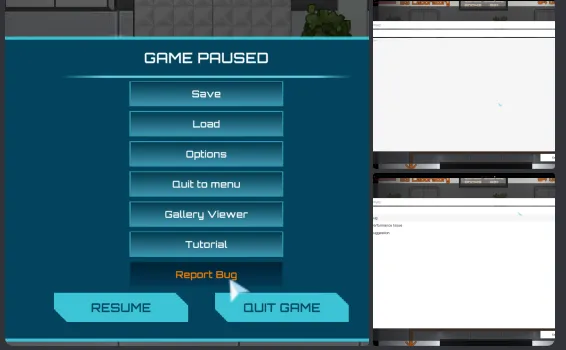
Implemented the Unity User Reporting feature. ✅ I'm currently allowed to receive 10 reports for free from players who enabled the analytics framework (the popup at the beginning of the game). It will send me a screenshot of what the player sees at that moment in the game, together with a save file made at the time of the report and whatever the user wrote in the description and category. This can be really helpful because it makes it much easier to send bug reports, but because I don't have Unity Pro or whatever (it costs more than $2K per year) I can't receive more than 10 for free per day. It looks like this
Made the game much more efficient (performance-wise) for all platforms and made it take much less space on the Android platform. ✅ This temporarily causes an issue with the character window not seeing the player avatar, but that can be solved some other time.
Finished writing the ISA Village ending, providing also a great pacing opportunity to add some side content to the ship with the crewmates. ✅ I still need to make a few adjustments/improvements in some parts, but the hard part for the writing is done. Unfortunately it's about 6,000 words, but I promise that there isn't any sort of filler, it's just that the cutscene will be pretty long and it's an important part of the game.
Enabled VSync again, to eliminate screen tearing. ✅
Released a hotfix today for all Patron builds, it should break one gamebreaking bug and make the game smoother. ✅
Bugs Progress:
During the ISA, time doesn't ever change. ⌛Still looking for a solution.
Sometimes the avatar doesn't reflect what the chibi is wearing. ✅ Should be fine, but this might occur in a few other places where the clothes animations are still played manually in very early parts of the ISA.
Some NPCs have their visual gameobject still flipped, so their bodies are looking the other way than the clothes. ✅ I could only find one NPC suffering from this, Julia, and fixed the issue.
On Day2 in ISA Classroom/Study room you can't interact with Alberto to give him the parts. ✅ Fixed as well, too bad it's not possible to do automated instrumental testing in Unity because I don't know how this one happened.
The game looks off on non 16:9 resolutions including ultrawide aspect ratios. 🤔 Made a few adjustments to the UI, but I'm pretty sure things are still not 100%. I don't know why Unity doesn't handle this by itself as it is the case on Android.
On Android loading a game might cause a crash? Asked for more details. ✅ Turns out this was a big issue. I have reenabled normal compression only for the Android platform, because android devices usually don't have so much space and RAM. I have also made the game much more efficient on all platforms by disabling rendering when unnecessary (This led to the character window not showing the player anymore but that one can be figured out later) and Android is now much smoother.
So that's about it. I still need to start animating two scenes but I believe we're making good progress.
There's also a lot of progress on drawing the Hub area, meaning that as soon as we have some content in the ship and finish up the cutscene of repairing the ship (explained in the village ending cutscene), we can move towards the Hub where we'll encounter more alien species!
Comments (2)
Hi, is ultrawide still bugged? Seems like the UI on the main menu is cut off and I can't get out of the promo screen at the beginning. Playing in 3440x1440 if it helps
Hehe you definitely kept me accountable for this task. I have indeed tried to fix it through anchoring some UI elements. If you can contact me on Discord I can send a "pre-ahead" link of the public build to see if it's still cut off. I'll also run more simulations in my editor with that custom resolution and report back.