
[HS] RendererEditor 1.4.0
After almost 6 months, it's a huge update coming through! Alright, time to see what's new here.
What's new?
- RendererEditor is finally compatible with the Import feature of StudioNEO.
- New field: Reflection Probe Usage for each renderer.
- Fixed a bug that would copy modifications to the wrong renderer when copying an object that had changes.
- Fixed the well known bug that would reset the "Enabled" setting on Renderers when hiding/showing them in the workspace.
- Mipmaps should be correctly generated for textures loaded.
- Textures now have individual import settings: you can change the Filter Mode, Anisotropic Level, Wrap Mode and enable or disable Bypass sRGB Sampling, more info here.
- The "Transparent border" setting forces your texture to have transparent borders (somewhat similar to the "Border mipmaps" setting in Unity).
- The "Compressed" setting makes the texture compressed and can save memory (it is recommended not to disable it) but it can also create unwanted artefacts. The default value can be edited in your modprefs.
- A new texture path reconstruction algorithm was put in place. This means that you should be able to move the textures around and reorganize your folders without breaking your scenes.
- A new "Include shaders" checkbox, enable filtering with shader names.
- A new "Only active" checkbox, hides disabled Renderers.
- A new "Only dirty" checkbox, hides unchanged Renderers.
- Memory usage improvements.
- Various UI improvements.
- Various behaviour improvements.
- RendererEditor is now compatible with Projectors! More info on what projectors are here (english) and here (japanese).
- The plugin also comes with four different projectors studio items:
Blend: classic alpha blend, the projected texture replaces gradually the texture below according to its alpha channel.
Add: the projected color is added to the color below (making things very bright).
Multiply: the best one in my opinion, the projected color multiplies the color below.
Sub: the projected color is subtracted from the color below.
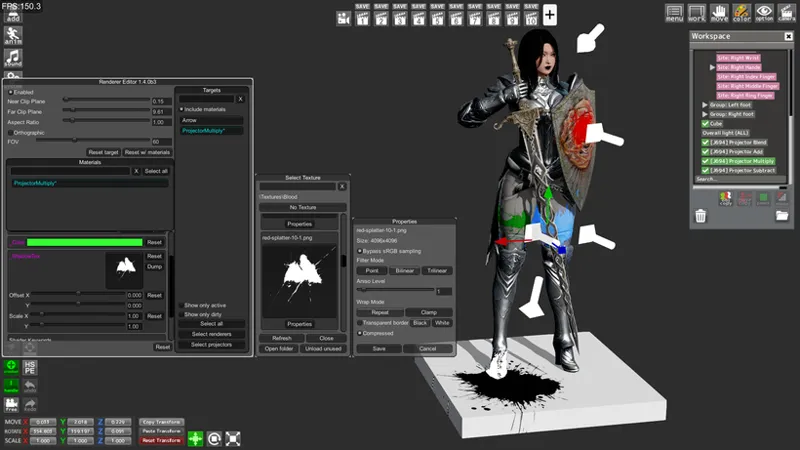
Here is an example:
In this picture, red is blend, blue is add, green is multiply and black is sub.
Projectors can work in a localized area but can also repeat their texture over a whole item if the user removes the "_CLAMP_ON" shader keyword.
Requirements (for first time users)
A fully updated game with the 630 patch (under "Game Update")
Download
Comments (9)
I figured it out thanks for your help and all the work you do here. I would have put this game down 2 weeks after playing it if it weren't for you.
For some reason I can't pull up the GUI for Render Editor after instilling LRE4 AAIO. Are you hearing this from others? Thanks in advance.
No, you're the only one, send your logs, StudioNEO_64_data/output_log.txt
I have used this for a few days, but so far no problems have occurred. Thank you for your work. I have a question. Texture compression is enabled by default, but can you add features that turn it all off in your configuration? I didn't like this compression noise, so I had to edit all the properties.
No problem, I can implement this option, but you'll have to keep in mind that not having textures compressed takes more ram, so be careful about that.
Thanks...will try.
Thank you for the update! I will try this from now on. I look forward to new features.
I noticed now.... I can edit all the items in the folder at the same time! Is this a feature added from this version? This is a great update. Thank you!
Haha, no, this feature has been available since the first version. Happy you like it anyway!