


Home, Library, light theme: EvoForge 1.1.18
Thank you for supporting EvoForge! 1.1.18 changes the app itself: a Home screen that gets you on track in one click, a rebuilt Library where every car has a picture, a light theme, mod archives to share, livery choice at import, and championship export for club organisers.
A Home screen
Hit the track: your last race in big, and Race in one click — EvoForge writes the race and the game starts straight on track, in Desktop or VR. Your saved starts sit next to it, each with its own ▶.
Convert or install: one drop zone. An Assetto Corsa car or track goes to conversion, an EVO mod to installation.
Your latest conversions, versions of the same mod grouped.
The Paddock at a glance: friends on track (Join), who is in tonight, what is coming up, friend requests, and the record a friend just took from you (Go drive).
To do: content to repair, and how many seconds your car packages add to the game’s startup.
Key figures — cars, tracks, to fix, disk space, your season — each opens the Library already filtered.
The Library, rebuilt
Cars and Tracks are now the page title: one click to switch.
Cleaner cards: the picture, the class (GT3, GT2…), the number of liveries, one line of facts. Conversions of the same mod are one card (“6 versions”).
Every car has a picture: a car without one of its own (older conversions, mods shipped without a thumbnail) is photographed by EvoForge in its 3D showroom, framed like the game’s thumbnails. The picture is used everywhere the car appears.
Quick views (All, Converted, From the game, To fix, Favourites — a star on every card), filters in a panel, and a real list view with sortable columns.
The preview on the right: On track with this car — your last race with it, in one click — 3D showroom, edit, folder, delete.
Multi-select: a box on every card, a column in the list. The bar at the bottom says what each action really touches — the game’s own cars are never deleted, disabled or shared.
Share mods as one archive
Select cars and tracks, Compress into an archive: one .zip your friends drop into EvoForge to install everything at once. The saved starts that use them can go in too.
Game content and mods withdrawn by their author never go in; a conversion made by an older EvoForge is flagged, so you can repair it first.
Liveries
Pick what you convert: when you import an Assetto Corsa car, every livery has its box, Single Colour included. Everything is ticked; untick what you don’t want.
Delete a livery from a car’s page: hover, bin, confirm. The other liveries and the car stay as they are; saved starts that used it take the car’s first livery.
Light theme, new top bar, notifications
A light theme, everywhere — dark stays the default. The moon / sun button in the top bar, or Dark / Light / System.
The top bar: the logo alone, five destinations in a new order — Home | Library · Workshop | Race · Paddock (keys 1 to 5); icons, and each name slides out on hover. A green dot on Paddock when friends are on track. Status chips shorten, then group under Activity.
Notifications: each with its type’s icon and colour, sorted by day, filters (All, Friends, Clubs, Servers), and the action right there — accept a friend, go drive a record you lost, see the round or the results. They follow the app’s language.
Championships: export to .ini
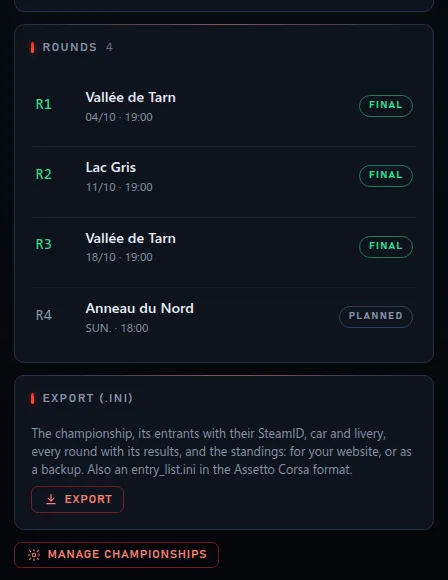
Club organisers (those who can create championships) export a championship in one click: championship.ini with the championship, the entrants (SteamID, car, livery, team, number, BOP), every round with its settings and results, and the standings — plus an entry_list.ini in the Assetto Corsa format. For your website, or as a backup.
The Race page
The Host page no longer gets in the way: a server link, Join from Home, the friends panel or the Paddock open that server; keys 1 to 5 and Esc work; panels open on top of it.
A hosted server running in the background no longer slows down the other pages.
To get it
Update EvoForge to 1.1.18, or download it from evoforge.fr.
Car pictures arrive while you browse the Library, a few seconds each.
Championship export: in your club’s Championships tab, under the rounds.
Thanks again: you are the reason EvoForge stays free for every driver. Feedback is welcome on the Discord: https://discord.gg/x3w7eCDFkK
Comments (1)
Amazing work, the updates keep on coming, awesome.