




SimSweep v2.15.0 and everything else you missed
It's been a busy day so there's a lot to cover here. I'll try to keep it organized but no promises.
SimSweep scans for malware now.
This was the big one. Every .package and .ts4script file gets SHA256 hashed during your scan and checked against a database of known malicious mods. If something in your folder matches a confirmed bad file, you get a fat red alert at the top of your dashboard with a button to quarantine all of it immediately.
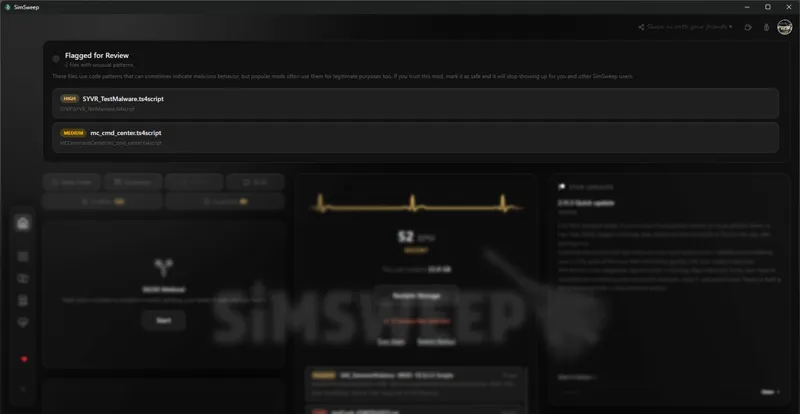
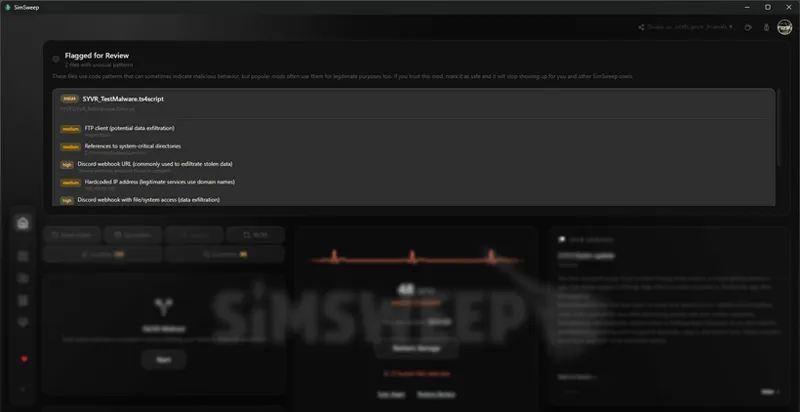
But it goes deeper than just hash matching. SimSweep now reads the actual Python bytecode inside your script mods and looks for stuff that shouldn't be there. Discord webhooks sending your data somewhere, raw IP addresses hardcoded in the script, imports for things like winreg and ctypes and smtplib. A hair retexture has no business importing smtplib. If it does, something's wrong.
Now obviously mods like MCCC and WickedWhims are gonna trip some of those flags because they're doing legitimately complex stuff. So there's a community safe list. You can mark a flagged file as safe, and once enough people do the same, it stops showing up for everyone. The non-critical stuff gets a calm "Flagged for Review" banner that explains what's going on. Actual confirmed malware still gets the full red scary treatment. Two very different vibes.
You can find where your CC came from.
This is the one I'm most excited about tbh. You download a hair from TSR, forget about it, three months later you need the original page because the creator released an update or a recolor pack and you have absolutely no clue where it came from. We've all been there.
SimSweep now has crowdsourced content sources. Double-click any file in the browse grid and you can paste the download URL. Other people can upvote it. The most upvoted source wins. Files with a known source show a colored badge on the thumbnail (blue for TSR, orange for Patreon, green for MTS, you get it).
The browser extension is the real move though.
I built a Chrome extension called SimSweep CC Source Tracker. It sits in your browser doing nothing until you download a .package or .ts4script from somewhere. When you do, it quietly grabs the filename and source URL. Next time you scan in SimSweep, it matches those filenames to your scanned files and auto-submits the sources. You literally don't have to do anything. Just download CC like normal, put into mods folder, run new scan and the sources tag themselves.
The extension is submitted to the Chrome Web Store but Google's gotta approve it first, so it might take a few days. If you don't want to wait, let me know and I'll make the extension files available for direct download so you can load it manually in Chrome (developer mode, load unpacked, takes 10 seconds).
Works with Chrome, Edge, Brave, anything that runs Chromium extensions.
Save scanning is actually turned on now.
So this is kind of embarrassing but save scanning was technically in the app for a while and the toggle just... wasn't wired up to the UI. It was off for everyone. That's fixed. It's on by default for new users now, and if you're existing you can flip it on in Settings > Scanning.
The big deal here is that SimSweep now checks ALL your save files, not just the most recent one. So if you used a hair in your legacy save from six months ago but not your current save, it still counts as used. Way fewer false "unused" results.
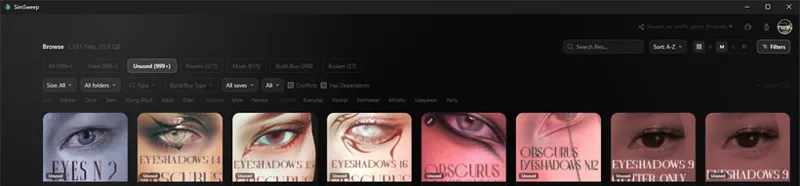
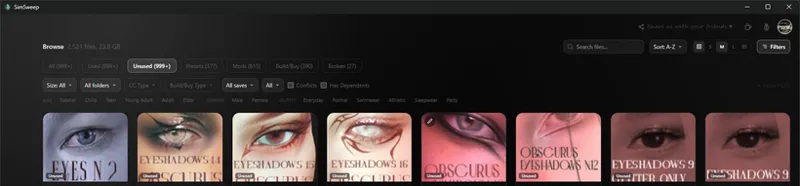
Files found in saves show a blue badge with the household name. Hover it for the full list if it's in multiple saves. There's also a filter dropdown in the browse toolbar so you can see which CC belongs to which save specifically. You'll notice I'm in the used category and every item doesn't have a blue tag, that means sims that are using those items are your saved households located in your library. I hope that clears it up a bit.
Browse page looks slightly different.
Stripped the cards down to just the thumbnail, filename, and a type label. All the detail badges (risk level, dependencies, save info, source link, patch status) moved into the preview modal you get when you double-click a file. The grid looks way cleaner now, more like scrolling through a gallery and less like reading a spreadsheet.
Filters are hidden by default behind a button in the toolbar. Open them when you need them, close them when you don't.
Decrypt keys exist now.
If Patreon isn't your thing, you can activate a Decrypt key instead. They're license codes (format: SYVR-XXXX-XXXX-XXXX) that you enter in Settings. If you hit a locked feature there's a "Have a key?" option right on the modal. Same access either way, just a different door in.
Smaller stuff that also shipped:
Safe mode toggle in Settings > Advanced. Disables hardware acceleration if you're getting black screens or visual glitches after scanning. Some GPUs just don't cooperate with WebView2
Diagnostic report generator in Settings > Advanced. Copies your system info, scan stats, and folder paths to clipboard for bug reports
Fixed 50/50 script exclusion. If you had "exclude scripts" enabled, companion .package files were still getting moved out, which left the script mod alone and caused bad script errors. Whole folder stays together now
macOS fixes for case-sensitive APFS volumes (Tray folder wasn't being found) and diagnostics incorrectly reporting Windows on Mac systems
To update: open SimSweep and it should prompt you, or hit "Check for updates" in the bottom left corner. If you're seeing this right when I post this, give the update 10-15 minutes to build and get sent out.
If you're not on SimSweep yet: simsweep.com/download
Questions or bugs, drop them in the Discord.
Comments (7)
It is not letting me connect my Patreon account. It says its connected, but nothing happens.
I’ll check what’s going on with your account as soon as I get home from work.
I would also use the extension whenever you’re able to upload it!
I would use the extension in developer mode!
I’ll upload the chrome, firefox, and opera extensions so anyone can use them while we wait for the approval.
Just wanted to chime in and say I appreciate the complex work your putting into this program. So far so good keep up the good hard work because this is a lifesaver.
Thank you Koolii 🤍