

[Early Access]🛍️ Stylish Shop v1.4.0: New Themes and Stock Tools
v1.4.0 is a larger Stylish Shop update with four new shop themes, saved Stock Pools, service entries, preview shortcuts, chat notifications, and new hooks for purchases and Cosmere RPG currency. It also adds category tag controls and fixes several Shop Settings and Dustroad issues.
This release requires GlitchSmith Library v0.7.0 or newer and Foundry VTT v13 or v14.
🎨 New Themes
Four more themes are now available from Shop Settings.
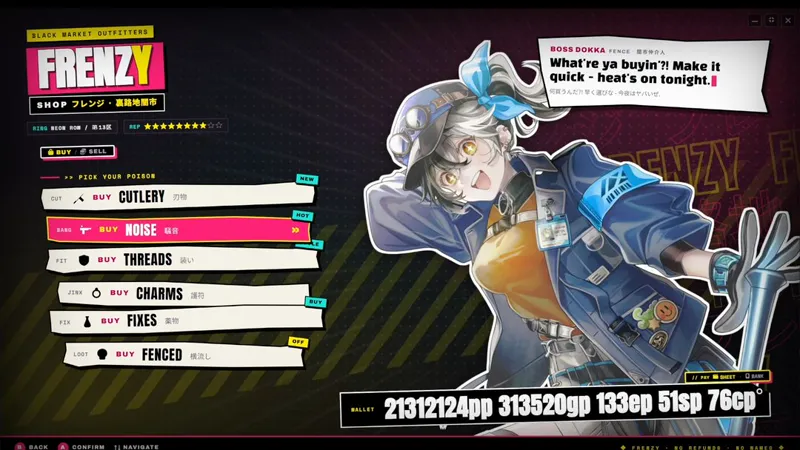
FRENZY adds the Black Market Outfitters character theme, with graffiti-style backdrop text, editable poster words, bold category cards, themed purchase dialogs, and character outlining tuned for performance.
Astra adds the Deep Space Bazaar character theme, with a deep-space backdrop, porthole, radar, mission patch, credit ledger, live UTC/T-minus status strip, manifest category panel, and terminal-style item browser.
Dustroad adds a western grid shop theme based on the Dustroad prototype, including the wanted poster, shopkeeper portrait panel, bill-of-sale detail split, sell-mode styling, demo setup macro, and theme-specific customization fields.
Paper Moon adds another selectable grid layout.
📦 Stock Pools and Services
Stock Pool tools now live on each category, with optional world presets for reusable weighted lists.
Each category can save a Stock Pool from a Folder or Compendium, with per-entry weights, stock mode, and an items-per-roll range.
GMs can roll a preview, then add missing items to the category or replace the category contents.
Category cards show a compact summary when a pool is saved.
World Stock Pool presets can be saved once and loaded into other shop categories. Replacing an existing preset asks for confirmation first.
Service entries add non-item rows with price, stock, description, and image fields. After purchase, a service can run a GM-side macro without adding an item to the buyer's inventory.
🏷️ Shop Settings and Preview Tools
Shop Settings now has more direct controls for category badges and GM preview work.
Category tag text is editable per category.
Badge background and text colors can be set with color pickers. Leaving either color field blank keeps the theme's default sticker or plate styling.
The Shop Settings window is wider so the new color controls have room to fit.
Ctrl+clicking a mapped preview element jumps to the matching Shop Settings field. Cmd+click works on macOS.
GM preview badges include a small settings button, so Shop Settings can be reopened from a preview-only shop after the config window is closed.
Windowed shop and GM preview windows can be dragged by their top handle. Fullscreen remains the default shop view.
💬 Currency, and API
This update also expands transaction feedback and integration points.
Shop Settings can post successful purchases and sales to chat, either publicly or as GM-only messages.
GMs can set a world-level item rarity data path per system from the module settings menu. When the current system has a built-in rarity path, the dialog shows it.
Cosmere RPG item prices are read from system.price, and sphere balances are spent or granted through GlitchSmith Library 0.7.0's money-item driver.
Developer modules can register purchase interceptors through game.modules.get("stylish-shop").api.registerPurchaseInterceptor(...) or the stylishShop.registerPurchaseInterceptors hook.
Returning false or { allow: false, message?, errorCode? } blocks the purchase before Stylish Shop changes currency, inventory, or stock.
Bug Fixes
Shop Settings redraws: Adding services or changing category structure now keeps unsaved item edits, such as stock values. Saved audio tracks also stay visible after switching tabs.
Foundry VTT v13 toolbar controls: Clicking the Stylish Shop toolbar button no longer leaves Token Controls unclickable on Foundry VTT v13.
Links
Module Wiki: https://www.notion.so/364a9504d0878176b9afe4fc160145b2
Install Guide: How to Install Premium Modules

Comments (3)
Could you please add a feature in a future update to resize the category panel on the left?
Hey, don't know if it has been suggested before. But the update that would really make it for me would be for item descriptions in the shop to be able to show compendium links. A lot of the items in PF2e have compendium links to reference conditions or such. In the module they just appear as the text for the link.
Thanks for the suggestion! This should be addressed in the latest Stylish Shop update. Item descriptions now render Foundry inline content, including PF2e compendium links such as @UUID references, instead of showing the raw link text. If you update and still see any raw compendium links in item descriptions, please let me know which item it happens on.