
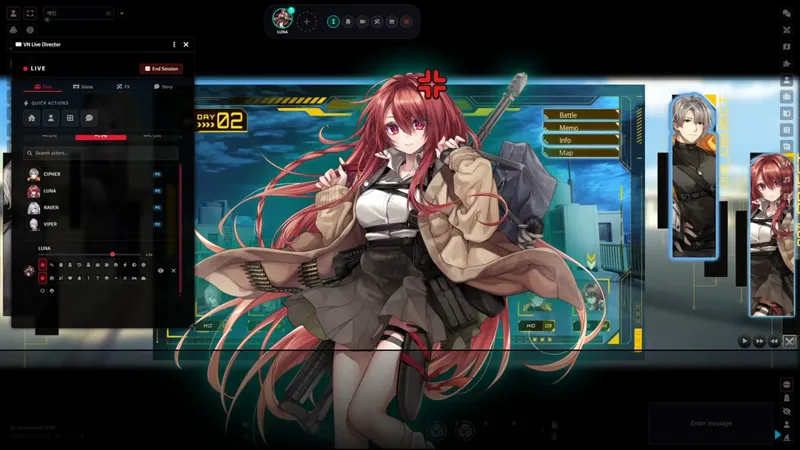

🌸 Visual Novel Maker v1.2.0: Props, Live Expressions, Character Effects
v1.2.0 adds image props for VN scenes, queued live expressions for chat-driven play, and more character presentation controls. It also expands scripting tools for flags, facing, private interactions, and module integrations.
Visual Novel Maker now requires GlitchSmith Library v0.6.0 or newer.
🖼️ Scene Image Props
GMs can now place arbitrary images on the VN stage as scene props, separate from the centered Picture card and character portraits.
Props can sit on a back layer behind characters or a front layer above characters and below the dialogue box.
The Live Director Scene tab includes add, replace, layer toggle, remove, clear-all, X/Y position, scale, and opacity controls.
Props can be dragged directly on the VN stage. Mouse wheel resizing updates scale, and Sequence Editor previews write drag and scale changes back into the matching Scene Image action.
Props sync to players during broadcast, stay local during rehearsal and private interactions, and are saved with snapshots and scene presets.
🎭 Live Expression and Voice Controls
Live Mode gets more control over who is speaking and when expression changes land.
The Live Director Quick Actions queue toggle, also available in the right-click expression popup, holds the next expression pick for the selected actor until that actor's next chat message.
Pending expression picks show a thumbnail or reset badge in the expression popup. The Quick Actions button also shows a count badge and a tooltip listing which actors have queued expressions.
Users can click an owned staged character to choose which VN character their microphone drives. The selected voice target is shown on stage and in the character dock, and voice highlights stay synced across clients.
Client settings now include softer or disabled inactive-character dimming, plus a Lip Image Mode that keeps the speaking mouth image fixed instead of alternating lip frames.
💬 Character Emotions and Visual Effects
Character presentation now separates placement-style emotions from full-portrait visual effects.
The Character Emotion action is available in the interaction and sequence editors. The emotion list includes Angry, Rage, Dazed, and Laughter.
Dazed adds an ellipsis bubble and head spiral without moving or recoloring the portrait. Laughter adds a megaphone-style comic emanata mark.
Dazed and Laughter are placement emotions, so their anchors can be adjusted per actor, group, or expression.
Portrait Config expression overrides now include an Auto Emotion selector. A linked expression can apply a chosen character emotion automatically, while No automatic emotion change leaves the current emotion untouched.
Full-portrait treatments such as Memory, Silhouette, Glitch, Ice, Fire, Electric Shock, Invert Color, and Awakening Aura now live under per-character visual effects instead of the emotion list. Existing saved scenes and sequence actions keep rendering the same way.
🧩 Interaction and Scripting Tools
v1.2.0 adds several tools for scripted interactions, live integrations, and GM macros.
Dialogue, narration, choices, and location labels can display runtime flags with {{flags.key}}. Macro actions receive the current flag context, and nodes can route through ordered conditional branches.
Character Enter actions can set a portrait to appear flipped. Character Move actions can set the target facing to Keep current, Normal, or Flipped.
GM macros can start a private VN interaction on selected active player clients with startPrivateInteractionForUsers(journalId, userIds, opts) or startPrivateDialogueForUsers(...).
Stylish Shop NPC actors now have an Open Shop action. Node and Sequence editors accept shop actor drag-and-drop, then open the shop for the correct Live Director target users.
Exploration element and exit conditions now use key, operator, and value flag controls, matching normal branch conditions while preserving existing simple flag-key checks.
Dialogue overlay text can be aligned left, center, or right. Actors can also override the dialogue typewriter tick sound from VN Portrait Config.
⚙️ Portrait Config Thumbnail Cache
VN Portrait Config now uses generated 160px thumbnails for the right-side standing, group standing, and expression lists.
Existing actors generate and save missing thumbnail references the first time their Portrait Config opens.
The left preview and runtime VN stage continue to use the original image files.
Actors with many standing portraits or expressions should open the right-side configuration lists faster because the small slots no longer load full-resolution portrait files.
🐛 Bug Fixes
Sequence Editor empty action insert: Actions can now be added as the first entry in an empty sequence, and the new action is selected immediately.
Live voice highlight sync: Voice activity now broadcasts the resolved actor ID, so GM-controlled NPCs and players with multiple owned characters highlight the same staged character for everyone.
Voice highlight persistence: When speech ends, lip sync stops but the last speaker remains highlighted instead of snapping back to the previous voice target.
Voice target badge rendering: Microphone target badges now render with CSS instead of Font Awesome glyphs, preventing missing-icon boxes in the dock and framed stage view.
Character dock portrait shape: Dock portraits and the add button keep fixed circular sizing when the dock grows, so entries no longer squeeze into ovals.
Live Director cast layout: Cast tab controls keep their natural height with large actor lists. Search, filters, pagination, actor browsing, and stage management are ordered more consistently.
Private interaction isolation: Private and local interactions no longer send read-ready pings, votes, BGM/SFX sync, flag sync, Cinematic Cut-ins, or Unboxing broadcasts to other clients.
Exploration flag conditions: Exploration element and exit conditions now honor simple flag-key conditions, including on player clients viewing a GM-driven exploration node.
Custom theme asset slots: The custom theme now exposes asset picker slots for the advance cursor, prompt bubble, and choice button normal, hover, and click states.
Custom theme asset bleed: Custom-only image overrides no longer leak into other visual themes after switching away from the custom theme.
Requirements
GlitchSmith Library v0.6.0 or newer
Foundry VTT v13 or v14
🔗 Links
Module Wiki: https://www.notion.so/33ca9504d0878010bbc7f9ad3f04c94e
Install Guide: How to Install Premium Modules

Comments (4)
혹시 캐릭터 이름 옆에 소속이라던가 그룹 같은걸 표현할 수 있는 칸을 만들어주실 수 있나요? 예를 들면 블루아카이브 채팅창 같은 식으로?
좋은 아이디어네요. 옵션으로 그런 것을 설정할 수 있을지 살펴보겠습니다. 제안 감사합니다!
YES, omigosh this is what I was wondering before and you just added it! amazing!
I'm really happy that this feature solved exactly what you were looking for! Enjoy!