


Translator++ 3.3.30 - Search tool is updated!
We have several major updates in the core module of Translator++.
Translator++ 3.3.30
Update : better appearance of update information dialog menu
Add : Now it is possible to issuing update from update information dialog menu
Fix : External links on popups are sometimes opened on more than one window
Fix : Editor on the grid must not trim the whitespaces
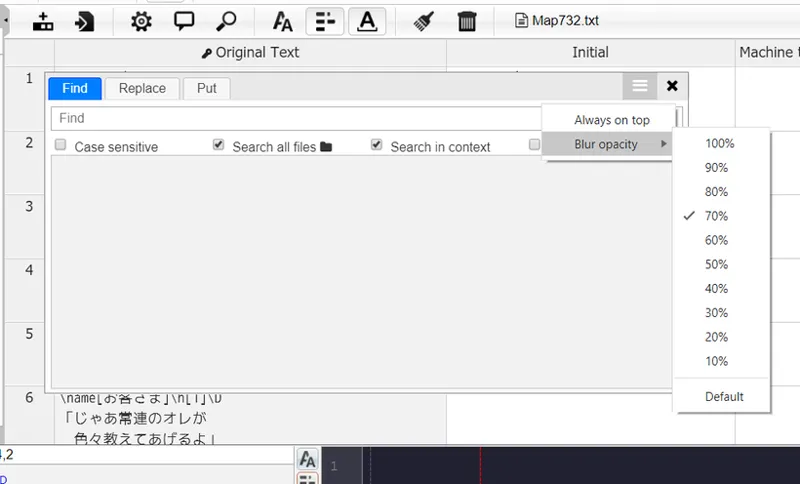
Add : Options menu on search tool windows
Add : Search window's opacity can be configured
Add : Search window always on top state can be configured
Fix : Search window will remember screen & position
Fix : Bug that caused search window can be opened more than one instance
Fix : Prevents Translator++ window to go beyond screen when opening the application (problems when using multiple screen)
Fix : Source material in inject dialog window is showing a previously opened project.
Update : Converted progress display into asynchronous functions
Update : better-copy 0.4
Search functionality is refined
Now we can adjust the blur (when the window is not in focused) opacity of the search window. We can also choose whether the search window is always on top or not.
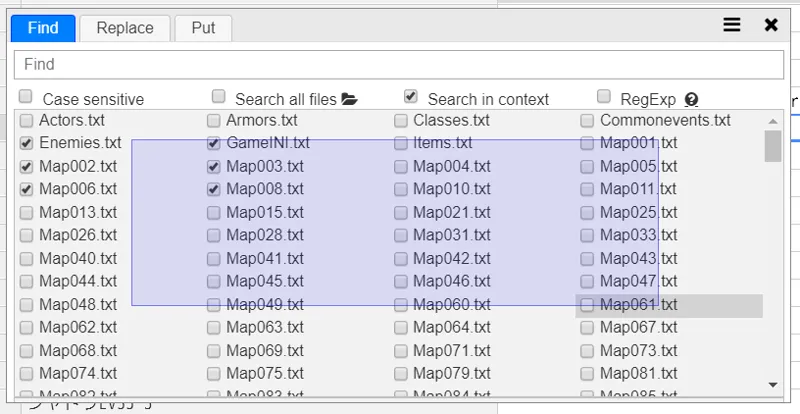
Now we can also drag to select in the search window.
You can also hold shift while draging to deselect.
Other fixes
Apparently there is a bug that causes whitespace on the grid to always be deleted when we input text in the grid. This bug has also been fixed in version 3.3.30.
Another bug that was fixed was an issue when using multiple monitors. Sometimes the Translator++ window disappears off the screen.
You can download Translator++ ver. 3.3.30 on the patron’s download section.
I strongly recommend you to update your Translator++ via auto-update though.