
Translator V.1.8.1 - Import from RPG Maker Trans Patch
Hello fellow translators,
Some developer has updated their games from previous version of RPG Maker engine to the newer one for example RPG Maker MV. And some 3rd party fan translators unable to update their translation because the engine has changed. And as we well know that RPG Maker Trans doesn’t support RPG Maker MV.
So, I think if Translator++ can import translations from RPG Maker Trans format, translator can continue their work regardless of the change of engine.
Translator++ V.1.8.1 change log:
Feature to import translation from RPGMKTrans Patch format has been added
Bug: sometimes unable to import data has been fixed.
RPGMKTrans format exporter has been improved
Some UI Improvement.
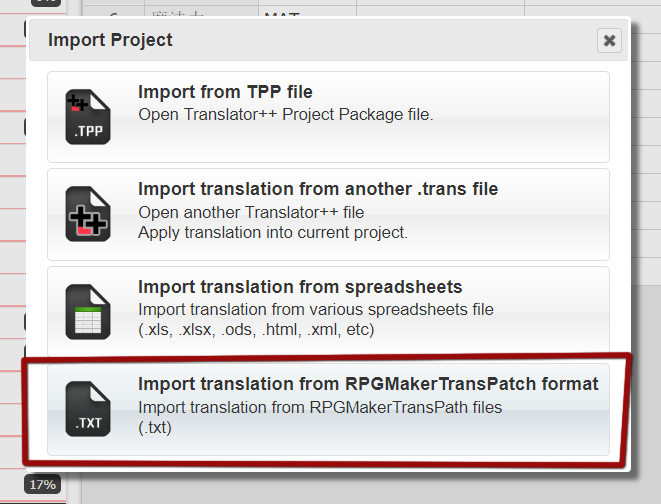
Figure1 : Import from RPG Maker Trans patch files (*.txt)
You can download Translator++ V 1.8.1 on the Patron’s download page.
Happy translating.
Comments (13)
I'm in process of translating a WolfRPG game. Unfortunately I have to resort to binary patching some strings due to a few problems with Translator++: 1. It won't translate an original text with '\s' in it. Looking at the unpatched binary, it supposed to be a plain ' ' character anyway, not '\s'. 2. It won't translate texts with '\n', which are just newlines in binary. 3. Worse, it won't even pick up texts with '\r', they don't show up in the editor.
In an RPGM Ace game i have the skills file the column size it too large for any screen. Alle the other files are normal but with skills the translation columns are off screen.
Is there a way to fix this?
I need to change the in-game font and it's size. The result I have now does not fit into the message window. How do I do that in game called The Crooked Man? It's Wolf RPG editor based.
when i changed target language, i cannot create new project. how can i deal with it?
Is it possible to add support for LEC Power Translator 15? I was using as offline translator when I was using VNR.
Are there any plans to add support to translate games where the actual text of the game is in a scenario folder in .sl format files? Its possible to decode the SL files with a simple tool and reencode them with the same tool so I think it should be reasonably easy to implement auto translation of those files you would just need similar logic where the program ignores editing any text that is a tag and only edits lines that are japanese text. For example https://steamcommunity.com/app/363890/discussions/0/1499000547478170635/ https://github.com/Sinflower/SL_Decoder
Hi, David Ropertson It's hard to help you without you specified the game engine. Is this encryption exclusively used only by small number of developer?
Hey, I recently updated Translator++ to the latest public version but I'm now having problems with the exporter. When I go to export a translation the save icon just spins around endlessly. Is there anyway I can fix this? It was working fine in the last version of Translator++ I had, which was 1.3.x (can't remember exact one), so not sure why the latest public version has trouble with it. EDIT: Found away around it. Created a brand new project, copied my old translations to excel and then copied them into the new project. Importing didn't quite work, some lines took the right most column other lines didn't for some reason.
yeah, the way I've started doing it is have two copies of the game, one that I start the translation off of and one I patch to test things.
hope you can fix the error for "Wrapping text" feature error log: Uncaught TypeError: Cannot read property 'split' of null at wordwrap (common.js:39) at Object.trans.wordWrapFiles (trans.js:1805) at Timeout._onTimeout (ui.js:1146) at ontimeout (timers.js:427) at tryOnTimeout (timers.js:289) at listOnTimeout (timers.js:252) at Timer.processTimers (timers.js:212)
@Kisehime, Thank you for the report. I'll fix that in the next update.
Thank you for good work.