
Ultra Ren'Py Translator v0.77 The Android Update
Fifty releases since the last public build. This is the biggest one yet, and
most of it comes down to one thing: **your translated games now run on your
phone.**
---
## Your games, on Android
This is the headline. Point the tool at a Ren'Py game and it gives you back
something you can actually play on your phone.
*Two ways out:*
- *A folder for JoiPlay* — light, quick, and it strips out the desktop
ballast (the Windows/Mac/Linux runtimes) that does nothing on a phone.
- *A real APK* — the app you tap to install. No JoiPlay, no extra steps. It's
built by Ren'Py's own toolchain, so the result is the same package the game's
author would produce, with your translation inside. It can also produce an
`.aab` bundle if you want to put it on Google Play.
*Three buttons, so you pick how much risk you take:*
| Button | What it does |
|---|---|
| 📱 *Port to Android* | Packages the game as it is |
| 🈯 *Pre-translate and port* | Translates the whole game first — plays translated with no internet. Rewrites the game's scripts, which on some games causes Ren'Py errors |
| 🔮 *Port + Babelith Android* | Puts the live translator inside. Doesn't touch a single line of script, so far fewer errors. Needs internet on the phone |
There's also a switch to do *both at once*: the game ships pre-translated,
and Babelith covers whatever slips through (menus, text built on the fly). The
tool runs them in the right order so Babelith seeds itself from what's already
translated instead of paying for it twice.
One button installs everything
Building an APK needs RAPT, a JDK and the Android SDK. You don't have to know
that. Press port, and if something's missing it downloads and installs itself
right there — progress bar, cancel button, and it skips whatever you already
have. Roughly 700 MB the first time, once.
It also handles the parts that used to fail silently:
- *Each game is packaged with its own Ren'Py version.* A game built on an old
Ren'Py can't be packaged by a new one — the build just stops with nothing to
fix. The tool now reads the game's version and downloads that exact one.
Java and the Android SDK are shared between versions via folder links, so
each extra version costs ~150 MB instead of 900.
- *The right Java for each version.* Not "the newest" — the exact one that
Ren'Py's Gradle accepts. Too new fails just as hard as too old.
- *Signing keys, project config, internet permission* — all generated for
you.
- *When a build does fail, you get told why*, in a sentence, instead of a
wall of Gradle output ending in "The build seems to have failed".
### Games packed in a .rpa now start
If a game shipped as a single `.rpa` archive, the APK built fine, installed
fine, and then showed the Ren'Py logo and closed. Every game like that.
The cause is inside Ren'Py itself: the list of `.rpa` files it indexes is only
filled by scanning the disk, and it opens them with a plain file open. Inside
an APK neither of those exists — so the archive travelled along and was never
opened once. The game booted with no scripts and died.
The archive is now unpacked before packaging. **Your copy of the game is not
touched**: files come out only for the duration of the build and go back
whatever happens, including if you cancel or the build crashes. If you already
had a loose file with the same name, yours wins.
Babelith on your phone
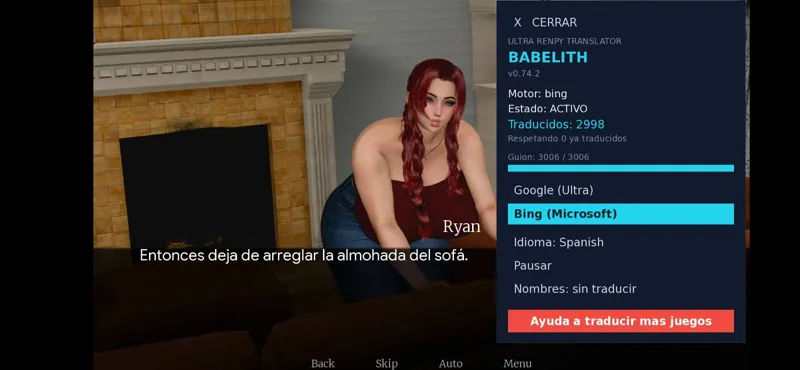
The in-game translator works inside the APK. It got a proper mobile redesign,
because the desktop panel was unusable on a phone:
- The panel takes 38% of the screen width instead of being a postage stamp, and
it scales to fit the screen height so it doesn't cover the game.
- A big *CLOSE* bar at the top instead of a 22-pixel "×".
- A tab to reopen it — on a phone there's no keyboard, so closing it used to
mean closing it forever.
- The language list scrolls with your finger. All 208 of them.
- On desktop the panel looks exactly as it always did.
### Small thing, big relief
Compiling no longer throws black console windows across your screen. The Gradle
daemon doesn't linger eating memory either.
---
## RPG Maker: a hard pass with real games
Everything below was found in games people actually sent, not in theory.
*Games with their own translation system.* Plenty of Japanese games ship a
localization plugin (Hendrix and friends) that swaps every line for one from
its own table, right before drawing. We installed ourselves after it — so we
translated the text and it put its own back. Babelith counted translations and
nothing changed on screen. With those games we now go in front and translate
what actually reaches your eyes.
*Formulas are no longer translated.* Some plugins keep formulas in their
parameters — `30 + textSize * 5` — and then execute them. Translating that
produced `SyntaxError` on the first line of dialogue, and `Failed to execute
script` when opening the save menu. Both fixed, on both the pre-translator and
Babelith. The filter is deliberately cautious: two words in a row, or a name
like `Sword +1`, and it's treated as text.
*Dialogue updates itself when the translation lands.* The message box was
excluded from repainting on purpose — it's typed out letter by letter and
refreshing it from outside corrupts its state. So a line that translated a
second late stayed in Japanese until you passed it and came back. It now
updates in place, including when the line has already finished typing.
*Plus, from the 0.63 deep pass:* choices with conditions, escape codes
leaking into the translator, the spaces that centre and pad text, games that
ship broken data files, half-written backups, and sentences with counters that
were being translated once per value. Japanese, Chinese and Korean text no
longer overflows the dialogue box. The local phase runs about twice as fast on
large games.
---
Change language without leaving the game
The language selector that only Unity had is now in *all three engines*.
Open Babelith's panel inside the game, pick from 208 languages with the 12 most
requested on top, and it switches instantly — no restart, no reinstall.
Each language keeps its own work, so you can switch away and come back without
paying for the same translation twice. All three engines offer the exact same
list, pulled from the same place as the app's, so they can't drift apart.
---
What this means for your tier
Two things moved, and the split is now clearer:
*🤝 Following the project — free*
- Translate Ren'Py, Unity, RPG Maker and GameMaker games
- Translate Godot games
- *Porting your games to Android* (JoiPlay folder and APK)
Porting used to be a paid feature. It isn't any more — just link your Patreon
account, no payment.
*🥇 Any paid tier*
- *Babelith*: translates as you play, no waiting
- On Ren'Py, Unity and RPG Maker
- Doesn't touch the game's scripts, so far fewer errors
- Switch language inside the game, out of 208
- Babelith on your phone too, inside the APK
*👑 Gold*
- Your credit in the Babelith panel of the games you translate
- Remove or customise the credit card in Godot
The app also shows you how much work you've saved, what each tier includes, and
the names of everyone keeping this going.
---
Heads up
- The first Android build downloads a fair amount and takes a few minutes. Both
are one-time; after that it's fast.
- Pre-translating rewrites the game's scripts. It gives the best result and it
works offline, but on some games it causes Ren'Py errors. If a game misbehaves,
use *Port + Babelith Android* instead — it doesn't touch the scripts.
- Everything here was tested against real games from users, on a real phone.
Thank you for keeping this going. Genuinely — the Android work took weeks and
it only exists because of you.