Building your tiers
Can we build it? Yes, we can!
Let’s turn those tier ideas into real tiers in Patreon.
And just like with the rest of your Patreon, remember: this is version one. You’ll learn what works and adjust along the way.
Create your tiers
Did you plan for one tier? Great!
Did you plan for more than one tier? Also great!
Did you use the Tier Design Worksheet from the Designing your tiers post? Pull it out! (Don’t worry. It was just an optional worksheet for inspiration.)
Naming
As you add your tiers in Patreon, you can give each one a name. Sometimes, naming things can be weirdly hard. Don’t get stuck here! If you aren’t sure what to name your tiers, keep it simple (Level 1, Level 2, Inner Circle) or skip the names altogether. No pressure!
Pricing
What you do is valuable. What you do is valuable. What you do is valuable.
Just a little mantra to keep in mind as you set the price for your tiers. It’s common to undersell yourself and what you have to offer. But not you! Especially now that you have your mantra!
Remember: people who join your Patreon already like what you’re doing. Pricing your tiers is just deciding how they can take part.
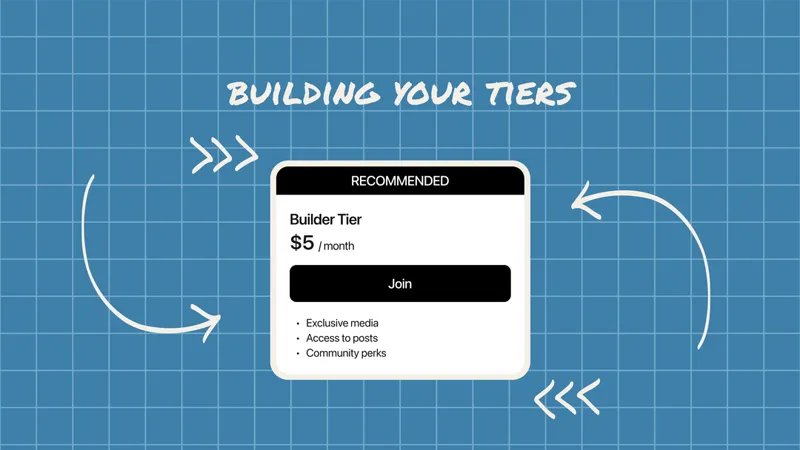
For many creators, $5 is a great starting tier. It’s accessible for fans and still meaningful for you.
Find the price that works for you. As you add more tiers or benefits, your pricing can grow from there. For example, you might offer tiers at $5, $10, and $15, with each tier building on the last so members can clearly see the value of upgrading.
Write tier descriptions people understand
We’ve got names. We’ve got prices. Let’s write descriptions.
Descriptions should clearly show the value so someone can decide if joining feels worth it.
A few tips:
Be specific.
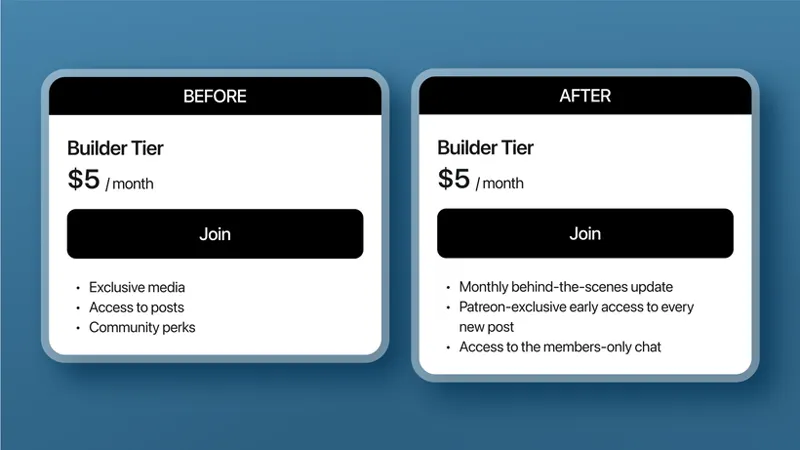
“Exclusive media” doesn’t mean much. Tell people exactly what they get and how often they’ll get it (weekly, monthly, etc.).
Show the difference between tiers.
Each level should feel distinctly different.
Lead with the best perk.
Put the most exciting benefit first.
Make it easy to scan.
Bullet points work great. (So great that we even used them here!)
We put our tips to the test in these before and after examples of tier descriptions:
The clearer it feels, the easier it is to say yes.
⚡Pro Tip: Check out 10 quick tips for setting up or optimizing your membership tiers Patreon for Creators post for more support with your tiers!
Need some inspiration?
Naming, pricing, descriptions, oh my!
Take a tour
If you’re feeling stuck, take a quick inspiration tour. Check out creators like:
Podcasters: Midnight Burger
Podcasters: Two Gay Matts
Video Creator: Brian David Gilbert
Visual Artist: Ginny Di
Look at how they name their tiers, describe them, and structure the levels. What do you like about their approach? What would you do differently for your own?
You’ll quickly get a feel for what’s possible.
Try a brainstorm buddy
Still feeling stuck? Find a brainstorm buddy to help generate ideas.
That could be a friend, fan, fellow collaborator — or even a tool like AI.
Try asking questions like:
“What are a few simple, creative names I could use for my tiers?”
“Here are my ideas for tiers. Can you tell that they are different from each other? Is there anything you would add or change?”
“How would you describe this tier in a way that makes it easy to understand what someone gets?”
You don’t need to use every suggestion. The goal is to get unstuck.
Then take what works, refine it, and make sure it sounds like you and fits your community.
Add a welcome note to each tier
Because we’re not posting, we’re what? Hosting!
Who doesn’t love a warm welcome to a community? On Patreon, welcome notes can be created and customized for each tier.
Welcome notes can include:
A thank you for joining
A reminder of the tier benefits and how to access them
A suggestion for what to do next
Explore even more welcome note tips in the Make custom welcome notes Help Center article.
Align tiers to your editorial plan
You’ve got tiers now! Make sure you talk about them.
Take another look at your 30-Day Editorial Planner & Calendar Templates and ask yourself:
Are there posts that highlight the benefits of my tiers?
Consider creating a simple “Start here” post that walks through what each tier offers and helps new fans find their fit. Visual art creator Shoutbam did this with a Welcome: Start Here post that links to each tier’s benefits.
Are there moments where I can naturally remind people what members get?
A monthly “what’s coming up” post can double as a preview of what each tier unlocks. Visual art creator Katy Lipscomb shares a free monthly post outlining what’s ahead and how it connects to each tier.
Because while you’re hosting, you’re also posting — and your posts can help reinforce the value of joining.
See what people respond to. Adjust from there.
You’ve got this.
🧭 Your next steps
Build your tier(s) for your Patreon. Don’t forget to use your Tier Design Worksheet!
Give them names (optional).
Set the price.
Write clear descriptions.
Add a welcome note.
Try a brainstorm buddy if needed for inspiration!
Revisit your 30-Day Editorial Planner & Calendar Templates and add a plan for posts that feature your tiers.
Next up: How people go from curious to member.
📌 How helpful was this material? Click to let us know: 👍 | 👎