
Building your page
Alright, let’s build this thing.
You’ve got an idea. You’ve got a plan. Time to make it visual. (While remembering that we can totally make changes and improvements later.)
⚡Pro Tip: Grab your Patreon Setup Checklist and any notes you took in the previous post. You can use them as you build!
Start with the essentials
As Granny Patty 🧓 (formal name: Granny Patreon) used to say, “keep it simple, sweetie.” Then she’d hand over a cookie with a gentle push out the door to play. But that’s a story for another day.
In honor of Granny Patty, use these basic Patreon elements to make your space clear and simple. And if you’ve already done these steps, that’s great! It can still be helpful to revisit and revise.
Profile basics
Start with the pieces that establish who you are and what this space is about:
Your profile photo
Your banner
A short description
The overall tone of your visuals and wording
These should reflect the community you’re building for.
Speaking of community… Do you have social media accounts? It assures people that this really is your Patreon. It also makes your Patreon a central hub that connects to the rest of your work.
Granny would be so proud.
Your About section
This is where you explain the idea behind your Patreon.
A good About section answers:
Who is this space for
What they’ll find here
Why it exists
Keep it easy to scan. Short paragraphs and clear language go a long way.
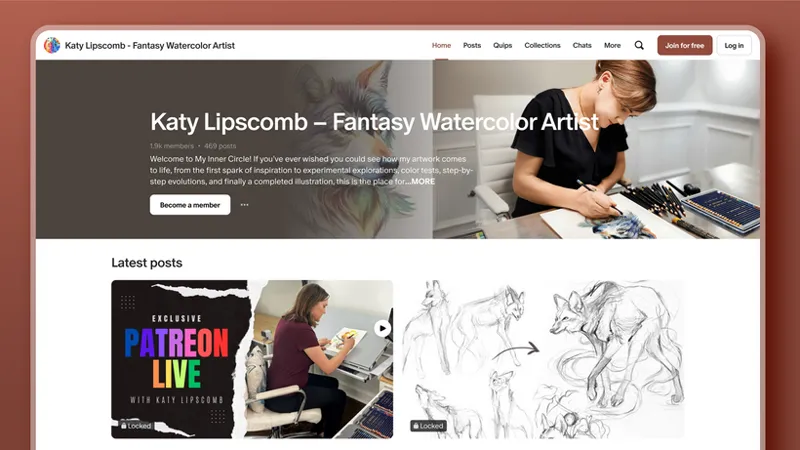
Creator and visual artist Katy Lipscomb does this well. When you land on her Patreon, it’s easy to understand who she is and what her members can expect.
That kind of clarity makes it easy for someone to decide if they want to join.
⚡Pro Tip: Did you create a 1-2 sentence pitch from the earlier post in this collection? Use it here to get your About section started!
Tiers and products
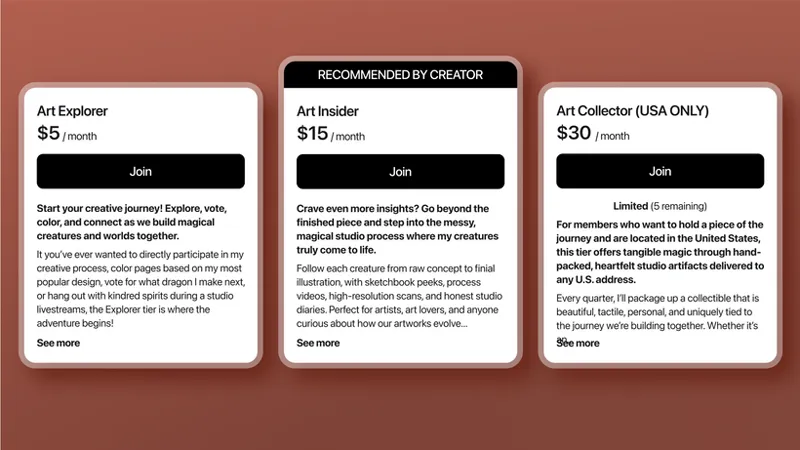
Do you have ideas for your tiers or any one-time purchases you’d like to offer? Cool! Add them here.
Tiers are your ongoing membership levels. Products (or one-time purchases) are things people can buy once instead of subscribing.
Not sure what to offer yet? Also cool! We’ll dive into tier strategy in another lesson.
For now, the goal is simple (just like Granny Patty taught): Make sure anything you offer is easy to understand and realistic for you to deliver.
Make it easy to explore
Remember: you’re not just posting. You’re hosting.
A little structure goes a long way:
Clear titles and descriptions so people know what they’re clicking on
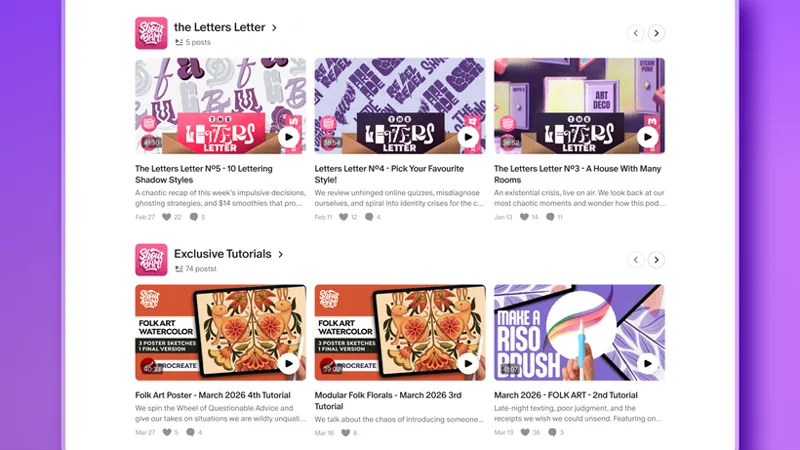
Shelves that group related posts together
Featured posts that highlight great places to start
A mix of public and paid posts so there’s something to explore right away
Creators like visual artist Shoutbam have made their Patreon structure an art form. Posts that grab your attention, show you where to start, then guide your journey in an organized and oh so comforting way.
Make it feel active before launch
“I feel like… I’ve heard this… somewhere before…”
If you checked out the Designing your Patreon experience post, you have! But now it’s time to make it happen.
Load your Patreon with a few posts:
A public post introducing your work
A post that shows what members can expect
Something that sets the tone of your community
Later in this collection, you’ll also find and refine the benefits you’re offering, which will also appear on your page.
Curious what that could look like? Check out these beautiful examples from visual art creator Shoutbam’s Start Here post or visual art creator Katy Lipscomb’s monthly announcement posts.
It doesn’t need to be a lot. Just enough for someone to land and think, “Nice! There’s stuff for me to dig into here.”
Have you checked out the 30-Day Editorial Planner & Calendar Templates? This is the perfect time to open them up, map out a few posts, and get things ready to load.
Improve as you go
Can you hear Granny Patty saying, “Keep improving your page, sweetie”? Ok, she never said that. But if she had a Patreon, she definitely would have!
Your Patreon isn’t frozen in time. You can always update and improve it as you go.
Once you launch, you’ll start learning new things:
Which posts people explore first
What sparks conversation
What gets the most engagement
Use that information.
Adjust your descriptions. Reorganize your posts. Highlight new work.
Your Patreon is a living space. It’ll evolve as your community grows.
And it all starts with these steps to create a welcoming space, ready for people to explore.
🧭 Your next steps
Use your Patreon Setup Checklist to set up or review your profile basics and About section.
Plan a few starter posts (public and paid) so people will have something to explore.
Consider how you want to organize your posts for easy navigation.
Next up: Designing your tiers.
📌 How helpful was this material? Click to let us know: 👍 | 👎
Comments (10)
this is very helpful thank you
this is stupid i just want to make a patreon, where can i do that
the little explore video at the top is too much . I'd prefer to just to watch a quick video.
I can't seem to find a way to access the Dashboard. Nothing in the tutorial video matches what the website interface looks like from my end.
Hey there! Just to clarify, are you trying to access your Insights dashboard or your Payouts dashboard?
what are the fees ?
Hey there! This article gives a detailed overview of creator fees on Patreon: https://support.patreon.com/hc/en-us/articles/11111747095181-Creator-fees-overview#zp-3-0 If you have account-specific questions about your fees, you can also reach out to our support team here: https://support.patreon.com/hc/en-us/requests/new
Good idea to explore everyone
Good tips. I be sure and tweak my profile. Thanks!
So excited about this resource and thrilled to have been featured!