
CC Toolkit for Blender and Photoshop
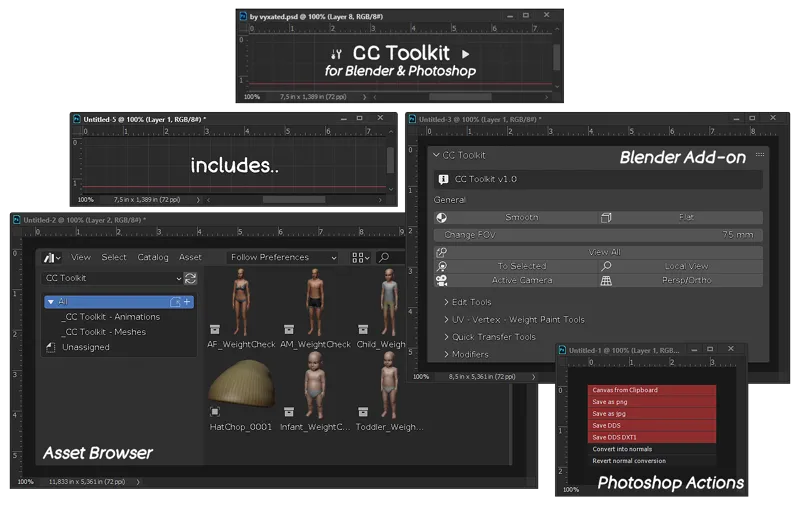
I've made this Blender add-on that gathers useful shortcuts for making CCs as well as a couple of other things 😄
Blender add-on
This add-on gathers all shortcuts into one custom UI panel found in the 3D View’s sidebar, with the addition of transfer weight/vertex/uv_1 tools that’s often used for making CCs.
// To install:
Blender Preferences > Add-on > Install… > select vyxated_cc_toolkit.zip. Made for Blender v3.3 and up.
// Features
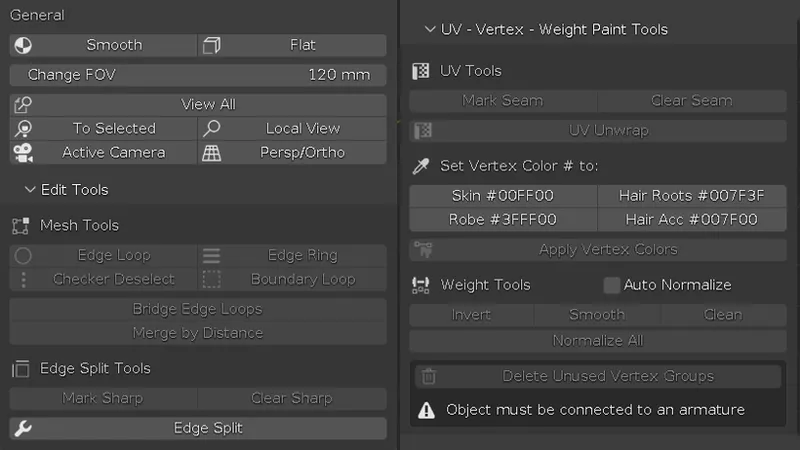
General: object shading & various camera view options. FOV slider is included here for quick access.
Mesh Tools: select and merge options.
Edit Split Tools: options to mark edges as sharp and create an edge split modifier (with only the Sharp Edges enabled).
UV Tools: options to mark edges as seam and UV unwrap the mesh.
Vertex Paint Tools: preset colors for vertex painting & a button to apply it to the whole mesh.
Weight Paint Tools: various shortcuts to clean up weight paint and a Delete Unused Vertex Groups shortcut to remove empty vertex groups generated from transferring the weight paint and using the Clean shortcut. Object must be connected to an armature for this to work.
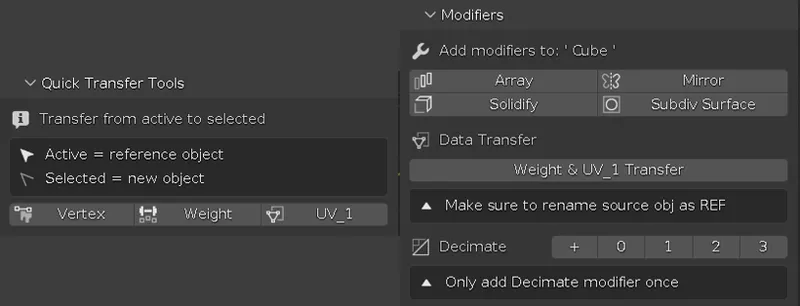
Quick Transfer Tools: buttons that were easily accessible in Blender v2.79 panels are now made into a shortcut for newer Blender versions.
Includes options to transfer vertex color, weight paint, and uv_1 from active to selected objects. Note that the reference object must have the needed data for the shortcut to work.Modifiers: added a few modifier shortcuts useful for making objects.
Data Transfer: modifier approach to the Quick Transfer Tools. Only available for weight & uv_1 transfer. It will automatically create a modifier with the necessary settings for a weight & uv_1 transfer. Note: must have a source object named ‘REF", otherwise the operator fails.
Decimate: a quick decimate modifier with LOD presets. Only add the modifier once as you can reset the value with 0. Converts the modifier value to 0.75, 0.4, and 0.25.
Asset Browser for Blender
This is rather barebones right now, but you can suggest things if anything comes in mind. To install, add the CC Toolkit folder (extract from vyxated_cc_toolkit_blender assets.zip) as asset library in Preferences > File Paths. Included in the library so far:
Hat models for hat chops.
Weight check animation for infant - adult.
Read the full documentation here.
Photoshop actions
// Features
Canvas from Clipboard: this will create a new canvas based on your most recent copied image and paste it in. This is useful if you want to do a quick edit of a snipped image.
Save as png/jpg
Save as DDS DXT5: export preset used for normal maps.
Save as DDS DXT1: export preset used for specular alpha mask.
Convert into normals: converts grayscale map to a regular RGB normal map. I use this to help me arrange normal maps for my CAS backgrounds and can be used to edit the normal map without having to worry about the individual RGB channels.
Revert normal map conversion: reverts the previous process and convert back to the grayscale map that’s readable by S4S. If you create everything from scratch, this can be used to convert your normal map as well.