
a guide to ui mod glitches
I figured, since everyone uses a UI mod or two, it'd be nice to do a compilation of their respective glitches (if or when they happen) and hopefully makes it easier for you to identify which mods need updating :9 but before that, some context about them! (disclaimer: all info based on my own experience w/ making UI recolors.)
// about UI mods
They usually edit one of these two UI files, or both:
GFX files: often edited to add/modify the functionality of a UI.
Examples: More Traits in CAS, Searchable menus/UIs, UI Cheats Extension, TOOL, etc.
Texture (DDS) files: often edited to change the texture of a UI.
Examples: CC wrench icons, main menu/loading screen override, and world map replacements.
Both: UI recolors often edit both files above as text colors are handled by GFX files and the textures are edited separately. Some main menu and loading screen overrides also edit both if there's a new functionality added to them.
// GFX and texture file(s) comes as a set for the UIs they're made for
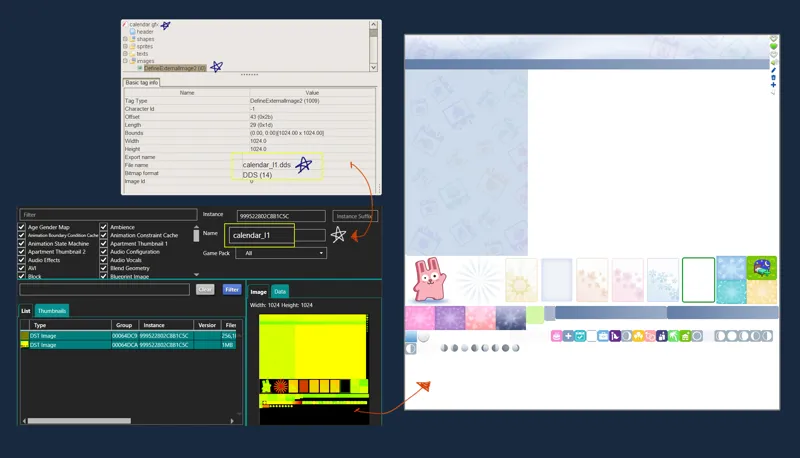
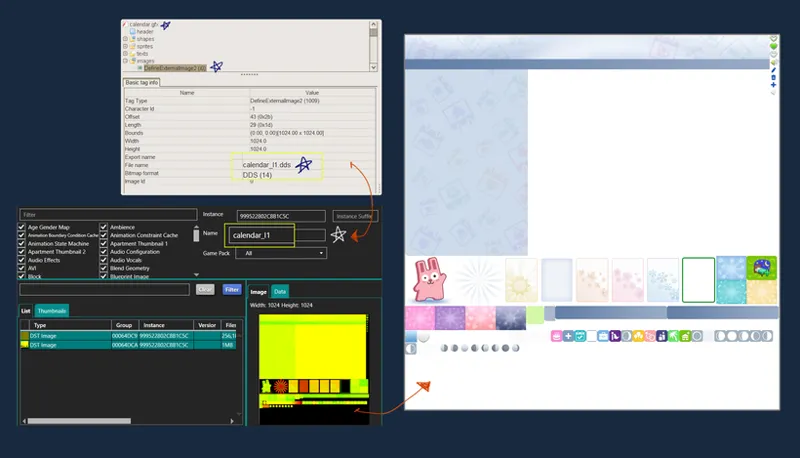
For example, the main Calendar UI comes with one GFX file (calendar.gfx) and one Texture file (instance # 999522802c8b1c5c). Meanwhile, the Edit Holiday & Plan Event UIs have their own set of GFX & Texture files. This can be further confirmed by checking the GFX file and see which external image it's referencing to in the file.
because of this, it makes it easy to pinpoint which UI mod is causing a glitch, hence the creation of this guide :p
// cause of a UI glitch
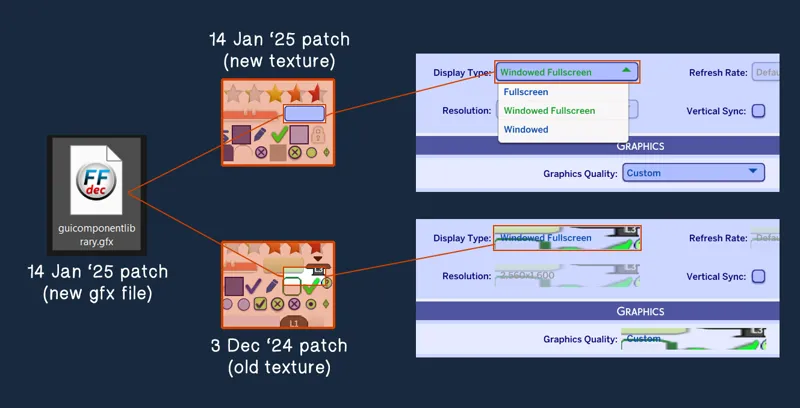
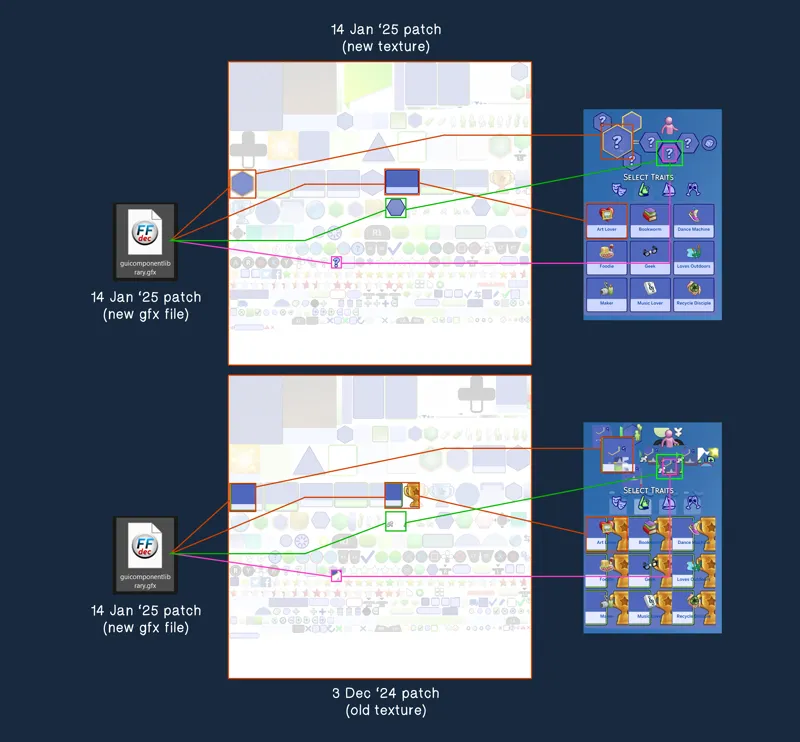
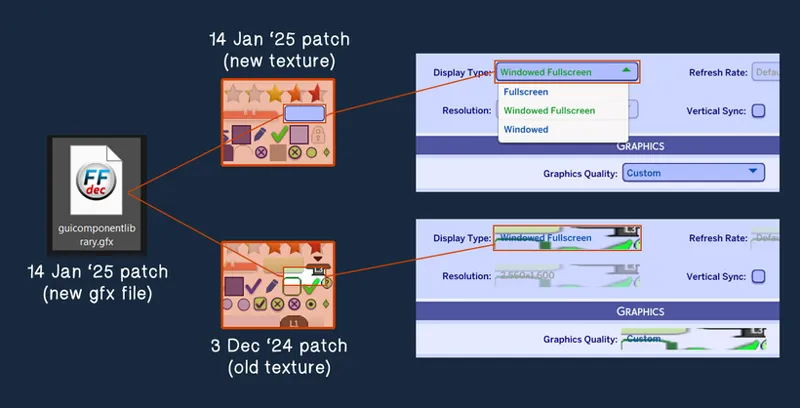
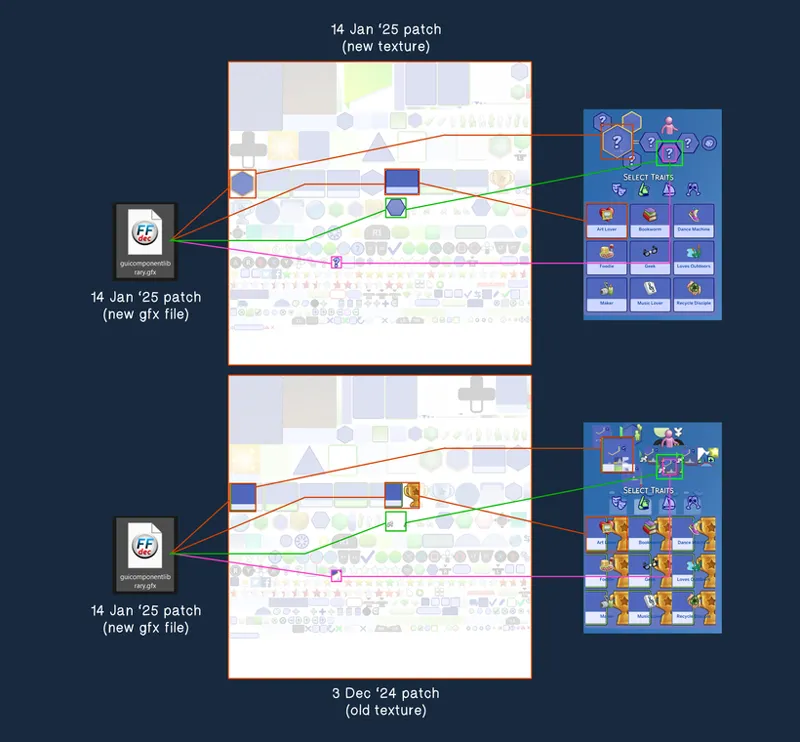
Whenever there's a new game update, the GFX and texture set are updated together if a new functionality is added to a UI. With that in mind, when you have a UI mod from the previous patch laying around, you now have one half outdated/modded UI file (i.e. GFX) and one half up-to-date/unmodded UI file (i.e. UI texture) loaded up by the game (or vice versa), and that discrepancy in version is how you get the UI visual glitch!
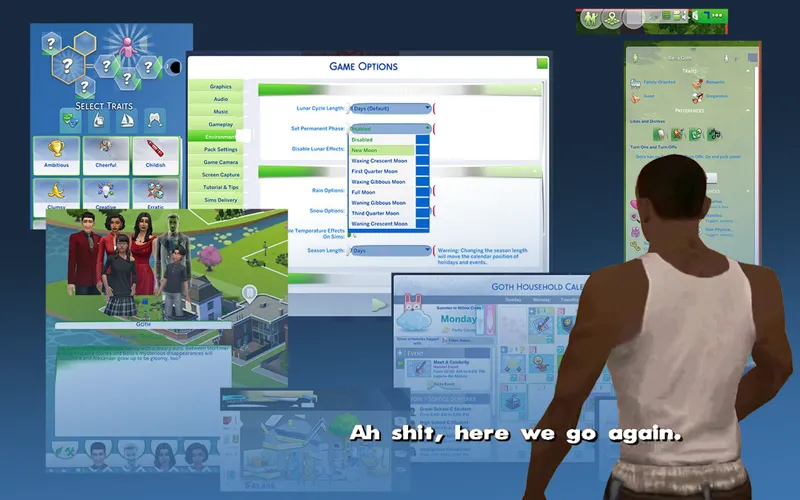
Here's an example of a UI known to break (guicomponentlibrary.gfx):
There are instances where only the GFX file gets updated and not the textures, causing little to no visual bugs. So even if there seems to be no visual bugs, some UIs may still not function as it's supposed to (mainly after big game updates). Always a good idea to check all of your UI mods.
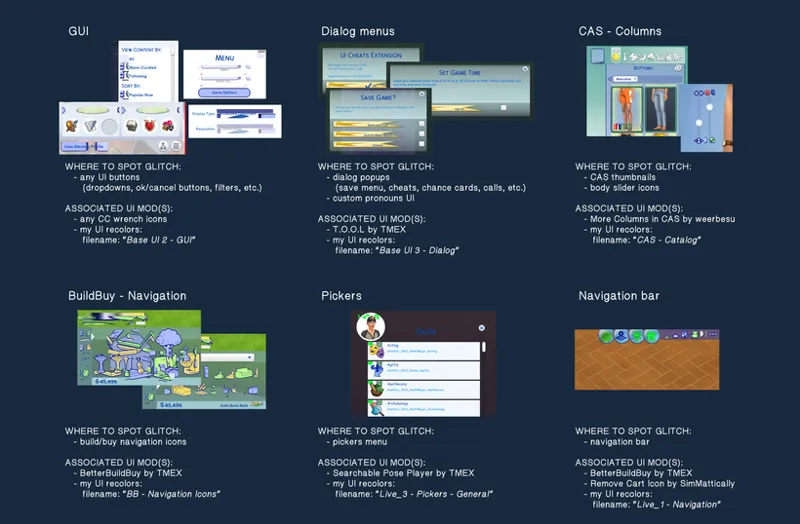
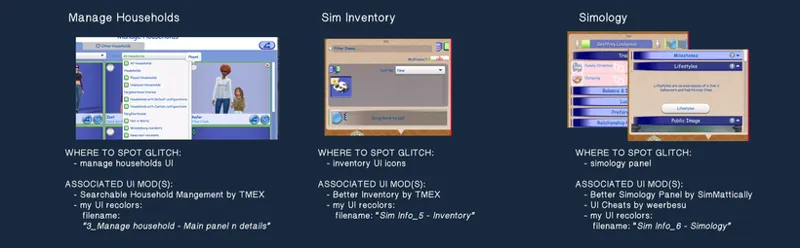
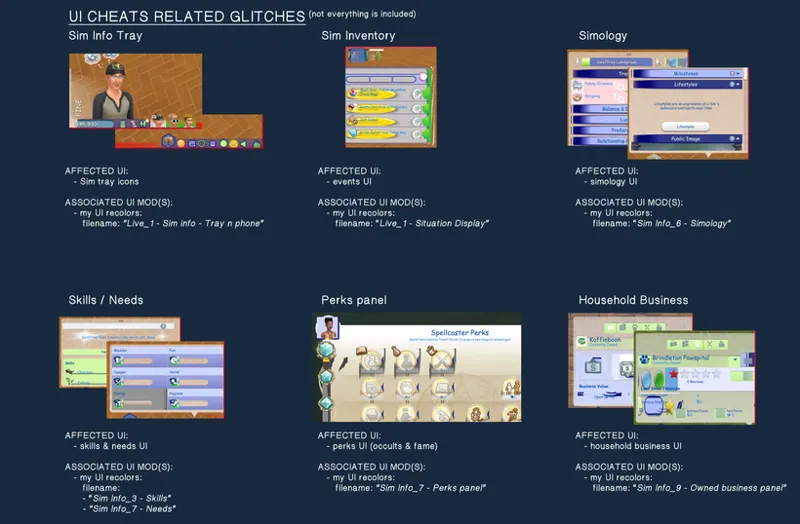
// list of UI mods and their associated glitches
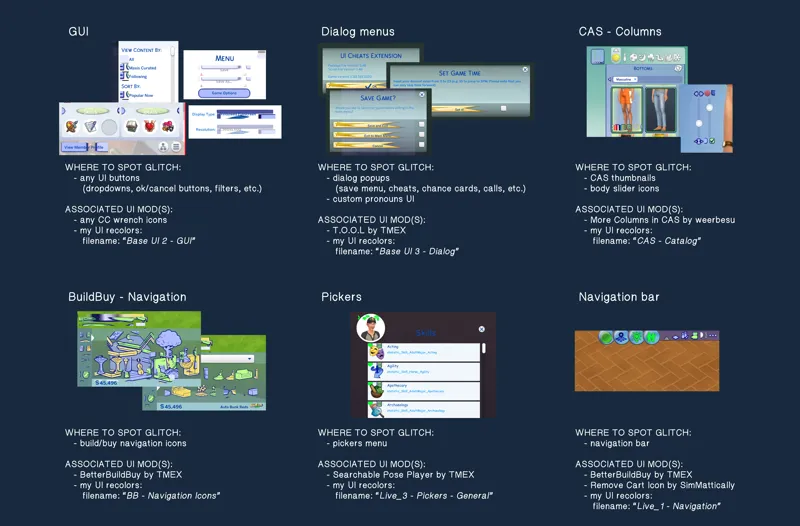
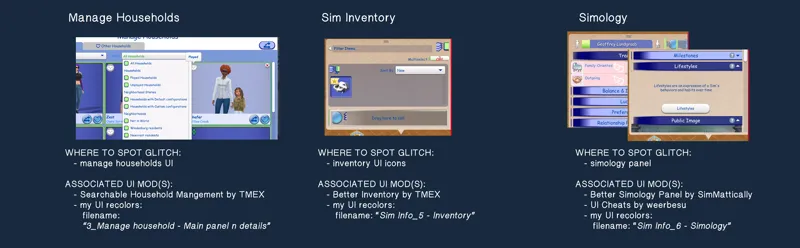
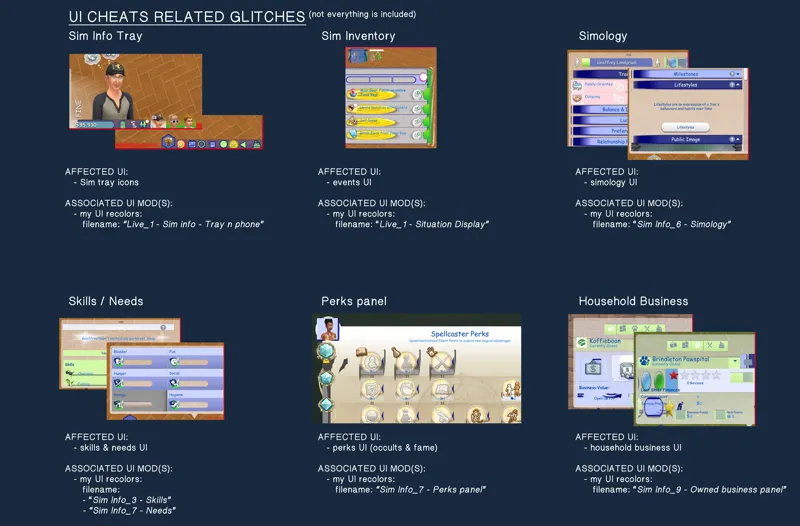
what you're here for :-)
⚠️ important note: I'm reproducing these examples using old UI files I exported & edited myself and doesn't reflect the current state of the mods mentioned below. UI mods that haven't been broken for a while aren't included. Use this only as a frame of reference!
Comments (48)
Can u update the ui mods plsss
hi! i've got an issue where i can't see or select any preferences for my sims while using the ui, could you maybe help me with that?
thank u 🤍
I could kiss you! I've pulled out almost all my hair, trying to figure out what was causing it. Thank you!
hii, im having an issue where basically the dialogue boxes are erased/blurred from the sides (idk how else to explain it, i wish i could show u a pic) is there any fix for it?
hello, thank you for this informative post. however, the issue i am having currently is not mentioned here. i have your sims 1 ui mod, and i do not use any of the mods that are specified as conflicting with it. i have deleted the necessary files in the config folder, but in my game the map, specifically the lot names and icons are completely glitched. i have checked all of my mods and reinstalled the ui mod too, but couldn't find any fix for it. both my game and the mod is updated. can you help me?
Can you help me ? Everything is fine usually but I updatd the mod and I have a glitch on the skill bar above my sim, not in the panel where all the skills are. I also have a glitch when you put the cursor on the sim or a bed for example to make their name appear. I don't know what to do
go to Config > BetterBuildBuy > keep Standalone file and delete the Compatible file. Make sure that BBB is updated to v4.4.2 For this patch, the Standalone file is the one working with BBB, not the Compatible file.
How do you change the writing on chalkd ui? Its blue is it meant to be? I cant really see the writing properly is there a way to change it so all of the writing is white? Know what i mean? 😅😅
Make sure the load order is correct for Chalk'd and UI Cheats mod. You can put the UI cheats file inside Chalk'd and it will be overriden by my file
where can i downloaded at
Hey. I realize you won't be updating for a couple of weeks still. I did want to tell you I have been having a ui glitch that is not on this list and I find it super weird. It effects my relationships panel, and it's been doing it for like 6 months or longer. It happened on my old computer and it happens on my new computer as well. It will not show all the relationships for that sim, and sometimes it will show their relationships as the wrong types, ie, children as friendships and so on. I have better exceptions, and all it does is show me all my ui mods, but it will not tell me which one or which combination is causing the problem. My sim relationships is the only part of the panel or ui that is doing that. have you heard of this or would you know what is causing it?
please please can you update it this week? the new EA update yesterday broke your UI
update's delayed for 2-3 weeks. I'm away and do not have access to my files.
i haven't even read it and you are amazing for this! Thank you for all you do!
Which file is it in your mods that affects the overhead stuff? For example, when a sim is doing something and you see the skill bar as they are doing it? And when they're in a situation, like a date, and you hover over their date and the "Date" label is there? That is currently glitching for me so I am just wanting to remove the files that control that aspect but I cant figure out which ones it is.
Nevermind! I have figured out my issue. A simple matter of me not reading properly 😂 there's a file I need to delete to fix that issue. I love your mods!! They change my game SO much 💖
for me the phone icon isnt showing up?
I’ve had this experience with some of them, except the Sims 2 UI!
Can anyone help me, the only issue I have with glitching is the phone Icon and the events tab. I am stuck at knowing what is causing it.
I had a Ui glitch and after deleted my wrench override it fixed, thanks so much!
hello!! I've been recently having a problem with one of the Ui's I downloaded from you months ago that won't seem to fully disappear. I download the light pink one for sims 4 and since then every now and then I'll have something pink pop up. At first, I didn't mind because it's very pretty and put together excellently but now I think its glitching my game and not letting me access past the manage worlds page and even that has Ui bugs. If you could help at all that would be very appreciated.
Trying to figure out how to get rid of the BuildBuy glitch. I'm using the "compatible" version but I'm still getting the glitch. Using your TS2 overhaul for the UI.
Hi! So I have this problem where I deleted (I think) all of the Sims2 UI related files but somehow my game still has it. It broke after the update a while ago and i wanted to delete all of it but some file is still remaining and I cant find it for the life of me. I tried searching for it but nothing comes up in my mods folder. Its gone in my files but somehow its still in the game and its broken. I love this UI and I wanted to update it but i cant find the old file to delete it. I hope it makes sense enough. Love your work!
have u found it out yet my game is sooo broken because of that one mod ive gave up
Do you know what causes glitch for turn offs and turn ons to become arrows instead of magnets? Never seen that UI glitch before
Hi vyxated! Whenever I select to travel with my sims, the season selection pops up and I'm unable to close it, I just installed the new version and don't use any mods that could be conflicting
hi vyxated! i love your sims 2 UI recolor and have used it for the past 3 or so updates and have a new weird glitch on the CAS gallery. it looks kind-of similar to the dialog menus + sim inventory one, but i can't figure out what the issue is!
if you use the more traits in cas, custom wrench icons, or more rentals mod, update those. I've already updated all the broken files from my end
hi vyxated, i seem to have a issue with the beige UI and when the sim is learning a skill above the head, the glitch is compressed
Having the same issue and couldn't fix it.
Very informative, Thanks!!
I can't begin to tell you how this literally fixed my whole game. Thank you so much! This is perfect resource for all things UI! Now to figure out why I keep getting kicked back to the world screen. The suffering never ends lol
omg yes I've been having this same issue, if you've found out what it is pleasee tell me lol
Thank you so much for this! I have a glitch on my navigation bar and on the box whenever I hover on a sim and their name appears above them. I have updated my betterbuildbuy though? Any advice on this?
depends on which ui mod of mine you have installed. if it's any of the pastel uis/sims 2 ui, there's a file you'll need to delete. you can check the mod's post info for more details
this is AMAZING KNOWLEDGE TO TEACH US thank you so much!
this is so helpful <3 my beige ui has been glitched for a while and this info came just in time before school starts kicking my ass! tysm as always
hiiii!!!
you are an ANGEL
i get a glitch where when i use the ui when i go to the cheat menu the bar is reallly stretched out i can still use it, but its stretched!
Oo yeah this one has been happening for the past several updates now and it's happening even with mods being disabled too 🫠
Love this guide! There's one more glitch though - there's also another ui glitch I don't see mentioned here - pack icons / new pack installed pop-up in main menu missing - most often it was caused by Zerbu's 'all worlds are residential', but sometimes it's caused also by Better Build Buy by Tmex I believe? Basically all the new content shows up in-game, but is missing pack icon, you don't get the pop-up window in the main menu and you also can't filter by those packs in cas/BB, builds/sims made using content from these packs without icons also won't show this pack as used in gallery.
Ohh that's good to know! I don't use the All Worlds Residential mod so I've never encountered the issue, though I did take a peek into the file as I got curious and while it doesn't include any GFX files, it does edit a UI sim data/tuning file, which contains references to the new content/pack alerts and pack specific data (like the pack icons, filter name, world select icons, new pack popups text, and new content alert images), which does explain that specific issue. So anytime the game updates w/ new packs, the mod needs to be updated too to now include references to the new pack assets/info :-) (in fact, I think BBB is working as it's supposed to even if the filter for the new pack is missing, because technically there's nothing to show in the filters in the first place due to the UI tuning file override from an older version 😆)
oh this is awesome thank you !!
Thank you so much for taking your time to write this ❤️
Appreciate you taking the time to compose all of this! 🫶
Good info to have! tysm 🩵🩵