
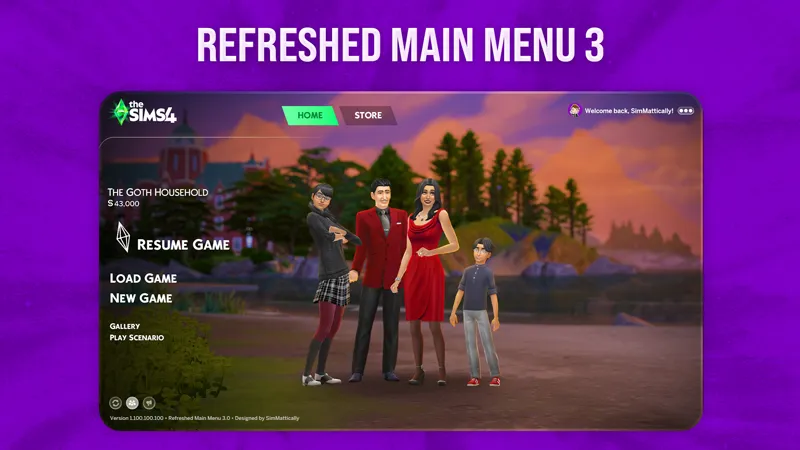
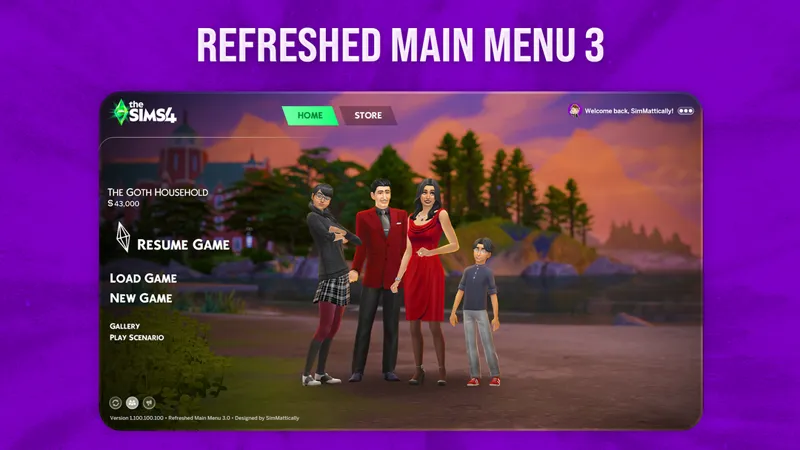

Refreshed Main Menu 3
The Sims 4 Main Menu Override with Unlimited Custom Backgrounds!
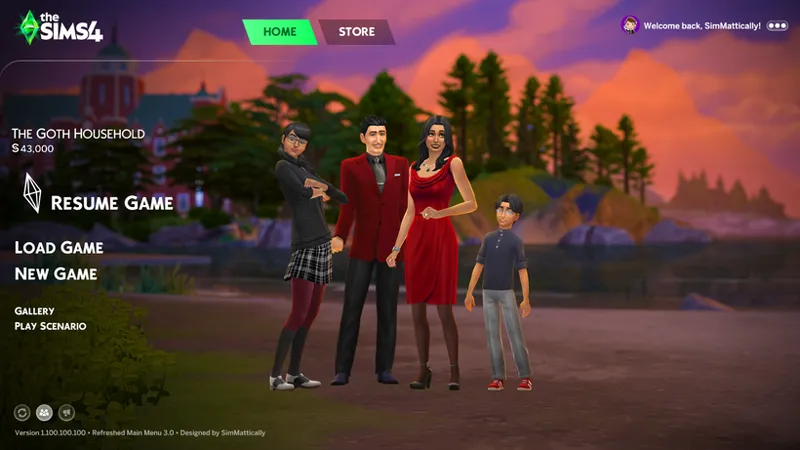
Refreshed Main Menu 3 brings a brand-new look, tons of quality-of-life improvements, and fully modular custom backgrounds that you can create yourself and share — all made to fit your style.
HOW TO INSTALL REFRESHED MAIN MENU 3:
1. Put the SimMattically_RefreshedMainMenu3_BASE.package file in your Mods folder.
⚠️ This file is required for the mod to work! ⚠️
2. Find and choose the backgrounds you want. There are many!
The background system is fully modular, so you can use as many or as few backgrounds as you like, freely mixing and matching them to your preference.
⚪ DEFAULT BACKGROUND
Refreshed Main Menu 3 comes with a default custom background file in the main folder. As the mod is fully modular, you have the option to use this background or not.
⚪ LEGACY BACKGROUNDS PACK
To start, you can also pick from the Legacy Backgrounds pack, which includes all the backgrounds from the previous versions of Refreshed Main Menu.
⚪ ORIGINAL GAME BACKGROUNDS PACK
You can use the backgrounds from the Original Game Backgrounds pack — these are enhanced versions of the vanilla backgrounds from the unmodded main menu.
⚪ BACKGROUNDS FROM OTHERS
Build your own collection by downloading compatible backgrounds from others or making your own using my Background Pack Generator tool.
⚠️ This mod is not compatible with other main menu overrides. Other custom main menus won’t “merge” with my mod if you place them in the Mods folder.
Backgrounds need to be created in the format supported by Refreshed Main Menu 3.
If you’re a creator, be sure to tag your creation as Refreshed Main Menu 3 compatible so others can find it!
⚪ ADDITIONAL INFORMATION
⚠️ You can rename any background file, but make sure to keep the assigned # hash number at the end — if you remove or change it, the background won’t load.
If no backgrounds are installed, the main menu will default to a plain black background.
3. Clear your thumbnail cache.
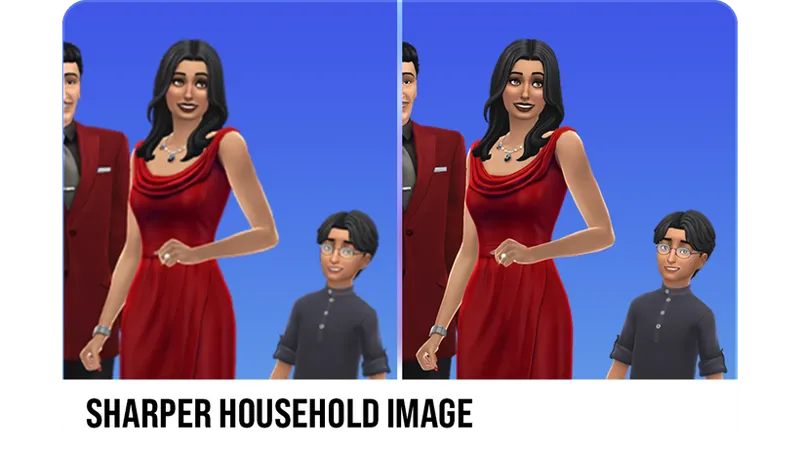
For a sharper, higher-quality household image, delete the localthumbcache.package file from your The Sims 4 folder.
HOW TO USE REFRESHED MAIN MENU 3:
You can reroll the current background by clicking the button in the bottom left corner or pressing the R key.
Toggle the household image and news section by clicking their respective buttons in the bottom left, or by pressing F key and S key.
The visibility of the household image is saved — if you hide it, it will stay hidden even after restarting the game, and the same goes for keeping it visible.
To adjust the size of the household image, hover over the family button while the family is visible — after a short delay, a slider will appear allowing you to resize it.
BACKGROUND PACK GENERATOR TOOL:
To turn your images into your own custom backgrounds for this mod, you can use the Background Pack Generator tool. It guides you step by step, lets you name and preview your backgrounds in-game, and generates ready-to-use package files!
👉🏻 AVAILABLE HERE!
The Background Pack Generator tool is available only to supporting Patrons.
CHANGELOG:
June 30th, 2026 – version 3.2
Updated for game version 1.125
You can now press "G" on your keyboard to toggle the background vignette effect.
March 19th, 2026 – version 3.1.1
Further tweaked promotional notifications to ensure they don't appear.
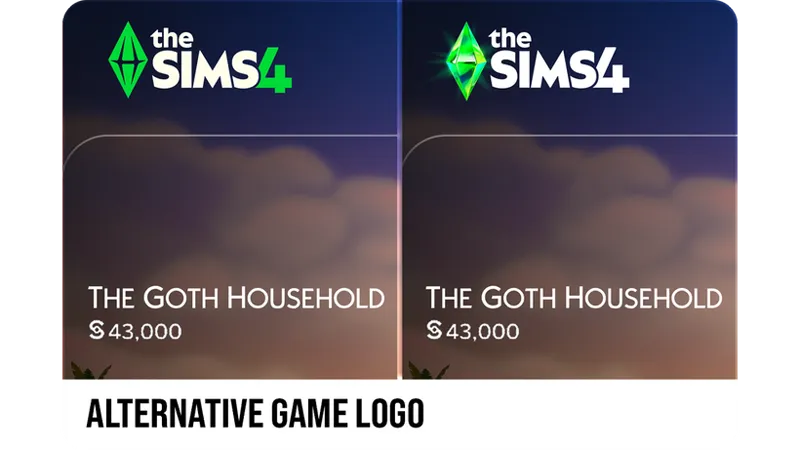
The alternative The Sims 4 logo is now optional.
March 18th, 2026 – version 3.1
Updated for game version 1.122
Adjustments to Marketplace:
The Virtual Currency Wallet will only appear while in the Marketplace tab.
The Download Manager button will only appear while in the Marketplace tab.
December 18th, 2025
The "Event" tab should now display correctly when an event is taking place.
October 6th, 2025
You can now click and drag the family portrait to reposition it for better alignment with the background you have.
August 21st, 2025
Refreshed Main Menu 3.0 | Public Release
July 14th, 2025
Refreshed Main Menu 3.0 | Early Access (v1.0) released.
Please ensure that you are acquainted with my TERMS OF USE.
⚠️ Game Patch Compatibility
Not sure if my mods are updated?
Check out my new Mods Compatibility Status page for a quick look at the current state of each of my mods.
👉🏻 MODS COMPATIBILITY STATUS
.

Comments (239)
I'm sad that in the new update to the menu and loading screen generator, I can make the image bigger, but when I copy-paste, the menu image doesn't include the copied picture like it used to. I do love it; it's just nice having that image available for the patreon peoples looking at the image!
Do you mean you’d like a feature to export the preview of the main menu as an image?
what do i need to do if i want the features like the overlay fix but i want to keep the default main menu background that EA currently has?
Does this wok for the recent update
For the latest status on my mods, please visit my website at https://www.simmattically.com/mods-compatibility-status/.
I love this so much thank you.
hallo kann man jetzt mehrere menü hintergründe in sspiel machen ???
Hello~ I'm having a little issue and I'm unsure of what I'm doing wrong. Firstly, the main menu background generator is working well. I'm able to make a custom main menu background, but I'm unable to make a custom loading screen. I've tried with both options selected and then separately with only making a custom loading screen. Alas, I haven't succeeded in any of the loading screens. :c I also thought it was because I was using a Plumbob overide, but it's not that either.
wished i read the comment before i subscribed this is not working at all!
The mod is fully functional, and all features and tools were tested with game version 1.124. If something doesn't work as expected, please refer to the post and ensure you read everything carefully to understand how things work and what is expected from the user to make it function correctly.
Hi! I keep getting a black background despite having a custom background file with the base file. What might be wrong?
is this currently working? my main menu just becomes all messed up, but i dont have any other ui mods installed. i tried a few things, im not sure what else the issue could be
hi! saw a comment a long time ago about you removing the black gradient on the side and was wondering if you still had plans to implement that? thank you for all your work!
Hey! I completely forgot about it, but I will make sure to include this option in the next big update!
Hi I dont have the slider to make the family zoom in on mine. How do I get that?
do you have any repository for older versions? i need the previous version of this since my game couldn't be updated :( for the ver 121 please
i tried to use this with the background i made using the sims 4 mod manager, which says it was in collaboration with you - but with or without this mod, it doesn't work at all. neither does the loading screen. what am i doing wrong?
Refreshed Main Menu 3 is the only project I'm responsible for. I'm fairly certain the Sims 4 Mod Manager features a large, red disclaimer regarding compatibility of their feature.
Hi, it also does not work for me. I have Simmerxo's SoftGirlEra Pack for the loading, main menu, and intro screen, as well as the custom plumbob and custom TS4 logo. The loading, intro, and custom plumbob work fine. It is the main menu and the custom TS4 logo that she stated your mod was necessary for. She stated only the 'SimMattically_RefreshedMainMenu3_BASE" file was needed. your mod seems to cause the main menu screen to black out. is it just not compatible with her mod pack? if so, no worries I will just pick another main menu screen! thank you :)
I’m certain you have another outdated mod causing your main menu to break.
I just updated my game today and all of my mods and it is working fine for me.
Can you add by The original game backgrouds the background of the newest pack?
Are there any previews for the legacy backgrounds??++++???????????++++??
It's linked in one of the first paragraphs. They're high quality so you can zoom in on each and it'll be crisp :) https://www.simmattically.com/wp-content/uploads/2025/08/LegacyBackgroundsPreviewC.webp
ur amazing thank u! <3
where do we see which legacy ones are which
is this compatible with S4MRT - Sims 4 Market Removal Tool by just joe sims?
I don’t think so
Hey, i just joined to have access to the background pack generator, i want to know which resolution it's best for images? I keep getting a warning none of the images i choose are supported
Hey! I apologize for that. I need to make that information more noticeable within the tool. The supported resolutions are 1920x1080 and 2560x1080.
Hi, I'm not know if this is just happening to me. The loading screen background I created on your website isn't working for me. Could you please help me?
Hey! Did you install the Refreshed Loading Screen base file? Refreshed Main Menu and Refreshed Loading Screen are two separate mods that use the same tools for generating backgrounds!
Please a question. I use a mod that deletes or hides the Shopping Cart while in game. This fantastic mod of yours would not conflict with that, correct?
Nope, it won’t conflict!
Thank you sooo very much!!!! That awful Blue Overlay Glitch has been my bane! And the other features of your wonderful mod are fantastic!! Thanks!
Thank you !
Thanks SimMattically, amazing ! <3
Thank you so much <3
Hi Simmatically! Could you create a version where the logo is the original or can be changed to a different language? Spanish speakers would really appreciate it!
Hey! Yes, I will make the new logo optional.
Hey, just noticed that SpongeBob and Royalty and Legacy are missing on the original backgrounds pack. Do you intend to add them?
I don’t plan to add them. I think they’re extremely ugly, honestly speaking. Sorry!
Hi Simmatically! Would the updated version work with non-updated versions of the game?
no just put it in a folder for when ready
So this has been updated per your mods status Page for this new Patch update? Just want to be clear first before I redownload it.
I'm curious, does anyone know why I wouldn't have the slider option to make family bigger or smaller?
It is hidden by default. From the description: To adjust the size of the household image, hover over the family button while the family is visible — after a short delay, a slider will appear allowing you to resize it.
When you bring this back (no hurry, take the time it needs), would you consider a toggle for hiding the Marketplace (and Home) button, similar to the toggle you already have for News and Last Played Family?
Please be aware that the upcoming update introducing The Sims 4 Marketplace will likely break main menu mods. Once the update is live, please either stay offline or remove my mod and wait for a compatibility update.
Hi! I love this mod so much its genuinely one of my faves! I have a question about one of the backgrounds, specifically the scene with the toddler stuff pack movie screen thingy. I was just wondering if that was a build or something bc I see it all the time and just really wanna play with it! Thank you for this mod!
Hey, thanks! It was a non-functional build made specifically for a screenshot!
hi! i love this mod so much, will you be making the background pack generator available to free members?
There are currently no plans for that.
Hi Simmatically, I have used the generator tool to create loading screens, but they are not generated when I load up the game?
Make sure you have Refreshed Loading Screen installed.
such a nice but effective mod to make the game more cosy. Awesome job. One question I can't seem to resize my household no matter how long I hover my mouse over it, the slider just doesn't appear. Does anyone have any tips on what I can do :). Many thanks in advance
Thank you! I believe you’re hovering over the family itself, but to resize the image with the slider, you need to hover over the button in the bottom left corner. :)
Background Pack Generator v2.0 is here! Generating custom backgrounds for Refreshed Main Menu 3 and Refreshed Loading Screen is now significantly faster and more reliable!
Maybe it’s just me but the mod isn’t working I’m still getting the huge news pop up and it won’t let me close it
Does is say “Refreshed Main Menu 3” in the bottom left corner of the main menu?
I downloaded your background pack generator. I can insert images, but it's not creating a package file. What am I doing wrong?
The Background Pack Generator is an online tool hosted on my website, not a downloadable file. Are you sure you're using the right thing?
amazing!
Hi, can someone please help? I made sure to follow the installation instructions correctly, but after the Sims 4 splash screen, my screen turns black. I can’t see the main menu or click anything. I also tested the game with only this mod in my Mods folder to make sure nothing else was causing the issue. My game is only updated up to the Innisgreen map, so I believe my version is 1.116. Thanks!
Never mind, I figured it out. I needed to use Refreshed Main Menu 2.2 instead. I thought this version would work with all game versions prior to 1.117. Sorry about that!
THANK YOU X 100000000000000 the Blue/Grey screen of death has been KILLING ME <3 <3 <3
Hello, I just used the background generator and unfortunately, it said that 1920x1200 is not supported
Would there be another way๐·°(৹˃̵﹏˂̵৹)°·๐
Hi! Really love this override, but unfortunately it doesnt show the events tab. when i remove the override/mod it appears again. no exception error or anything but just letting you know.
Thanks for letting me know, I will look into it soon!
Hey, I have to take out the refreshed main menu once in a while while the rewards event is going on because the refreshed main menu doesn't show the event content even if I hit the "show news" button, and I need the event content to unlock the rewards. Can you look into this issue?
Thanks for letting me know, I will look into it soon!
Hi I've started having an issue where the screen is black instead of my backgrounds. It was working fine yesterday. The only thing I've done is update my map overwrites.
never mind I figured it out. For some reason the # was missing from the Default background
Hello there! Thank you for your amazing tools! Today BACKGROUND PACK GENERATOR TOOL doesn't work. Error 504.
Should be up and running now!
Hey hey do you guys know where we can get cool backgrounds from other creators? I tried googling and going on pinterest, reddit with no luck. Any suggestions?
https://modthesims.info/d/693595/dlc-screenshot-loading-screen-pack.html
Hi there! Not sure if I messed something up, but I dont think it's registering my ultrawide monitor? I do have a fairly wide monitor...
I actually have the same issue??
Hi my game only shows a black screen on start up and wont load the main menu, i made sure to follow the instructions for installing correctly too. is there a way to fix this?
What version is your game?
Hiya! i just started using your pack generator (love btw ty) and am trying to create loading screens with it but they dont seem to work in my game.. is it some kind of user error? or would it be something else?
same here..
Hi I appreciate your mod so much! I don't have enough to purchase the generator tool, how do I make my own? Or how do I use others and make them compatible? I would love my own custom screens
Just wanted to say you're an amazing modder. I don't code myself, but I figure manipulating the game's UI in multiple ways isn't simple. Thank you so much for your mods!
Thank you very much!
This is a stupid question and im so sorry. Where can I find the SimMattically_RefreshedMainMenu3_BASE file?
Shouldn't that be in the .zip you got when you downloaded the RefreshedMainMenu3 zip?
I installed the new mod, and downloaded the legacy backgrounds to use. However, my game now shows as completely black once it loads into the main menu. Am I doing something wrong? D: This has only happened since I went from using solely the legacy backgrounds for the 2.2 refreshed mod (which broke for some reason), to using the new one. I'm not even playing my game online so it hasn't updated
I'm having this same issue as well
Wondering if more resolutions will be added? I play on 2560x1440 and downscaling images and then them being upscaled in-game makes the images look bad.
It’s highly unlikely due to the game’s performance limitations.
The slider to adjust the size of households doesn't show up when hovering over them for me -- anyone know why that might be?
you have to hold down the little people icon and it appears
Hello! Is this the current updated file for 10/25/2025?
there is a huge compatibility button at the bottom of the page
Hello, SimMattically. Thank you for the reassignment function on the Background Pack Generator! There may be an issue with the Tomarang Beach background. When I tried to use the BPG to reassign the legacy backgrounds for the loading screen, the Tomarang Beach background did not show in the list, and trying to select its package alone gives a "No valid or new package files found." message. Upon testing that background alone in game, it does not appear (with the main menu defaulting to black and the loading screen defaulting to blue-gray when the filename is manually edited to enable it), and checking the image file in the package, I have not seen it randomize before.
Hello again! The error persisted upon re-downloading the files, testing them in-game again, etc., so I ended up trying to re-create it in the BPG by exporting the image from the current Tomarang Beach and using your creator and pack name. The file it gave me had a near-identical filename, but with a zero at the beginning of the hash. Changing the filename made it able to be re-assigned and work in game, so it appears the issue is a typo in the filename for the Tomarang Beach background in the .zip. Thanks again!
October 6th, 2025 | Small Update! You can now click and drag the family portrait to reposition it for better alignment with the background you have! :)
Im using Sims 4 Mod Manager and it just showed an update from the 20th september but the files after updating are still from august. Also the update deleted the backgrounds Im using. They are moved into the bin.
I don't have control over what third-party program does to my mods.
hii! i miss the sims 3-inspired picture frames. i can't seem to find them. thank you for your creations, by the way!!
hey SimMattically, I wanted to know if you could make a change, see the row where it says home and store, can't we get rid of the green effects around them and instead have it just be white text with it getting slightly darker on click
Thank you <3 modders like yourself keep this game enjoyable
im using the generator tool what resolution works when creating the main menu backgrounds
1920x1080 and 2560x1080
does this version still fix the blue overlay glitch and support ultra widescreen
this is insane woah
Hi! I really love this main menu override, but just out of curiosity, would you mind sharing what worlds you took the pictures in from the legacy backgrounds?
Hey! Let me know which backgrounds exactly, cause there’s so many of them!
Hi! This is one of my favorite mods I've ever used. I LOVE it. I wanted to ask if there's a specific way to install the background packs? It seems like my families are "floating" in some of them, even when I adjust the sizes. Thanks!
Hey! Thank you! Whether the families float really depends on the background. All the shots in the Legacy pack were taken back when the main menu didn’t show families, so they appear to float. The default background included with this mod is the only one where the family doesn’t float. Of course, you can also create your own backgrounds! I’m also planning to make a new background pack with screenshots where the family isn’t floating, I just haven’t gotten around to it yet!
I know the problem is on my end, but I can't seem to get this to work. Ellesimswrld's main menu backgrounds work just fine but every other one I've tried doesn't. Is there something specific I need to do?
Hey, I think this is such a great mod however I can't seem to get the sharper family images.
as he said: 3. Clear your thumbnail cache. For a sharper, higher-quality household image, delete the localthumbcache.package file from your The Sims 4 folder.
Hi I love love love this mod and I use vyxated sims 2 main menu mod with it! Before I downloaded your mod and it was required the border wasnt as dark so im wondering if you have a setting to remove the ombre effect that makes the edges darker? Thank you if you take the time to read this and again thank you for putting time and effort into creating this mod!
Hello! I hate to be the noob here but I wanted to ask if your refreshed main menu mod (v3.0) is compatible with the latest patch released 9/18/25? I'm having a bunch of issues with button outlines not showing up, buttons having weird backgrounds, etc and this is the only UI mod I use that hasn't been updated for the latest patch. Your Mods Compatibility Status page says v3.0 was last updated 8/21/25. Any response is appreciated, thank you in advance!!
Yes, it's compatible.
hey, love the mod! i was wondering, is the build in the legacy background "cozymovienight" one that you made?/ is it available to download? i think its so cute.
Thank you! Yes, I made it (based on some random pic from Pinterest), but it wasn't a functional build, just a set for a picture! :)
Heya, beautiful RMM. BE is notifying a potential UI issue w the most recent update for this and dynamic clouds, though :S
Hey, please always refer to the Mods Compatibility Status page for verified information about my mods.
This mod is seriously a godsend so thanks for creating it and allowing us to download!! <3
It works, but you must use all the zip files after extracting "Not choose one". The only issue I see is a glimpse of several Ws stuck at the top above the "Resume Game" font. Still, it works! Make sure you clear your cache and cachestr folders.
I used to have the exact same glitch ansd it was not refreshed main menu, but some other broken mods i had, so maybe some mods conflicting w this one broke it and made the glitch
Im still struggling with the background image. I managed to pick one from your backgrounds. When I remove that I get a black background. I picked the basegame version and I get the basegame background. I pick the default background and get some beach with an island in the background. But really I want the current unmodded background. Isnt that missing in the "how to install" part? Maybe add a picture what its supposed to look like in the folder. Visual aid would really make things easier for people like me.
Finally figured it out. To get the desired background, install the base file, the default background and from the other zip the actual background. Then ingame hit the R kay to switch the background. That should be abit more clear in the info.
Hi. What resolution do images (for the generator) need to be? I'm getting an error with the one I imported
Theres a little purple icon thta tells you i think its like 1920 1080 somehting like that but theres two options to choose from
I love this! The main menu without this is an absolute abomination. Any chance you'd consider a version of this with just the plain vanilla blue that we see in the loading screen? Like literally just a plain solid colour background for us minimalists, ha ha. * EDIT * Just used your tool to create my own. Such a nice tool, thank you!
Hey so is the Background Pack Generator down right now? Everytime I press Generate Background Packages nothing happens at all..?
Hey! The tool should be working. Make sure you don’t have any browser plugins that can potentially interfere with it.
How can I convert other main menu screens to work with this mod? ♡
Depending on the creator, you may need one or two external programs to export their image and convert it with the Background Pack Generator tool. Unfortunately, there’s no other way unless the creator shares their image with you or uses my tool to generate a compatible file. For now, the tool is limited to supporting members, but a free tier will be available eventually!
hello, is there a way to remove the black side overlay that comes with the mod?
Do you mean the gradient on the sides? I will add it to the list of future features!
Thank you so much for this dude you are a lifesaver! I happen to use ellesimsworld's bright start menu and loading screen overlays,, but that blue overlay glitch has become to be a bother- is there anyway you could tweak this mod to only get rid of that glitch without including the backgrounds that conflict with my other background mods? no pressure of course if not, i can always do that link click fix. thank you again for your work!
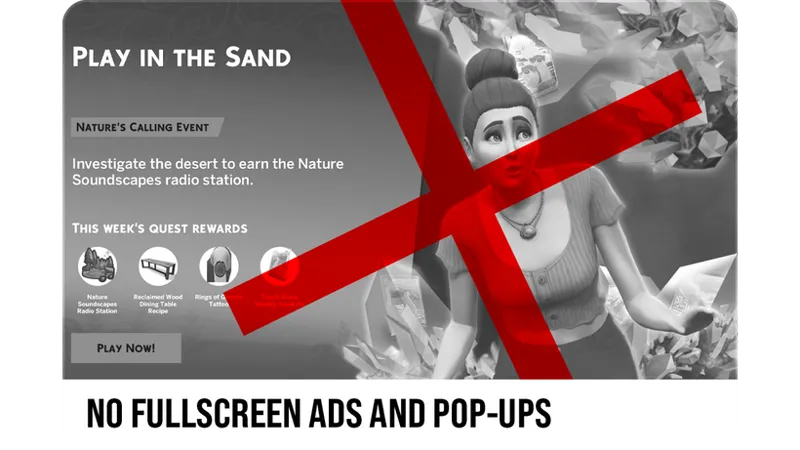
I want to express my gratitude to you, especially after hearing about the inexplicable hatred, harassment, and threats you’ve faced from a few individuals recently. I believe those people completely fail to understand the immense contributions that modders, including you, have made to the development of The Sims 4. For instance, the main menu override mod and tools you released have genuinely resolved the gray screen issue caused by official full-screen events and ads, which should have been the responsibility of the developers. Yet, you addressed it before they did. Surprisingly, instead of being grateful, some people have accused mods of causing the game to malfunction. This update changed a lot of the game’s code, and the developers didn’t provide prior notice, catching everyone off guard. But this is not the fault of modders. I hope players will understand this reality before encountering issues and work with modders to troubleshoot.
Thank you so much for doing Gods work with his one <33 I have a little question, do you happen to have a png/jpg file of Family Portrait mod? i love that background so much and i know that version is retierd so i was wondering if it's possible to use that with your background generator.
I want to make a remastered version of it and put it out as a background pack!
hello good evening. I want to try my hand at making my own main menu override. I was on your twitter/x page and it says the repository was free. Is that no longer the case?
Hey! That repository was published a long time ago and is now outdated. The main menu has changed a lot since then, and I’m now focused on keeping Refreshed Main Menu 3 up to date.
Do i need to install this for my main menus i made with mod manager?
While Mod Manager used a file I provided as a base, it relied on an older version of Refreshed Main Menu and it was always a standalone project. Refreshed Main Menu 3 is a complete redesign under the hood and isn’t compatible with menus made in Mod Manager. You’ll need to use Background Pack Generator to recreate the backgrounds in the new format.
Is there still a file to change the logo on the main menu? for some reason with this version I get by default your version of the logo and theres no file i can find in the downloaded folder to change that back.
I decided to integrate the alternative logo into the mod without making it optional, since it’s simpler that way.
I became a patron just for the tool and it worked perfectly! Thank you so much for your work :)
thank you so much for all the updates! i love ur main menus! sorry for all the comments you are receiving. some people tend to forget that there is a human behind the text
Recently discovered this mod and it’s been a game changer, the blue screen overlay bug has irritated me endlessly. And the backgrounds are so cute! Thanks so much for such a useful and well thought out mod 🥰🤍
I don't normally comment but y'all he literally lets us know when the mods are updated some even updated the day of the patch (which he doesn't have to do ) if y'all actually sat there and read you would know or just take the mod out of your game and wait for the update like normal people there is no reason for you be sending hate you people seem to forget modders are people with lives outside of the Sims. He even made a whole ass website for you to check the status of his mods what more do you want like seriously 😑. Also simmattically love all your mods I have almost all of them in my game🩷🩷
is this update applied to the Sims 4 Mod Manager app?
I don't usually comment but guys cmon... pls read the instructions. this mod works as described. take the time to read, it helps!
so tell me why in background generator when i try to create the package file it's auto cancelled after a few seconds...
hi!! this is breaking my game with the newest update and idk why :( ive removed all of my other mods so i know that this one is causing the problem!! when i have it in my game, the main menu completely glitches out
i also checked your mods compatibility website to make sure it was updated ^-^. no idea why its not working for me ! i really love your main menu refresh so it sucks not to be able to use it :( maybe its a problem on my end?
Hi! Is this compatible with patch 1.115? I seriously need to get rid of the AD popups but I still want to use my custom background which isn't updated.
It says this was made with 1.117, and I would be safe and assume its not backwards compatible
I try to use the background generator but after a few seconds the package generation is cancelled... i'm trying with a 1920x1080 size... And how can i use background packages from other creators or make them compatible?
Hey! Sometimes errors can occur because of browser plugins interfering with the process, or your device blocking something it shouldn’t. Try using a different browser, an incognito tab, or even a different device or network to see if a clean slate helps. Keep in mind the tool is currently limited to supporting patrons, so an active tier is required. If the issue persists, feel free to contact me via DM or email.
Do we have to remove all backgrounds but one? or keep them all in the mods folder? and does this clash with cas backgrounds and loading screen backgrounds?
Read the instructions in the post.
Thanks for updating this so quickly, can't wait to use it :) Just a heads up that the options button is still appearing wrong in buy/build mode
Can you elaborate, please? What options button? This is a main menu override and it doesn’t affect build/buy mode in the game.
u make the coolest stuff! tysm king <3
Thank you for all your contributions!!! You really made the gaming experience much better!!! But I'm still wondering if you don’t mind, would you add the frame option back? I really like your design before.
Thank you so much!!
Could we please have a version where the news feed stays on?
The news feed should stay on! The last state you left it in should be saved. If it isn’t working, I’ll check again, maybe I missed something while updating it to the latest patch.
i love the background pack generator tool. but when i uploaded an image and generated background packages, it always show the wrong download file. lets say, i uploaded an image called, "city". and another image called "meadow" previously, it will always show the download link to the previous image, which in this case is meadow, and won't show a download for the city image file, etc. etc.
I’ll take a look at it, thanks! The tool is still being worked on, so there might be some minor issues. If you’ve already generated a background pack and want to create another, the best thing to do right now is refresh the page to restart the tool.
Thank you for updating. These aren't even cosmetic, I need these to actually fix EA's stupid main menu which glitches and becomes unclickable after one of their obnoxious full screen ads, which literally JUST happened.
so excited to have this back in game, it really makes the experience for me! thank you!!
Thank you. But unfortunately, I have a black screen. Tested in vanilla game, still black screen. Put base module and one of the background files. Maybe I'm doing something wrong?
This release works only with game version 1.117.
are the loading screens and start up screen compatible
Yes. :)
Is there a way to keep the on screen ads and pop ups? Because I like when the event tabs come up.
There are no plans to make this feature toggleable.
thanks!!! 🥹🤘🏼🦇💜
Thank you!!!
I've been playing this franchise since 2001. I just got into adding mods this past week. Your mods are incredible. They may seem "simple", but they add so much depth to the game in a really different way. Thank you so much! :)
I've spent half of the day finding out which mods are keeping my game from loading. Had to take out the old overlay ofc and missed it dearly every one of the 30 (or more!) times I had to restart for testing. You have no idea what a highlight the news of your updated override are for me. <3 Thank you so much for making my day and making our games beautiful <3
Thank you so much !
THANK UU <3
🩷🩷🩷🩷🥹
Thank you!
Yayyyy
jayyy
Yesss
Thank you! <3
Thank you :)
you are the best! I love your main menu override. So happy to have it back <3
Heyy, for some reason main menu appears black but there are no other overrides for mainmenu. I'm kinda confused about what file is neccessary to put into mods file.
the mod is broken at the moment, an update will be released in the coming days!
I'm really excited, thank you so much! This is so creative, well thought out and just overall amazing! Thank you for creating amazing content for us simmers!💗
Hello! I became a paid member so get this and for some reason its not working, do you have to put EVERYTHING into the mods folder or just the base file?
Hey! Technically, only the Base file is required for the mod to work. Keep in mind that without a custom background installed, the main menu will appear black. If the menu looks unchanged after installing my mod, most likely another main menu override that you have is taking priority and preventing my mod from loading.
Love it!
i cannotget this to work in my game nomatter what
I don’t know if it’s just me but since I updated my game for the patch yesterday I’ve gotten that blue overlay 3 times.
Does this cycle through backgrounds like the old one?
Yes! :)
Hi there! I'm just curious if its possible/ you have a mod already that fixes the blue overlay glitch with other custom main menu screens? I use Lijoues but I still get the glitch v often unfortunately :/
Hey! No, my fix for the overlay glitch is part of the main menu itself.
You're literally a Godsend, i've been looking for something that supports ultrawide monitors. Thank you for your work!
i'm a bit confused, what does the default background do? is it that ugly fortnite looking background EA gives us lol?
Sorry I didn’t explain that more clearly! The default background is the custom one with the shore at sunset, you can see it in some of the previews in the post!
Hi! Thank you for this amazing override. I wanted to try your background pack generator and it works up till the generating part. It loads for a little bit and then it does nothing...
Hey! Did you get a chance to try again? Does it always fail for you? Generating the background can take up to a minute! When you say it does nothing, does it give you an empty result, or is the progress bar still running?
The previous version of the Refresh Menu had a separate file for the Alternative logo, but this new version doesn't have. Do we use the file from the previous version or it's something we can toggle?
This version of the mod is completely separate from the previous versions, so please don't mix any files between versions. Refreshed Main Menu 3 has the new logo by default and currently it's not possible to switch it off.
I used the background tool generator , but the image doesn't appear on the menu , it was a 782kb 1920X1080 wallpaper , so , idk , i'm using the 2.2 version with DirectX9 and i deleted every default wallpaper , so it's just the base mod
What do you mean when you say you’re using the 2.2 version? And if your background doesn’t appear, what background shows instead? Is it just a black screen?
You added buttons?!
What size do the images have to be to work with the background pack generator?
Either 1920x1080 or 2560x1080, up to 4MB. :)
Unsure if this is a me issue, but I am not able to use the main menu screens i made using the Background Generator Tool. I had them in a folder, along with the base mod, and didn't work. I then moved them out of the folder itself, and it still didn't work. Like I said above, I am unsure if it's a me thing, or not but the Mod itself works, but I am not able to see the backgrounds at all, I am also not able to see the three icons on the bottom left either, I just see, what I suspect is game versions, and DX11. I also have hit the keybinds for the mod itself, and they don’t seem to work? But I am able to see the mod? Appreciate all of your hard work on the main menu! I love this Mod, and it has to be one of my favorite Quality of Life mods to have in my Sims game! Edit 01: I might have to dig through my very large mod folder as I think I may have something conflicting from Vyxated, but I’m unsure. Will update when I have had sleep. 🤍
It does sound like the base mod is not loading for you, probably because it’s conflicting with another main menu override. You said it works, but I believe you’re mistaken. If it doesn’t say “Refreshed Main Menu 3” in the bottom left corner and you don’t see the three buttons above it either, it means the mod is not loaded! You need to definitely check for conflicting mods! :)
Hello, I'm having difficulty accessing the Background Pack Generator tool. Logging into my Patreon account for the website, I can download the actual mod files, but nothing is showing on the page for the Background Pack Generator other than the title/copyright across multiple browsers.
Hey! Thank you for letting me know. There seems to be an issue and I’ll be working on fixing it today.
Will it be free? What date?
There’s no set date for the public release just yet. Since so much has been redesigned and more features are still in the works, I want to gather feedback from supporters first. Once it’s been tested by more users, the public version will follow! :)
Hi Matt. Would it be possible for the state of News section visibility to also get saved, just like it's happenning for Household visibility already?
Hey! Yes, absolutely! ☺️ Thank you for sharing your feedback, I’ll make sure to add this feature in the next update!
That's amazing *-* You are so talented!
Will dynamic backgrounds be possible? The ones that change depending on the time?
I’d love to bring those into this mod, but they’re a bit more complicated. It’s definitely something I’m looking into, but for now I can’t promise anything!
You are AMAZING for this, I almost can't believe this will eventually be free. I might go ahead and pay for this because you def deserve it
As always amazing! You always go above and beyond!
Thank you!! ☺️ I did read your DM about adjusting the household image size from months ago, so hopefully you’ll enjoy this new feature!
Loveeee it - you are so talented! When will it be public? I have the one with the picture frame but this one is more what I was looking for
Thank you! There’s no set date for the public release just yet. Since so much has been redesigned and more features are still in the works, I want to gather feedback from supporters first. Once it’s been tested by more users, the public version will follow! :)
Oh my goodness! This looks beautiful! I am yet again surprised by how talented you are. I can’t wait to try this out. Thank you for sharing this! 🙌🏾
Thank you very much!! 😊
Man you really are the fairy godfather of sims aesthetics
thank youuuu 🫶🏻
you are genuinely the most talented individual on this planet omfg
🫶🏻 thank youu Deyyyy