
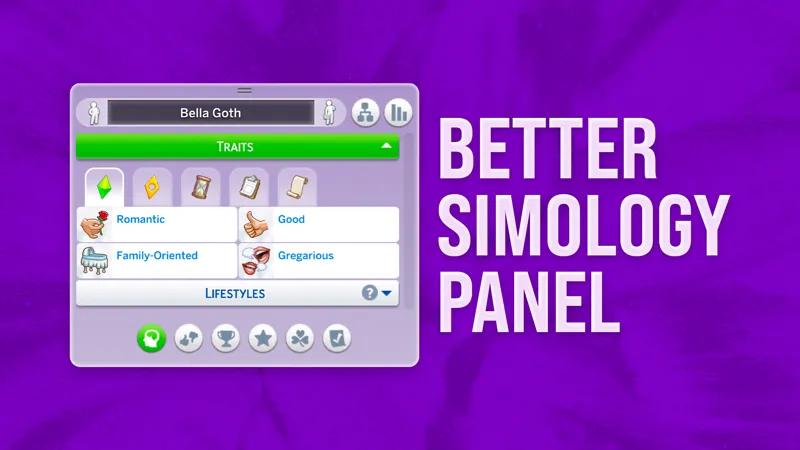
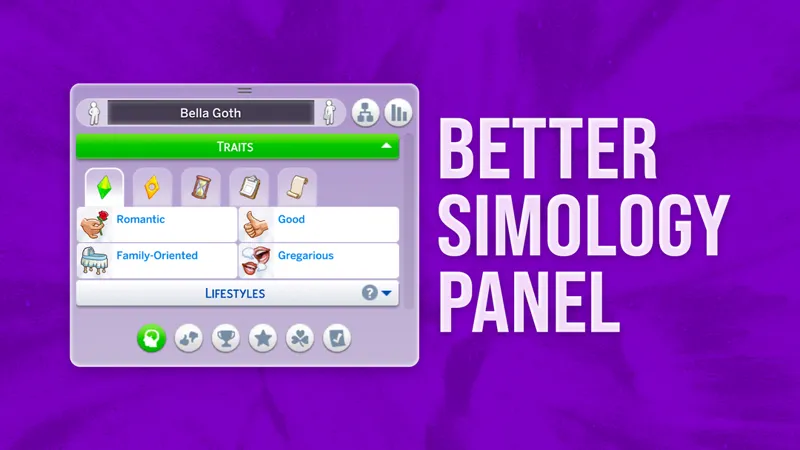

Better Simology Panel
Filter Your Sims' Info with New Categories
👤 Personality: Sim's Traits, Lifestyles, Character Values, Ghost Powers, and Robot Modules.
👍🏻 Preferences: Likes and Dislikes and Relationship Preferences.
🏆 Accomplishments & Growth: Milestones, earned Degrees, and Resolutions.
🌟 Public Standing: Public Image and Faction Reputations.
🍀 Inner Harmony: Luck and Balance.
☑️ Neighborhood Action Plans.
Smart Buttons: A Cleaner Look
The mod only shows buttons based on the packs you own:
Neighborhood Action Plans: Eco Lifestyle
Public Standing: Get Famous, Journey to Batuu
Accomplishments & Growth: Seasons, Growing Together, or Discover University
Inner Harmony: Enchanted by Nature
NOTE: Some buttons may show empty lists if you own the pack but have no current data to display. That’s just how modding works, sorry!
Traits Are Now Organized as Well!
Traits Update (v1.2) introduces new filtering options, grouping traits into Identity, Rewards, Temporary, Status, and All categories.
Sims with over 8 traits of any kind will see new filter buttons above the traits list.
ADDITIONAL CHANGES:
New "Enter Create a Sim" button replaced the previous "Sim Stats" button in the upper right corner; Enter CAS buttons in Preferences and Relationship Preferences panels were removed to save space and improve appearance. Let me know your thoughts!
Lifestyles and Preferences panels will collapse by default if Sim has no data.
How to Use: Tips & Tricks
The Simology Panel auto-expands if no custom height is set.
You can still resize the panel manually – height is saved per Sim and stays consistent across categories.
To reset back to auto mode, shrink the panel as much as possible, then click any of the new buttons.
The selected category is saved per Sim, so switching between Sims remembers your last view.
You can collapse sections for an even more condensed layout.
How to Install
Pick ONLY ONE file from the zip — either the basic version or the one made for UI Cheats Extension.
Do not use the UI Cheats–compatible version of this mod unless you also have UI Cheats Extension installed.
“Hey! Your mod isn’t working!”
This is a UI mod, so it conflicts with other mods that also modify the Simology panel.
UI Cheats is one of them, that’s why there’s a special version just for it!
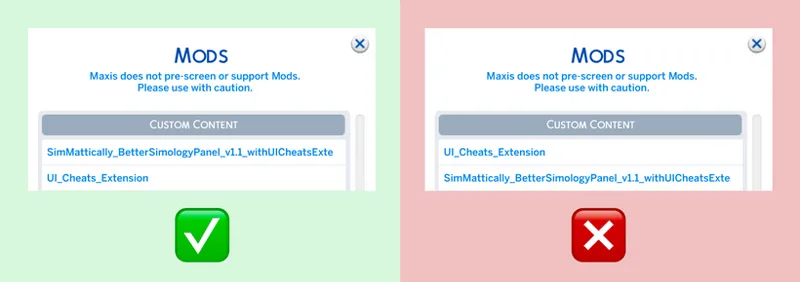
If you use UI Cheats, install
SimMattically_BetterSimologyPanel_withUICheatsExtension.package
🚨 IMPORTANT: Make sure my mod loads above UI Cheats in the game’s mod list.
Can’t figure out mods loading order?
➡️ CLICK HERE TO LEARN HOW TO FULLY CONFIGURE YOUR MODS LOADING ORDER
What about UI recolors?
Depends on the creator, but usually you can use both if my mod loads first.
Visual inconsistencies might happen depending on how intense the recolor is, but functionality should be fine. Just expect some possible visual quirks!
Changelog
March 29th, 2026
version 1.2.4 | compatible with game version 1.122 w/ UI Cheats v1.53*
Fixed Lifestyles cheat from the UI Cheats Extension.
March 20th, 2026
version 1.2.3 | compatible with game version 1.122 w/ UI Cheats v1.53*
Added a new Luck cheat from the UI Cheats Extension update.
The Basic version remains at 1.2.2 as there were no changes; it is compatible with game version 1.120+.
December 10th, 2025
version 1.2.2 | compatible with game version 1.120 & UI Cheats
Bug fixes and ensured compatibility with the latest game version.
September 19, 2025
version 1.2.1 | compatible with game version 1.118 & UI Cheats
August 20, 2025
version 1.2a | compatible with game version 1.116/1.117 & UI Cheats | public release
August 4, 2025
version 1.2a | compatible with game version 1.116 & UI Cheats | Early Access
New "Enter Create a Sim" button replaced the previous "Sim Stats" button in the upper right corner.
July 30, 2025
version 1.2 | compatible with game version 1.116 & UI Cheats | Early Access
Traits Update – traits are now grouped into categories; Lifestyles and Preferences panels collapse if no data is present; “Enter Create a Sim” buttons removed from Preferences panels; minor visual tweaks.
July 2, 2025
version 1.1.0 | compatible with game version 1.116 & UI Cheats | public release
June 24, 2025
version 1.0 | compatible with game version 1.115 & UI Cheats | public release
⚠️ Game Patch Compatibility
Not sure if my mods are updated?
Check out my new Mods Compatibility Status page for a quick look at the current state of each of my mods.
👉🏻 MODS COMPATIBILITY STATUS
.
Comments (220)
Hey, I don't know if it is only my game but I got a better exception for this mod saying that it is broken.
So, I want to apologize. It seems that my save file got corrupted, and when I recovered it, everything was working. Again, I apologize if there was any confusion.
Do fears show up in the temporary traits section?
Dear Simmattically, First off i love love this mod and i use it often i also use the save button in live mode mod in my game they are thing i cannot live without , second off i read all the everything posted in the patreon posts for both of those for the instructions and since the new patch update on 5/12/2026 , i have been having trouble getting them to work when using both mods with the ui cheats extension portion build in , i think it may need to be updated what i see when i have them both in my game with the ui cheats extension is just my sims in live mode and none of the buttons, no build / buy mode, manage world, the buttons to pause,play or make time go faster, none of that, if you could please respond and let me know what i might be doing wrong, that would be greatly appreciated, Thank you so much
Make sure your UI Cheats Extension mod is updated to version 1.55.
Reminder: I’m getting really tired of comments claiming my mods don't work just because the person didn't bother to read the post from A to Z — which already contains the answers and clues to all those questions. There are also multiple comments below that have received specific answers, so I believe users can find everything they need by just reading. From now on, any comment saying "the mod doesn't show up in my game" or "it crashes my UI/I can't click on anything" will be removed. I don't want new members to be confused into thinking my mods are broken when they aren't. I'm keeping the comments on for my Patreon posts because I want members to be able to voice feedback, requests, and potential ideas for improving my mods.
Sorry about my other comments, what I mean is, I've followed everything correctly, and it shows on my mods startup and loads exactly how it should, but the simology panel is just the normal one? Maybe it's UI cheats that needs an update. Maybe Dark Mode UI.
Hello, loved this mods and it's really cool, Thank You for creating this! Just a quick question: Where is Sims Stats located? It was now replaced by CAS button and I couldn't find it in Simeology Panel.
You can find the Stats button in the Notebook!
Hello, I’d like to confirm whether this mod requires an update to maintain compatibility with UI Cheats? The UI Cheats mod was recently updated and introduced a Luck cheat to the Simology panel. Edit:- I’ve checked, and the new luck cheat doesn’t work with this mod.
Thanks for letting me know! I will update the UI Cheats version soon to include the new Luck cheat.
Sorry to bother you, but is this mod updated with UI Cheats?
It works well with UI Cheats without updating. There is only one cheat that needs to be added and I will work on it soon.
I’m getting really tired of comments claiming my mods don't work just because the person didn't bother to read the post from A to Z — which already contains the answers and clues to all those questions. There are also multiple comments below that have received specific answers, so I believe users can find everything they need by just reading. From now on, any comment saying "the mod doesn't show up in my game" or "it crashes my UI/I can't click on anything" will be removed. I don't want new members to be confused into thinking my mods are broken when they aren't. I'm keeping the comments on for my Patreon posts because I want members to be able to voice feedback, requests, and potential ideas for improving my mods.
Hiya, I am also having problems with this mod. (no other mods or CC in folder). Once game loads I am no longer able to select any options on the panel like clubs, relationships etc... it also prevents me from selecting the UI menu to quit the game.
1. Since you don't use UI Cheats Extension, ensure you installed the standalone version of my mod. If you accidentally installed the version designed for UI Cheats without having UI Cheats installed, your UI will crash. 2. Ensure you are running the latest game version. I do not support outdated game versions.
Hello! I've been having the same issue that Marco had at first. Both my UI extensions and Better Simology (for UI extensions only) have been updated I can: -Change careers -Change traits -Upgrade skills -Change fame and fame points -Change influence points -Change reputation I can't: -Fill all needs with one click -Add or Change lifestyle -Choose skills -Add sims to relationships
Your problems go beyond Simology panel, so it has to be some other mod that stops UI Cheats from working properly.
Hi! After UI Cheats latest update, the Simology Panel cheats do not work even if I use the UI Cheats compatible version of this mod :) I tested with only UI Cheats and this mod on my Mods folder. I also made sure the load order was correct.
Hey! Can you tell me which cheat specifically doesn’t work for you? I’m able to remove traits, add milestones, change reputation and fame, change the balance, etc.
Amazing mod from an amazing modder ~
Hihi, was just wondering if this is compatible with the jan 3rd update & the new version of UI cheats? im about to load up the game either way so if youre not sure I can let you know :)
You can just read the post and find out.
This mod looks so cool... But I kept getting popups from Better Exceptions until I removed it. I need to figure out what the issue is because I really want it. Thanks for all your hard work!
When I use the panel with UI cheats, the entire UI of the game breaks. I thought that you should know.
You installed it wrong then, the mod works just fine.
Shame that I can't download this right now, I'm purposefully behind on updates. One day though 🥹
If you’re on 1.118 and up, it might still work! You can always try and test it, it won’t permanently break anything if it doesn’t work. 😊
BE says this might need updating
https://www.simmattically.com/mods-compatibility-status/
MERCI
for me isnt working
Is the Sim Stats button still there? if so where is it?
Even though your mod is working, and I installed the correct version of it it still says that there is a conflict issue with UI cheats and I’m not sure why
It’s just how it works with Sims, it will “conflict” because both mods modify the same thing, but it’s not actually broken! ☺️
Thanks so much for this! So I used the UI cheats version and unit outlines in build mode disappeared, it re-appeared when i removed this mod...maybe i have another conflicting mod
My mod has no impact on this feature, so your issue is unrelated to it.
Hi! I just wanted to say thank you for this mod, it is an absolute lifesaver and is one of the mods I haven't played without since I found it.
December 10th, 2025 version 1.2.2 | compatible with game version 1.120 & UI Cheats Bug fixes and ensured compatibility with the latest game version.
mod is breaking "stay over" list UI issue
This mod doesn’t affect the Stay Over feature’s UI, and I haven’t found any issues with it on my end.
Hi! i noticed the mod stopped working, just wanna know, is the mod broken??
Nope. If it was broken, it would be listed as such on the Mods Compatibility Status page.
Please add the sim stats button back! Or is there another way to check them?
hi! i noticed when i was playing that in my sims simology panel, there was a slight ui issue in the age meter part of the simology panel. my teen sims had the child icon instead of the teen icon, and my adult sim had the teen icon instead of the adult icon. it really wasnt that big of a deal but then i started 50/50ing for another issue (my sim who had recently aged up wasn't reflected properly in the save-as image), the simology tab just broke. everything else was blank except for the age meter, which was completely filled in with green even though my sim had just aged up - and she still had the child icon at the beginning of the meter. i was also unable to click on anything but the simology panel, needs panel, and the phone. i had to close the sims with task manager because i couldnt exit out. i tested with only better simology panel (plus deleted resource.cfg and deleted all cache and old exceptions in the sims 4 folder) in my game as advised by support staff from Deaderpool. I can confirm that when i took better simology panel out afterwards (so i have nothing in my mods folder right now), i had none of those problems - my simology panel is visible and every menu is clickable. hopefully this is helpful and i explained enough and thank you so much for this mod :)
OKAY UPDATE - the reason we think it broke was because i took out UI cheats and left in the better simology panel (ui cheats version) so it blew up on itself. but the mod description doesnt Say that ui cheats is necessarily required for this version so we dont know if its intended to be like that (as in, thats what happens when you take out ui cheats). i also discovered that the visual bug of my teens having the child icon next to their age up meter is a completely different mod. sorry
Thank you so much for your mod! However, I noticed that when my Sim makes a cocktail, it gets stuck in their hand and an error message pops up. After removing the mod, my Sim started making cocktails normally again. I don't know if this is happening to anyone else. I have the version compatible with the UI Cheats mod.
This is fantastic and desperately needed! Thanks so much!
is there still a sim stats button somewhere or is it not included because the CAS button replaced it? i'd like to have it back somewhere if possible...
It’s accessible within the notebook! Originally the stats button was in both places so I decided to replace it with a CAS button :)
I'm so sorry to be a bother, but better simology doesn't seem to be working for me. It is breaking my simology panel, the panel won't open when I click on it then it breaks every other part of the UI. I don't have UI cheats so I really don't know what's going on. I know it's this mod causing it because I removed it then everything was fine. If you have any advice on what I should try it would be really appreciated, if it's not a bother to you
Hey! It sounds like you might be using the UI Cheats version of my mod without having UI Cheats installed, or your game might be outdated (possibly pre–Adventure Awaits). Let me know!
I hope this is the right place for this, but I've had a problem w the simology panel for a while. The UI functions but they're out shape or switched around with the wrong icons. Even when I delete the mod, it stays with the broken panel with the categories. Additionally UI cheats won't work on the simology panel. </3
It’s not caused by my mod, it sounds like you have another outdated mod in your game. When it comes to Better Simology Panel and UI Cheats together, all the info is in the post.
is there any upload coming for this mod after the adventure awaits pack?
The mod was updated for Adventure Awaits a long time ago, before the EP even came out, and it does not require an update.
I cannot get over how awesome this mod is. I absolutely LOVE it. This is what I would expect EA quality to be. Well done :)
I'm not able to find formative moments, does it take time until they populate into the panel?
https://www.patreon.com/posts/alpha-release-72190264 ¿can you update this mod?
No, it's not my mod.
I'm getting stuck in an endless loading screen after exiting the cas from the simology panel
Putting yours in overrides folder should work with ui cheats?
Download the one in the download folder that says with UI cheats extension
i need help. for clarification, i have the most recent updated Ui cheats & better simology. i simply put yours in the mod folder, and i put UI cheats in my cheats folder and put its package file in an extra folder inside the cheats folder to try and deprioritize it over your mod. however, not only is something preventing your mod from working, but its also saying in a BE report for checking mod conflicts that your Ui cheats extension coflicts with UI cheats with the tuning "62ECC59A:00000000:DA7597EAEB9BA388 (Type: GFX Resource). am i doing anything wrong?
Hey! This is unverified, but I read once that putting files deeper in folders actually makes The Sims 4 load them with priority! My mod will cause “conflict” with UI Cheats while scanning with BE because they both modify the same GFX resource, so that’s why it’s important my mod load first. Since you’re getting a conflict, I’m pretty sure it’s priority and load order in your case!
⚠️ SEPTEMBER 19, 2025 ⚠️ Update for Better Simology Panel (version 1.2.1) has been released and is designed for game version 1.118. Enjoy! :)
thankss <3
Better Simology Panel will break again with today’s update (September 18th), so keep that in mind before updating your game. I’ll work on an update soon, but since Adventure Awaits is adding new features today, I’ll need to take my time to make sure everything’s modded properly (without having access to the pack myself).
have it be updated
will you be updating this mod on CurseForge? or should I get it from here?
Thank you so much for your hard work!
Thank you
LOVE YOU <3 Thanks !
For anyone having trouble with the load order, my game loads the mods based on which was downloaded first (I assume it's the same for everyone??). So download Better Simology Panel first then download UI Cheats. If you already have UI Cheats just delete it then redownload.
are you still able to right click to change their age, delete traits, change character values or public image? I wasn't able to do any of this (while using weerbesus ui cheat)....
Thank you so much!!
i love this mod and cant play without it.
Is this mod updated for yesterdays patch? Just asking, no stress!
No need to update it, no changes were made to Simology panel in the patch, so the current version is still compatible!
Does anyone know why I can't see how many days left any of my sims have to age up when this mod is installed? Usually you hover over it and it shows up and it's not. Was this a change with the mod on purpose?
Better Simology Panel doesn't change anything about the age bar, and it's been tested in that regard. The days should appear in a tooltip on hover. If the tooltip simply doesn't show, I don't know the reason, but I doubt it's related to my mod.
This is definitely an awesome mod and it's NEEDED!! It's ridiculously cluttered without your mod. However, I've done everything you've said to do concerning your mod loading first (making folders labeled Better Simology Panel and one UI Cheats Extension). I also have the SimMattically_BetterSimologyPanel_withUICheatsExtension file. Now, I am not able to use weerbesus UI cheats mod to control any aspect concerning the simology tab. I can't right click to change their age, I can't right click to delete traits, nor change character values or public image. I'm not sure what else I need to do.
You just need one file "BetterSimologyPanel_withUICheatsExtension.package". Did you update the UI Cheats Mod (the last version from July 2025), if its still not working, you could try putting everything inside the mods folder and remove the Better Simology Panel Subfolder and the UI Cheats Extension Subfolder. If it still doesn't work, you could still try to put the Better Simology Panel file inside an _OVERRIDES folder, this loads always first.
Just wanted to let you and others know, this is incompatible with Tmex's Better Inventory. I was having some UI issues with the inventory section and 50/50'd it. Thought it was UI cheats originally because it was doing that mosaic button visual glitch, but yeah. Incompatible.
This is not true, these mods affect and override two different game resources.
i love this!! you always do a good job. idk how u do it!!! do you know if it conflicts with vyxated's pastel ui recolors?
i use both, it works fine
This mod is so perfect thank you so much!!!
How do you even change the order let's say if I don't use folder? I will use folders I'm just saying how would you do that considering in my mods folder I have one folder for scripts and one folder for clothing etc etc. But anything not in folders is sorted alphabetically by the computer
you can right click and change after what criteria it gets displayed (after name, after date etc) but i dont think this affects how its loaded in sims? 😭
OMG I couldn't love this more! I play with long life span, multiple aspirations per life stage, and a lot of mods - by the time my sims are teens, their traits panel is so overwhelming. This is perfect! <3 Thank you!
hey the download link for the new one isnt working is says media not found
Hey! Don’t click the attached “Traits Update” file, it’s just a placeholder! I added it there to highlight that the actual download link is in the post itself. I’ll reword it to make that clearer!
omg this mod was already an absolute blessing but organizing the trait list too? thank you so much, that one always stressed me out lmao ;n; If it's not too much to ask, do you think it might be possible to add tabs to the skills panel too (in this or a seperate mod), like divide them up into their respective categories (eg mental, physical, creative etc). That list gets so long and unwieldy lol
omg those tabs are GENIUS
Hi ! I love this mod, but I have one issue with it. I've got UI cheats installed and I have the UI cheats compatability file downloaded, however I can't right-click any simology panel sub-cathegories with this mod installed. Like for example, if I wanted to change or set up family dynamics or relationships or add any hidden traits for my sim, I would right-click the green sub title "traits" or "relationship preferences" and a list of all available objects would appear. Now with this mod installed, nothing happens when I right-click anything on the simology panel. I would really appreciate if you could fix that issue and make the mod more compatible with UI cheats bc both of the mods are must haves for me, but I can't play the game without UI cheats.
Hey! My mod is fully compatible with UI Cheats and there is nothing to fix. The right-click should be working, so if it doesn’t, you had to make a mistake somewhere or there’s something else wrong on your end. Sorry! After re-reading your comment, I noticed that you mentioned having the „UI cheats compatibility file.” It's not a "compatibility file", but a separate "UI Cheats compatible" version of my mod. As the instructions in the post state, you only need to use one file. It seems like you’ve installed both files for my mod simultaneously.
Maybe I did something wrong but it doesn't work with UI cheats. I tried to put both mods at the same folder but nothing. Mow both mods are in the mods folder without subfolder and better panel is higher that ui cheats at the folder and idk what to try next. I tried to remove trait with right click now it doesn't remove nothing.
same here
For some reason this just doesn’t work for me. It messed up the original simology panel completely. I’ve tried several methods, also all the ones from the comments here, but I can’t figure out whats wrong. I’d really love this mod😩
If you use the BetterExceptions mod, you can send me the latest report from when the bug happens. I can check it and let you know what’s wrong. You can DM me a link to the report or email it to me.
Hi, i downloaded the UI cheats compatible one, it doesn't change the simology panel at all. Is there any other mod conflict? I haven't put it any folders deep, just directly into the mods folder
It needs to come before UI Cheats in you mod folder so that is loads first.. Make sure it is listed alphabetically before UI Cheats. I placed a ! before the folder name so that it would be first in the list
I love this mod, these panels were getting very tiresome to use... I have a suggestion for another mod that I would love to see... On the Aspiration Panel I would love to see Soul's Journey moved down so that the Aspiration was back on the top of the panel...
Same!
Hi, im really loving the mod however i cannot find the version that works with ui cheats! would you be able to explain/link where to get it please?
I downloaded the ZIP (v1.10) and when I unzipped the package, the UI Extension version was in there!
I see where you say to put it in a different folder but is there any way to ensure it loads first? I'm not sure why the mod isn't working
Does it show on the list of mods in the game?
Just wondering if this is compatible with the pack that came out today because it brings two new things to the simology panel -- "Balance & Imbalance" and "Luck"
It's integrated. I just installed it and the luck/balance button is available :)
Hello, I have a quick question - BE says that UI Cheats conflicts with the UI Cheats compatible version. Is this to be expected?
Hey! Yes – if you used the "Check for Conflicts" feature in the BE menu, then it will report that these two mods are conflicting with each other. It doesn't cause any real issues. But since they both modify the same resource, it's important that my mod loads first, as explained in the main post! :)
When I install 1.1.0, I keep getting an error in the UI, but it works. When I install 1.1.0 with UICheatsExtension, it doesn't work. How can I fix this?
this is a must have. thank you so much!
Seeing all the early access stuff for "EBN" just makes me so mad and all the more glad for this mod! This game is unbearable without the modders. So I felt the need to express my thankfulness!
Hey folks! Make sure your downloaded zip file says “v1.1.0” and not just “v1.1”. I accidentally uploaded the wrong version of the mod earlier today. That file was a partial WIP and might cause issues in your game. I apologize for the mistake!
THANK YOU! I just love this mode!
I tried this before the fairy-patch but no difference to the ui appeared. What additional mods do I need?
You don't need any additional mods, but you need to make no other mod conflicts with my mod. Please read the blog post for all the information to troubleshoot it.
Yayyyy! You did find a way to implement my request for organized traits <3 <3 <3 Thank you!
Hey! Sorry to disappoint you – I'm currently working on the update for traits, but it's not finished yet. I initially uploaded the WIP version by accident and Patreon takes some time to update the file. You can keep it if you want, but it might cause issues in your game. I strongly advise you to re-download the update.
THEE GOAT!!
Sorry to bug you but ui cheats was just updated!!!!
which one is the one to use if you Ui cheat mod the first or the second
Hiii ^^ You must upgrade to version 1.1. This is just a file, not a package, so there are no UI cheat files.
cant wait for this to be updated </3 ik it wont take long for you tho!!!
This is very good, thank you for sharing :)
You never miss, thank you so much for your hard work <3
Hey!! Im usung the Ui version of the mod and its not working. I put the file straight into my mod folder and ui cheats is in a sub folder so it should load first?
I had to put it in the same folder as ui cheats for it to work
Wow
⚠️⚠️⚠️ Better Simology Panel is expected to break with tomorrow’s update due to the new Balance and Luck features from the new EP! I’ll try to update the mod ASAP, but please be patient. 💜
Thank you!
heyy, thank u for sharing this mod! Does it work on Mac ? Because I installed the UI cheats compatible version and somehow it doesn't change anything in my game :/
Yes, it works on Mac. Make sure my mod loads before UI Cheats. Mods usually load alphabetically, so mine should load first (S comes before U), but putting a file in a subfolder can delay its loading. The best way is to place my mod directly in the Mods folder.
Hi, I love your mods and I downloaded the Better Simology Panel today. I have gotten a Better Exception and it points to all UI mods including the Better Simology Panel mod? Anything I should do? I did not get this BE before I installed this mod? I do have UI Cheats and installed the version for UI Cheats. Thanks
Does everything work otherwise? Better Exception will point to a specific error in the generated report (the file that opens in your browser), so you can read that and try to deduce what mod causes the issue. If it's a true error and not just a scan of all your UI Mods (some people confuse these two features of BE), there will be Formatted Ul Exception headline and bunch of labels in XML format. There will be "‹desyncdata>" part and in there you'll see the specific reason for the error. It will also give you the path to where the issue happened. If the error is caused by my mod, you will see something like "at widgets.Gameplay.SimInfoHUD.SummaryPanel.****".
This is amazing
Thank you! May I suggest to maybe develop a trait overhaul? So that the traits within the simology panel get organized? It’s been driving me mad for ages 🙈. There are so many …
i second this
thank you so much for this!! works well and looks so much better than the default :D
ahhhhhh this is game changing I'm not even kidding. This easily is my newest "must-have" mod recs for gameplay/ui improvements. Thank you so much! I can't imagine how it must have been to organize through EAs mess 😭 you're a lifesaver 🙏🏼
the way i p much have all your mods in my game is crazy lol tysm
Dankeshoen!
I must be stupid because it’s not working for me. I put the UI cheat thing in as well. I have a colour. You want to change it from white to black and it’s still not showing up. I don’t understand.
This is amazing and so helpful! Like it's so much better to not have to scroll so much!
Thank you!
wooooo, i was really looking forward to this release! you're a cherished modder, friend <3
Love
I haven't downloaded this yet and I never comment, but you are the best for this!!!
This is the most beautiful thing I've ever seen lol Thank You!
Thank you so much!!! You just made the game more playable LMAO
Thank you so much for this! I set my calendar alerts for public release since I've been so excited for this! 😂👍😁
thank you!!! you're the best ❤️
The way I’ve been waiting for this ohmygosh thank you so much!!! ❤️
omg finally!! ✨ thank you 🤍
Finalllyyy Thank you u u 👌💕
Thank you so much for this!!!
THANK YOU SO SO SO MUCH!
Let's goooooooooooooooooooooo! Big panels be gone :D \o/\o/\o/ Thank you so much for this!
We’re SAVED
This one is my long awaited! Thank you!
I need EA to start hiring modders.
King sheit. Congrats on the public release!
YESSSS i've been waiting for thissss
Hey! Its June 24, is the mod still going to be free today? No worries if not, take all the time you need, just checking!
hi! i have ui cheats and downloaded the extension version of the mod. It has not showed up in the game even after multiple restarts. I tried moving it to a new folder, but that didn't seem to do anything. I don't have any other U.I mods in my folder. Is there any other troubleshooting I should try? Thanks so much!
Hey! Go to the Settings in the game and open the list of installed CC and Mods. Is my mod above or under UI cheats?
Thank you, works great! <3 Can you add Polish translation for icons, pelase? Personality -> Osobowość Preferences -> Preferencje Accomplishments & Growth -> Etap życia i Osiągnięcia Public Standing -> Wizerunek Neighborhood Action Plans -> Lokalne plany działania
Matt, jak mogłeś o polskim zapomnieć XD
i assume that this will conflict with ui recolors, right? like the pink ui?
Something tells me when EA gets an eye on this they’ll finally want to make a official version of this
Thank you so much! I just wanted to mention that when I check my BE report, this mod shows up—along with the Cherry Blossom main menu. I'm not sure why, since I haven’t had many issues with my game.
Hey! Do you get an automatic exception when using the mods, or are you running a manual report? A lot of people don’t realize that a manual report lists all UI mods you have installed, but it doesn’t mean they’re actually causing issues in your game.
Thank you SO much for this unexpected improvement! This section is such a mess.
This is awesome! The Sims Team should really need people like you to make the game look much better and cleaner. I'm hyped for this mod, and thank you for making it compatible with UI Cheats. This is a must have mod!
For some reason this makes my game stop working after 12 sim hours pass. It just freezes. I took it out and everything is fine. I'm not sure why it's doing that but i don't have any other ui mods
Hmm, that’s interesting! I’ll definitely look into it. Could you tell me as much as you can about your experience? What packs do you have, and who is your Sim (just so I can narrow down which panel might be causing it)? Even better, if you’re comfortable with it, feel free to send me your save file to my email. My DMs on Patreon are also open if you’d rather discuss the details there!
Holy shit Batman! This is amazing! I was watching some of LilSimsie's reviews of the last four or so packs just because it's been a year since playing the Sims, and she was mentioning how much she hated that the Simology Panel is so overcrowded, and I was like "yeah it is!". So excited for this to come out for public release. You're a legend <3
when would this become free to download!?
June 24th
You should use one or the other correct?
Yesss!! Sorry for not making it clear enough 😬 gotta fix it!
*chef's kiss*
this is such a high quality life improvement 😭😭😭😭 thank you 🫶🏻
AHHHH THANK YOU
Seems like a really great mod but as a already subbed member I do not see why I need to give up my Email, Full name and connected socials for early access to a Sims 4 Mod... I care alot about my privacy and this just feels a bit much. I don't mean to sound rude, I'm sure you have good intentions but in a world where our security is slowly slipping, this rubs me the wrong way.
This is just very poor communication on Patreon’s side. I use their plugin for WordPress to host files on my website. It simply checks your membership and then gives you access to the content. I don’t get to see your full name or linked socials.
Oooh, this is amazing, can't wait for public access!! thank uuu
Thank you for working on a UI Cheats compatible version
I think I'll wait until Public Release to get it on Curseforge, if that's where it'll be released to? I hope. 🙏🏾
Yippeeeee!
this is amazing! i use many of your mods for my regular gameplay and they're always so high quality. i subscribed to the patreon for this mod, but its well worth my money for how much you improve the game for me! :-)
became a patron just to get this!!! literally impossible to navigate most of the time. Please consider integrating it with ui cheats! i use that mod all the itme and having to type in cheats for certain things is going to be a pain in the ass ^^' ik it'll be a chore to figure out how to make them compatible tho
omg i see you already made it compatible!!! youre an actual wizard wth????
When it comes to mods that improve the clusterfu*k that is the Sims 4, you are truly the GOAT
You’re an actual godsend.
The mod looks great! I hope you will consider compatibility with the UI cheats mod 👉👈
Just added a new version compatible with UI Cheats Extension! 🫶🏻
Wow!!! Thank you, your a hero!!👊
Omg if its possible, please do explore the option of integrating with Weerbesu's UI cheats. That would be such a godsend, you have no idea 😱😱😱😱❤️
Just added a new version compatible with UI Cheats Extension! 🫶🏻
thank you omg!! i have been bothered by the cluttered simology panel for so long 😭 this is a game changer
This sounds amazing, great job!! But I pass, at least for now - I can't live without UI cheats extension XD
Just added a new version compatible with UI Cheats Extension! 🫶🏻
Is the Simology panel where the Parenthood Character Values (Responsibility and a couple others) appear? If so, that’s the only thing I ever use UI Cheats for in this part of the UI. I may try this out!
Just added a new version compatible with UI Cheats Extension! 🫶🏻
Wow!!! Thank you so much!!
YOU ARE AMAZING!! That panel is an absolute nightmare! Thank you SO much for making this! Luckily with the help of MCCC and some Lumpinou mods I can pretty much cheat anything I want in the simology panel! This will definitely be a must have mod for me from here on out <3
You lifesaver!💜💜💜 Now to find out how to make it not butt heads with UI cheats, as I cannot live without it, shame on meow😅
Just added a new version compatible with UI Cheats Extension! 🫶🏻
This is amazing!!!
OMG this is brilliant! 🤩 I hate even looking at that panel lol. Cannot wait to download! 🙌🏼
KING!!
Thanks alot for this!
You're a hero! I do use the UI Cheats mod but at least for me the Simology panel is not one I tend to use it with so prioritizing the load order for this works as a solve.
Thank you! AND THANK YOU FOR READING THE WHOLE POST WHERE I EXPLAIN EVERYTHINGGG 🫶🏻
HAD to become a patron as soon as this came out!! :)
Thank you!!