
How to Configure Load Order for Mods
Below is a reliable and simple method to manage mods loading priority.
Setting Mod Priority
Navigate to your Mods folder.
Locate the Resource.cfg file and open it with a text editor (e.g., Notepad or TextEdit).
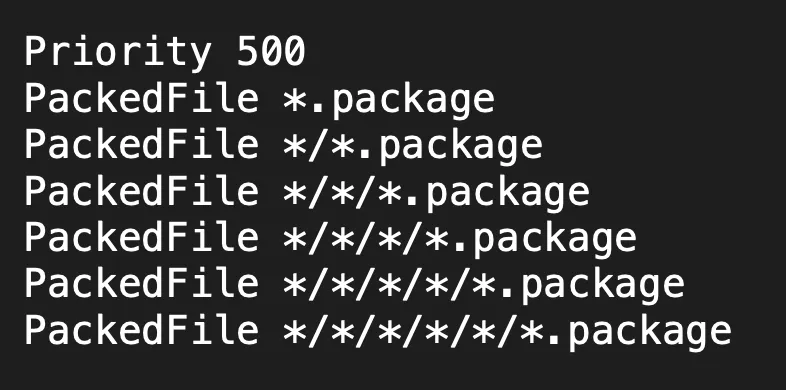
Default Configuration: By default, the file should look like this:
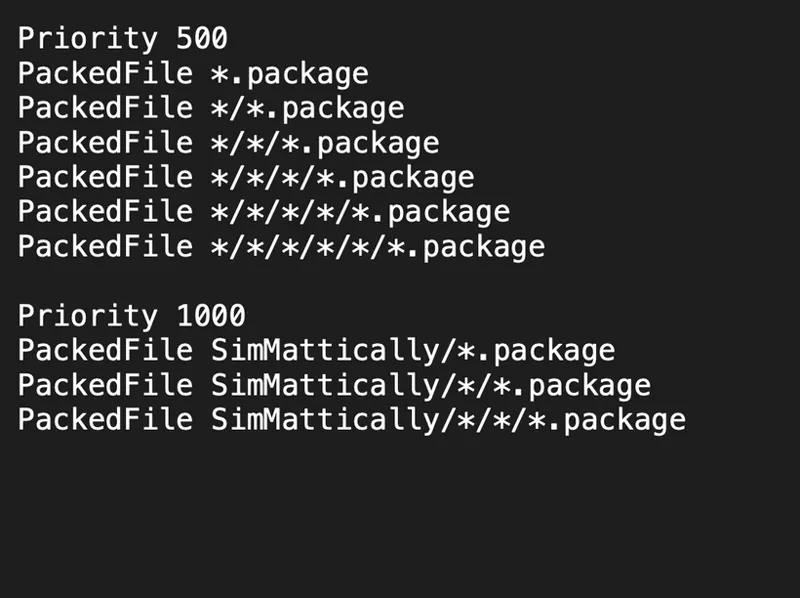
Priority Configuration: To prioritize specific mods, clone the existing text and update the priority number and folder path.
For example, for my Mods, you can do this:
What Does It Do
🚨🚨🚨🚨 THIS IS THE MOST IMPORTANT PART THAT PEOPLE SEEM TO KEEP SKIMMING OVER, SO I'M HIGHLIGHTING IT AS BEST AS I CAN. 🚨🚨🚨🚨
Editing Resource file this way ensures that any file placed inside the /Mods/SimMattically ⚠️FOLDER⚠️ will load with higher priority than anything else.
⚠️ SO YOU NEED TO PUT THE FILES IN THE SimMatticaly FOLDER
ADDITIONAL INFORMATION
You can create sub-folders for better organization. The depth of folders that will load is defined by /*, so you can simply add more if you want to go deeper than three folders.
You don’t have to name the folder “SimMattically.” You can name it anything you want and keep various mods in there; it’s just an example tailored to my content. But make sure that whatever you call it matches the folder name you used in the Resource file.
For instance, you could create a folder called “Overrides,” and use “Overrides” instead of “SimMattically” in the Resource file.
So, to summarize:
You can create custom priority levels for any folder.
A higher numerical value equals a higher loading priority.
This method provides full control over the .package file loading order without the need to rename individual files.
Please read the guide carefully. If the mod still isn't working, re-read it until you've successfully followed all the steps.
Comments (42)
still not work
Is it possible that this just not working on Mac? I sometimes play on my Macbook too. For my windows gaming pc I got it working but on Mac it just messes up the game...
I use MacBook as my primary device and this method works with no issues.
Okay, when I first read through this, I was read it wrong somehow. But now that I'm reading it correctly, I get exactly how you meant it, just the wording was weird for me. In case anyone else has the issue: Steps: 1. Go to the sims Mods folder. 2. Open the Resource.cfg file with notepad or text edit. 3. Copy the first section, the Priority 500 and the package text below it. --- paste that below. Below that, type in the folder name you're going to put things into, such as SimMattically or Overrides or CC and then put a / after it. No spaces. So it should look like SimMattically/ or Overrides/ or CC/ -- then CUT that text (not copy) and paste it before the asterisk with each line. You can keep the same number of rows as the original. 4. The Resource.cfg file stays in the Mods folder, not in a subfolder. 5. The content - the mods or cc goes into the folder you put the higher or lower priority you want load things with. 6. So if you wanted to be extremely particular. You could have like 7 versions or however many you need, of priority above. The main thing is the the number and making sure the folder names match. The mods folder default has a priority of 500. Anything under 500 will load after all the other mods. Anything over 500 will load before... so the higher number always loads first: 1000 <<< loads 1st 900 800 600 <<< 600 and above are for different potential folders for loading preference. 500 <<< default mods loading 400 <<< loads last I don't know why, but I got stuck on clone the first time and at first wanted to clone the resource file and put it in the the specific folder with how I read it, but then that didn't make sense. Took me re-reading it a few times for my brain to be like... oh... OOPS. Thank you SimMattically for dealing with us technologically dense simmers =)
Very sorry if this is mentioned somewhere in the post, not my intent to be annoying, just for clarification. Is there a specific order your mods need to be within the "SimMattically" folder that I gave priorty too in the way you mentioned. I have your early access world map, better simology w ui cheats, and main menu override in the folder.
No, computers do not store files in folders in any specific order.
I did it the one you show, It does show up in the game but it does not allow me to check off if that is the purpose as I do each step in the challenge?
I'm having the same problem as well
Dumb question but do I have to do this if I'm only using SimMattically's mods?
Hello everyone ! , I have installed the the mod into a folder i created titled SimMattically i also have the custom challenge in their as well, i also went into my Resource.cfg and i have this posted . but it still will not load in my game. now i will say the Resource.cfg in my mods folder doesn't look like a folder it look like a white piece of paper with the top right corner folder over . Any help will be greatly appreciated thank you !! Priority 500 PackedFile *.package PackedFile */*.package PackedFile */*/*.package PackedFile */*/*/*.package PackedFile */*/*/*/*.package PackedFile */*/*/*/*/*.package Priority 1000 PackedFile SimMattically/*.package PackedFile SimMattically/*/*.package PackedFile SimMattically/*/*/*.package
Thank you queen
hopefully be easier do this scary I never edit files and hopeluy we can have more one challage in it
Thank you so much for teaching us this. I love a creator that's also a teacher. Super helpful
Would it matter in which order the mods were installed? For instance, install your Save Button mod before UI Cheats?
Installation order has no impact; only loading order does.
Sadly, this doesn't work. I've been trying to get your phone ui mods to work WITH UI cheats installed AND with this loading order edited, and it still doesn't work. Only way to have your phone ui mods work, is to completely remove UI cheats.
it does work, but you have to do it properly.
Thank you! This reminded me that I needed to reset up my resource cfg, I forgot to save my main one after the whole patch issue
So I tried to do this but it completely ruined the main menu!! I have more than 3 of your mods, do I have to do each mod and not just 3 in the image? Sorry if this is a stupid question, I'm very new to this
No, it just means 3 folder deep, so the system can read all the sub-folders.
Can you explain why one would want certain mods to be higher priority? I have not heard of this, despite using a great many mods.
With many of my UI mods overlapping with the UI Cheats Extension and various UI color overrides, ensuring my mods load first is essential for their functionality.
Could this method be done with any type of mod that conflicts with another or overrides the same asset?
If it's a timing issue yes. If it's that they're working with the same asset, then no you wouldn't be able to use both at the same time.. At least from how it seems.
I needed this!
Thank you so much for this! 💗
An additional note: anything in your mods folder loads above EA's stuff so if you really need/want to micromanage your load order, you can add a priority less than 500 that will load above EA, but below your main mods. I've got an "Underrides" folder with Priority 499 that has my main food texture overhaul in it, then my specific food overrides (plates/cups/ect, certain dishes) in my main mods folders, and that leaves my Overrides folders *slightly* less cluttered.
This is a great idea as well! For example, instead of giving a higher priority to other UI mods, one can just give a lower priority to UI Cheats Extension!
I was told if wanted a certain folder to load first you make sure its put at top of mod folder with either things like " [ or !! " Ex- "!!Game overrides - Simmattically" "Ui cheats extention" has its own folder at the bottom of the mods folder. But like your post(for new phone setup mod) said, the bottom right needs cheats didnt work for me. My setup had been working till now.
you are a SAINT! I never knew how to do this until today!!!!
Just to clarify, when it comes to your mods and UI Cheats Extension, your mods need to load BEFORE UI Cheats and thus have a lower priority level right? I think I did this backwards yesterday and forgot to fix it today
If I dont have UI Cheats, do i need to do the override thing just to be safe?
No, creators typically specify if you need to do this or not. The standard way that the resource.cfg is set up is perfectly fine for most users.
What is the reason for giving some mods priority over others? Does it speed up loading time? or does it achieve something else?
With many of my UI mods overlapping with the UI Cheats Extension and various UI color overrides, ensuring my mods load first is essential for their functionality.
Wow. Did NOT know this was a thing I could do. Thank You, SimMattically!
I can't get into the world with my mods and CC, I'm fed up with doing 50/50%.
if you’re fed up with 50/50 you should just start over tbh. nobody else can fix your game for uou
Thank you but I have over 90 000 CCs with hundreds of different creators. I doubt this method is working with such an amount of CCs !
i thought i was the only one with over ~60k CC 😭😭😂 how long does your splash screen take to open? caus mine takes like 20min when i clear the cache LOL i hate it
Can we list certain mods that are suggested to have priority when loading? Who's mods should we have load first? 💚
It doesn't matter whose. This trick can be used if you see a creator mention that their mods conflict with this or that mod and ask to ensure their mod loads before the conflicting one. I believe this hint is to help people ensure mods load in the correct order. I personally never knew how I could do it.