

Quick-install Sunblind by softerhaze for The Sims 4 (NEW automatic installer for macOS)
🆕 NEW UPDATE: AUTOMATIC INSTALLER
When I posted the manual process last year, I didn't expect it to get as much attention as it did. Because of that, I decided to give it some extra care and turned the previous manual steps into an automated process for macOS players.
Note: As much as I tried to predict every possible outcome, players have proven to me more than once that I can't foresee everything. Please keep in mind that just like before, you are doing this at your own risk, and I am not responsible if anything breaks.
The automatic installer comes in the form of a .command file (inside the zip you can download from this post) that you need to double-click to run.
🚨 IMPORTANT:
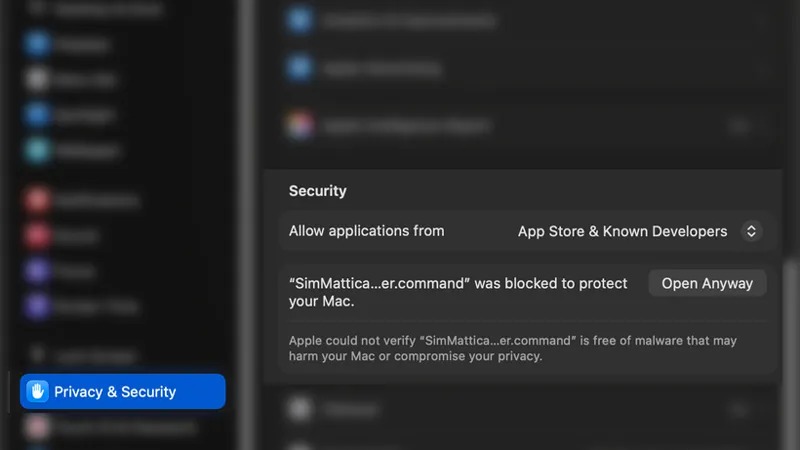
Because this script modifies files inside your game, macOS will block it on the very first launch with a malware warning. You will only need to authorize it once!
To open the installer:
Unzip the file and double-click SimMattically_SunblindMod_Installer.command.
When the security warning pops up, click Done to dismiss it.
Open your Mac's System Settings and go to Privacy & Security.
Scroll down to the Security section near the bottom. You will see a note about the installer. Click Open Anyway (also again in the new pop-up, ugh).
Enter your Mac password when prompted, then click Open on the final confirmation box (or use TouchID).
The installer opens inside the Terminal, but I formatted the text to make it user-friendly. I also ensured that any questions or prompts pop up in native macOS windows, so you won't have to type anything directly into the terminal.
The installer will ask for the following:
If the downloaded Sunblind zip file is located directly in your Downloads folder.
If yes, whether you want to proceed with the installation.
If you proceed, it will ask if you want to create a backup of the original world files (and it will display the size of that backup).
If the mod is already installed and a backup exists, it will instead ask if you want to uninstall the mod and restore your backup.
Below, you can watch a GIF showing exactly how the process works:
A little technical explanation why I made this:
As a Mac user/player, I always dread installing mods that require merging (copying/pasting) folders into other folders because macOS lacks a very useful Windows feature – the ability to replace files in the destination.
Technically, macOS does have something similar, but it works completely differently from Windows. Instead of copying and replacing overlapping files, it will swap the contents of the existing folder with the one you’re trying to copy. Since most game mods only include parts of the game, this basically deletes all the other files not included in the mod (lol).
If you don't trust the automated installer and giving it permissions to modify the files on your computer, you can use the manual process described below!
OLD VERSION: MANUAL PROCESS
⚠️ BEFORE YOU PROCEED ⚠️
THIS GUIDE IS ONLY FOR PEOPLE WHO HAVE READING COMPREHENSION AND A BASIC UNDERSTANDING OF HOW COMPUTERS WORK. THIS METHOD IS EXTREMELY SIMPLE AND WILL WORK, BUT ONLY IF YOU FOLLOW THE INSTRUCTIONS CAREFULLY AND WITH UNDERSTANDING.
IF YOUR GAME BREAKS, YOUR COMPUTER EXPLODES, OR YOUR DOG DIES, THIS IS NOT MY FAULT. I WILL NOT BE HELPING YOU FIX ANYTHING. YOU ARE FULLY RESPONSIBLE FOR EVERYTHING YOU DO ON YOUR COMPUTER.
PROCEED ONLY IF YOU UNDERSTAND THIS.
Step 1.
Download the Sunblind mod and unzip the file to get the “sunblind” folder. Keep it nearby, we’re obviously going to need it soon.
Side note: This method moves the entire mod content, no matter which packs you actually own. If you want to save some drive space, you can open the sunblind/Delta folder now and delete the folders for any packs you don’t have.
Step 2.
Now in Finder, preferably in a new window or tab for convenience, go to Applications/EA Games/ (or wherever The Sims 4 is installed on your Mac) and right-click on The Sims 4.app, then choose Show Package Contents.
The Sims 4.app will open like a regular folder, and you will see a single Contents folder.
Keep it nearby, we will need it soon.
Step 3.
Now open Terminal.
If the idea of using it scares you, or you don’t even know what it is, ABORT THE MISSION. You probably shouldn’t be doing this anyway.
The concept is simple: we’ll use this command to automatically merge folders:
rsync -rDv --progress /path/to/sunblind/ /path/to/contents/
Here’s the GIF showing the full process first:
First, copy the command itself and paste it into Terminal (don’t forget the space at the end):
rsync -rDv --progress
Next, drag and drop the "sunblind" folder into the Terminal window. This will automatically fill in its path. Your command should now look like this:
rsync -rDv --progress /path/to/sunblind
This part is critical: remove the space after sunblind and manually type a forward slash “/” at the end of the path so it looks like this:
rsync -rDv --progress /path/to/sunblind/
Now, add a space after the slash and drag the Contents folder into Terminal. It should fill in that path automatically, like this:
rsync -rDv --progress /path/to/sunblind/ /path/to/contents
Again, remove the space after Contents and add a “/” at the end. The final path should look like this:
rsync -rDv --progress /path/to/sunblind/ /path/to/contents/
To give a real example, my final command looks like this:
rsync -rDv --progress /Users/mateusz/Downloads/sunblind/ /Applications/EA\ Games/The\ Sims\ 4.app/Contents/
Step 4.
Press the Return/Enter key and pray you read everything carefully and did it all correctly.
Congratulations, Terminal just installed the Sunblind mod for you!
Comments (54)
Quick question, it keeps saying the file isn't in my downloads but it is. Any suggestions??
hey this isn't working for me :( the sunblind folder is in my downloads unzipped, when I go to use terminal it says there's no folder found. how do I fix this?
I'm having the same problem, did you figure it out?
thank you for this!! it saved me so much time omg
hi! is there a way I could alter the automatic installer to install milk thistle or is that stuck to the manual version? thank you so much for your time!
Thank you so much for this! I've been using your manual instructions ever since you posted them, but I'm always a little nervous about messing it up and this is even easier! Quick question: Can I delete the sunblind zip file from my Downloads once the installation is complete? From what I understand, the files inside it have been copied over into the Sims world folders, so keeping the original files in my Downloads is unhelpful. But I don't want to accidentally delete anything important. Sorry if this is stupid!
I also have been deleting them after every manual install & it would be hilarious if I've been gaslighting myself into believing I have sunblind when I actually don't LMAO
Omg bless you for making this. Installing sunblind is just on the other side of my understanding and I've always wanted to have it!
Does this work on external hard drive? Because when I try your installer script, it asks for a game location, I give it, and then it says it can't find Sunblind when it is in my download folder.
It should work even if the game is installed on an external hard drive. But the Sunblind zip must be placed directly in your native Downloads folder.
youre doing god's work simmatically
omg windows whennnnn
Windows doesn't need anything like this, you can just drag and drop the Delta & Data folders from Sunblind and replace the vanilla game files.
Can you make one for milk thistle?
Sure!
Bless you, man! 🫶🏻❤️🔥
ur amazing for this
I always come back to this after every update lol
Wow! This is so helpful as a mac user... installed sunblind manually every time... i feel so stupid *hahaha* thank you so much and have a nice day! :)
Saved my entire life after me trying to do it manually, thank youu!!!! MVP
can't thank you enough for this 💜
You are heaven sent
bless youuuuuu tysm
i LOVE you so much!!! thank youuu
omfg the amount of time this just saved me.. thank you thank you thank you <333
Not you getting me to use terminal, thank you!
thank you sm for the tutorial!! i did this using milk thistle and it worked perfectly 🤍
this is much easier than people think, thank youuu!!!!
Not "if your dog dies"😄😄😄 but I sooo appreciate you taking the time to explain. I thought I knew how to do it but yeah, I was missing some steps. Thank you!!!
As a simmer on the mac.. i wish i understood what all this meant...I'm sure it would be useful.. I'm definitely tech slow! lol.
Would this work if I swapped out sunblind for milk thistle also by softerhaze? :)
Yes! I switch between them for different vibes just input milkthistle file instead of sunblind 🖤
IT WORKED! AHHH! Thank you so much. (Also, I'm dying at your disclaimers, lol)
yay thank u for this simmattically!!
This is so amazing cause I hate how long it takes to do one by one after each update! I love you!!
Omg thank you!! I’m so tired of updating these files manually after game updates. This is going to save so much time.
This is my introduction to you and your work! Thank you! I hope both sides of your pillow are cold! ❤️
See.... This is why I understand Anadius and Deaderpool. Reading is FUNdamental. If they can't follow instructions, oh well!
I hope you get nothing but good things in this life 😭 thank you so much!! on an unrelated note, have you also been experiencing the issue with swatch sliders not working to the left since the high school years update? I’ve been on a mission to rally any other mac players on this issue for literally 2 years 😭
Do you mean the swatch sliders in CAS for things like makeup? 🤔
Screaminggggg at your disclaimer 😂 I so love you for this. Feeling un-loved and forgotten as a MAC user trying to navigate with these aesthetics without blowing up our computers because we only get Windows/PC instructions. This is going to be so helpful thank you! 🩵
oh my thank you!!!
this is awesome thank you! could you help us with gshade/reshading
Unfortunately reshade and similar tools aren’t available for Mac! :(
Not the dog dying 😂😂😂😂 I used my mac for stardew and mods but built a PC just for other gaming which finally led me to the SIMS - I know if I was still on my Mac I would have loved this <3
Ah! Thank you. Bookmarking for next time too :)
TricouFamily on tumblr has a downloadable script for this (:
A very quick google search tells me their script is for Windows, mine is for MacOS.
wow, thank you!!!
Thank you so much! This was so helpful, it’s so much faster this way
Thanks so much for this, Matt! I'm a Mac user who's familiar with Terminal, but I was having trouble finding commands that approximate "Windows-style" folder merging. Thanks for saving us the time and effort to do this manually each update - you're a lifesaver!
It’s great, especially since this is just a generic command and not specific to The Sims 4. I was installing a mod for another game that required replacing files in multiple folders, and I would’ve gone nuts doing it manually… so I decided to research and found a solution. And then I realized I could turn it into a Sims tutorial :)
This is awesome! It’s rare to find creators who are Mac users! Thanks a ton, you know we can use all the help we can get over here
haha you must have read my mind because while installing this mod yesterday i was wondering if there was another method , thanks much for this!!