









Update 0.7.10 Release
The update contains expansions and new mechanics, additional content, as well as bug fixes from the previous update.
New Items :
Added a Steel Fiddle. A more modern version (Not Cannonical).
Added a Wooden Fiddle (Cannonical).
Added Kitty Mittens.
Added a Leather Harness.
Added a Bone Gag.
Ball Tie :
The Ball Tie technique has been added, or more precisely, the ability to tie the legs above the knees to the neck using a tight knot. Usage:
This technique can be applied by creating a knot from jute rope.
The character must be in the "Sit" or "Lying Down" position.
The character must be wearing a "Thighs" bondage (the knot is formed by connecting the loop around the neck and the loop on the ropes above the knees).
Restrictions:
Transition to the "Standing" position is blocked.
Transition to the "On Your Back" position is blocked.
Transition to the "On Your Stomach" position is blocked.
Transition to the "Sit" position is blocked until you release your arms (if you decide to fall on your side or were tied in the "On Your Side" position).
You cannot remove a "Thighs" bondage until the knot for the Ball Tie technique is removed (if your arms are tied, you can try, but it will be ineffective).
Release:
The Ball Tie technique knot is a torso bondage, so use the "Struggle Torso" action.
The Ball Tie technique knot takes precedence over other torso bondage and will be removed first.
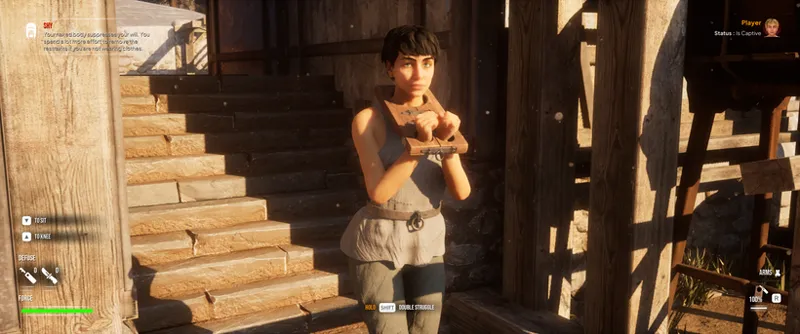
Fiddle :
The hostage conditions for using the Fiddle have been updated.
Restrictions:
The item can only be equipped in the "Stand," "On Knees," and "Sit" poses.
Moving to the "Lying Down" and "Lying On Spine" poses while using the Fiddle is temporarily blocked (will be added later).
The hostage cannot stand up from the "Sit" pose on their own (temporary limitation. You can still get the hostage to their feet using the context command).
The Fiddle also prevents the removal of a secure and advanced gag (similar to ropes and mittens).
Bunny Hops :
A balance mechanic has been added to bunny hops. Each time you move using a hop, your character's body will tilt in a random direction. To balance, use the Left/Right Mouse Button or Left/Right Trigger when using a gamepad. Main functions:
If you lean while moving, your movement direction shifts in the direction of the tilt.
If you lose your balance, your character falls to her knees.
Falling to her knees is also accompanied by a change in Global Time Dilation and sound effects.
Controls have been added to the game settings for the new balance mechanic during bunny hops.
Settings > Sandbox > Balancing Behavior For PC - for player characters only:
Disabled - completely disables this behavior.
Imitation - the character will lean and attempt to maintain balance independently (the player does not need to make balance adjustments).
Simulation - the character will lean in a random direction and may fall if they lose balance (the player must make balance adjustments using the appropriate control keys).
Settings > Sandbox > Balancing Behavior For PC - for NPCs only:
Disabled - completely disables this behavior.
Imitation - the character will lean and attempt to maintain balance independently (the character cannot fall under any circumstances).
Settings > GUI > Display Balance Widget - Show the balance bar (this is optional and can be disabled based on which direction the character is leaning).
Noises :
When losing balance during bunny hops, the player character will use new sound assets from the in-game "Struggle Noises" system. When the character falls, it emits noises tied to the gag type, as well as the voice actress selected in the game settings.
Bondage Priority Filtering :
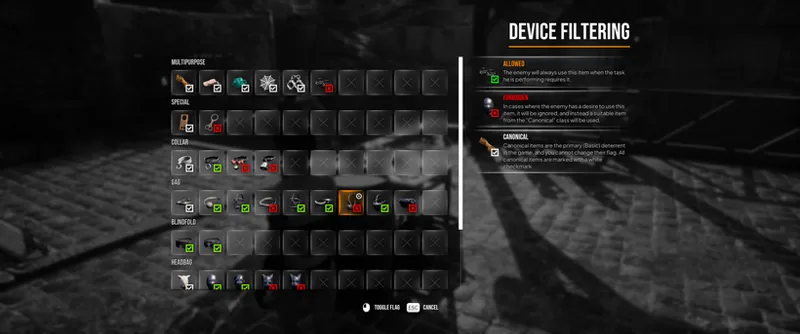
A filter for items usable by NPCs has been added. It can be found at Game Settings > Sandbox > Bondage Device Filtering. The button in the field opens the classic window with a grid of all items available in the game.
Status flags:
Forbidden - NPCs will not use the item under any circumstances.
Allowed - NPCs will use the item if the task they are performing requires it. This means that if a task an NPC is performing requires equipping, for example, a Sleepbag Leather, the NPC will select a canonical alternative (if available) or skip the item entirely unless it is absolutely necessary.
Canonical items are structurally important items integrated into the game's narrative, as well as items whose use is expected in most situations. Such items have a white check mark, and their flag cannot be changed.
AI ( Player Threat Level ) :
The task fabricators for enemy NPCs responsible for bondage have been changed.
Normal Configuration:
Level 1:
Random item (hands) x1.
Random item (legs) x1.
Random simple gag.
Random simple blindfold (currently only Fabric).
Random simple collar (currently only Jute Rope).
Level 2:
Fiddle.
Random item (legs) x1.
Random Reliable Gag.
Level 3:
Ropes (hands) x3.
Ropes (legs) x3.
Rope (Pussy).
Random Reliable Gag.
Random Reliable Blindfold.
Random Reliable Collar.
Random Mittens.
Level 4:
Ropes (arms) x3.
Ropes (legs) x3.
Ropes (chest + waist + pussy).
Random advanced gag.
Random head sack.
Hogtie Technique.
Random mittens.
Level 5 and above:
Random sleeping bag.
Random advanced gag.
Random head sack.
Random secure collar.
Leash configuration:
Level 1:
Random item (arms) x1.
Random simple gag.
Random simple blindfold (currently only Fabric).
Random simple collar (currently only Jute Rope).
Level 2:
Fiddle.
Random secure gag.
Level 3:
Ropes (hands) x3.
Rope (pussy).
Random reliable gag.
Random reliable blindfold.
Random reliable collar.
The remaining levels remain unchanged.
Of course, the selection of reliable items also relies on the new preference settings (Bondage Device Filtering), and all items can be replaced with standard ones if the random item dropped doesn't meet the rules of the user-defined filter...
Workbench :
Added the "Leather Harness" blueprint.
Added the "Wooden Fiddle" blueprint.
Added the "Steel Fiddle" blueprint.
Added the "Bone Gag" blueprint.
Added the "Kitty Mittens" blueprint.
Player Panel :
The "Pick up" action has been assigned as the primary action for clicking on a cell with an item from the inventory in the player panel (in the previous update there were problems with the display of some items in the radial menu and this action is a small workaround in case similar problems arise again).
Model View :
Invoking a trade task no longer requires a timeout (the trade panel opens immediately after invoking it).
Some rules for using bondage items have been updated (taking into account the new, fundamentally different items and bondage techniques added in the current update).
Some error descriptions for using bondage items have been updated.
The icons for some assignments have been updated.
The "Hogtie" assignment has been removed from the "Unbound" action, as the "Arms" and "Legs" assignments also remove the knot.
The "Unbound" action with the "Torso" assignment also removes the knot from the "Ball Tie" technique.
The "Unbound" action with the "Torso" assignment also removes items with the "Harness" assignment.
The "Unbound" action with the "Arms" assignment also removes items with the "Fiddle" assignment.
The "Unbound" actions with the "Breast," "Waist," and "Pussy" assignments also remove items with the "Harness" assignment first.
Captive Place :
Added Arrow component to Captive Place placeholders (for objects whose front side direction is not entirely obvious).
Key Binding :
Camera zoom in Rescue Mode has been remapped to the Spacebar / Left Gamepad Shoulder keys.
Bug Fix :
The Scene Statistics category fields have been removed from the game settings (they are no longer used).
Leather Cuffs were not displayed in the radial menu - fixed.
The bokeh effect when zooming in Rescue Mode did not respond correctly to the "Bokeh Effect When Zooming In" setting in the game settings - fixed.
Fixed an exploit affecting the default number of bolts in a single object (bolts in a single instance inherited the logic of bolt boxes, and even a bolt fired from a crossbow could have a random number).
Fixed an exploit affecting player-placed objects and items with the "Duplicate" ability (the player could place traps, anchors, and other items, then pick them up, resulting in two copies of that item).
After loading a session, clothing was unloaded from memory without the "Stack" property, leading to incorrect cell filling - fixed. (ATTENTION* This fix applies to new saves; clothing will also be damaged in older saves.)
Duplicate default clothing could be added to the inventory after loading a session - fixed.
Added an additional ray check to the "Stack Solution" script. This should theoretically resolve issues with teleporting outside the playable area. Since hostages packed in Captive Places use the same script, this should work for them as well.
The Captive Place hostage packing requirement panel could remain visible after dismantling - fixed.
The Captive Place hostage packing requirement panel could remain visible after successfully packing a hostage - fixed.
Slot overlapping sounds, as well as page turning sounds in the radial menu, ignored the sound sliders in the game settings - fixed.
Slot overlapping sounds, as well as page turning sounds in the player panel, ignored the sound sliders in the game settings - fixed. The sounds for opening and closing the radial menu ignored sound classes and did not respond to volume sliders - fixed.
Morph Keys could fail to be overwritten when switching roles with an assistant if the player's character had a hood on (ear shape would reset to human-like, regardless of race).
Components of additional skeletal meshes assigned to certain races could be displayed after switching roles, ignoring visibility flags - fixed (cat ears could be visible under the hood when switching roles with an assistant).
The check conditions for the NPC self-release module have been fixed (before sitting down and untying the NPC's legs, the NPC had to remove all other items on the body, which they could choose not to do).
The "Stand" context action could fail to display if the NPC had only their legs bound and was in the "Sit" pose - fixed.
Download Links :
Google Drive - https://drive.google.com/file/d/1zXCM3l2zgZBHjUF4To-mC4yNcPW8vimN/view?usp=sharing
Mediafire - https://www.mediafire.com/file/6e00egmzlr7524r/MPT_Bulid_0.7.10_Alpha.rar/file
Archive Password - HasteX508z
❗The archive should prompt for a password when unpacking. If this does not happen, try a third-party archiver, such as WinRar or WinZip. Unpacking without a password will result in the loss of executable files or even result in an error during unpacking.
The password must contain only numbers, lowercase and uppercase letters! It must not contain punctuation marks or spaces. When copying the password, make sure the website translator has not altered the meaning of the characters or changed the letter case. ❗
Comments (2)
Sorry for disturbing, but i have some unusual issue... When i try to lounch the game it pops up massage with "Fatal error" and game instanteniosly closes... Could you help me, please?
I had a similar issue, not sure if this will work for you- the first time I played, I changed the game from Windowed to Windowed Fullscreen and the next time I booted it up I got "Fatal Error". This went away after I changed it back to Windowed, and it hasn't happened again as long as I boot it up in Windowed.