
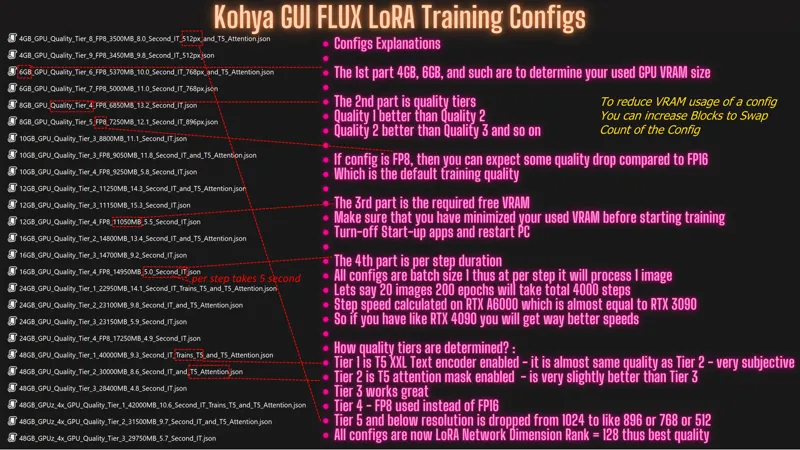

Kohya brought massive improvements to FLUX LoRA (as low as 4 GB GPUs) and DreamBooth / Fine-Tuning (as low as 6 GB GPUs) training
You can download all configs and full instructions
> https://www.patreon.com/posts/112099700 - Fine Tuning post
> https://www.patreon.com/posts/110879657 - LoRA post
Kohya brought massive improvements to FLUX LoRA and DreamBooth / Fine-Tuning (min 6GB GPU) training.
Now as low as 4GB GPUs can train FLUX LoRA with decent quality and 24GB and below GPUs got a huge speed boost when doing Full DreamBooth / Fine-Tuning training
You need minimum 4GB GPU to do a FLUX LoRA training and minimum 6 GB GPU to do FLUX DreamBooth / Full Fine-Tuning training. It is just mind blowing.
You can download all configs and full instructions > https://www.patreon.com/posts/112099700
The above post also has 1-click installers and downloaders for Windows, RunPod and Massed Compute
The model downloader scripts also updated and downloading 30+GB models takes total 1 minute on Massed Compute
You can read the recent updates here : https://github.com/kohya-ss/sd-scripts/tree/sd3?tab=readme-ov-file#recent-updates
This is the Kohya GUI branch : https://github.com/bmaltais/kohya_ss/tree/sd3-flux.1
Key thing to reduce VRAM usage is using block swap
Kohya implemented the logic of OneTrainer to improve block swapping speed significantly and now it is supported for LoRAs as well
Now you can do FP16 training with LoRAs on 24 GB and below GPUs
Now you can train a FLUX LoRA on a 4 GB GPU - key is FP8, block swap and using certain layers training (remember single layer LoRA training)
It took me more than 1 day to test all newer configs, their VRAM demands, their relative step speeds and prepare the configs :)
Comments (12)
The speed boost is insane!! Gone from 15s/it to 8.5s/it on my 3090, and I can actually use my PC while training as it doesn't hang up anymore! Thanks for updating your scripts, they make my life so much easier!
Hi, have you done a fresh installation? Did you do the installation with Windows_Install_Step_1 and Windows_Install_Torch_2_5_Dev_Huge_Speed_Up and nothing else? I did a fresh installation and it hasn't changed the speed. (I have an 3090) Thanks!
Has something changed with batch size 7 training, config file or koyha update? batch size 7 training now takes 7 hours with 15 pictures instead of roughly 2 hours on massed compute. i set 15 source pictures, 160 epochs. output gives to much steps and to much epochs for batch size 7? yesterday it worked fine. enable full bf16 training. running training / 学習開始 num examples / サンプル数: 15 num batches per epoch / 1epochのバッチ数: 3 num epochs / epoch数: 534 batch size per device / バッチサイズ: 7 gradient accumulation steps / 勾配を合計するステップ数 = 1 total optimization steps / 学習ステップ数: 1600 steps: 0%| | 0/1600 [00:00
yes currently calculations are broken i think. it shows you are doing 534 epoch. not related to config but related to kohya or kohya gui. run installer again and try again please i can test later today
[Edit] figured it out. It was the extra param with --blocks_to_swap 32. Reducing or removing it solved it. [Original] I have 16gb vram and 32gb ram, and for some reason it starts loading data into ram after the "enable full bf16 training" message. Ending with a CUDA out of memory error. I tried both the 16gb lora config and the 12gb lora one for flux. I also allow system managed swap file so it should be able to increase it? Using the v44 installer. enable full bf16 training. Traceback (most recent call last): File "F:\ai\Kohya_GUI_Flux_Installer_v44\kohya_ss\sd-scripts\flux_train_network.py", line 574, in trainer.train(args) File "F:\ai\Kohya_GUI_Flux_Installer_v44\kohya_ss\sd-scripts\train_network.py", line 639, in train unet = self.prepare_unet_with_accelerator(args, accelerator, unet) # accelerator does some magic here File "F:\ai\Kohya_GUI_Flux_Installer_v44\kohya_ss\sd-scripts\flux_train_network.py", line 545, in prepare_unet_with_accelerator accelerator.unwrap_model(flux).prepare_block_swap_before_forward() File "F:\ai\Kohya_GUI_Flux_Installer_v44\kohya_ss\sd-scripts\library\flux_models.py", line 1006, in prepare_block_swap_before_forward self.offloader_single.prepare_block_devices_before_forward(self.single_blocks) File "F:\ai\Kohya_GUI_Flux_Installer_v44\kohya_ss\sd-scripts\library\custom_offloading_utils.py", line 210, in prepare_block_devices_before_forward weighs_to_device(b, "cpu") # make sure weights are on cpu File "F:\ai\Kohya_GUI_Flux_Installer_v44\kohya_ss\sd-scripts\library\custom_offloading_utils.py", line 91, in weighs_to_device module.weight.data = module.weight.data.to(device, non_blocking=True) RuntimeError: CUDA error: out of memory
yes as you use it more, it will use more RAM
I just did a fresh install of Kohya to try this and this is the error I keep getting using the Dreambooth tab, I made sure I selected a Dreambooth config. It happens as soon as I hit start training. Traceback (most recent call last): File "D:\AI\kohya\kohya_ss\venv\lib\site-packages\gradio\queueing.py", line 624, in process_events response = await route_utils.call_process_api( File "D:\AI\kohya\kohya_ss\venv\lib\site-packages\gradio\route_utils.py", line 323, in call_process_api output = await app.get_blocks().process_api( File "D:\AI\kohya\kohya_ss\venv\lib\site-packages\gradio\blocks.py", line 2018, in process_api result = await self.call_function( File "D:\AI\kohya\kohya_ss\venv\lib\site-packages\gradio\blocks.py", line 1567, in call_function prediction = await anyio.to_thread.run_sync( # type: ignore File "D:\AI\kohya\kohya_ss\venv\lib\site-packages\anyio\to_thread.py", line 56, in run_sync return await get_async_backend().run_sync_in_worker_thread( File "D:\AI\kohya\kohya_ss\venv\lib\site-packages\anyio\_backends\_asyncio.py", line 2441, in run_sync_in_worker_thread return await future File "D:\AI\kohya\kohya_ss\venv\lib\site-packages\anyio\_backends\_asyncio.py", line 943, in run result = context.run(func, *args) File "D:\AI\kohya\kohya_ss\venv\lib\site-packages\gradio\utils.py", line 846, in wrapper response = f(*args, **kwargs) File "D:\AI\kohya\kohya_ss\kohya_gui\dreambooth_gui.py", line 817, in train_model log.info(max_train_steps_info) UnboundLocalError: local variable 'max_train_steps_info' referenced before assignment
same issue. please advise v14
Thank you for all that you do Furkan, people can be so negative on Reddit...I really don't understand the hate you get, this is all super insightful information. I find so much value in what you share, please keep going! 👍🏼🔥
Thank you so much. Yes mods just deleted my post which was most up voted one :/
Great value as always Doctor. Your raising the bar as always
thanks a lot