
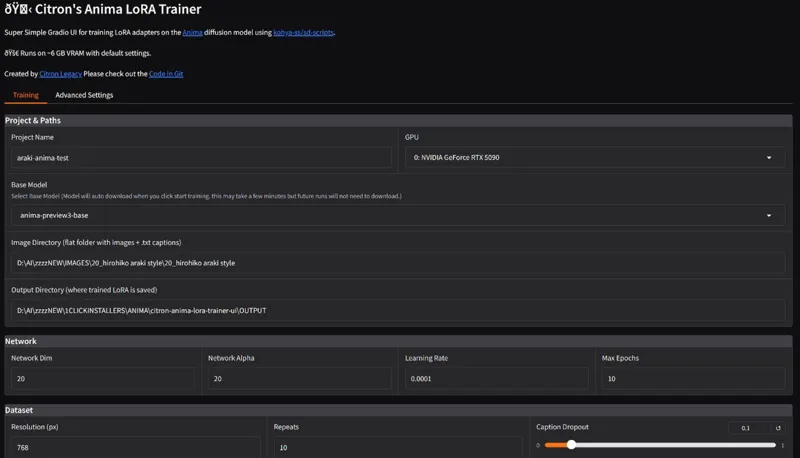
CITRON ANIMA LORA TRAINER 1-Click INSTALL!
EDIT 16th may: RELEASE OF THE ANIMA 1.0 BASE MODEL VIDEO:
https://youtu.be/W2G8mbbxAg0
IF YOU INSTALLED THE CITRON ANIMA LORA TRAINER BEFORE THE RELEASE OF THE FINAL BASE MODEL, DOWNLOAD THE APP.PY FILE LOCATED IN THIS POST AND MOVE IT TO THE citron-anima-lora-trainer-ui FOLDER AND REPLACE THE PREVIOUS APP.PY FILE SO THAT YOU CAN SELECT THE BASE MODEL FOR TRAINING. OR YOU CAN JUST DOWNLOAD THE UPDATED INSTALLER AND REINSTALL EVERYTHING IN A NEW FOLDER...UP TO YOU :)
Hey everyone! I've created a 1-click installer for CITRON ANIMA LORA TRAINER!
That allows you to train any Lora for Anima with less than 6GB OF VRAM! OH my....
THIS IS INSANE....
You can check out the video right here: https://youtu.be/W2G8mbbxAg0
The workflow: https://www.patreon.com/posts/157355749
I also created a 1-click installer for the Webui for my Patreon supporters for Local AND Runpod, that you can find right here: https://www.patreon.com/posts/157355820
The installer of course automates the entire install process!
Local install:
Make sure you have these installed:
Git for Windows
https://git-scm.com/download/win
Python 3.10
https://www.python.org/downloads/release/python-31011/
NVIDIA Driver
https://www.nvidia.com/Download/index.aspx
1. Download the CITRON_ANIMA_LORA_TRAINER-V2.bat
2. Run the bat file
3. Wait for the install to finish
4. ???
5. Profit 😎
RUNPOD:
1. Create an account if you haven't already: Runpod
2. Click on Pod (on the left side) then click deploy
3. Choose a GPU, and chose the pytorch 2.8.0 if it's a 5000 series or 2.6 if older, then edit the template and choose 100GB for both the container and volume disk, then under expose ports, edit:
8888 into 8888, 7860.
4. Go to my pods, wait for everything to finish and then click "connect", then "Connect to HTTP SERVICE port 8888"
5. Then drag and drop the CITRON_ANIMA_LORA_TRAINER-RUNPOD-V2.sh file on the left side of the UI then click on the "Terminal" icon on the right side on the UI
6. Copy and paste these two lines then press enter:
chmod +x CITRON_ANIMA_LORA_TRAINER-RUNPOD-V2.sh
./CITRON_ANIMA_LORA_TRAINER-RUNPOD-V2.sh
7. Wait for everything to be installed
8. Create 2 new folders, IMAGE and OUTPUT inside the citron-anima-lora-trainer-ui and inside the IMAGE folder drag and drop all of your images and captions, then go back and right click on the IMAGE folder and select copy path,
9. Go to the port 7860 and click on it to launch the webui
10. Under image path, paste the path you just copied and add a / before workspace so that it starts like this:
/workspace/.....
11. Go back and right click on the OUPUT folder then select copy path and do the same for the lora output folder path. Don't forget to add a / before workspace so that it starts like this:
/workspace/.....
12. Name your lora then start the training
As always, supporting me on Patreon allows me to keep creating helpful resources like this for the community. Thank you for your support - now go have some fun😉!