
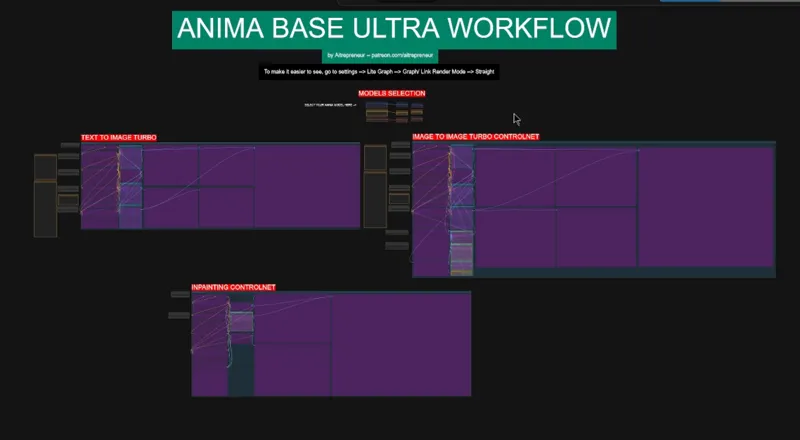
ANIMA 1.0 FINAL BASE ULTRA ANIME AI KING WORKFLOW!
Edit 19th August: replaced the updated anime lllite node
EDIT 16th may: RELEASE OF THE ANIMA 1.0 BASE MODEL VIDEO:
https://youtu.be/W2G8mbbxAg0
Hey everyone! I’ve just released a brand new video on ANIMA THE ANIME AI KING, and BOY OH BOY this anime model is actually ridiculous!!!
We’re talking about a 2B parameters ANIME TEXT TO IMAGE MODEL that looks amazing, follows prompts really well, understands both Danbooru tags and natural language and that can run or even be trained with only 6GB OF VRAM… YEAH.... 6GB! FOR AN ANIME BASE MODEL. THIS IS INSANE....
You can check out the video right here: https://youtu.be/W2G8mbbxAg0
I also created a 1-click installer for the Webui for my Patreon supporters for Local AND Runpod, that you can find right here: https://www.patreon.com/posts/157355820
As well as the Citron Lora Trainer installer: https://www.patreon.com/posts/157355769
Here the link to the manual install guide: https://pastebin.com/wrYvjh7b
Down below you will also find the ANIMA_BASE_ULTRA_WORKFLOW.json for you to use!
As always, supporting me on Patreon allows me to keep creating helpful resources like this for the community. Thank you for your support - now go have some fun😉!

Comments (31)
Hi, Image to image and Inpainting workflows are not working due the errors in the "Apply Anima LLLite" node. The node doesn't even have the lllite_name parameter. I've uploaded a screenshot using Lightshot: https://prnt.sc/X0ZWfnfv9IFI I've updated ComfyUI and there aren't any errors about missing custom nodes. On the github page (https://github.com/kohya-ss/ComfyUI-Anima-LLLite) it says "Breaking change: node renamed to AnimaLLLiteApply_sdscripts". I've tried adding this node and connecting it the same way the old node was connected but it didn't work. Can you update the workflow, or how can I fix this? Feel free to message me so we can get in touch if needed. Thank you!
Yup, indeed, an update changed that node, I replaced it, redownload the new workflow
I got an error saying this in your Python environment to install Node Manager, then restart ComfyUI with the --enable-manager flag.
Dm me the full log
Umm.. iam gatting very bad result similer to what person get when he change the sampler,i didnt change anything in the workflow just disabled all the upscale things ,and also on offical comfy anima workflow when i put a artist name the image style is diffrent with each kmage anyone know how to fix it?
again what do you mean bad? Dm examples
I am getting pretty bed results but completely different results using a simple workflow anima base. only Enable text to image turbo images are always screwed up
what do you mean bad?
a bit late ,but is anybody else having problems with inpainting? like no matter what i do, it just does not work, i keep everything set as it is and the result is still just the original image. If i mess with settings it still results in original image without any changes. :( img2img works, only inpainting does not work for some reason
dm me screenshots of what your parameters are
Hey. Is there a way to disable the "Detailer (SEGS)" ? It's always on and i can't find a way to disable it. I also already disabled all the other upscaler but still. I'm not really experienced with ComfyUi. Any idea ?
Yes? It's one of the buttons on the side
First, thank you for the workflow; it's extremely detailed and intuitive. Things worked relatively well. But I'm having trouble with the img2img part. In some images, OpenPose fails to capture the character from the image and only shows a black screen. The Depth option shows a result in the image, but it seems to have very little impact on the generation. The Lineart option also doesn't impact the image at all. I've used simpler workflows that had the option to adjust the controlnet strength; does this option exist and I missed it? The inpaint flow worked well in the few tests. But the upscaler made the image worse than the original. Any adjustment tips?
When it comes to the controlnet models, these are still in training, the controlnets that you see were made for the preview 3 model, once their are ready, I'll update the workflow and installer. For now you can check out this link for newer V2 model (anima base): https://huggingface.co/kohya-ss/Anima-LLLite/tree/main I know there is already the finished V2 inpainting as well as the V2 any-test-like (lineart) For the open pose not capturing the character, you can try swapping the dw pose estimator with the OpenPose Pose node and try with that node. To control the strength of the controlnet you can look at the Apply Anima ControlNet-LLLite node (second colomn under CONTROLNET PROCESS). Then finally for the upscaler, this looks like you haven't updated comfyui and the nodes in a while, so you need to run the update comfyui bat file inside the update folder and then update all the nodes using the manager inside comfyui.
https://huggingface.co/kohya-ss/Anima-LLLite/tree/main <- v2 inpainting model from kohya-ss https://github.com/kohya-ss/ComfyUI-Anima-LLLite <- custom node (also my mask opacity was set to .7 and I had to set it to 1.)
Once all the controlnets are trained into V2, I'll update the workflow and installers
Hey thank you for the workflow! I saw that 1.0 Anima has officially released, any chance of getting a 1.0 workflow update?
Yes in a few hours ;)
Anima base v1.0 is out since yesterday! Any improvements?
Video coming in a few hours ;)
Hey! the segm/yolo11m-seg.pt (UltralyticsDetectorProvider) is deleted on your huggingface page // Where can I get it ? Thanks a lot for everything you do!
here: https://huggingface.co/Ultralytics/YOLO11/tree/main
i get this error, and its my first time using this programm... The workflow does not contain any output nodes (e.g. Save Image, Preview Image) to produce a result.
you can dm me
Hi, Aitrepreneur. Thanks for this workflow. I’m wondering if this will run on ComfyOnline. Do you have experience with the platform or have any idea if it will fully support this workflow fully? I assume there’s no issues with Runpod but I am considering ComfyOnline. It seems a bit less complicated than running ComfyUI on Runpod.
I never used it so I can't say
YOU CANT EVEN
can't even?
Thank you!
Thanks again! Though...hmm, is there a way to bypass the Low VRAM stuff? Its taking forever to generate and yet barely using any of my card's total VRAM.... 😅
The model is small so it's not gonna use a lot of vram, if you want faster you can just disable all options and once you find an image you like then you can keep the fixed seed and enable all options so that you get the best image possible in the end