
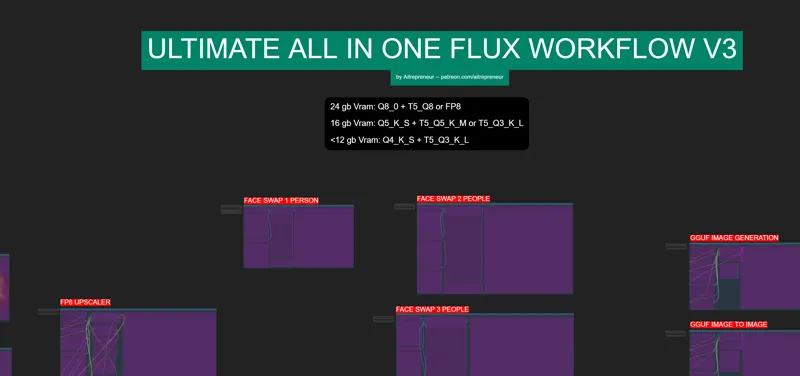
ULTIMATE ALL-IN-ONE FLUX WORKFLOW V3!
Hey everyone! I've just released a new video on my "ULTIMATE ALL-IN-ONE FLUX WORKFLOW V3". NOW WITH new inpainting model, redux, new controlnet, liveportrait, Ltx and Hunyuan the SOTA open source video generation !!!! It's just amazing!
You can check out the video right here: https://youtu.be/q5kpr84uyzc
I also created a 1-click installer for the Webui for my Patreon supporters for Local AND Runpod, that you can find right here: https://www.patreon.com/posts/121355091
Here the link to the manual install guide: https://pastebin.com/NL8Z9QXa
You can also checkout my troubleshooting video if you are not sure what to do: Exclusive Patreon Video: Troubleshooting Flux Workflow Comfyui!
Down below you will also find the ULTIMATE ALL-IN-ONE FLUX WORKFLOW V3 for free for you to use, next following updates to the workflow will be for paid members only.
As always, supporting me on Patreon allows me to keep creating helpful resources like this for the community. Thank you for your support - now go have some fun😉!

Comments (90)
Hi, get alwaya this: can't access property "output", res is undefined what should I do? greetings
Is there anyway to get this workflow working, Flux was still amazing for me when using my own loras and now its fallen apart and wont work.
Yeah, this workflow really broke down. Everything is not working, it's a shame really, it was very useful a few months ago.
Hey, I really have to speak up because this is getting ridiculous. I’m paying £54 every month for the Royal Emperor tier, and honestly I don’t see the point anymore. Out of 10 one-click installers, maybe 2 worked without problems. The rest only work after I spend hours struggling with GPT, Gemini, and every possible workaround just to fix things that should work out of the box. The whole reason people pay is because you say it’s a ONE-CLICK installer — but right now, 90% of them don’t work directly. And yes, I installed everything EXACTLY the way you show in the videos. They don’t work anymore because node repos, dependencies and other components have changed, and nobody is updating the installers. That’s not on us, that’s on maintenance. I messaged you on October 9, you replied on October 18 with almost nothing helpful, and since then it’s been two months of silence. I’m paying Royal Emperor — £54 — and getting basically no support and broken installers. It just doesn’t make sense. Please check my message and help me out, because this situation really isn’t okay.
Can you please answer direct messages? Please update this install or edit this post that is not working anymore, lot of people are waisting time, just to find out it's not working...
Most of the workflows not working anymore in the new version of comfyui
after comfy update, upscale workflow is not working
Hey I'd like to know if there is an FAQ to using this, I am trying to run it but it just says no prompt etc. Where do we start begin etc?
I keep getting memory allocation error everytime I run it once. First time its okay but after the first I keep getting errors and it doesn't give me the continuity
I am getting the error: Prompt outputs failed validation BasicGuider: - Required input is missing: model. This is in the FP8 REDUX + PULID section. All the models are in the drop downs so not sure what's happening here.
dm me screenshots of the whole parameters before generation
what a mess: I deleted everything and ran the latest 'M' bat installer. It all seemed to go without a hitch. trying to just render the default text to image: Token indices sequence length is longer than the specified maximum sequence length for this model (109 > 77). Running this sequence through the model will result in indexing errors FETCH ComfyRegistry Data: 35/86 Requested to load Flux FETCH ComfyRegistry Data: 40/86 0 models unloaded. loaded partially 128.0 127.94342041015625 0 0%| | 0/20 [00:00
this means your prompt is too long AND that you don't have enough vram to do the operation, download a smaller model
The outpainting workkflow is creating a new image under the orinial one but it does not generate the extension of the original image, why do you think it could be that? Thanks
maybe because you haven't activated the whole workflow and are using the preview area only?
to fix the missing custom nodes I just look for them in github and installed inside the ComfyUI/custom_nodes dir, this was the nodes I have missing cd ComfyUI/custom_nodes/ git clone ComfyUI-PuLID-Flux https://github.com/balazik/ComfyUI-PuLID-Flux.git git clone ComfyUI-Florence2 https://github.com/kijai/ComfyUI-Florence2.git git clone x-flux-comfyui https://github.com/XLabs-AI/x-flux-comfyui.git git clone ComfyUI-Impact-Pack https://github.com/ltdrdata/ComfyUI-Impact-Pack.git git clone ComfyUI-Long-CLIP https://github.com/SeaArtLab/ComfyUI-Long-CLIP.git git clone ComfyUI_JPS-Nodes https://github.com/JPS-GER/ComfyUI_JPS-Nodes git clone ComfyUI_essentials https://github.com/cubiq/ComfyUI_essentials git clone ComfyUI-Impact-Subpack https://github.com/ltdrdata/ComfyUI-Impact-Subpack git clone comfyui-various https://github.com/jamesWalker55/comfyui-various.git git clone ComfyUI-LTXVideo https://github.com/Lightricks/ComfyUI-LTXVide git clone cg-use-everywhere https://github.com/chrisgoringe/cg-use-everywhere.git
can you explain how to troubleshoot in Pinokio? Because your workflow nodes are missing
Still missing a lot of the custom node types, even after making everything else work. Had to manually install compatible versions of albucore and albumentations, have all of the needed models and custom nodes, but comfyui still can't recognize these custom node types. Do you have a repo that has these, so we can just add them to the custom_nodes folder? workflowFlorence workflowFlux Controlnet workflowNodes 3 workflowXLabs Sampler workflowAdetailer workflowoutpaintflor workflowfaceswap2 workflowfaceswap3 workflowREACTORFACESWAP workflowpullflo workflowpulidtxt workflowpluidlux workflowfillparam workflowPULIDREDUX workflowREDUXOTHERPARAM workflowshaker workflowLiveparam workflowLIVEPORTRAITIMGPARAM workflowLIVEPORTRAITVID2VIDPARAM workflowLTXPARAMTEXTOVIDGGUF workflowLTXPARAMTXTFP workflowLTXIMAGETOV workflowhuynyav2vparm Same for me , fresh install , follow all step , but that bug help plz
3 weeks later, no update, no help, no response, unsubscription, bye
Thank you for this great workflow! I am currently trying to swap faces, but the results look more like a merge, than a swap. Are there any parameters I can tweak?
Still missing a lot of the custom node types, even after making everything else work. Had to manually install compatible versions of albucore and albumentations, have all of the needed models and custom nodes, but comfyui still can't recognize these custom node types. Do you have a repo that has these, so we can just add them to the custom_nodes folder? workflowFlorence workflowFlux Controlnet workflowNodes 3 workflowXLabs Sampler workflowAdetailer workflowoutpaintflor workflowfaceswap2 workflowfaceswap3 workflowREACTORFACESWAP workflowpullflo workflowpulidtxt workflowpluidlux workflowfillparam workflowPULIDREDUX workflowREDUXOTHERPARAM workflowshaker workflowLiveparam workflowLIVEPORTRAITIMGPARAM workflowLIVEPORTRAITVID2VIDPARAM workflowLTXPARAMTEXTOVIDGGUF workflowLTXPARAMTXTFP workflowLTXIMAGETOV workflowhuynyav2vparm
Hey man, great work with this workflow, thanks for your work. Some improvements suggestions: - Img to Img resize the image. In my case from 1440x2240 to 816x1272. It should keep the same dimensions. - I feel like your Inpaint sections miss a ImageCompositeMask node. When you inpaint, even the zone you don't mask suffer small degradations. https://www.reddit.com/r/StableDiffusion/comments/1gy87u4/this_looks_like_an_epidemic_of_bad_workflows/ - For any "modification" section (inpaint, img2img, ...) you should add the image comparer you already put in new inpainting for example
Is there any way I can recover from "Failed to download model-00002-of-00004.safetensors." without starting over? This is like the fourth time now... :(
Hi there! I have some trouble with this during im trying make an faceswap. [ReActor] 08:29:16 - STATUS - NSFW content detected, skipping... [Impact Subpack] Your torch version is outdated, and security features cannot be applied properly. This is sad, cause it even didnt that dirty as is write here. This happened with regular bikini picture. But in any case, don't I run all this on my own so that I don't have to deal with it? :\
Try to get ReActor from https://codeberg.org/Gourieff/comfyui-reactor-node
I have hit a little issue, maybe someone has found the solution, i so far have not. So i put the V3 on my hard drive and everything otherwise looks good, but it seems like something is messing up the queue. Because it is just not working when pressing it. V1 works fine, but V3 the Queue is just not working and therefor cannot make any images or whatever else. Any ideas/solutions ? ((CMD does not show any errors or issues ))
I am still missing nodes workflow>Florence ReActorFaceBoost (In group node 'workflow>REACTORFACESWAP') workflow>REACTORFACESWAP ReActorFaceSwap (In group node 'workflow>REACTORFACESWAP') ReActorMaskHelper (In group node 'workflow>REACTORFACESWAP') workflow>outpaintflor workflow>faceswap2 workflow>faceswap3 PulidFluxInsightFaceLoader (In group node 'workflow>pluidlux') workflow>pluidlux PulidFluxEvaClipLoader (In group node 'workflow>pluidlux') PulidFluxModelLoader (In group node 'workflow>pluidlux') ApplyPulidFlux (In group node 'workflow>pluidlux') workflow>PULIDREDUX LivePortraitCropper (In group node 'workflow>LIVEPORTRAITIMGPARAM') workflow>LIVEPORTRAITIMGPARAM LivePortraitProcess (In group node 'workflow>LIVEPORTRAITIMGPARAM') LivePortraitComposite (In group node 'workflow>LIVEPORTRAITIMGPARAM') workflow>LIVEPORTRAITVID2VIDPARAM LivePortraitLoadCropper DownloadAndLoadLivePortraitModels LivePortraitLoadMediaPipeCropper Text Multiline
im missing the "workflowpluidlux" (yes seems to be spelled 'plu' in your workflow) and workflowpulidtxt nodes and 'find missing nodes' doesnt pull them up and also searching for their names in custom nodes manager doesnt work. Where can I find these nodes? Its part of the pulid fp8 workflow
Sorry man, I stopped your cute installer after it downloaded 132GB of data and still hasn't finished. Just to generate some images using a local model there are lots of other 1 click installers which download less than 30GB and work fully fine with controlnet and face swap etc. Good luck.
the installation literally take 232gb oof
Hi, everything was working well until a few days ago and now I am unable to navigate in comfui. I can't click and drag the workflow to move it, nor can I zoom in and out/fit screen with the shortcut keys on the side. I've tried dragging and dropping json files in, refreshing, updating everything possible, clearing cache and alternate browsers, but nothing is fixing it! Have you ever seen this bug before? Weirdly I can add things to queue and change inputs in the nodes, but only the ones visible on the screen.
I'm thinking a fresh install is needed as potentially updating comfyui has caused this. I'll report back
the same
Why is it that I get the same woman every time I run the workflow regardless of my text prompt. I’ve actually added the Flux prompt generator node as well, and connected it to the prompt box to feed it a prompt based on my selections. However, it’s still ignoring them, and choosing the same woman all the time.
There are many missing custom nodes, even after installing all missing custom nodes and redropping the json. Im using Pinokio: Missing Node Types When loading the graph, the following node types were not found DownloadAndLoadFlorence2Model (In group node 'workflow>Florence') workflow>Florence Florence2Run (In group node 'workflow>Florence') LoadFluxControlNet (In group node 'workflow>Flux Controlnet') workflow>Flux Controlnet ApplyFluxControlNet (In group node 'workflow>Flux Controlnet') XlabsSampler (In group node 'workflow>XLabs Sampler') workflow>XLabs Sampler ImpactGaussianBlurMask (In group node 'workflow>Nodes 3') workflow>Nodes 3 ReActorFaceBoost (In group node 'workflow>REACTORFACESWAP') workflow>REACTORFACESWAP ReActorFaceSwap (In group node 'workflow>REACTORFACESWAP') ReActorMaskHelper (In group node 'workflow>REACTORFACESWAP') SAMLoader (In group node 'workflow>Adetailer') workflow>Adetailer UltralyticsDetectorProvider (In group node 'workflow>Adetailer') FaceDetailer (In group node 'workflow>Adetailer') workflow>outpaintflor workflow>faceswap2 workflow>faceswap3 workflow>pullflo LongCLIPTextEncodeFlux (In group node 'workflow>pulidtxt') workflow>pulidtxt Text Concatenate (JPS) (In group node 'workflow>pulidtxt') PulidFluxInsightFaceLoader (In group node 'workflow>pluidlux') workflow>pluidlux PulidFluxEvaClipLoader (In group node 'workflow>pluidlux') PulidFluxModelLoader (In group node 'workflow>pluidlux') ApplyPulidFlux (In group node 'workflow>pluidlux') workflow>PULIDREDUX Anything Everywhere (In group node 'workflow>REDUXOTHERPARAM') workflow>REDUXOTHERPARAM JWFloatSub (In group node 'workflow>Liveparam') workflow>Liveparam LTXAttnOverride (In group node 'workflow>LTXPARAMTEXTOVIDGGUF') workflow>LTXPARAMTEXTOVIDGGUF ModifyLTXModel (In group node 'workflow>LTXPARAMTEXTOVIDGGUF') LTXPerturbedAttention (In group node 'workflow>LTXPARAMTEXTOVIDGGUF') workflow>LTXPARAMTXTFP workflow>LTXIMAGETOV
Hi. Getting the same errors, so I'm doubling on the question on what we need to do to get this to work!
Some help please. I tried the outpainting for the first time. Nothing happens. I expanded the image as you did in the video. But after doing that and going up to the outpaint section. Putting a prompt, clicking queue. Nothing happens.
send me a dm and some screens
Please Help - Having problems loading the WAS Node Suite - apparently it's for numpy ver 2.1 - I did a complete fresh install via the batch file and have numpy 2.2. I have tried to uninstall numpy numerous times and tried to pip install numpy--2.1.0 but it says the version isn't available, although it is via the numpy site. It continually fails to update via comfyUi manager as the numpy version is too 'new' - I don't know what else to try, please help.
Installed with the BAT file, but for life of me can't get the workflow working. Just getting Nodes missing errors. I try to install everything with the Manager install missing nodes feature. But after every restart, just more missing node errors. Tried to run some stuff but just nothing happens. a Tutorial video would be awesome, where it starts with installing the BAT file then goes all the way to get up and running with the workflow.
watch the troubleshooting video if this is your first time: https://www.patreon.com/posts/exclusive-video-116007628
hi friend, in live portrait v3, in result, in output video i get a vidéo without sound, and also it is accelerated video, how to fix this please?
There is a ComfyUI problem with the UltimateSDUpscale node crippling your v3 workflow. (In just the one portion anyway.) I have been scouring posts in other places for a fix. Is it possible you've encountered the problem? Or maybe you replace it with another upscaler that works?
At 17:49 in your video when I try to do the Liveportrait image to video segment, I get an error message that says 'ImageResizeKJ height and width must be > 0' What height and width is it referring to? I get this message even when I try to change the height and width of the uploaded video in comfyui.
I also get the following long error message when I try to use either of the HUNYUAN TEXT TO VIDEO Options: "Prompt outputs failed validation DualCLIPLoader: - Value not in list: clip_name2: 'llava_llama3_fp8_scaled.safetensors' not in ['ViT-L-14-TEXT-detail-improved-hiT-GmP-TE-only-HF.safetensors', 'clip_l.safetensors', 'longclip-L.pt', 't5xxl_fp16.safetensors', 't5xxl_fp8_e4m3fn.safetensors'] UNETLoader: - Value not in list: unet_name: 'hunyuan_video_FastVideo_720_fp8_e4m3fn.safetensors' not in ['flux1-dev-fp8.safetensors'] DualCLIPLoader: - Value not in list: clip_name2: 'llava_llama3_fp8_scaled.safetensors' not in ['ViT-L-14-TEXT-detail-improved-hiT-GmP-TE-only-HF.safetensors', 'clip_l.safetensors', 'longclip-L.pt', 't5xxl_fp16.safetensors', 't5xxl_fp8_e4m3fn.safetensors'] VHS_LoadVideo: - Custom validation failed for node: video - Invalid video file: d6_trim.mp4 - Custom validation failed for node: force_rate - Invalid video file: d6_trim.mp4 - Custom validation failed for node: custom_width - Invalid video file: d6_trim.mp4 - Custom validation failed for node: custom_height - Invalid video file: d6_trim.mp4 - Custom validation failed for node: frame_load_cap - Invalid video file: d6_trim.mp4 - Custom validation failed for node: skip_first_frames - Invalid video file: d6_trim.mp4 - Custom validation failed for node: select_every_nth - Invalid video file: d6_trim.mp4 - Custom validation failed for node: format - Invalid video file: d6_trim.mp4 - Custom validation failed for node: unique_id - Invalid video file: d6_trim.mp4 UnetLoaderGGUF: - Value not in list: unet_name: 'fast-hunyuan-video-t2v-720p-Q8_0.gguf' not in ['flux1-dev-Q8_0.gguf', 'flux1-schnell-Q8_0.gguf'] VAELoader: - Value not in list: vae_name: 'hunyuan_video_vae_bf16.safetensors' not in ['ae.safetensors', 'ae.sft', 'clearvaeSD15_v23.safetensors', 'orangemix.vae.pt', 'sdxl_vae.safetensors', 'vae-ft-mse-840000-ema-pruned.safetensors', 'taesd', 'taesdxl', 'taesd3', 'taef1'] VAELoader: - Value not in list: vae_name: 'hunyuan_video_vae_bf16.safetensors' not in ['ae.safetensors', 'ae.sft', 'clearvaeSD15_v23.safetensors', 'orangemix.vae.pt', 'sdxl_vae.safetensors', 'vae-ft-mse-840000-ema-pruned.safetensors', 'taesd', 'taesdxl', 'taesd3', 'taef1']"
Is it possible to restore an old image in this workflow?
By "restore" do you mean have the workflow recreate the image?
I didn't really use the v1 and v2 workflow (or Comfy for that matter!) as I'd been waiting for a NSFW video option. Got v3 all installed and running. Went to GGUF Hunyuan text to video, updated prompt and clicked Queue - but nothing happens in the browser or the cmd.exe file. Thoughts on what's wrong?
You may have checked this already, but.... check that the seed update is not on fixed. Use Increment or Random, otherwise if the seed has just been used and no other changes, the system just ignores the Queue instruction. No error message it just does nothing! ComfyUI devs should change that.
Can the main Comfyui folder be moved or will this break dpendencies?
when I want to use the text to video of huan type A it gives me this error, how do I solve it? Mode B works instead "DownloadAndLoadHyVideoTextEncoder Failed to import transformers.models.timm_wrapper.configuration_timm_wrapper because of the following error (look up to see its traceback): cannot import name 'ImageNetInfo' from 'timm.data' (D:\Comfyui\ComfyUI_windows_portable\python_embeded\Lib\site-packages\timm\data\__init__.py)" "RuntimeError: Failed to import transformers.models.timm_wrapper.configuration_timm_wrapper because of the following error (look up to see its traceback): cannot import name 'ImageNetInfo' from 'timm.data' (D:\Comfyui\ComfyUI_windows_portable\python_embeded\Lib\site-packages\timm\data\__init__.py)"
I will just say that everything actually works, I installed it according to the manual instructions. Yes, you need at least minimal knowledge of where to look for which models, what interacts with what, how to configure it. But it all loads quickly. Thank you for this workflow.
I created a portrait of a model I really am happy with. I would like to put this same model into different poses. I used the openpose section and got a skeleton but how do I get my model to be used instead of it generating a completely new image?
Hello, I don't understand anything. (I speak Spanish, I am using a translator.) By chance I saw your latest video, which is dubbed into Spanish, I wanted to download the program, so I paid the subscription. visual studio has been installed. I entered the manual at https://pastebin.com/NL8Z9QXa but I don't understand anything (even with a translator) What or how do I have to extract this? -Download and extract the ComfyUI portable version from: https://github.com/comfyanonymous/ComfyUI I went to that website, and there are many folders... none of them say "ComfyUI portable" so I already got lost in the first step... I've gone to watch your other videos to look for a tutorial, but everything is in English, with no option for Spanish subtitles. Please can you give me a step by step? thank you
I keep getting errors of "missing models", I was able to get some of the simplier stuff working like the text to image, but other items are unable to see the models. I ran the script. I am running this locally on my ubuntu server. Just need some clarification on what I am missing? I look in all the model folders and they are full of items.
Here is an example of my last one: Failed to validate prompt for output 1935: * UnetLoaderGGUF 1967: - Value not in list: unet_name: 'fast-hunyuan-video-t2v-720p-Q8_0.gguf' not in ['flux1-dev-Q8_0.gguf']
Does anyone have a prompt they can share to get the lifelike photorealistic looking people? Everything I type in using the flux schnell model comes out as an illustration.
Altrepreneur how do i fix? missing node types in the latest comfy. i tried adding them but yeah
Thank you for this. This is amazing. :)
I have no "workflows" nodes they are in red. nothing works... :((
Did you manage to figure this out? I'm also missing all workflow nodes.
Hey friends, am i blind or how do i use checkpoints with anything? like for example GGUF image generation.
Do you happen to have any experience with running a "serverless" Runpod instance? It seems like it could be great since you only get billed for GPU usage, but I'm struggling to figure it out.
How do i increase the length or time of the ltx image to video scene?
Hi, can you provide a list of the recommended LLM models so l can check against what has been installed? Having errors such as Prompt outputs failed validation VAELoader: - Value not in list: vae_name: 'ae.safetensors' not in ['taesd', 'taesdxl', 'taesd3', 'taef1'] Thanks
For whatever reason the cython package is choking on the space in "C:\Program Files" when it tries to install it. Anyone able to point me to the build script to check that its quoted? building 'insightface.thirdparty.face3d.mesh.cython.mesh_core_cython' extension [!] creating build\temp.win-amd64-cpython-312\Release\insightface\thirdparty\face3d\mesh\cython [!] "C:\Program Files (x86)\Microsoft Visual Studio\2022\BuildTools\VC\Tools\MSVC\14.42.34433\bin\HostX86\x64\cl.exe" /c /nologo /O2 /W3 /GL /DNDEBUG /MD -Iinsightface/thirdparty/face3d/mesh/cython -IS:\ComfyUI_windows_portable\python_embeded\Lib\site-packages\numpy\core\include -IS:\ComfyUI_windows_portable\python_embeded\include -IS:\ComfyUI_windows_portable\python_embeded\Include "-IC:\Program Files (x86)\Microsoft Visual Studio\2022\BuildTools\VC\Tools\MSVC\14.42.34433\include" "-IC:\Program Files (x86)\Microsoft Visual Studio\2022\BuildTools\VC\Auxiliary\VS\include" "-IC:\Program Files (x86)\Windows Kits\10\include\10.0.26100.0\ucrt" "-IC:\Program Files (x86)\Windows Kits\10\\include\10.0.26100.0\\um" "-IC:\Program Files (x86)\Windows Kits\10\\include\10.0.26100.0\\shared" "-IC:\Program Files (x86)\Windows Kits\10\\include\10.0.26100.0\\winrt" "-IC:\Program Files (x86)\Windows Kits\10\\include\10.0.26100.0\\cppwinrt" "-IC:\Program Files (x86)\Windows Kits\NETFXSDK\4.8\include\um" /EHsc /Tpinsightface/thirdparty/face3d/mesh/cython/mesh_core.cpp /Fobuild\temp.win-amd64-cpython-312\Release\insightface\thirdparty\face3d\mesh\cython\mesh_core.obj [!] cl : Command line warning D9024 : unrecognized source file type 'C:\Program', object file assumed [!] Failed to build insightface cl : Command line warning D9027 : source file 'C:\Program' ignored [!] cl : Command line warning D9024 : unrecognized source file type 'Files', object file assumed
Solved my problem, Solution for anyone else having it: My main system has python version 3.10, however the ComfyUI embeded python is 3.12 so there was a semi-hidden version mismatch. https://codeberg.org/Gourieff/comfyui-reactor-node#troubleshooting Follow the instructions below, using the 3.12 package to manually install the wheel that was failing. For Windows users) If you still cannot build Insightface for some reasons or just don't want to install Visual Studio or VS C++ Build Tools - do the following: (ComfyUI Portable) From the root folder check the version of Python: run CMD and type python_embeded\python.exe -V Download prebuilt Insightface package for Python 3.10 or for Python 3.11 (if in the previous step you see 3.11) or for Python 3.12 (if in the previous step you see 3.12) and put into the stable-diffusion-webui (A1111 or SD.Next) root folder (where you have "webui-user.bat" file) or into ComfyUI root folder if you use ComfyUI Portable https://github.com/Gourieff/Assets/raw/main/Insightface/insightface-0.7.3-cp312-cp312-win_amd64.whl ... Then install Insightface: python_embeded\python.exe -m pip install insightface-0.7.3-cp312-cp312-win_amd64.whl (for 3.12) Enjoy!
I installed Ultimate V3 and WOW! First install didn't quite work, maybe due to me messing around with the folders. Reinstall over that kept crashing so I did a fresh install into a new folder and (probably importantly) installed the missing nodes (via Manager) one at a time. Restart revealed some more missing nodes; added those... required two rounds of this but with a bit of patience (damn site quicker than a manual install, that's for sure) it seems to work fine. very impressed with the new Video suite. Thanks, K
Enjoy ;)
In the HUNYUAN Text To Video Option A section, I receive the following package. Although clip-vit-large-patch14 is installed correctly, so is llava-llama-3-8b-text-encoder-tokenizer. DownloadAndLoadHyVideoTextEncoder Trying to set a tensor of shape torch.Size([128256, 4096]) in "weight" (which has shape torch.Size([128320, 4096])), this looks incorrect.
Fixed it by completely re-downloading Kijai/llava-llama-3-8b-text-encoder-tokenizer
File "/workspace/ComfyUI/execution.py", line 174, in _map_node_over_list process_inputs(input_dict, i) File "/workspace/ComfyUI/execution.py", line 163, in process_inputs results.append(getattr(obj, func)(**inputs)) ^^^^^^^^^^^^^^^^^^^^^^^^^^^^ File "/workspace/ComfyUI/nodes.py", line 893, in load_unet model = comfy.sd.load_diffusion_model(unet_path, model_options=model_options) ^^^^^^^^^^^^^^^^^^^^^^^^^^^^^^^^^^^^^^^^^^^^^^^^^^^^^^^^^^^^^^^^^^^^^ File "/workspace/ComfyUI/comfy/sd.py", line 882, in load_diffusion_model sd = comfy.utils.load_torch_file(unet_path) ^^^^^^^^^^^^^^^^^^^^^^^^^^^^^^^^^^^^^^ File "/workspace/ComfyUI/comfy/utils.py", line 36, in load_torch_file sd = safetensors.torch.load_file(ckpt, device=device.type) ^^^^^^^^^^^^^^^^^^^^^^^^^^^^^^^^^^^^^^^^^^^^^^^^^^^^^ File "/workspace/ComfyUI/venv/lib/python3.11/site-packages/safetensors/torch.py", line 313, in load_file with safe_open(filename, framework="pt", device=device) as f: ^^^^^^^^^^^^^^^^^^^^^^^^^^^^^^^^^^^^^^^^^^^^^^^^^^ safetensors_rust.SafetensorError: Error while deserializing header: MetadataIncompleteBuffer 2025-02-04T02:39:21.735286 - Prompt executed in 9.32 seconds ``` ## Attached Workflow Please make sure that workflow does not contain any sensitive information such as API keys or passwords. ``` Workflow too large. Please manually upload the workflow from local file system. ``` ## Additional Context (Please add any additional context or steps to reproduce the error here) " I am always getting errors with this setup. At first it was pip modules then this, whatever I try to do it gives errors. I am using podman setup with a5000
fresh install getting conflict errors with nodes - anyone else have that issue?
Just getting this error in Comfy: Missing Node Types When loading the graph, the following node types were not found workflowFlorence workflowFlux Controlnet workflowNodes 3 workflowXLabs Sampler workflowAdetailer workflowoutpaintflor workflowfaceswap2 workflowfaceswap3 workflowREACTORFACESWAP workflowpullflo workflowpulidtxt workflowpluidlux workflowfillparam workflowPULIDREDUX workflowREDUXOTHERPARAM workflowshaker workflowLiveparam workflowLIVEPORTRAITIMGPARAM workflowLIVEPORTRAITVID2VIDPARAM workflowLTXPARAMTEXTOVIDGGUF workflowLTXPARAMTXTFP workflowLTXIMAGETOV workflowhuynyav2vparm
nvm I reloaded the workflow and it worked fine!
For anyone having trouble. Please. try this: 1. Open the workflow and then Update comfy ui. close everything and restart 2. Now Update missing custom nodes. close everything and restart. 3. NOW open the workflow from the file again, like dont just let it load up from memory. open it up separate. idk why but it worked after i did that.
i totally forgot about the last step. thanks bro
I want to try the live portrait feature of adjusting the face. but I don't want this monster of thousands of nodes that requires installing 50 new nodepacks. This idea of one all in one workflow is just a bad idea imho. I have tried and failed to delete all the other groups to install just the live param one, but then it cant figure out what that sentral workflowLiveParam node is..
Time to read up then :) But just to clarify, having a lot of nodepacks doesnt really affect the performance of comfy ui except the start time of course. But after than that, each node is only loaded when used actively.
tryd to post picture of workflow loding errors , asked how to fix it
I might be stupid, but I cannot find the workflow
same here...
i am getting this error: DownloadAndLoadHyVideoTextEncoder Failed to import transformers.models.timm_wrapper.configuration_timm_wrapper because of the following error
Hey, I was wondering, is there a guide to train flux loras? I did the SDXL but I couldn't use them with the flux model and comfy ui. I was really hoping. Thanks for all your content man! Hope you're feeling better.
how did you train the sdxl one? kohya ss has flux training but on a 4070 ti super 16gb vram its either really slow or i have to train at low res. im sure theres some paid flux training websites that make it easy by just throwing images at it as well
just get comfy desktop. auto updates and prioritized support. also comes with the manager. making the portable version obsolete unless you actually want to put comfy on a usb drive to make it portable. desktop: https://www.comfy.org/download
Nice to have you back ! I have a problem with v3, I can't install the missing PuLID nodes... I keep getting Import Failed :(
No Insightface or wrong python version thus no avaiable Insightface version?
Could you do a local rag with deepseek and qdrant and streamlit ?
Finally…🫣