
RIP ELEVENLABS! Make THE BEST Text-To-Speech Locally!
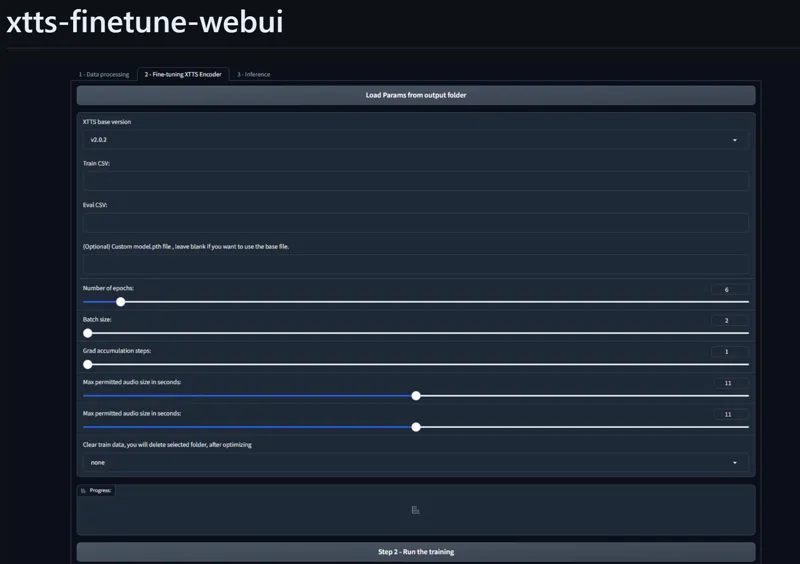
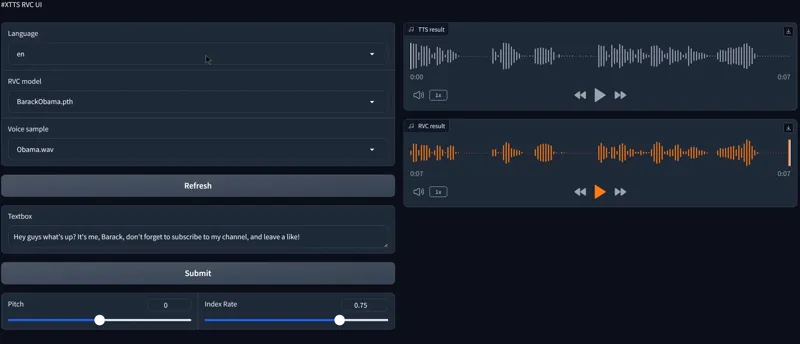
Hey everyone! I've just released a new video on how to make the best Ai text-to-speech voices on your local computer with 3 different methods and 3 Webui! So that no matter who you are and what your goals are, you get the best quality possible! Bye-bye elevenlabs!
You can check out the video right here: https://youtu.be/ds5LLIt5OLM
I also created a 1-click installer for the 3 Webui for my Patreon supporters, that you can find right here: https://www.patreon.com/posts/103930347
You can also find the free PDF guide for the methods down below 👇
As always, supporting me on Patreon allows me to keep creating helpful resources like this for the community. Thank you for your support - now go have some fun😉!
Comments (44)
I tried running it, but it seems like it spesifically search for nvidia drivers. Is there any way to make it work with an AMD GPU?
Hi Air - have you checked out chatterbox v3? Might be a worthwhile video looking at what it can do.
yes, I'm looking into it
I attempted using this software to convert a book, a text file I loaded through Batch file, it does not look like there will be a success. Does @Aitrepreneur or anyone knows a way around this? Also, do you know a competing TTS similar to XTTS with excellent quality, free and open source that can be used? Thank you. Log: rev3_sample audio Test The text length exceeds the character limit of 250 for language 'en', this might cause truncated audio. The text length exceeds the character limit of 250 for language 'en', this might cause truncated audio.
Yes. ask gpt to add a text splitting code into your logic, you can also add other things in there like read roman numerals as numbers, dates properly. just remember to back up before every update. I also find it's helpful to get one AI bot/window write instructions for another one to build. That way you can discuss your projects likely pitfalls before you hit them
Hello... Unfortunately I have a problem with the installation. I always get the message at the end: xtts-webui-main\xtts-webui-main\scripts\modeldownloader.py”, line 4, in import requests ModuleNotFoundError: No module named 'requests' Press any key . . . how can i fix the error? Can anyone help me further ? Best regards: Lissy G
send me a dm
when installing the xtts-finetune-webui I start to get notes: INFO: pip is looking at multiple versions of ... to determine which version is compatible with other requirements. This could take a while. ... INFO: This is taking longer than usual. You might need to provide the dependency resolver... I am not able to get to the end of the install as it gets slower and slower.. I tried editing the installers to update pip version etc, but it just got worse ... now I removed the installed folder and trying a clean install from beginning.. and gettign the same "notes".... any idea why I am getting this issue? also how does the CUDA version affect these installs? I seem to have cuda_12.6.r12.6 and the install is using cu118.. can this be the issue? I did remove all python installs and reinstalled the recommended python310 version and added it to the path. EDIT: I managed to do the install directly from https://github.com/daswer123/xtts-finetune-webui .. but I guess I still need to fix the XTTS-RVC-UI
indeed make sure that you have first, the python 3.10.11 (or 3.10.6 but now I recommend the 3.10.11 instead) and that it's added to path with no other python install, make also sure you got cuda 11.8 installed and added to path as well before launching the installer
Please is there a guide or tip on how to write prompts? For example I want something to be SAID OUT LOUD, or in a certain tone. Is that possible?
No that's not possible no, you can't control that with this repo, I seem to remember that parler tts had this kind of function however, haven't tried it but you can try it out yourself see if that works for you: https://huggingface.co/spaces/parler-tts/parler_tts_mini
On step 1 creating data set, after loading the audio I got this error: The data processing was interrupted due an error !! Please check the console to verify the full error message! Error summary: Traceback (most recent call last): File "C:\Users\walla\Desktop\New folder\xtts-finetune-webui\xtts_demo.py", line 246, in preprocess_dataset train_meta, eval_meta, audio_total_size = format_audio_list(audio_path, whisper_model = whisper_model, target_language=language, out_path=out_path, gradio_progress=progress) File "C:\Users\walla\Desktop\New folder\xtts-finetune-webui\utils\formatter.py", line 131, in format_audio_list segments = list(segments) File "C:\Users\walla\Desktop\New folder\xtts-finetune-webui\venv\lib\site-packages\faster_whisper\transcribe.py", line 1111, in restore_speech_timestamps for segment in segments: File "C:\Users\walla\Desktop\New folder\xtts-finetune-webui\venv\lib\site-packages\faster_whisper\transcribe.py", line 508, in generate_segments encoder_output = self.encode(segment) File "C:\Users\walla\Desktop\New folder\xtts-finetune-webui\venv\lib\site-packages\faster_whisper\transcribe.py", line 767, in encode return self.model.encode(features, to_cpu=to_cpu) RuntimeError: Library cublas64_12.dll is not found or cannot be loaded could you help me please?
You need to download and install cuda 12 from the nvidia website: https://developer.nvidia.com/cuda-downloads
I am geting two errors. This one Using cached gradio-4.13.0-py3-none-any.whl.metadata (15 kB) ERROR: Could not find a version that satisfies the requirement torch==2.1.1 (from versions: 2.2.0, 2.2.1, 2.2.2, 2.3.0) ERROR: No matching distribution found for torch==2.1.1 and this one ERROR: Could not find a version that satisfies the requirement torch==2.1.1+cu118 (from versions: 2.2.0+cu118, 2.2.1+cu118, 2.2.2+cu118, 2.3.0+cu118) ERROR: No matching distribution found for torch==2.1.1+cu118
First download and install cuda 12 from the nvidia website: https://developer.nvidia.com/cuda-downloads Then that your python version installed is the correct one, you need to uninstall your current python installation and reinstall it correctly. Go to the add and remove programs, search for python and uninstall both the current python version and the python install program. Once this is done, go here and download this installer: https://www.python.org/ftp/python/3.10.6/python-3.10.6-amd64.exe Run it and check the “Add python 3.10 to Path” checkbox and continue with the installation. You can check that the right python version is installed by opening a new command prompt window and typing: python --version and it should give you the 3.10.6 version Then just relaunch the 1-click installer in a new folder and try again.
This is great! is there any way to get this to work in text-generation-webui with the "automatic xtts to RVC". Maybe an extension for oobabooga already exists to do that? Or do I have to frankenstein the .py files code and try to do it with Chatgpt 4o? Would be great to have a chat with Carl Sagan lol
you can just use the xtts coqui extension or xtts inside sillytavern
when trying to install, I am getting this error about the model "requests" Collecting gradio==4.13.0 (from -r .\requirements.txt (line 1)) Using cached gradio-4.13.0-py3-none-any.whl.metadata (15 kB) ERROR: Could not find a version that satisfies the requirement torch==2.1.1 (from versions: 2.2.0, 2.2.1, 2.2.2, 2.3.0) ERROR: No matching distribution found for torch==2.1.1 Looking in indexes: https://download.pytorch.org/whl/cu118 ERROR: Could not find a version that satisfies the requirement torch==2.1.1+cu118 (from versions: 2.2.0+cu118, 2.2.1+cu118, 2.2.2+cu118, 2.3.0+cu118) ERROR: No matching distribution found for torch==2.1.1+cu118 Install deepspeed for windows for python 3.10.x and CUDA 11.8 Traceback (most recent call last): File "D:\aitrepreneur\tts\xtts-webui\scripts\modeldownloader.py", line 4, in import requests ModuleNotFoundError: No module named 'requests' Install complete. Press any key to continue . . . (venv) D:\aitrepreneur\tts\xtts-webui>
open a command prompt window and type: python -m pip install --upgrade pip Then 1) Open System Properties: Right-click on the Start button and select System. Click on Advanced system settings on the left side. In the System Properties window, click on the Environment Variables button near the bottom. Add New System Variable: In the Environment Variables window, under the "System variables" section, click on New. For the Variable name, enter PYTHONUTF8. For the Variable value, enter 1. Click OK to close the dialog box and exit. 2) Open Control Panel and go to Clock and Region. Click on Region. In the Region window, go to the Administrative tab. Click on the Change system locale button. Ensure that the checkbox for Beta: Use Unicode UTF-8 for worldwide language support is checked. Click OK and then Restart the computer. You might also have a bad initial python install, you need to uninstall your current python installation and reinstall it correctly. Go to the add and remove programs, search for python and uninstall both the current python version and the python install program. Once this is done, go here and download this installer: https://www.python.org/ftp/python/3.10.6/python-3.10.6-amd64.exe Run it and check the “Add python 3.10 to Path” checkbox and continue with the installation. You can check that the right python version is installed by opening a new command prompt window and typing: python --version and it should give you the 3.10.6 version Then just relaunch the 1-click installer in a new folder and try again.
I gave this whole process a try and it is pretty amazing just like you mention! One question I have though is if there is any way to preserve accents? I was trying to get a British-sounding voice to work, but it always seems to end up sounding like a more American accent no matter how much I seem to train it. For XTTS, having a voice file with a British accent seems to lose it and for the Finetune as well it doesn't preserve the accent. I had slightly more success with RVC, but half of that was using a voice file that already had an accent. Is there a trick I'm missing or is that just how the model gets trained?
accent can be finetuned (maybe try with the 2.0.3 model as well might give you better results)
Hi finetune xtts is working fine, but when i give it a try about your last video over to open xtts-rvc-ui doesn´t open. thats the output : ValueError: mutable default for field common is not allowed: use default_factory. any idea ?
I need the full error log, any errors during install also?
The CMD screen pops up for a split second and then closes/disappears. Not even enough time to see what's written on the screen. I didn't see any errors during install. If dragging into the cmd prompt, the command line is: C:\Users\me>C:\Users\me\Downloads\xtts-finetune-webui\start.bat and the responding message is: 'venv' is not recognized as an internal or external command, operable program or batch file. python: can't open file 'C:\\Users\\me\\xtts_demo.py': [Errno 2] No such file or directory
This is probably a bad initial python install, you need to uninstall your current python installation and reinstall it correctly. Go to the add and remove programs, search for python and uninstall both the current python version and the python install program. Once this is done, go here and download this installer: https://www.python.org/ftp/python/3.10.6/python-3.10.6-amd64.exe Run it and check the “Add python 3.10 to Path” checkbox and continue with the installation. You can check that the right python version is installed by opening a new command prompt window and typing: python --version and it should give you the 3.10.6 version Then just relaunch the 1-click installer in a new folder and try again. Also no need to write new messages, just reply to this message, or send a dm, easier to follow this way
I've installed the XTTS-Finetune model as per K's video and the one click installer, however when I go into the folder and click the start.bat file, the program doesn't start/give me a localhost URL. Anyone know what I need to do?
what exactly happens? The cmd doesn't even start? Any errors during install? have you tried opening a new cmd prompt and drag and dropping the start bat file inside?
I keep getting a : Traceback (most recent call last): File "C:\Users\Dayma\Documents\TTs\xtts-webui\app.py", line 1, in from scripts.modeldownloader import install_deepspeed_based_on_python_version File "C:\Users\Dayma\Documents\TTs\xtts-webui\scripts\modeldownloader.py", line 4, in import requests ModuleNotFoundError: No module named 'requests' when trying to run the batch file.
open a command prompt window and type: python -m pip install --upgrade pip Then 1) Open System Properties: Right-click on the Start button and select System. Click on Advanced system settings on the left side. In the System Properties window, click on the Environment Variables button near the bottom. Add New System Variable: In the Environment Variables window, under the "System variables" section, click on New. For the Variable name, enter PYTHONUTF8. For the Variable value, enter 1. Click OK to close the dialog box and exit. 2) Open Control Panel and go to Clock and Region. Click on Region. In the Region window, go to the Administrative tab. Click on the Change system locale button. Ensure that the checkbox for Beta: Use Unicode UTF-8 for worldwide language support is checked. Click OK and then Restart the computer. then redo the installation
my c drive holds the os and i have all the ai stuff on drive e but i tried installing it on drive c but same error
try this one: https://we.tl/t-JnKo7InjBD
im sorry k it seem like i have a issue with everythingDownloading ffmpeg... % Total % Received % Xferd Average Speed Time Time Time Current Dload Upload Total Spent Left Speed 100 282 100 282 0 0 247 0 0:00:01 0:00:01 --:--:-- 248 100 85.9M 100 85.9M 0 0 1727k 0 0:00:50 0:00:50 --:--:-- 3583k Extracting ffmpeg... New-Item : Cannot find drive. A drive with the name 's\Documents\ffmpeg\ffmpeg.zip -DestinationPath C' does not exist. At C:\Windows\system32\WindowsPowerShell\v1.0\Modules\Microsoft.PowerShell.Archive\Microsoft.PowerShell.Archive.psm1:318 char:32 + ... eatedItem = New-Item -Path $DestinationPath -ItemType Directory -Conf ... + ~~~~~~~~~~~~~~~~~~~~~~~~~~~~~~~~~~~~~~~~~~~~~~~~~~~~~~~~~ + CategoryInfo : ObjectNotFound: (s\Documents\ffm...stinationPath C:String) [New-Item], DriveNotFoundExce ption + FullyQualifiedErrorId : DriveNotFound,Microsoft.PowerShell.Commands.NewItemCommand Failed to extract ffmpeg. Please check the zip file and destination path. Press any key to continue . . .
looks like you don't have a C drive...on which drive have you installed your OS?
Is there a way to reduce the gaps in the audio output? There are long pauses with the audio that isn't present in the text and I'm trying to figure out how to get rid of them. Or is that something I'll have to do in Audacity?
you can try out the 2.0.3 model, this might make it better for some voices, otherwise yeah manually editing it is always good, there are automatic softwares that can do that as well but they are paid
Great video! What would you recommend as the best Github repo for voice conversion (similar to Voicemod) that converts emotion well and has a high quality? In other words, to use a different voice while acting a scene/monologue/et cetera, but with all the nuances that my own voice does. Thanks in advance!
RVC, already did a video on this: https://youtu.be/sT6_pi5Jq4w
wow, this is amazing, can i integrate this with text-generation-webui/SillyTavern? if this is possible, maybe you could make an video about it?
already did, this is still xtts, so it's already available inside Sillytavern and text gen webui
run into this issue with the finetune repo: Exception in callback _ProactorBasePipeTransport._call_connection_lost(None) handle: Traceback (most recent call last): File "C:\Users\MainUser\AppData\Local\Programs\Python\Python310\lib\asyncio\events.py", line 80, in _run self._context.run(self._callback, *self._args) File "C:\Users\MainUser\AppData\Local\Programs\Python\Python310\lib\asyncio\proactor_events.py", line 165, in _call_connection_lost self._sock.shutdown(socket.SHUT_RDWR) ConnectionResetError: [WinError 10054] An existing connection was forcibly closed by the remote host any ideas on how to fix?
the error itself is not an issue, I see this error happening to me as well, but it shouldn't interfere with the use of the tool
Looking forward to trying tonight. But, does it allow for an API local server setup so I can presetup voices and then submit text which then does both including RVC, producing a wav/mp3?
no there is no API unfortunately
Ahhh no I want to learn to code to make my own chatbot lol