
SkyrimUpscaler ENB Test Build 09
Fixed random crash on startup.
Fixed FOV not being applied correctly so that FSR2 has more ghosting than expected.
Fixed some ReShade effects darkening the image.
Note that rendering ReShade effects before upscaling is best for RTGI and Comic.fx, they will cost less performance and look much more stable.
But for DOF it's still best to be applied after upscaling, so you will have to choose, cuz currently I can't separate them, they either all render before upscaling or all render after.
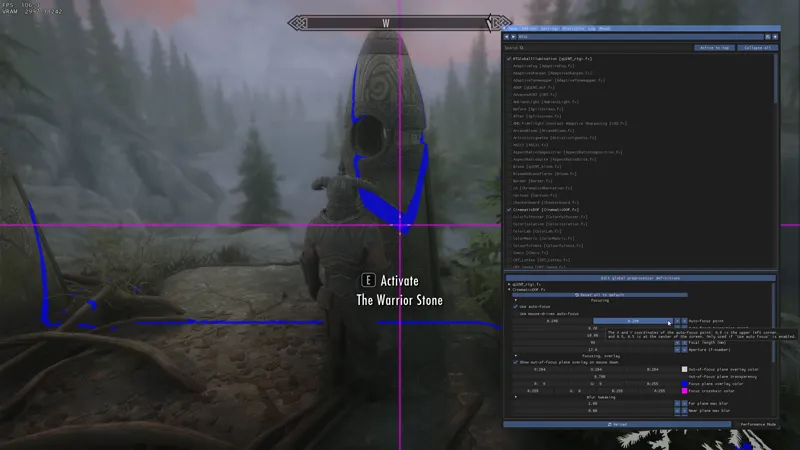
If you need to render RTGI before upscaling, and still want to use CinematicDOF, remember to adjust the focus point as in the picture.
INSTALLATION
Install as any other SKSE plugin, using MO2 or Vortex would be the best way.
Slide DOF all the way to the left in the settings.
Turn off ENB Edge AA and DOF (If you play at high enough resolution you can still try to use ENB's DOF, but if you can't stand the jittery just turn it off).
Press END in the game to open the menu for upscalers.
(Optional) Install Reshade for DOF if you really want DOF. I recommand the CinematicDOF with aperture set to 12-15, and focal length around 90, and near plane max blur 0.
If you use ReShade, make sure it's at least 5.6.0, to know this check dxgi.dll's version.
Note that you can't change quality level at runtime, you'll need to change it in the ini and restart the game.
IMPORTANT: If you are using SSE Display Tweaks, open SSEDisplayTweaks.ini and set Fullscreen = false and BorderlessUpscale = false. Remember to remove the # before them or they won't take effect.
If you are not using it, set bFull Screen = 0 in SkyrimPrefs.ini
If you are using detection meter, make sure it's at least v17.
Comments (58)
I play the game on fullscreen because I play on a 4K TV and play the game at 1080p, when I turn on borderless the game only uses a small percent of the screen, any tips?
You don't need to do that with DLSS, just set the game to run at 4k then use UltraPerformance.
Could this be causing snow effects not to show with FSR2? Or is this due to a bad configuration? I'm referring snow storm with true storms.
FSR2 has more ghosting than DLSS
Sorry, my bad
doesn't for me, is set SSEDisplayTweaks.ini fullscreen mode to false and in Skyrim Launcher i disabled windowed mode & borderless which allowed me to set skyrim resolution to 4k and so far works perfectly fine
Yes that's borderless. Cuz Display Tweaks fullscreen mode set to false means it will overwrite the launcher settings, and the game won't launch in fullscreen but in borderless. That's written in the installation.
For my laptop Upscale actually works allot better in Fullscreen mode on 4k display settings, fixes the jitteriness in shadows (especially under player) and textures and somehow increases few fps
But this mod won't work in Fullscreen mode, it will freeze.
Game still crashes in my build... oh well. At least I can use the one from Nexus for DLAA.
You should ask in the server with log
Is it compatible to TKV6? If no, would you please make it compatible?
It has no compatibility issue with any particular ENB preset, it can only conflict with another skse plugin.
This works quite well, I'm notice though that in menus when I click with my mouse the screen goes blue and there is a cross that follows my cursor. Not sure if this is from this mod or from reshade, and if there is a way to fix that?
Is fsr2 that bad compared to dlss?
I use fsr2 and for some reason there's ghosting on npc's lips, not sure why since you said on the description that you reduced ghosting. I followed the guide correctly, but just in case could this be caused by not configuring something correctly?
That's just FSR2's normal working state. FSR2.2 reduced some ghosting on walking NPCs, but lips aren't better with it.
Solid 15-20 fps gain on the whiterun plains with grass LOD and 2k grass textures. I'm impressed. Keep up the good work.
My resolution gets wonky when I use the mod. Is there a fix for this
What's `wonky`, you might need to link your discord to patreon, then ask in the server.
Hello, thank you for making this mod! By chance, where can I find edge AA and how do I disable it? My game keeps crashing on startup and I'm troubleshooting. Thanks in advance!
You can disable EdgeAA in enblocal.ini, and you can find help in discord server.
Hi, my character gets blurry and I have no idea why
Sorry if this is a dumb question but How do I turn off edgeAA
In enblocal.ini
Can't disable the mod.. I keep going into the ini and setting mEnableUpscaler = false, but it keeps making it go true... help? Guess I will just disable in mod organizer
For the ENB workaround upscaling must always be enabled. If you want to disable it you do need to disable it in MO2.
part of my enb giu is cut off when using this, is there a fix.
ENB GUI is still restricted to the render resolution, you might need to set the quality level to Quality to use ENB's menu, after you have tweaked the settings, change it back to what you want to play with.
SilveredSloth#6836
i keep crashing and i dont understand how to get in the discord sorry
Just cancel the membership thats what I did
I connected my discord but didn't get the invite
Can someone send me a discord invite, I have some questions about the upscaler, I have connected my patreon to discord I am not getting invited to the discord. TY
hey guys , ive updated my drivers for my pc but it still crashes at start up, any ideas ?
Link your discord to patreon and you'll be auto invited to the server. Then ask in the bug-report channel. I can only do troubleshooting in the discord server.
Notice this kind of thing, i'm disabling enb there as well. Let me know if i can do more? https://streamable.com/wlwfa3, no sure if it's scaler related, maybe you know better.
it's too good, but i cant pull up Menu in-game on laptop(END key doesn't operate like regular keyboards lol) is there a way to change the binding?
You can change the binding in the included ini file.
how can I render ReShade effects before upscaling ? or is it automatically ?
It's an option in the menu, you press END to open the menu by default.
How to fix borderles window screen being too small?
If my desktop resolution was not set to 100%, my window would be too zoomed in. I'm not sure if it helps, but just wanted to mention it here if anyone sees a similar issue.
What I have noticed with this update is that my ReShade preset is not appearing on UI elements anymore (I'm not using ReShade Helper), so far the game space seems to have the ReShade effect still.
Yes the new feature does the same thing as ReShade Helper. If you check the new option it will render before upscaling, if not it will render after upscaling, but both before UI.
mod works fine for me, will have to wait to report on FPS boost until I get a monitor with a much larger refresh rate (just 60hz currently). I notice FPS drops when looking in a direction that has a lot more draw calls, but that's part of Skyrim's engine limitations.
i get seriously ghosting with FSR2...
Thanks for the update! It seems to have fixed also CTD with this mod https://www.nexusmods.com/skyrimspecialedition/mods/85416 I used to get, I don’t know if you fixed that on purpose or not o.O
I wasn't even aware of this mod before, but what I did to fix the compatibility with ChineseInput and ImprovedCamera might also apply to other plugins.
i keep crashing i tried but thanks for everything this isn't for me just more problems stopping me from playing my mod order peace
If you are having issues launching, don't hesitate to ask me for help, I have solved dozens of people's issues and most of them are just user errors. Link your discord to patreon and then you can ask in the server, post the logs so that I can know what went wrong.
When I launch the game, my GPU (RTX 3090) usage skyrockets to 100% while making squeaky noises, then crashes. I reduced the resolution from 2K to 1K, but the issue still persists. FYI I can launch the game if I disable the plugin.
Link your discord to patreon then ask in the server, I can't do troubleshooting in the comments. Also remember to post the log
Noticing a minor side-effect when using with the "Screenshot Helper" mod: https://www.nexusmods.com/skyrimspecialedition/mods/64124 All my screenshots are cropped and cut-off to the downscaled resolution: https://imgur.com/a/ICF0qLQ Playing at 4K, using DLSS Performance.
You will have to use external method to take screenshots, any internal method will only take screenshots before upscaling.
Thanks so much! Love this mod!
not sure whether it's my hardware or NOLVUS in it's current state, but after installing both of these today and changing the ini to 0 for "performance" I can get clear gameplay here and there, but of course loading starts out choppy and can equal any spawns and new elements make the game chop again, hopping I can get past it somehow as I followed all the installation steps here and on their discord (after posting I have discovered the preset option and realized that preset 6 might have been conflicting with performance and DLSS) (Since testing the preset it certainly didn't help, simply just can't handle combat with this enabled, it does seem to make out of combat smoother but anything with more script traffic and the game breaks with this version, using NOLVUS without this worked so my hardware is either better off or something is unstable with the combat element)
Probably best to link your discord to patreon and report in the server. I've seen people playing well with NOLVUS, so I might need some short clips to know what you are describing