
TS4 Mods - Management and Organization
Author Notes:
Jan. 4, 2024 - I'm likely going to redo this post completely using the Image post template. I'm currently poking around in S4S and troubleshooting in r/Sims4 but I'll get to this soon.
Dec. 28, 2023 - I want to overhaul this too. Stay tuned!
Before we begin:
I've attached the images to this post because I realize Patreon's in-post images are horribly reduced in quality.
Proper folder structure doesn't mean you'll never have problems with mods but it should eliminate some of your headaches by making it easier to find what you're looking for or should be looking for.
I avoid deep folder hierarchies. I prefer to see everything laid out before me like a feast on a dining table.
You don't have to name your folders exactly like mine. This is just how I do mine. Initially I had the prefixes abbreviated e.g. GM for GameMods and CC for Custom but found that it started looking too cluttered. I even tried numbers but that's a whole other mess.
I refer to mods and custom content as mods. I don't make the differentiation often.
.ts4script files and their accompanying .package files can only be one folder deep inside your Mods folder.
If a creator says their mod should be X folders deep only, follow their instructions.
If a creator says their mod should be directly in the mods folder, follow their instructions.
Some mods have their own folder structure within their archives, preserve them unless they're optional bits meant to be placed alongside the main files. eg. Simdulgence's body mod archives have multiple folders you're meant to pick and choose from along with a mandatory main file.
Avoid renaming mods because some mods with multiple packages or those designed to integrate with other mods require their default filenames. I understand some creators lack decorum but going wild with a program like RenameMaster (my preferred renaming tool) can do more harm than good. Instead, ask your mod creator to stop being a moron because they know better.
Now hold onto your hooves and let's get this party started!
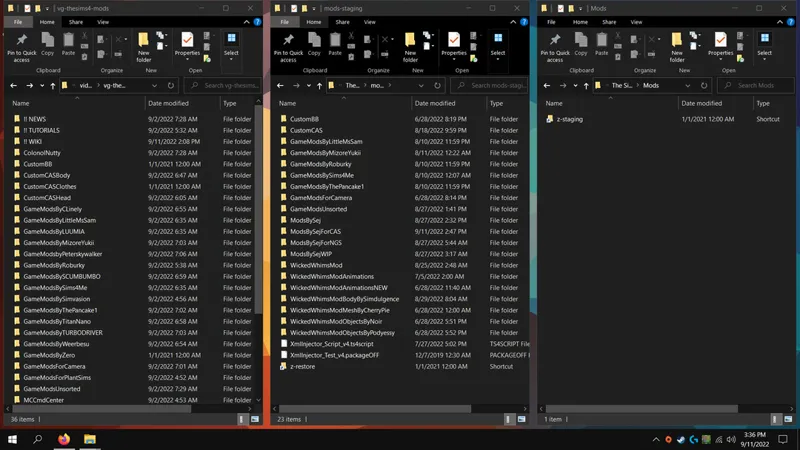
I have three (3) folders for mods as seen below:
A TS4-specific Downloads folder on my secondary drive.
A Mods-Staging folder in Documents\*\The Sims 4 - Backup.
And the Mods folder in Documents\*\The Sims 4.
My Downloads folder and my overall folder structure is simple to understand.
Folders are named in such a way to keep mod types grouped together while keeping my main mods and creators separated and avoiding +2 sub-folders. eg. CustomCAS*, GameModsByMizoreYukii, GameModsForPlantSims, MCCmdCenter, etc.
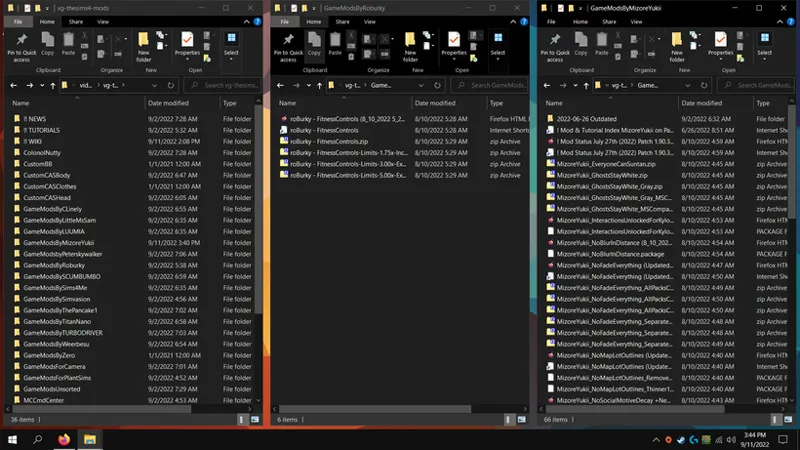
Inside each of these folders are the downloaded mod files, a webpage shortcut renamed to match the main package filename, and sometimes a webpage saved using the SingleFileZ browser extension (an advanced version of SingleFile by the same developer available for Edge, Chrome and Firefox) because I have no internet at home and sometimes need to re-read instructions or features.
The second and third windows show the difference between a creator folder with one mod and a creator folder with multiple mods.
There is no difference between a creator folder and my GameModsUnsorted folder. They both contain mod files, renamed shortcuts and renamed saved webpages. If a mod has multiple packages with messy filenames that don't match, they get their own folder or they get deleted because creators should have some discipline.
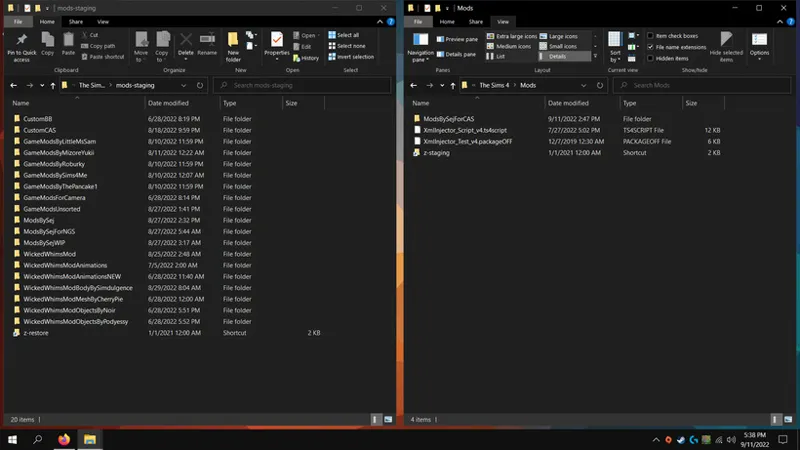
My Staging and Mods folders are equally simple but my usage gets a little complex.
The folder structure is identical to Downloads.
The Staging folder is Purgatory. It's my one stop dump for mods in time-out.
Take notice of the shortcuts in each of these folders. They link to one another. When I need to remove my mods to troubleshoot a problem, I highlight everything in my mods folder and move drag it into the shortcut then I delete my *\The Sims 4\localthumbcache.package.
If you look closely at my Mods folder you'll notice the Resource.cfg is missing. It's not, I've simply r-clicked > Properties > Hidden this file so it doesn't get dragged around and I can avoid overwrite prompts. I never edit my Resource.cfg.I don't know why this is a thing. I've never had to edit this file for my mods to work. If for any reason I feel I need to regenerate this file, I simply View > Hidden items and delete it.
Updating mods works the similar to troubleshooting. If for example I'm updating MCCmdCenter, I'll copy it into Staging then open the folder in Mods, delete the contents and extract the new version. I do this because I'm always suspicious of old settings not working properly with new mod versions. By keeping a copy of my old MCCmdCenter folder, I can restore my old settings if I need to.
I have very little Custom Content, hence the single CustomBB and CustomCAS in my Staging folder. I literally have one tattoo and I recently downloaded those fancy eyelashes. You can expand the number of these folders and categorize them similar to my GameModsBy*, GameModsFor*.
End notes:
It can seem daunting and time consuming, and it is at first, but it gets easier and simpler once you have your foundation laid out.
This is a first draft. I will refine instructions and descriptions where necessary and possibly add to this in the future.