
🗳️ POLL: I could CASO faster if...
🔢 Multiple choice is enabled. You can go wild and select errthang for the funzies.
☆// ⋆ I COULD CASO FASTER IF...:
... I didn't have to explain what I'm doing or take a ton of screenshots.
If you trust that I know what I'm doing, then we can CASO a lot more in a lot less time.
I still intend to explain everything, and I will still take screenshots to show the work, but we can do that after. I like doing my detailed posts for new folks or just visiting folks, but it does slow the modding.
We've got (99) content releases (most of which include CAS items) to get through - that's thousands of items. BASE GAME has the largest selection of CAS items with over (1,000) CAS items (I still ain't released the Limited CASO for BG yet).
Screenshots slow me down.
The number of screenshots that Mod The Sims was asking for, was the reason no CASO project ever got approved on Mod The Sims (when my mods were still on Mod The Sims).
If you can survive without even the summarized list like what I did for the EP20 CASO [🌐], then I can give you more CASO in a shorter time.
I might still do a version of the list though, and of course a cover screenshot for the post wearing something nice from the content release (like I do for the CAS Review posts), and we can just crack on, then circle back.
Comments (4)
I am curious though, if you happen to mess up with one of the items and the tags get all jumbled and maybe even break the game, would it just be a matter of removing the fix file thats affected? or could this potentially break the game more severely? that could change my answer :)
"if you happen to mess up with one of the items and the tags get all jumbled and maybe even break the game, would it just be a matter of removing the fix file thats affected?" Let's use the EP16 CASO as a perfect example. When that CASO released, it worked perfectly. Then EAxis changed the mesh resource ID for a few Tops, so my overrides for those specific items now show the items as "invisible" when worn because the resource ID in my "CASPart" override no longer existed - in other words, my override isn't loading the mesh, because EAxis changed the mesh ID. I've ignored fixing it for a very long time because EAxis has been trashing the game otherwise and I needed to fix it, but it's as simple as just recreating that CAS override and making a new MERGED PACKAGE. I'm about to release the EP19 CASO feature update, then I'm finalizing the EP16 CASO critical update. So yes, it is just a matter of of replacing the busted override if EAxis changes the ID of a referenced texture or mesh resource. Otherwise, these things don't break. Actually, I changed that compatibility line at the top of my CASO to highlight this, but I used the wrong compatibility line in the new CASO. ─ When EAxis fixes CAS items, it's usually not meshes. It's usually PARTFLAGS and TAGS, so the EP16 example doesn't occur often, and my CASO just overrides whatever changes EAxis makes to PARTFLAGS and TAGS. In fact, there is no reason for EAxis to change the ID of the mesh if they modify it. They could have fixed those EP16 meshes without changing the ID and without breaking my CASO - the same way I can RESO and replace a mesh for an item without changing the ID or needing to override the entire item. You'll see that in action when I RESO those two EP20 "leggings". ─ "or could this potentially break the game more severely?" Only in the way I explained above if EAxis changes the ID for meshes or textures.
personally, i dont want to download a cas fix without knowing exactly whats been changed. if it's editing the mesh then i think screenshots are necessary, otherwise i dont see a reason for them at all. just a simple description like 'changed [item#3] to fit both frames'. so you actually know what youre downloading. I trust most of your fixes will just be an auto add to my mods folder, but there are a few items i have in mind that i DONT want converted for the opposite sex or for a different age and i'd rather keep the original ea item. Maybe post the full fix as soon as you can for people who dont really care and just want all of the fixes, and people like myself who want the full description of all the changes can wait until thats ready.
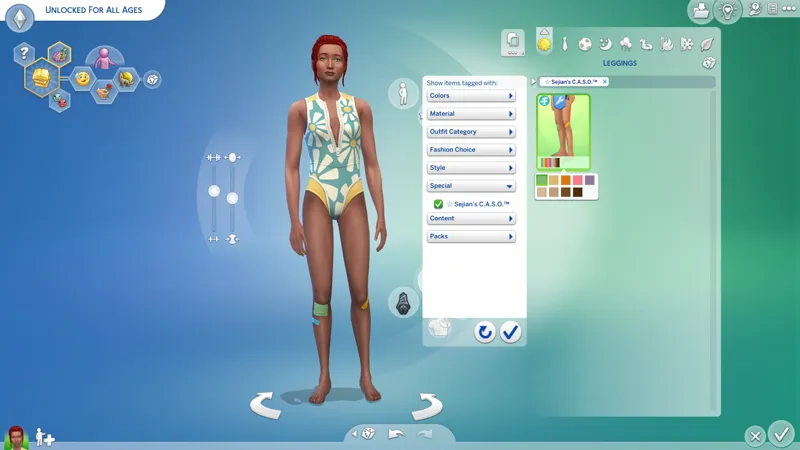
Mesh fixes and texture fixes are no longer included directly in "CASO" (CAS Overrides). Those are now in "RESO" (Resource Overrides) because I can do them independently of "CASO". You'll always get full details and screenshots for those. "CASO" is just for PARTFLAGS and TAGS and other "CASPart"-based fixes now. ─ "but there are a few items i have in mind that i DONT want converted for the opposite sex or for a different age" "Conversions" and "unlock/unrestrict" are two different things. To actually convert an item between sexes or ages I need to make a new item. That's not what I'm doing with "CASO", and when I decide to do that, it will be released as "CASA" (CAS Add-Ons) separately. I "unrestrict" items like Makeup and Tattoos and Skin Details for all ages where applicable without having to create a whole new item configured for other ages (I really wanted them Vampire Skin Details for kids and younger). What that means is that I simply enable the necessary "Age & Gender" PARTFLAG so that the other age groups have access to the item. HOWEVER, randomization is never changed to include those new ages, so for example with Makeup, children and younger will NEVER randomly generate with any adult Makeup that I "unrestrict". They just have access to it in CAS. Same with Tattoos and Skin Details. In fact, I always disable "Allow For Random" on each and every Accessory, Makeup, and Tattoo that I override, because I absolutely loathe the randomly generated "clownies" who wear one of every accessory and mismatched makeup. Your RNG Sims will end up being a little more "bland" with CASO, but at least every RNG Sim won't be a "clownie". ─ "just a simple description like 'changed [item#3] to fit both frames'. so you actually know what youre downloading." I have an old, old, "master post" for "CASO". I should revisit it and overhaul properly to explain everything I do and then just link to it. I'll do it after we do the big CAS Filters update. Where Tops, Bottoms, and Shoes is concerned, there's no way to make it "fit both frames" without modifying the mesh for both frames in Blender - "fit both frames" might mean different things for you and me. For me it means that each item has a variant for each frame so that we do not experience any "mesh deformations" (like the crotch warping that occurs when a Sim wears a Bottom that wasn't made for their frame). What I do when I say I'm unrestricting those items for all Sims is that I'm removing the "hard restrictions" on the items. These are the "Restrict Opposite" PARTFLAGS. I ensure the "Gender" FLAG and the "Fashion Choice" TAG matches the frame the item was made for, then I remove the "Restrict Opposite" FLAGS. This allows all Sims to access the item under the corresponding "Fashion Choice/Clothing Preference" filter. It gives the player the choice to wear whatever they want - and this is only necessary because EAxis does not make a feminine and masculine variant of every CAS item. The same way I unrestrict all of these items for everyone, is the same way they unrestrict those specific items that they couldn't be arsed to make a feminine and masculine variant for, to make it appear as though that item exists for both frames. That's why we've had so many reports of "mesh deformations" (like the crotch warping, and the neck warping, and the hand warping). It's not always simple because EAxis mucked up the Restrict Opposite FLAGS. Sometimes it's intentional. EAxis unrestricts and TAGS items for frames they were not made for, and then we suffer the consequence because we thought those items matched our "Physical Frame". ─ I need to finish the EP16 Costume Box BUGFIX and then record a video of how - what's the word I'm looking for - versatile(?) CAS becomes when the items that can be unresticted for everyone are unrestricted for everyone and TAGGED "properly". It's magical watching the Costume Box give me the outfit that matches my "Clothing Preference" TRAIT: 1. I swap to Masculine "Clothing Preference" (which auto-changes "Fashion Choice" to Masculine) and it gives me the Masculine Frame CAS items. 2. I swap to Feminine "Clothing Preference" and it gives me the Feminine Frame CAS items. In this example, nothing about my Sim changes except my "Clothing Preference" TRAIT. But this level of functionality with CAS is only capable when CAS is configured "properly" - as in the way I do it in these "CASO" projects. I do know what I'm doing. 😹 I know the "CASPart" side and I know the "Tuning" side to make clothes work perfectly for all Sims in this game.