
🦄 Sims 4 Studio - Re-hosting v3.2.3.2 for Windows because v3.2.3.5 just ain't cutting it. ⚡ There's a public repository! Also, the issues highlighted started with v3.2.3.3.
I missed two updates so I'm not 100% sure when the change happened but the Studio tab in v3.2.3.5 ain't gonna cut it for me. It's hampering my workflow.
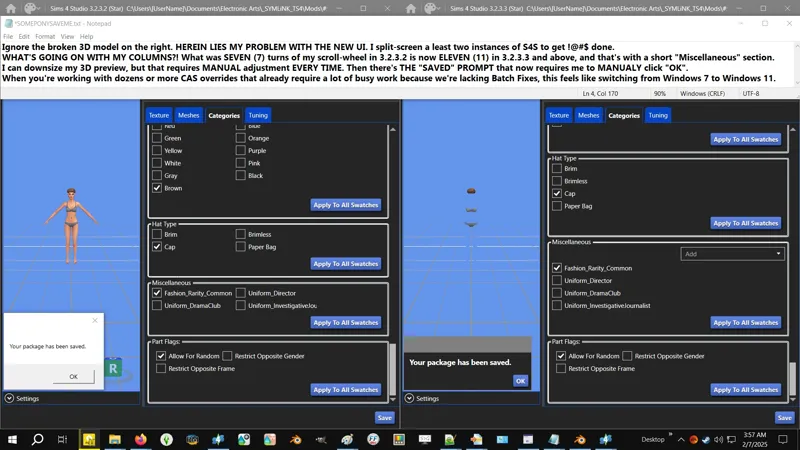
FOUR measly overrides ruined my patience due to layout changes and a missing hotkey. I'll add some screenshots later to explain the problem.
I gave some feedback and once again inquired about Batch Fixes for Restrict Opposite PartFlags - https://sims4studio.com/post/210110/thread
Hopefully the next version fixes the issues I'm having with v3.2.3.5.
⋆⋅ THE RE-HOSTED ARCHIVE IS UNMODIFIED:
Turns out they do keep a public repository and the link is right there on the download post and I never used it 'cause I always download from GDrive! 😹
I don't think S4S keeps a public repository of their old versions for download, but if they do and I find it, I'll share a link to that instead.
🎀 Get an older version direct from the source - https://mega.nz/folder/S4S
🗺️ SFS Homepage - https://sims4studio.com
🎁 GDrive Folder - https://../drive/DIYResources
⋆⋅ I HAVE (12) OF THESE. I'M RE-HOSTING (1):
Sims4Studio_v3.2.3.5 (Star).zip - This is the latest version as of this writing.
Sims4Studio_v3.2.3.4 (Star).zip
Sims4Studio_v3.2.3.3 (Star).zip - The UI issues started here.
Sims4Studio_v3.2.3.2 (Star).zip - I'm stuck here! Somepony save me! 😹
Sims4Studio_v3.2.3.0 (Star).zip
Sims4Studio_v3.2.2.9 (Star).zip
Sims4Studio_v3.2.2.7 (Star).zip
Sims4Studio_v3.2.2.5 (Star).zip
Sims4Studio_v3.2.2.2 (Star).zip
Sims4Studio_v3.2.2.0 (Star).zip
Sims4Studio_v3.2.1.7 (Star).zip
Sims4Studio_v3.2.1.6 (Star).zip
Comments (2)
Older S4S versions are kept in the "Previous Versions" folder in the MEGA link that's on their website, if you want to add that link.
That'll do! Thanks for informing me! I've legitimately never used that MEGA link, so I didn't know that was there!