
🎓 DIY FOMO Unlock 💀 Do not use the old instructions for Blast From the Past! Your game will literally crash to desktop!
👹 My FOMO !@#$%^&* Collection - https://../884492?view=condensed
I DRAFTED THIS ON NOVEMBER 27, 2024. The same night EAxis shoved Cozy Celebrations in my face.
MY SCHEDULED DATE WAS DECEMBER 21, 2024 AT EXACTLY 05:20 ATC, A.K.A. the start of ❄️ Winter Solstice for the Northern Hemisphere. I finished attaching and embedding the screenshots TEN (10) minutes later. Cheers!
I can't do snazzy seasonal event things, but I can share whatever oddball knowledge I've accumulated.
I know there are other simmers out there who can do this. I've encountered one of them on Tumblr, posting screenshots of event items before the event went live. I know there are others still trying to figure it out, one of them banned me from their Patreon for mentioning my FOMO Unlock in their comments.
What I don't know is who or where FOMO Unlocks like mine are shared. I assume not by any of the more popular creators since... y'know... being in EAxis' good graces has it's benefits. I won't fault anyone for that, but I'm a lost cause where that's concerned, so I might as well embrace my anarchist tendencies.
⋆⋅ I WAS CONCERNED ABOUT SHARING THIS:
I've tried to obscure my FOMO Unlocks to some extent because I understand what they're viewed as by some in the community. They don't see the bullshit EAxis is doing, but they'll see me "promoting piracy".
To those ponies, I'm sorry, ☢️ but we were all present for those three months while EAxis dragged their feet and did nothing, while saying nothing of value, not even that they were working on it. Had they had the !@#$ing decency, I'd have had no reason to do this or continue doing it - and by "the !@#$ing decency", I mean not manufacture Fear Of Missing Out, then somehow manage to !@#$ it up.
Happy At Home wasn't the first time either. They pulled this !@#$ in 2023 with pajamas that they tried to make EA subscription-only, for console simmers only. I've mentioned this before - https://www.youtube.com/watch?v=ZYx6NjfH9Uo - and no, I am not Simsina. I simply love their style and would love to see them return to making Sims content... even though I don't watch a lot of Sims content.
Live FOMO Events are simply a way to divide the community and prime you for whatever bullshit they come up with next.
This is what SDX "Sims Delivery Express" was made for, remember?
⋆⋅ THIS DIY FROM MY "CREATOR PERSPECTIVE":
Showing you the tricks of the trade is... not a very sharky thing to do. 🦈
But, as I've said before, I do not have control over my availability.
This is why I don't ask permission to mod, or honor bullshit "don't" requests. I am considerate and I will extend courtesies where applicable, 🎙️ but I'm only a man, and I do what I can, when I can, when I'm here.
Also, lets be honest; if you know anything about modifying Tuning resources - even if you don't know how to do this yet - all you'd have to do is dissect my FOMO Unlocks, put away "the flower of life", and put two and two together and... it's really simple and takes almost no effort, which is why EAxis' "three months of improvements" pissed me off so much.
This <INSERT WOO-WOO HAND GESTURES> is all they had to do.
No account-bound or server-bound bullshit required.
⋆⋅ LET'S GET STARTED - YOU NEED SIMS 4 STUDIO:
To quote myself,
As of this writing, the OPEN BETA VERSION(s) of Sims 4 Studio (S4S) are still recommended - https://sims4studio.com/board/6/download-sims-studio-open-version
I personally download the ZIP and extract it because there have been issues reported in the past with the installer, and I just can't be bothered.
I personally recommend purging your S4S data after official game updates, after adding new DLC packs, and after updating S4S. You do this by exiting S4S and navigating to "%USERPROFILE%\Documents\Sims 4 Studio" A.K.A. your "S4S USER FOLDER" and deleting the following folders and files:
📁 Cache
📁 Tuning
📄 S4Studio_[VERSION].sqlite
📄 Settings.xml
Doing this will trigger the "SQLite" cache to rebuild itself the next time you launch S4S, and settings will need to be reconfigured, and your Tuning cache will need to rebuild itself the first time you use "Extract Tuning", but this will keep S4S running optimally and avoid random issues.
⋆⋅ I WILL DO AN ENTRY FOR EACH FOMO UNLOCK:
You can do an ALL-IN-ONE, but I prefer separa- actually, maybe I'll release an "AiO" override some day and just update it for every new Live Event.
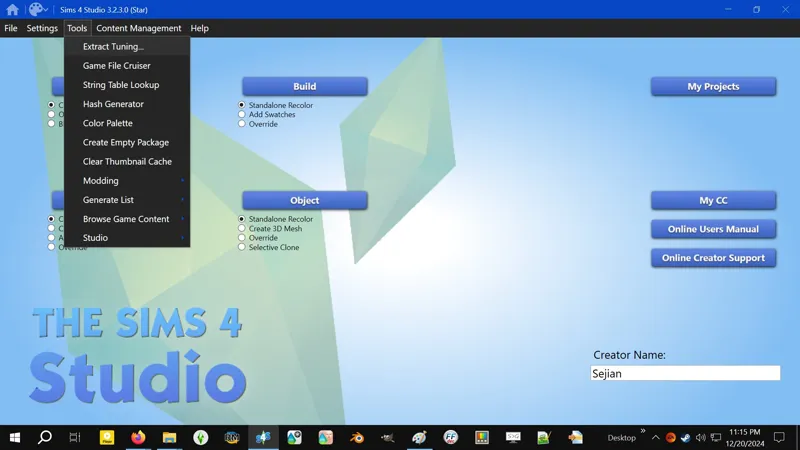
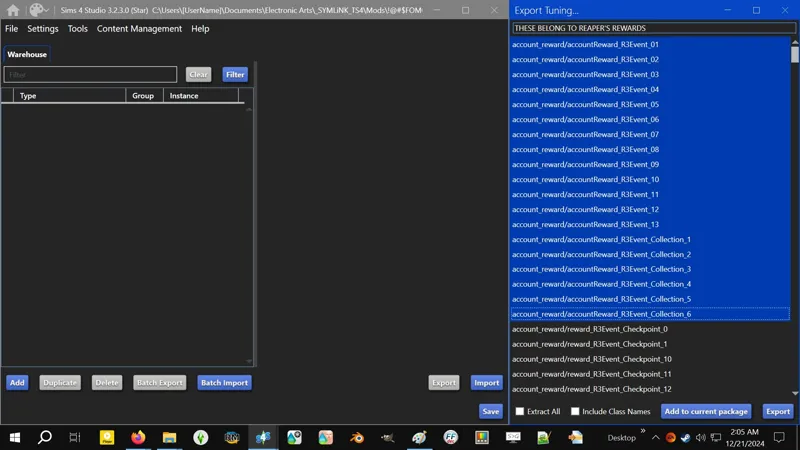
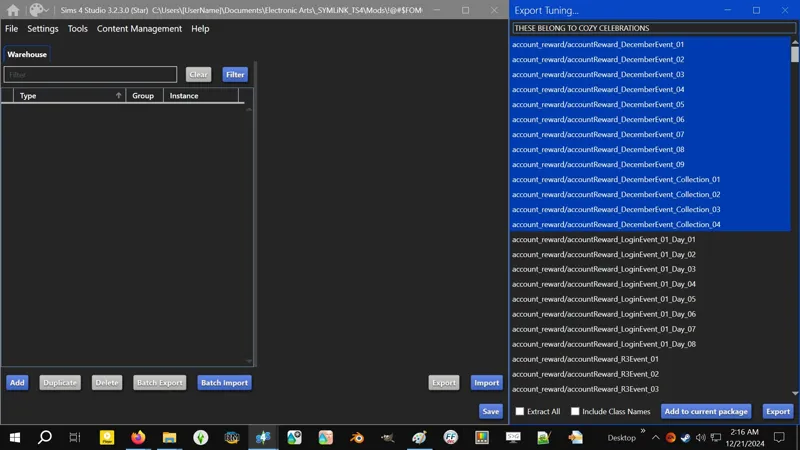
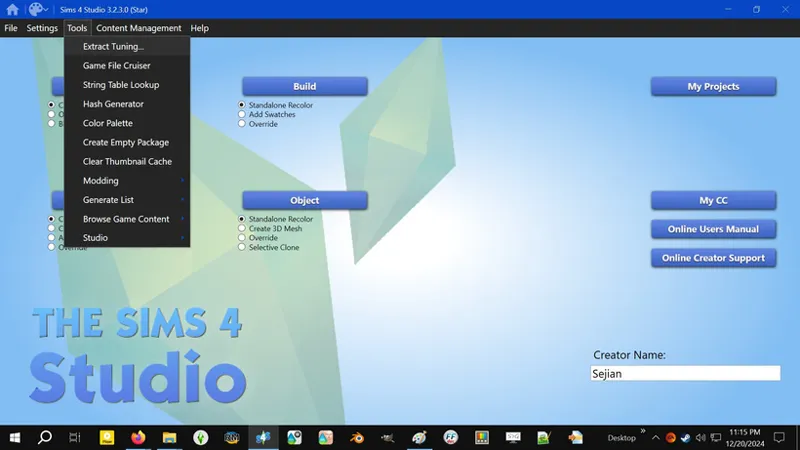
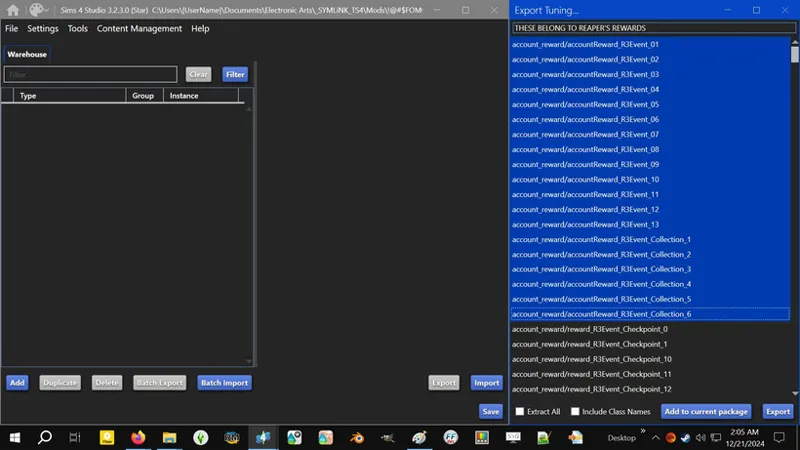
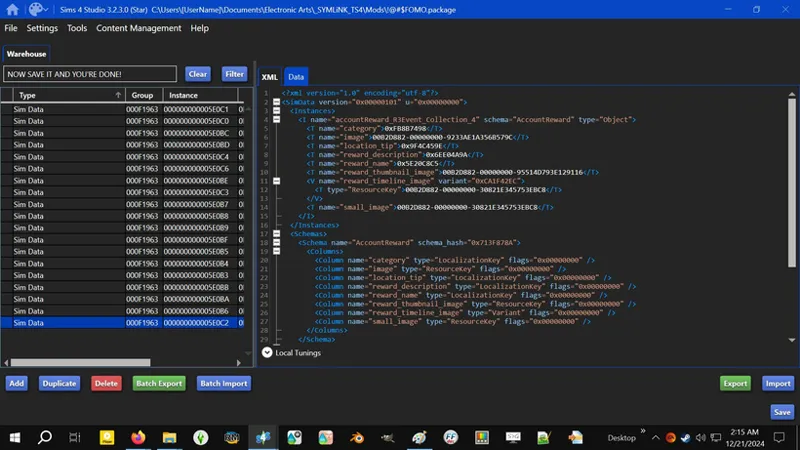
1️⃣ Open S4S, click on the TOOLS drop-down menu, and click on EXTRACT TUNING.
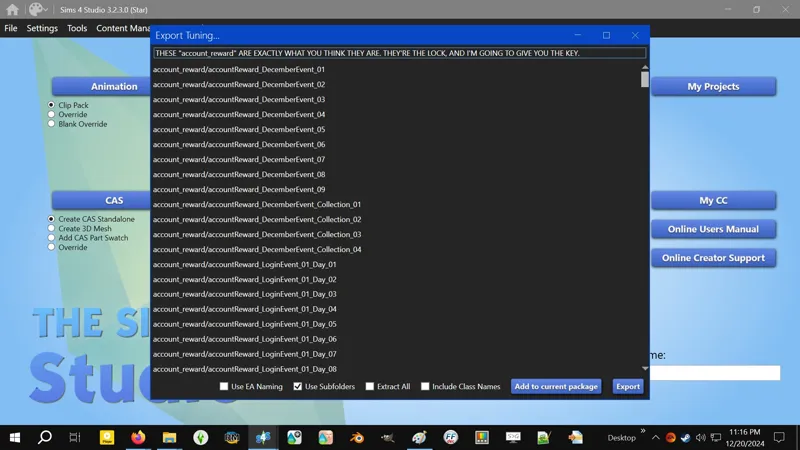
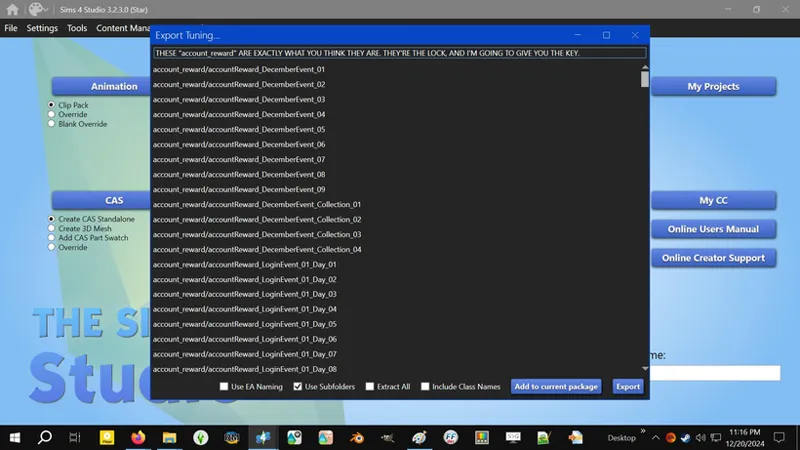
2️⃣ Do you see what I see? These "account_reward" Tuning resources are exactly what you think they are. They're the lock, and I'ma give you the key.
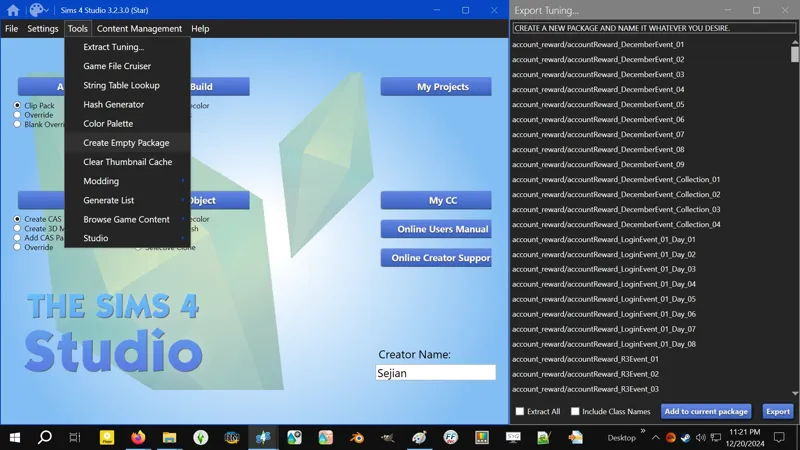
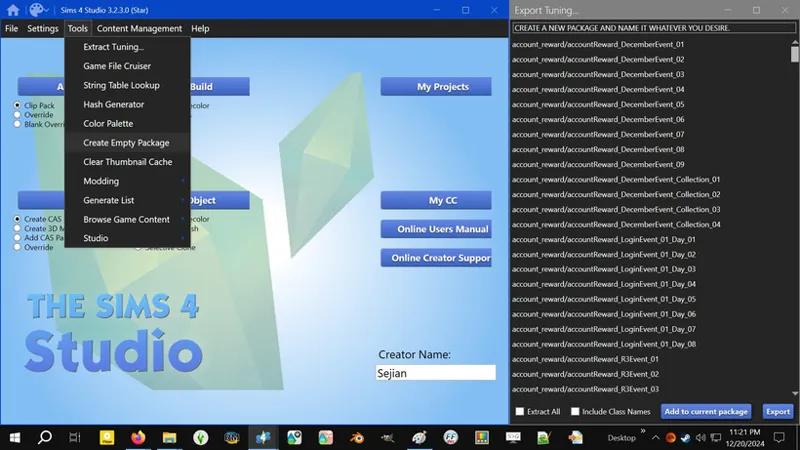
3️⃣ Create a new PACKAGE by clicking on the TOOLS drop-down menu, then clicking on CREATE EMPTY PACKAGE.
You will need to repeat this step if you want to do separate PACKAGES.
Clicking on ADD TO CURRENT PACKAGE on selected Tuning resources without first creating a new PACKAGE will prompt you to create a new PACKAGE, so you can skip this step and jump to ADD TO CURRENT PACKAGE the necessary resources.
⋆⋅ 📆 [2024] HAPPY AT HOME:
This was my first time doing this and I had absolutely no idea what I was doing.
While I was hunting down the UserSetting.INI fix, I kept watching these Tuning resources and thinking, "It can't possibly be that simple, is it? They wouldn't literally shove this !@#$ in my face while taking the !@#$, would they?" Turns out, "Yes, of course they would..."
If you dissect my HAH Unlock, you'll notice it's a bit different than the "key" I'm about to give you - well, it's a lot different - that's because my HAH Unlock was made weeks after the event had concluded. I didn't know that what I initially did would conflict with a Live Event, and I didn't find out until Reaper's Rewards rolled around.
If you're making a post-event unlock, you're welcome to just nuke everything from orbit the way I did in my HAH Unlock, but if you're making a live-event unlock, you need to do the following:
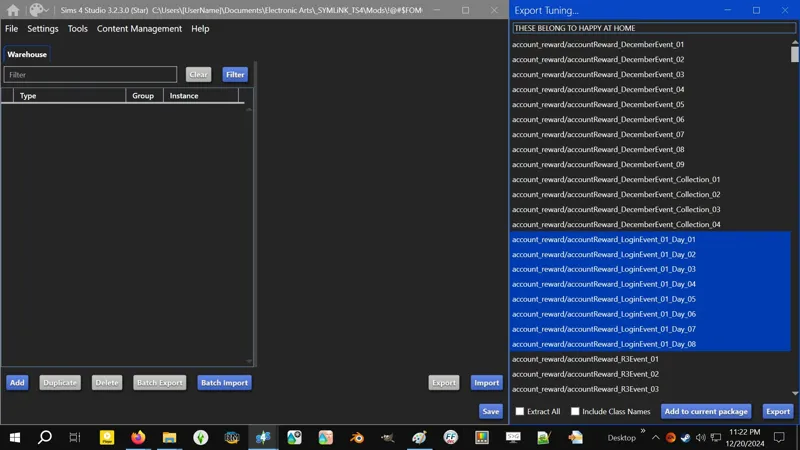
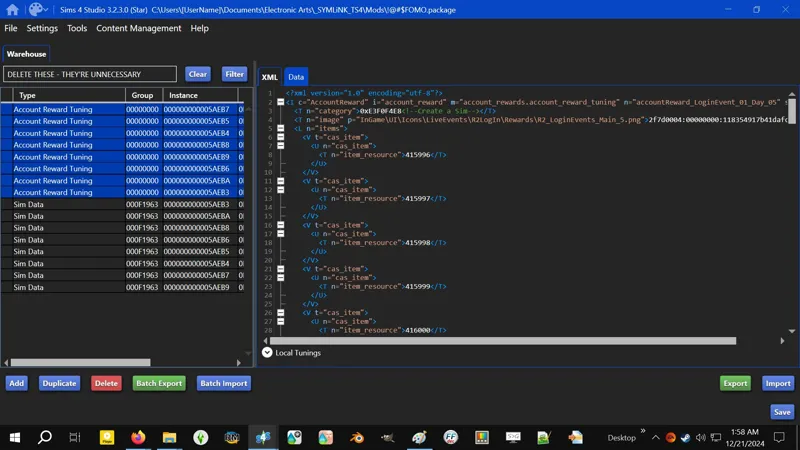
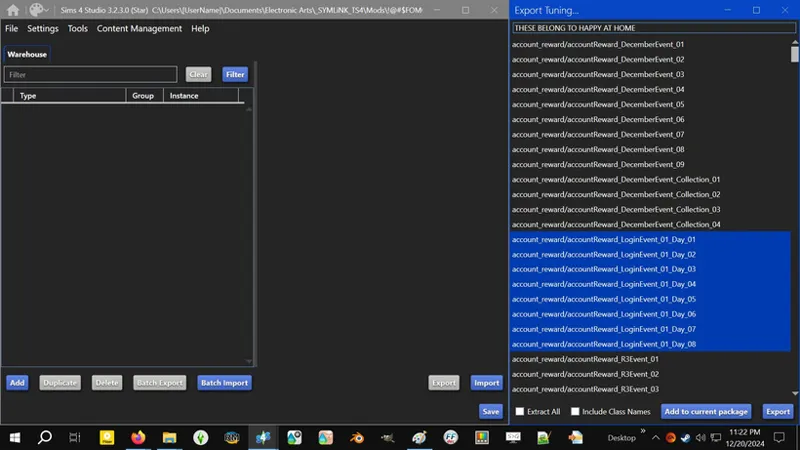
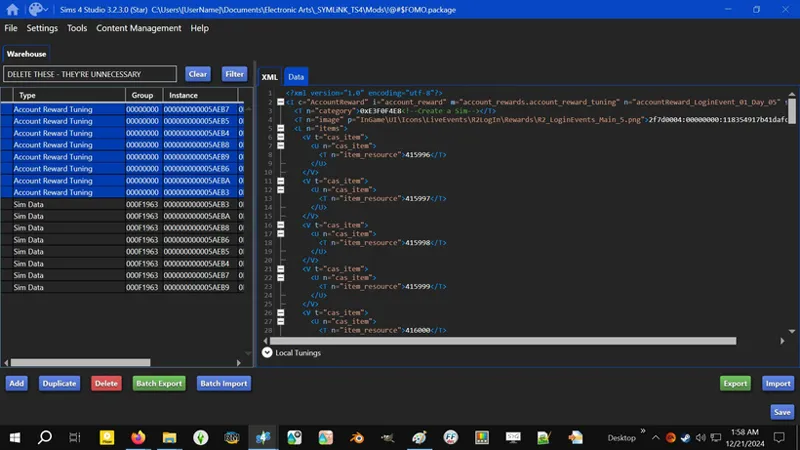
1️⃣ Select and ADD TO CURRENT PACKAGE the following Tuning resources:
accountReward_LoginEvent_01_Day_01
accountReward_LoginEvent_01_Day_02
accountReward_LoginEvent_01_Day_03
accountReward_LoginEvent_01_Day_04
accountReward_LoginEvent_01_Day_05
accountReward_LoginEvent_01_Day_06
accountReward_LoginEvent_01_Day_07
accountReward_LoginEvent_01_Day_08
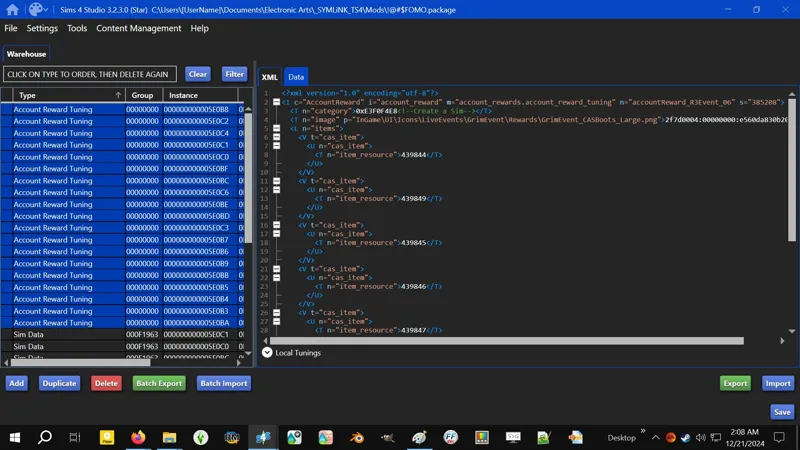
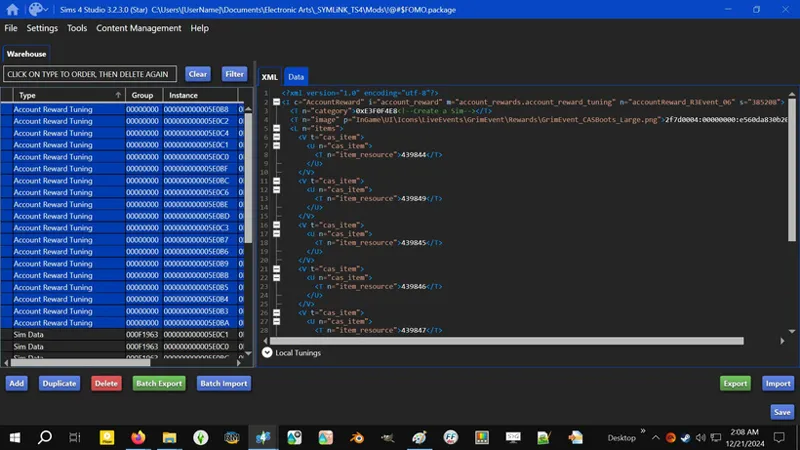
2️⃣ Select and DELETE the "Account Reward Tuning" resources. We won't need them. If this ever changes I will update this guide.
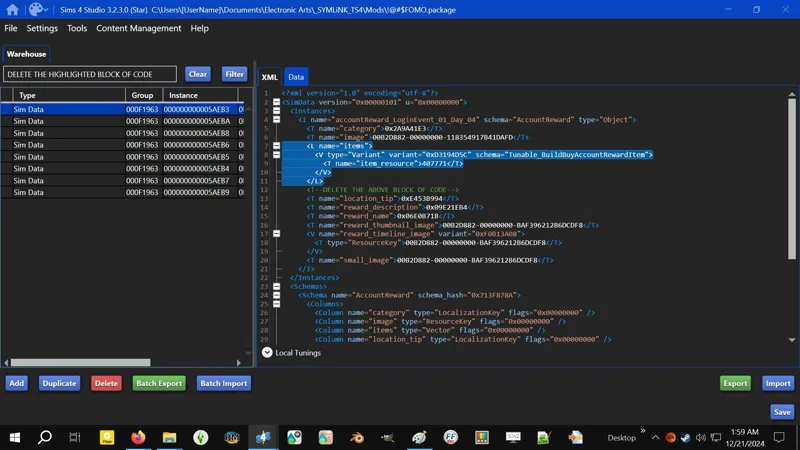
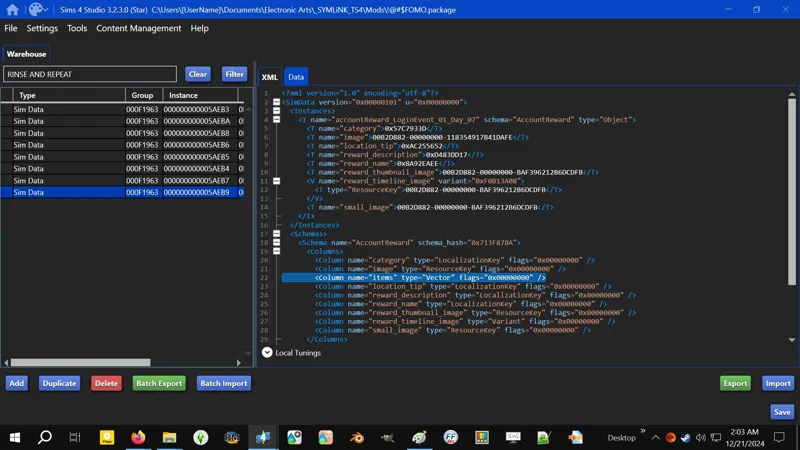
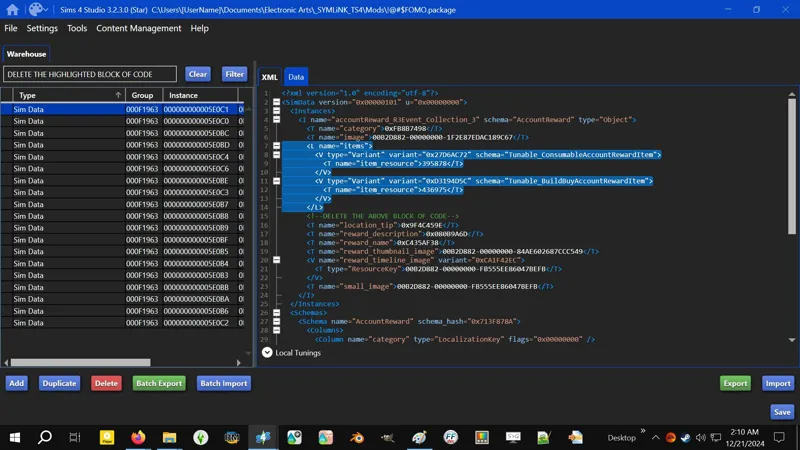
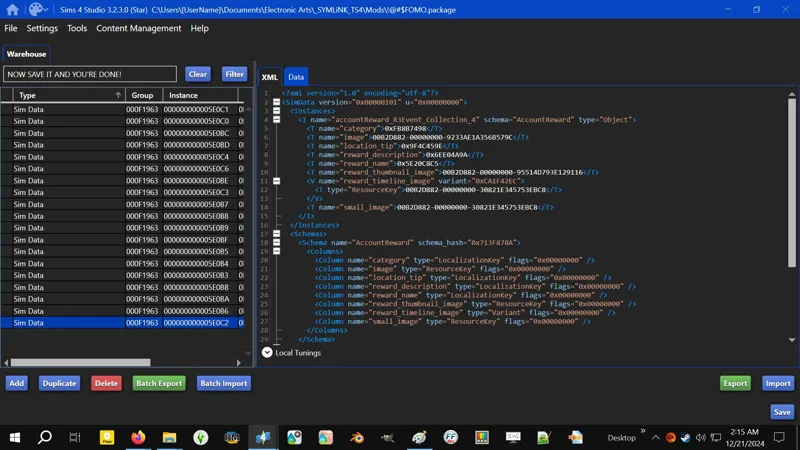
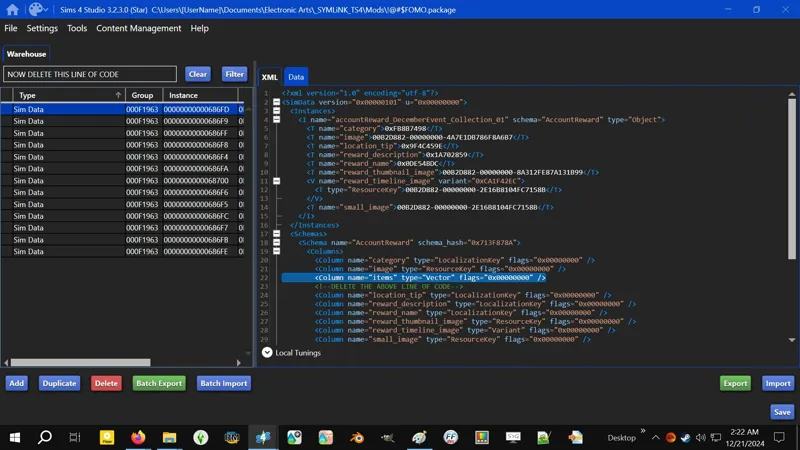
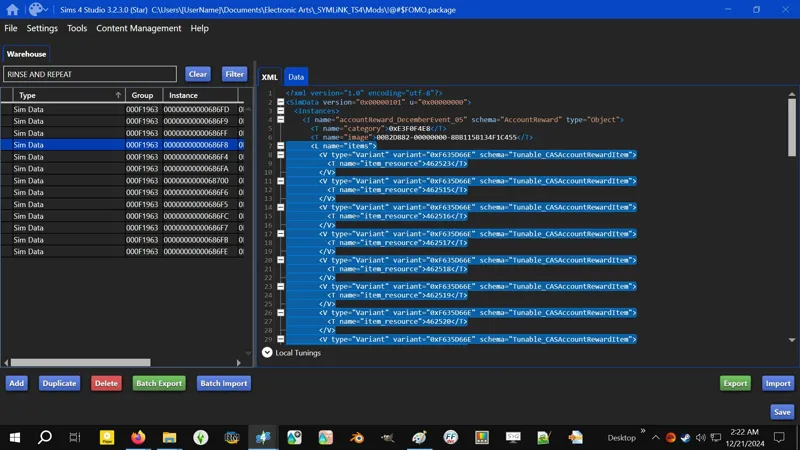
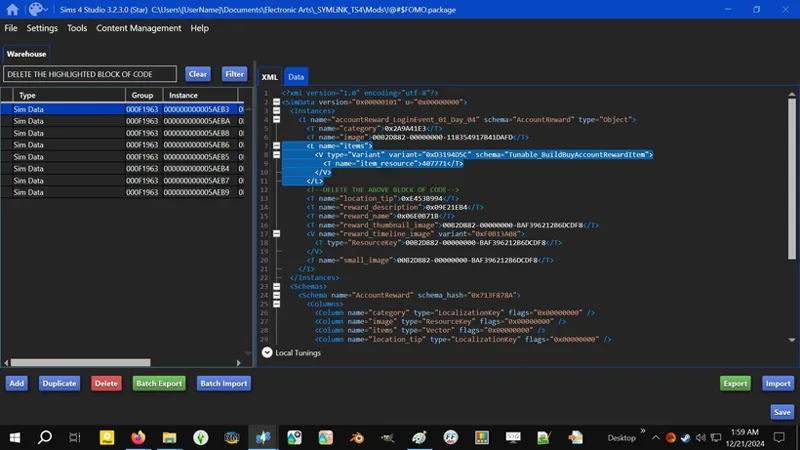
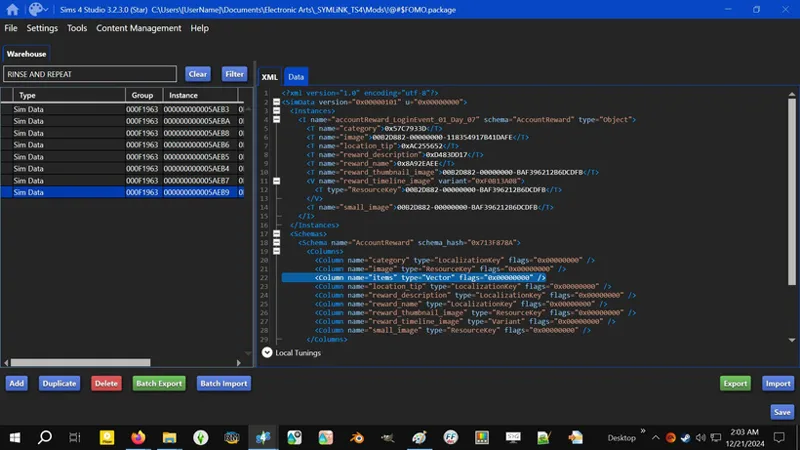
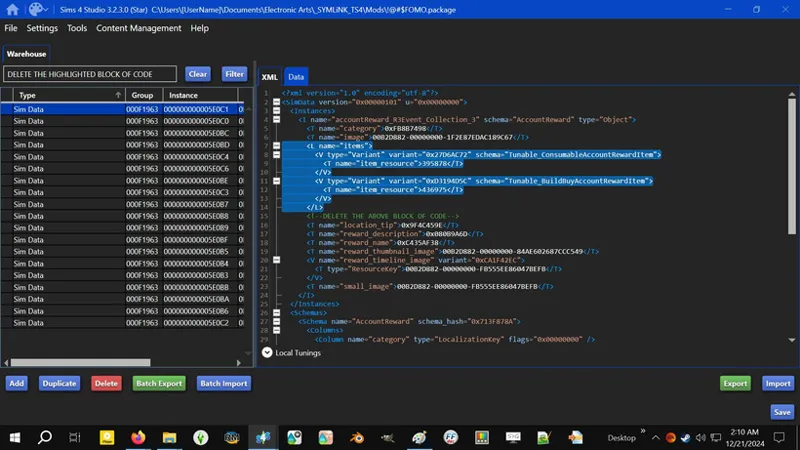
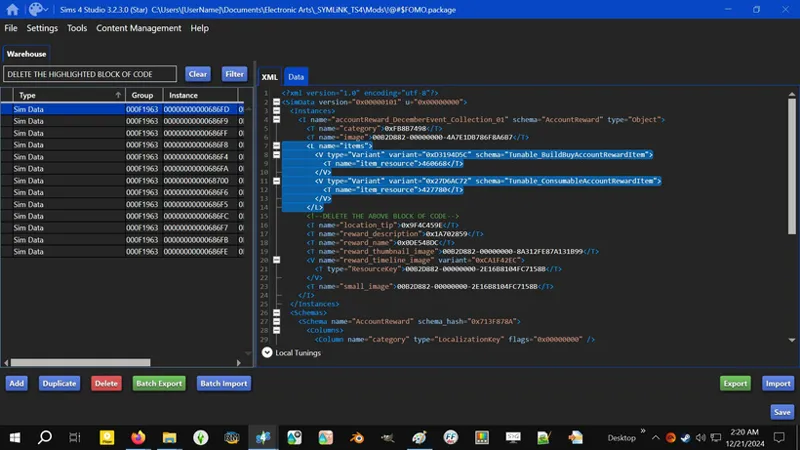
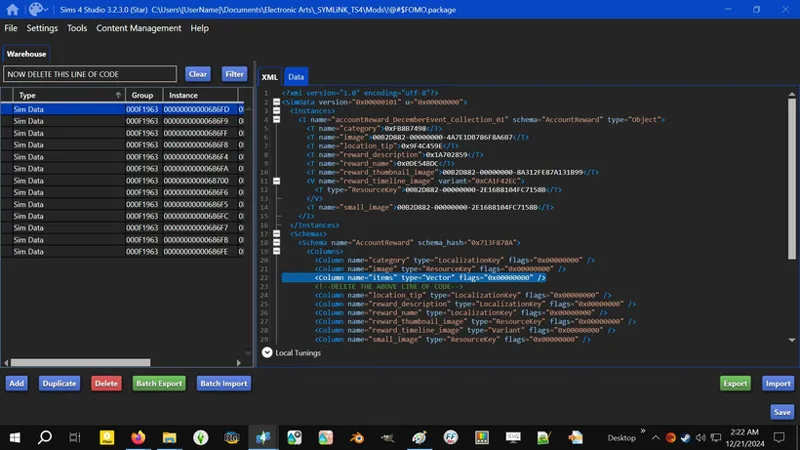
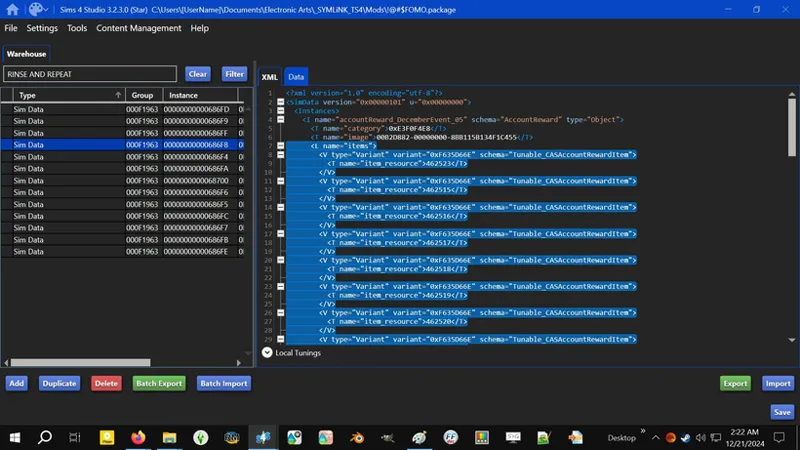
3️⃣ Now for the "Sim Data" resources. In the XML tab, under the "<Instances>" section, select the block of code for "<L name="items">". You can do this a few ways:
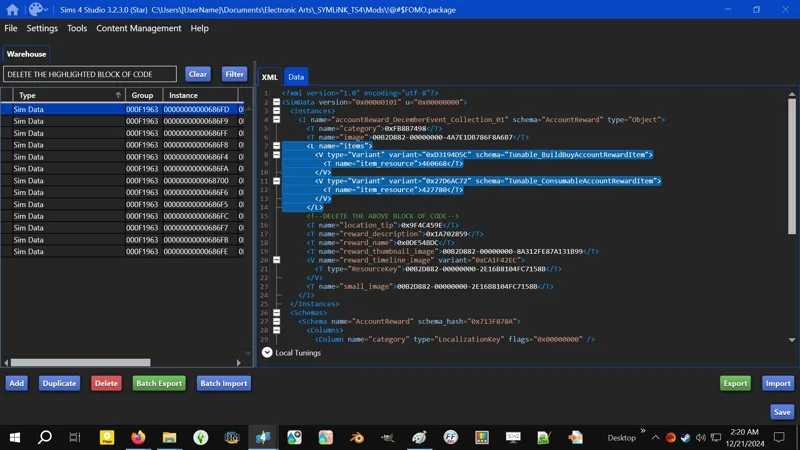
The easiest way if it's a big block is by clicking on that little white square to the left of the text to COLLAPSE the block of code, then click on the LINE NUMBER. This will select the whole block and you can just press DELETE to remove it.
Alternatively, you can find the closing "</L>", place the cursor behind it, then click and drag to select.
Alternatively, you can place the cursor at the beginning of the "<L name="items">" code, then find the "</L>" and press and hold SHIFT and click behind the "</L>" to select all.
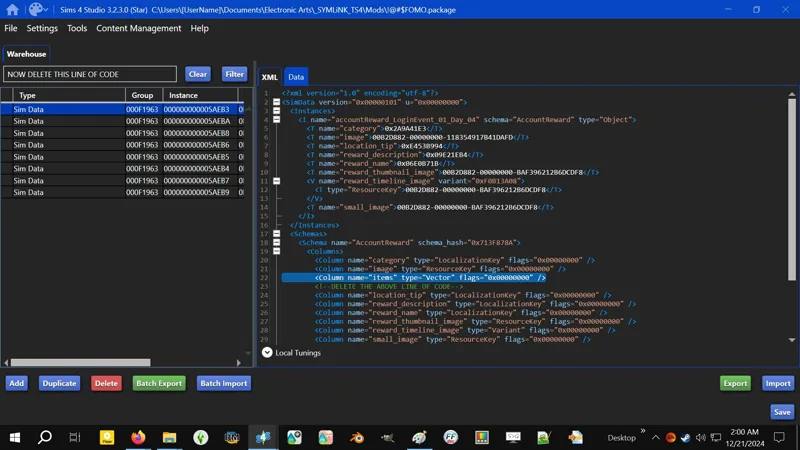
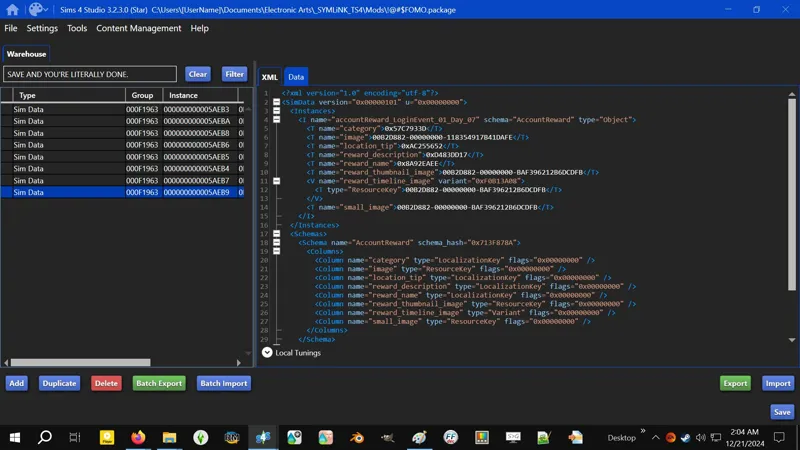
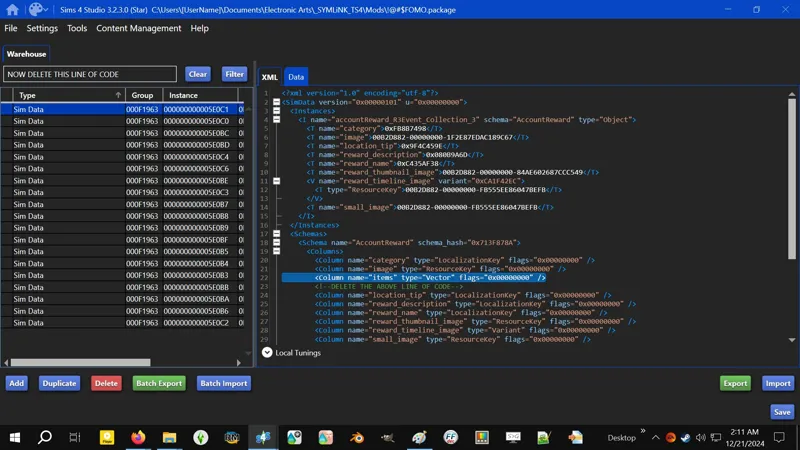
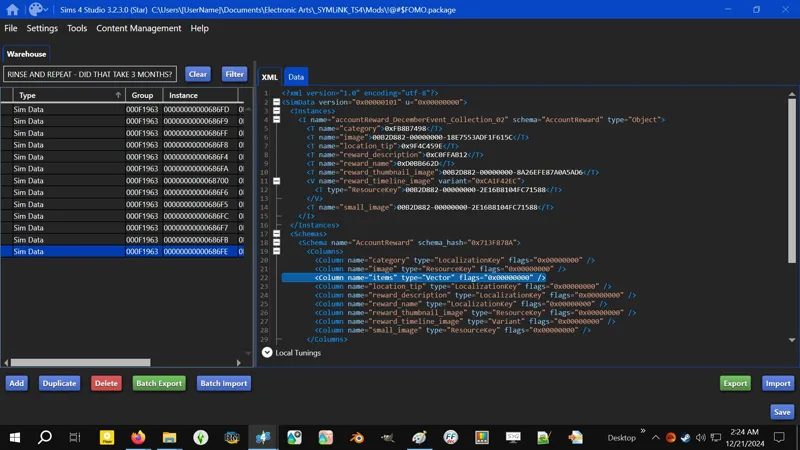
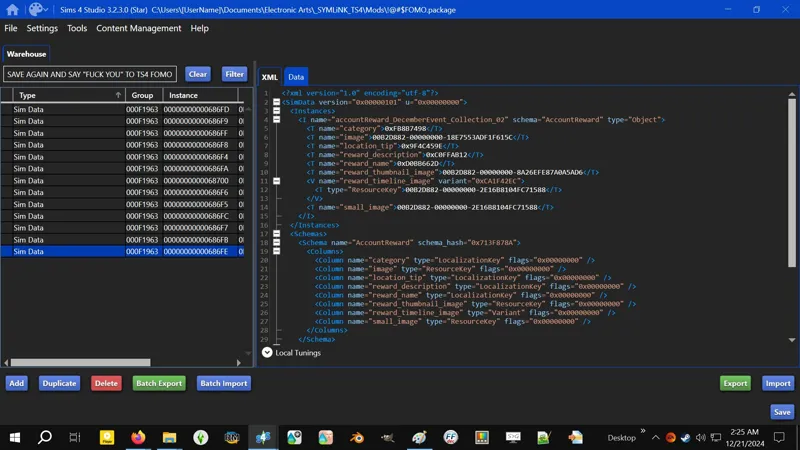
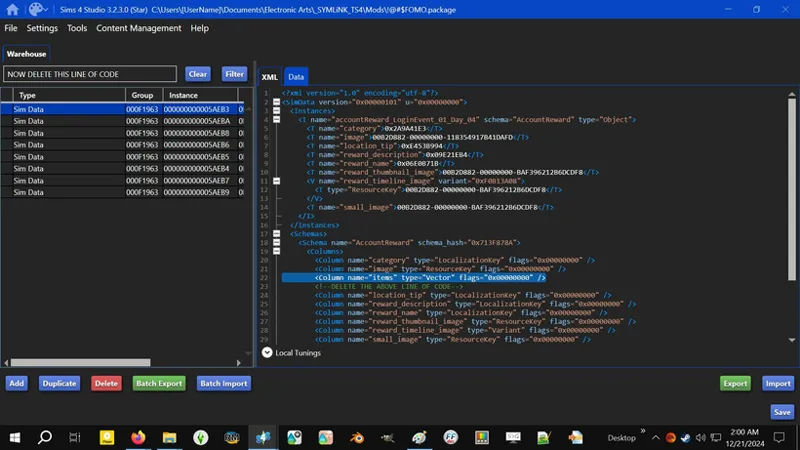
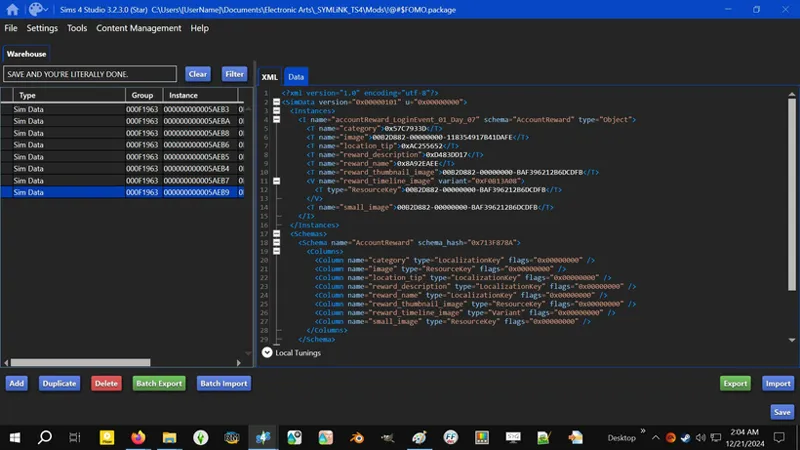
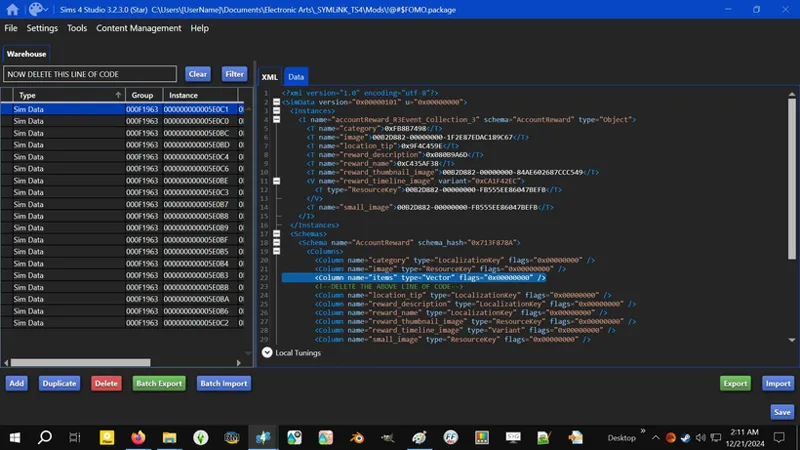
4️⃣ Now scroll down to the "<Schemas>" section and remove the "Column" entry for "items". If you don't do this, S4S will give you an error when trying to save the PACKAGE.
It's possible that we can remove the contents of "items" instances and close the code block by doing "<L name="items" />", which would negate removing the "Column" entry - but if I have tired it and just can't remember, it means it didn't work.
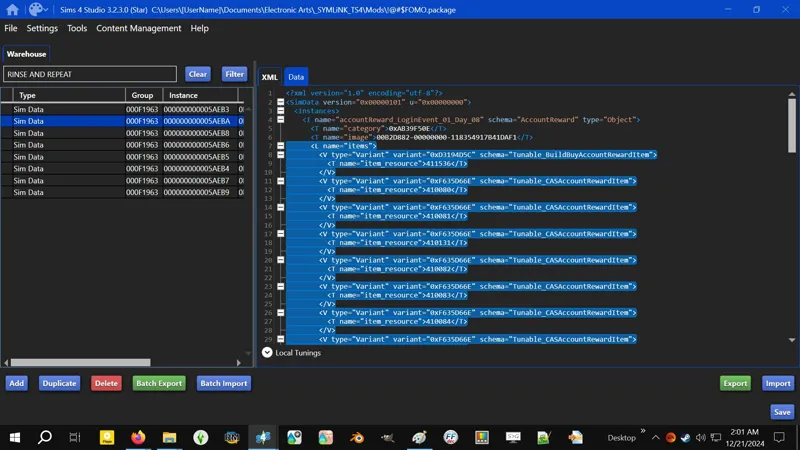
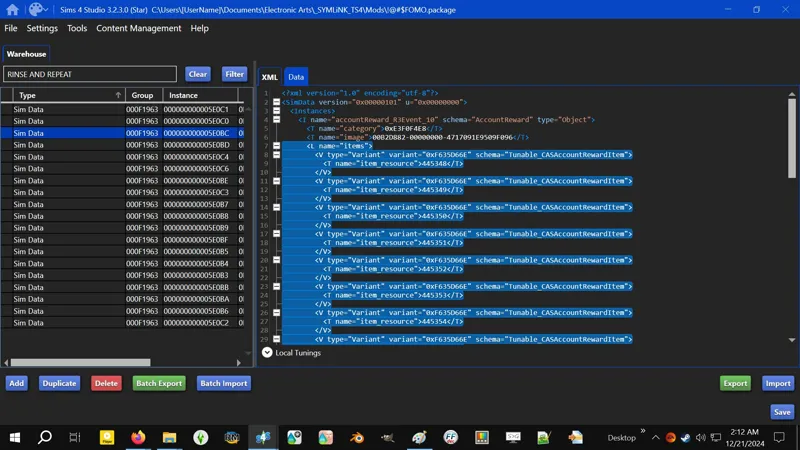
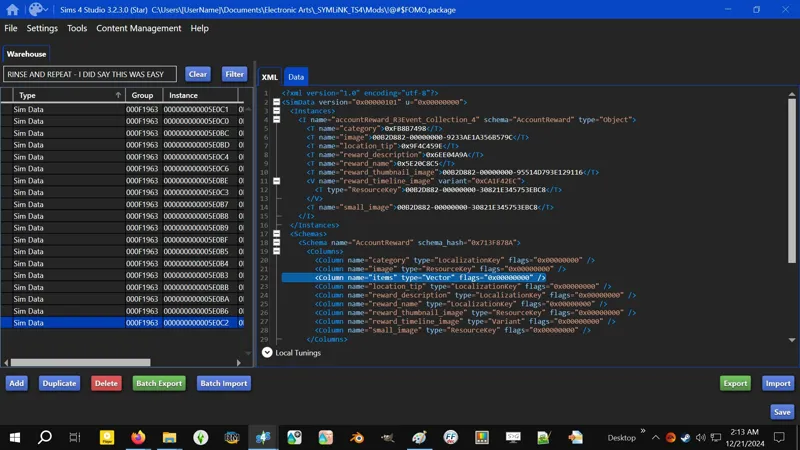
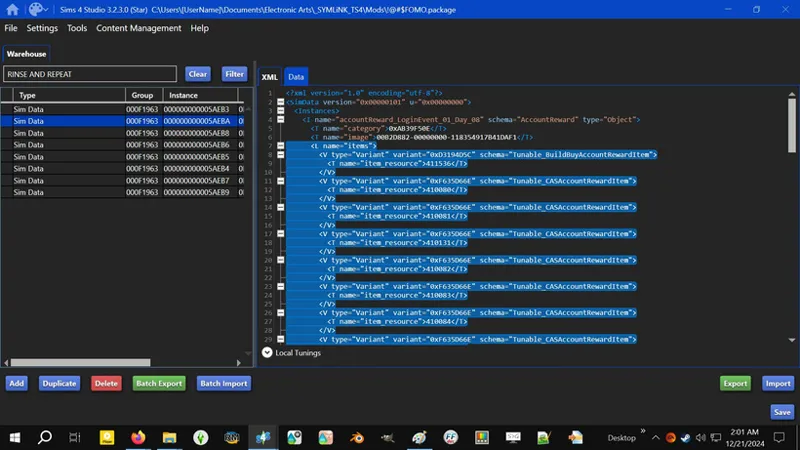
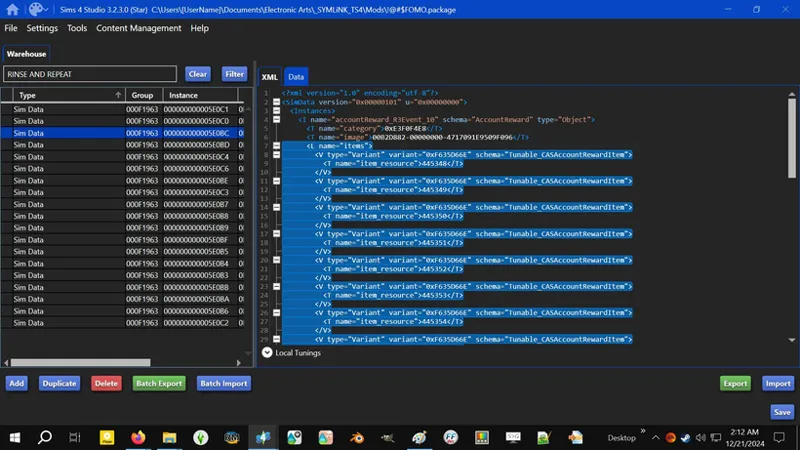
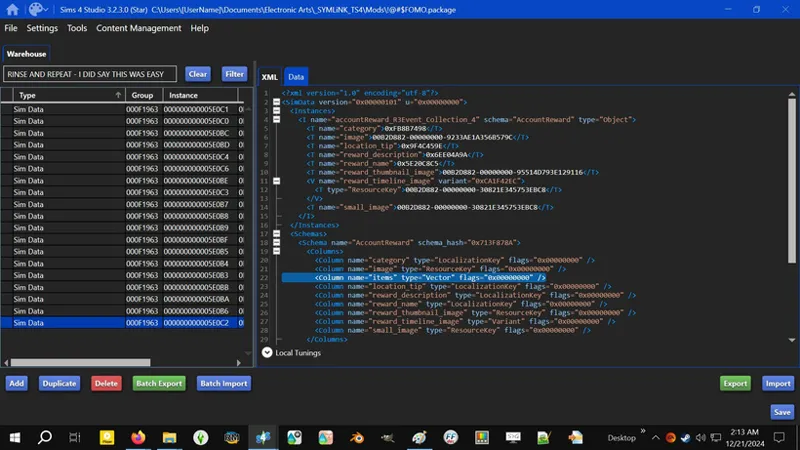
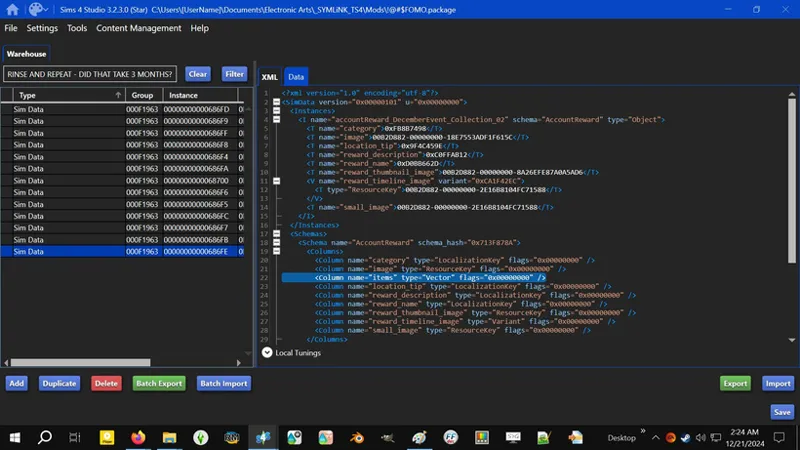
5️⃣ Now rinse and repeat steps 3️⃣ and 4️⃣ for the remaining "Sim Data" resources.
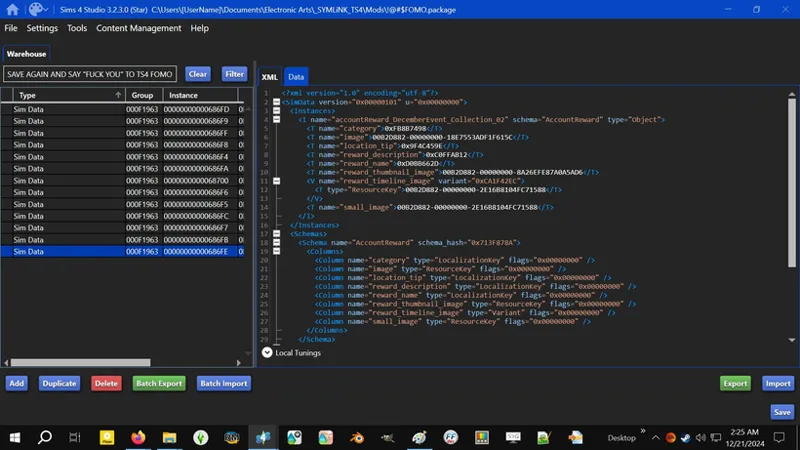
6️⃣ When you're done, SAVE your PACKAGE. You're done done. I did say in one of my rants that this !@#$ was easy, didn't I? Didn't take THREE (3) months, did it? !@#$ FOMO.
⋆⋅ 📆 [2024] REAPER'S REWARDS:
Reaper's Rewards are a little different - it has THREE (3) groups of Tuning resources. We only need TWO (2) of the THREE (3):
accountReward_R3Event_[...]
accountReward_R3Event_Collection_[...]
"reward_R3Event_Checkpoint_[...]" concerns the "trash" items in-between the FOMO items. Don't touch it.
1️⃣ Select and ADD TO CURRENT PACKAGE the following Tuning resources:
accountReward_R3Event_01
accountReward_R3Event_02
accountReward_R3Event_03
accountReward_R3Event_04
accountReward_R3Event_05
accountReward_R3Event_06
accountReward_R3Event_07
accountReward_R3Event_08
accountReward_R3Event_09
accountReward_R3Event_10
accountReward_R3Event_11
accountReward_R3Event_12
accountReward_R3Event_13
accountReward_R3Event_Collection_1
accountReward_R3Event_Collection_2
accountReward_R3Event_Collection_3
accountReward_R3Event_Collection_4
accountReward_R3Event_Collection_5
accountReward_R3Event_Collection_6
2️⃣ Select and DELETE the "Account Reward Tuning" resources. We won't need them. If this ever changes I will update this guide.
3️⃣ Now for the "Sim Data" resources. In the XML tab, under the "<Instances>" section, select the block of code for "<L name="items">". Follow the additional instructions in the Happy At Home guide if necessary.
4️⃣ Now scroll down to the "<Schemas>" section and remove the "Column" entry for "items". If you don't do this, S4S will give you an error when trying to save the PACKAGE.
5️⃣ Now rinse and repeat steps 3️⃣ and 4️⃣ for the remaining "Sim Data" resources.
6️⃣ When you're done, SAVE your PACKAGE. You're done done.
⋆⋅ 📆 [2024] COZY CELEBRATIONS:
Cozy Celebrations has no "trash" items and therefore lacks a "Checkpoint" group. We'll be modifying the TWO (2) available groups:
accountReward_DecemberEvent_[...]
accountReward_DecemberEvent_Collection_[...]
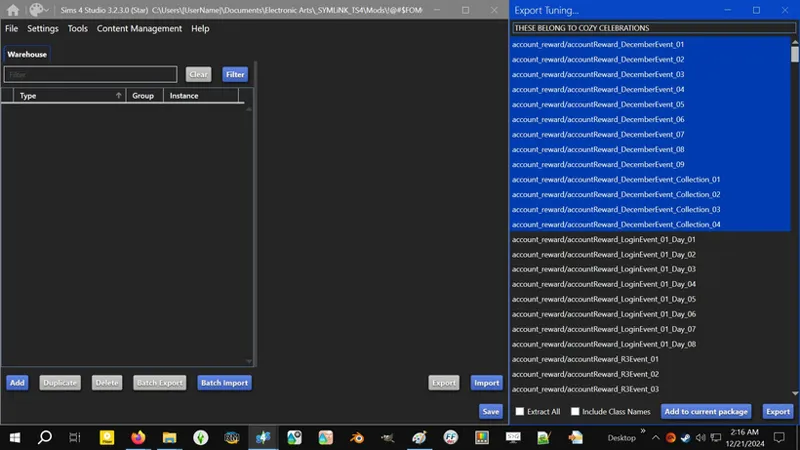
1️⃣ Select and ADD TO CURRENT PACKAGE the following Tuning resources:
accountReward_DecemberEvent_01
accountReward_DecemberEvent_02
accountReward_DecemberEvent_03
accountReward_DecemberEvent_04
accountReward_DecemberEvent_05
accountReward_DecemberEvent_06
accountReward_DecemberEvent_07
accountReward_DecemberEvent_08
accountReward_DecemberEvent_09
accountReward_DecemberEvent_Collection_01
accountReward_DecemberEvent_Collection_02
accountReward_DecemberEvent_Collection_03
accountReward_DecemberEvent_Collection_04
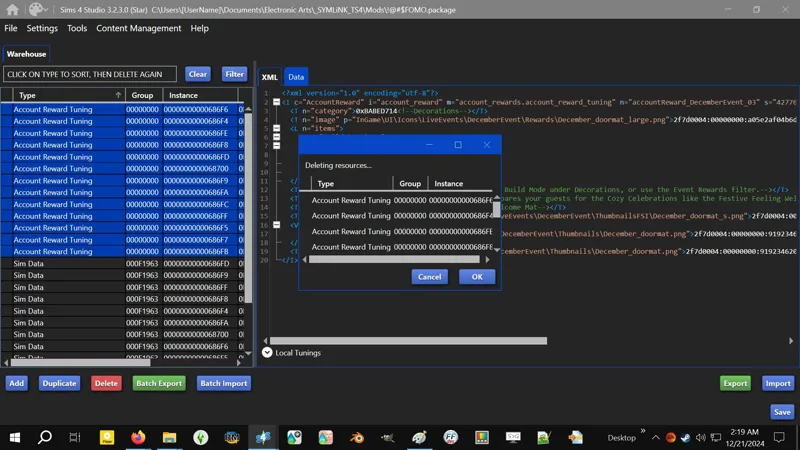
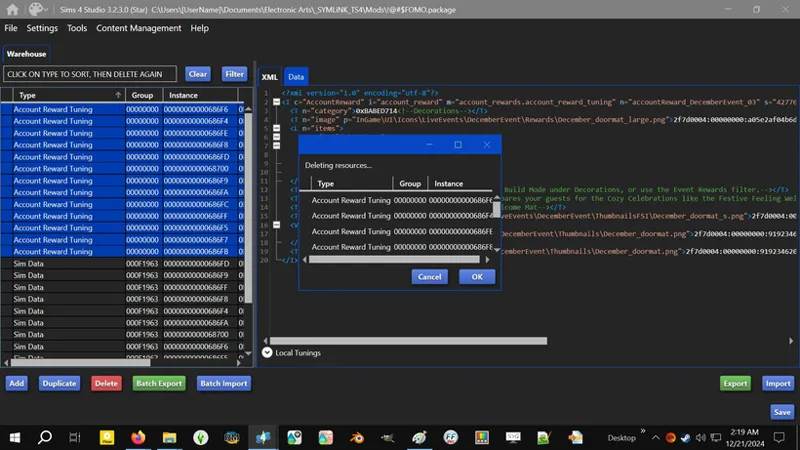
2️⃣ Select and DELETE the "Account Reward Tuning" resources. We won't need them. If this ever changes I will update this guide.
3️⃣ Now for the "Sim Data" resources. In the XML tab, under the "<Instances>" section, select the block of code for "<L name="items">". Follow the additional instructions in the Happy At Home guide if necessary.
4️⃣ Now scroll down to the "<Schemas>" section and remove the "Column" entry for "items". If you don't do this, S4S will give you an error when trying to save the PACKAGE.
5️⃣ Now rinse and repeat steps 3️⃣ and 4️⃣ for the remaining "Sim Data" resources.
6️⃣ When you're done, SAVE your PACKAGE. You're done done.
⋆⋅ 📆 BLAST FROM THE PAST:
Either EAxis did something or S4S ain't workin' right, but do not try to use the instructions for previous events for this one. Your game will literally crash to desktop every time you launch it.
Grab the FOMO Unlock I released for this - it works.
I will DIY this after significant troubleshooting.
TBC...
Comments (2)
once you've saved the package file, where do you put it?
In your Mods folder. It's a basic Tuning override. Nothing fancy or suspicious. No "-bound" shenanigans. If it doesn't work, pop over to the Community Tab and let me know which one you're having issues with in chat. I need to revise all of my old instructions to verify they still work properly after what I experienced with the new one, but they should, since I've got all of them installed, including the new one for whatsitcalled, uh... I already for- Blast From the Past! 😹