



Insta360 Cam 5.9, new Lexi Mount pole, the car stops shaking and replays follow the car you watch
A couple of you sent videos of your car shaking in the Insta360 picture, and Anthony asked why the camera stayed on his own car in replays, whatever car he picked. Both are fixed in this update. The iPhone app also works now with only the Insta360 installed.
The clip at the top was filmed with the real Lexi Mount on Matt Field's Corvette. Alexey Orlov built it together with Matt, and in the first two minutes of this video he sets it up at Laguna Seca:
How to Film #RealLifeGTA Drifting at Laguna Seca (ft. Alexey Orlov), Insta360 on YouTube
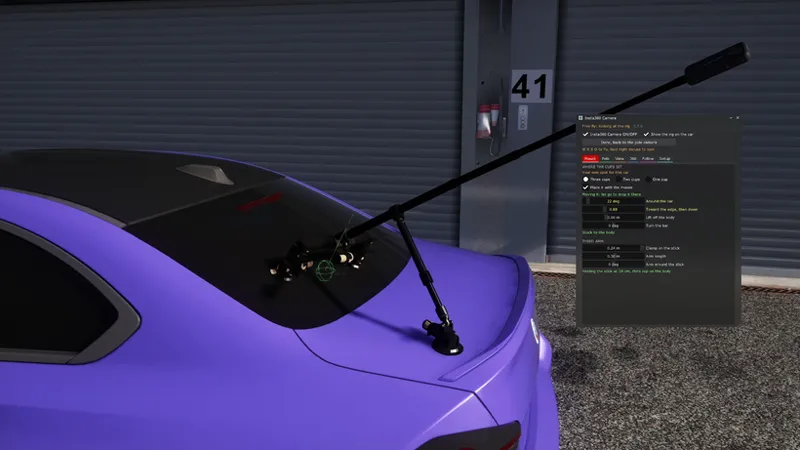
There it's pinned through the rear hatch. The one in the mod is the suction cup version, rebuilt in 3D from the videos:
The Lexi Mount takes the Drift look's place
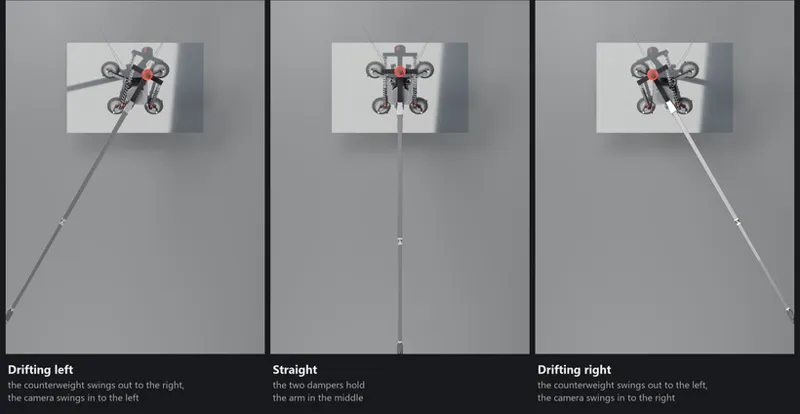
It's a new mount made for drifting: four big suction cups on the rear glass, an arm on a bearing with a counterweight in front, and a carbon pole with the camera behind.
Nothing drives it but the g. In a corner the counterweight gets thrown out, the arm turns and the camera swings in behind the car. In a drift that puts it behind where the car is really going, not where the nose points. Two shocks pull it back to the middle on the straights.
No script turns it. The arm has its own physics: the counterweight, the pole and the camera, the springs and the dampers.
The Drift look is gone. It turned the pole with a script, and with three cups, the default mount, it did nothing at all. If you had it on, there's nothing to do.
Turning it on
Open the Insta360 panel and go to the Mount tab. Pick Lexi Mount, on its own line above Three cups.
Leave "Place it with the mouse" on, click your car and drag the mount onto the rear window, the trunk or the roof. Do it from free fly or one of AC's cameras, not from the pole camera. Wait until it says "Four cups on the panel".
Tick Insta360 Camera ON/OFF at the top.
What you can change
Counterweight: 60/40 is what the maker recommends, and it swings the camera into the corner. 50/50 balances the arm, so it only moves a bit on turn-in.
Springs, from 0.25 to 1.00 N/mm, and Damping, both in the Mount tab. Softer springs swing further and slower. Low damping goes past the middle a few times, high comes back without going past.
In the Pole tab: the pole angle, from 5 to 60 degrees, and one or two sections (1.5 or 1.8 m).
Under the shocks the panel shows how fast it swings, how many degrees per g and where it stops.
The car doesn't shake in the picture anymore
On some PCs the car jumped back and forth in the shot by a few cm every frame, worse at speed and with an uneven frame rate. The camera was placed a moment before CSP drew the car, and that gap changed from one frame to the next.
Now the picture rides one of the car's own F6 cameras. AC moves those together with the car as it's drawn, so the gap is gone. In my tests the camera moved 6 to 12 cm against the car before, and 0 now.
It also holds if you switch the camera on while AC is looking at another car. If your CSP ignores the F6 camera, the app goes back to the old camera by itself instead of filming from the wrong spot.
Your car's F6 camera goes back to normal when you turn the pole camera off.
Still shaking on your PC? Look at the new Picture line in Setup > Tools > live readout. It shows how much the camera moves against the car each frame. Send me a screenshot of it with your bug report and I'll know what's going on.
Replays follow the car you're watching
In a replay with the pole camera on, the rig and the camera move to the car the replay is showing, and switch the moment you pick another one. The mount gets fitted to that car's body.
Before, it always sat on your own car and kept pulling the replay back to it.
Driving works exactly like before.
The On car line in the live readout tells you which car it's on.
RZ 360 Remote with only the Insta360
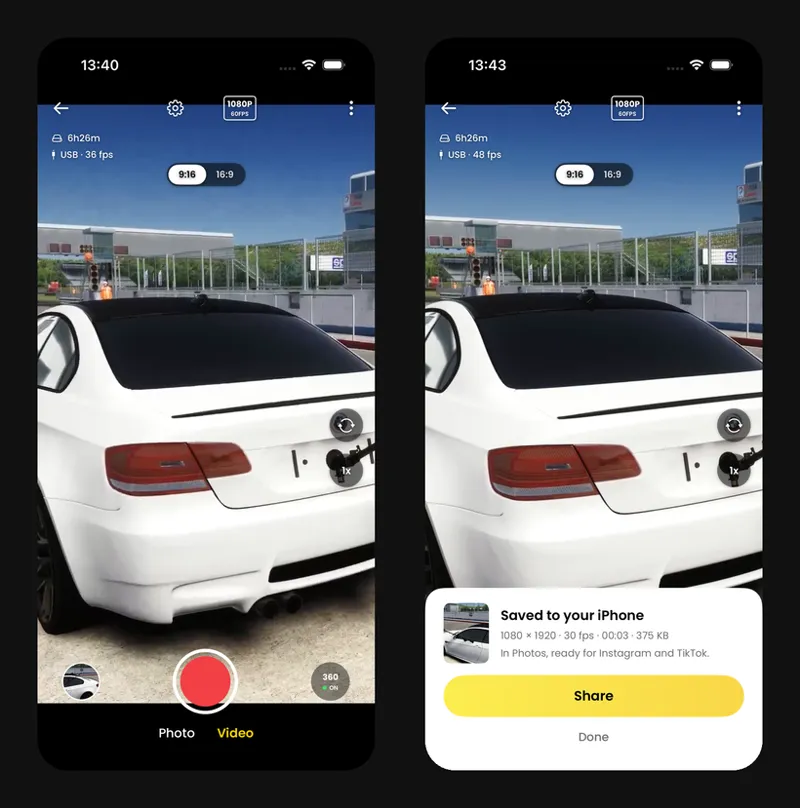
RZ 360 Remote is the new name of the iPhone app in the Phone tab (it was 360 Remote). It borrowed the video tools from the Walking Mod or the Mobile Cam, so with only the Insta360 installed it connected but showed no picture. The Insta360 brings its own now, and the live view and the recordings work without the other mods.
That's why this download is bigger than usual.
Smaller fixes
If the 3D rig can't load on your PC, Setup > 3D model says so now, and why. Before it just didn't show up.
Older CSP 0.3.0 previews (before preview 520) could get "not licensed" after the last update. Fixed.
How to update
Close the game and open the russozl Hub. It updates the Insta360 by itself, there's no button to press. Then start the game as usual.
Don't have the hub yet? Download it here: https://russozl.com.br/rz/v1/download/hub
Known limits
You need CSP 0.3.0 preview or newer. It doesn't work on CSP 0.2.11.
A car with no F6 cameras of its own uses the old camera, so on some PCs the shake can still show up on that car.
On triple screens CSP draws the camera with the triple screen layout, so the FOV slider doesn't change the picture there.
With the pole camera off, the rig you see in a replay stays on your own car.
RZ 360 Remote is iPhone only for now, and it's a beta on TestFlight.
The Lexi Mount only sits where its tilt can level the bearing: a rear window, the trunk or the roof. On a steeper panel the arm hangs to one side, and the Mount tab tells you.
The Lexi Mount is my own rebuild for Assetto Corsa, not an official Lexi Mount product. The cups, the camera and the pole follow real measurements. The masses and spring rates aren't published anywhere, so those are my estimates.
Thanks to freksis and winskinz for the videos, and to Anthony for the replay one.