


Walking Mod v2.1.0 - Custom Blender Animations, Path Recorder, Avatar Rework & New Menu
Update, October 2026: this version is retired. The Walking Mod now installs and updates through the russozl hub, attached to this post. Run it, sign in with Patreon and click Install. It finds the copy you already have and keeps your presets.
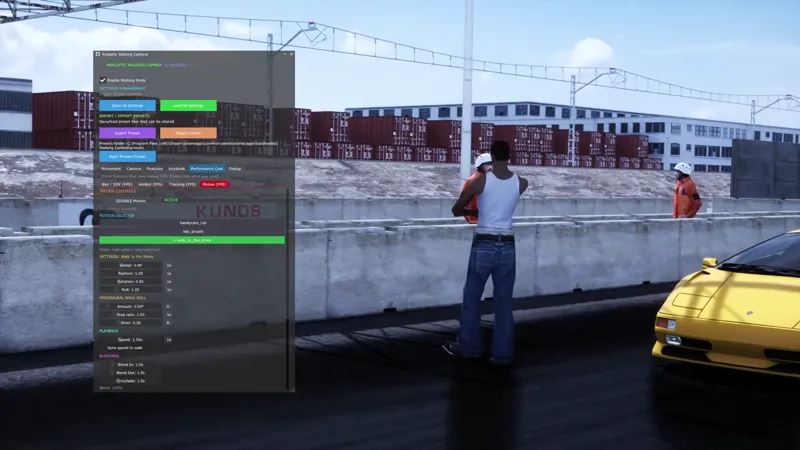
This is a big one. The headline feature is something I have wanted to do for a long time: I built a pipeline to make animations in Blender and bring them straight into the mod. That is what drives the avatar now, and it opens the door to a lot more down the line. On top of that the character system got a full rework, there is a new path recorder, the menu was reorganized, and there is a long list of fixes for tracking, replay and the sliding.
Here is everything that changed since the multiplayer update (the v2.0.1 build).
Custom animations from Blender
This is the part I am most excited about. I set up a full pipeline that lets me build animations in Blender and convert them into the format the game uses, so the avatar is no longer stuck with a couple of canned moves.
• Proper idle, walk and run animations that blend into each other naturally.
• A set of emotes and dances you can play on your avatar (waving, pointing, saluting, talking on the phone, and a bunch of dance animations).
• The same pipeline feeds the camera side, so the handheld camera motion and the Dolly camera packs come from Blender too.
• Because the pipeline is mine, I can keep adding new animations over time without rebuilding anything. More are on the way.
Path Recorder
New Recorder tab. You can record your walking path and play it back any time, on any car or track.
• Hit record, walk around, stop, and it captures the whole path.
• Play back your last take with one key, or save it as a named template to reuse later.
• If you had a camera motion running while recording, it saves that too, so the take plays back with the same feel.
• Good for repeatable shots, walk and talk style takes, or setting up a moving camera without placing dolly keyframes by hand.
Dolly camera
The Dolly is a full cinematic camera tool. Free Camera (Shift+P) lets you fly around with WASD and drop keyframes with K, then the camera travels the A to B path with straight, smooth or custom curve styles, with a 3D path preview before you record. Each keyframe saves the exact camera state (position, zoom and tilt). Ready made camera packs (full moves built in Blender, loaded from a list) are absolutely doable and something I am working on, just not bundled in this build yet.
The Avatar (it used to be the Stickman)
The on foot character is now called the Avatar everywhere in the app. Stickman never really made sense as a name, so it is gone. The picker was rebuilt from scratch.
• Ships with only CJ built in. Everything else is pulled from your own folders.
• Your installed drivers show up automatically, and anything you drop into the avatars folder shows up too with a clean auto generated name (drop red_ferrari_guy.kn5 and it reads as Red Ferrari Guy, no editing needed).
• Duplicates are merged. CJ, CJ (Driver) and the raw file name used to appear as three separate entries, now they collapse into one.
• Grouped by source (built in, your avatars, your drivers), with the long driver list collapsible and a search box.
• Your pick is saved properly now. Before it was tied to a list position, so re sorting could swap your avatar. It remembers the actual model now.
• Fixed the preview that cut off half the body and floated the avatar in the air.
Tracking that actually holds the car
The big fix. On drift tracks like Ebisu and Akina the camera kept losing the car and dropping back to free look. That was a bad value leaking in from the old AI track line aim, even when it was supposed to be off. I removed that system entirely. Tracking is predict based now and stays locked. It also no longer drops the car on the replay free and helicopter cameras, and if the car briefly disappears (pits, respawn) it holds the last position for a moment instead of snapping away.
The roll stays where you put it
The horizon used to slowly roll on its own. Manual roll was being read twice per frame and the second read cancelled the first, so Q and E did nothing while a drifting pad axis could tilt the camera by itself. Fixed. I also added an Auto roll and banking master toggle. Turn it off and the horizon stays level no matter what, while Q and E still work for manual roll.
Replay records your walk
Walking in a replay now plays back on the avatar. Recording used to be tied to the third person view, so if you walked in first person the replay showed you standing still. It records every frame now, in any view. You can also exit the car and walk around during a replay again, and entering a replay no longer leaves a frozen body with the camera stuck orbiting it. Hide in Replay now actually means no avatar in the replay at all if that is what you want, and it is off by default so your walk shows.
Two new presets, with real scroll zoom
Added Stable Camera (smooth and cinematic, locked horizon) and Unstable Camera (handheld, documentary feel). Both use smooth scroll wheel zoom instead of the old stepped zoom. I also fixed the MyPreset and MyPreset alt slots, which had leftover settings from features that no longer exist.
Hold to activate, by default
Every keybind is now hold to activate out of the box, with a per key option to turn it off. Before, hold only worked if you had already saved a value for that key, so on a fresh install the keys fired the moment you tapped them. The hold time is a quick 1 second.
Aimbot
New Completely Stable toggle at the top of the Aimbot tab. On keeps the aim perfectly locked with no sway, off leaves it as it is with natural human-like movement. The camera Motion layer complements the aimbot too: with a motion running, even a locked aim keeps a subtle handheld breath, so the whole shot looks more realistic.
New menu
The menu got reorganized. Features are at the top, debug and status info at the bottom where they belong. Tabs were renamed to make sense (the character stuff lives under Avatar and Avatar Model, the old Driver tab is now Walk Mode). The Avatar tab no longer sits on Initializing forever, the sync info moved to the bottom under its own heading. Passenger mode is hidden for now while I rework it, and I removed the Race Start bind since that feature does not exist yet.
A small heads up
The idle breathing animation still has a little bit of foot movement while standing still. The constant sliding is gone, what is left is minor. Proper foot planting is on my list for a future update.
Multiplayer note
Same as before: for everyone to see each other walking, all players on the server need to be on the same version. Mismatched versions make the avatars invisible to each other, so update together.
Smaller fixes and version notes
• Tracking diagnostics moved into a collapsed Diagnostics node at the bottom of the Tracking tab instead of cluttering the top.
• Replay track cameras no longer kill tracking (focused car fallback).
• A hard timeout so a stale car position can never freeze the aim.
• Settings now load on the first frame, and saving is blocked until that first load, so touching a slider early no longer overwrites your saved config with defaults.
• The character module was renamed under the hood, but your existing saved presets still load.
• Renamed the CineMotion labels to Motion.
• General cleanup of the Blur / DOF and Tracking tabs.
How to install
1. Download the attached file.
2. Extract the Realistic Walking Camera folder into Steam\steamapps\common\assettocorsa\apps\lua\
3. Enable the app in Content Manager (Settings, Custom Shaders Patch, Lua apps).
4. Open the app window in game. The toggle at the top turns walking on and off.
Thanks
Thank you to everyone who reported the tracking drops and the sliding, those reports are exactly what made this update happen. Drop bugs in the comments and I will be around.
russozl
Credit: the Thriller dance emote is based on "Thriller Dance By Michael Jackson" by Ace-Jane on Sketchfab, used under Creative Commons Attribution 4.0 (CC-BY).
Credit: the Macarena emote is based on "Skeleton- Macarena Dance" by yigitayyildiz on Sketchfab, used under Creative Commons Attribution 4.0 (CC-BY).
Credit: the Orange Justice emote is based on "Orange justice" by Coldary on Sketchfab, used under Creative Commons Attribution 4.0 (CC-BY).
Credit: the Criss Cross emote is based on "Fortnite Splatterella With Criss Cross Emote" by AstroNatee on Sketchfab, used under Creative Commons Attribution 4.0 (CC-BY).
Credit: the Electro Swing and Crackdown emotes are based on "Electroswing" and "Crackdown emote Fortnite" by Coldary on Sketchfab, used under Creative Commons Attribution 4.0 (CC-BY).