
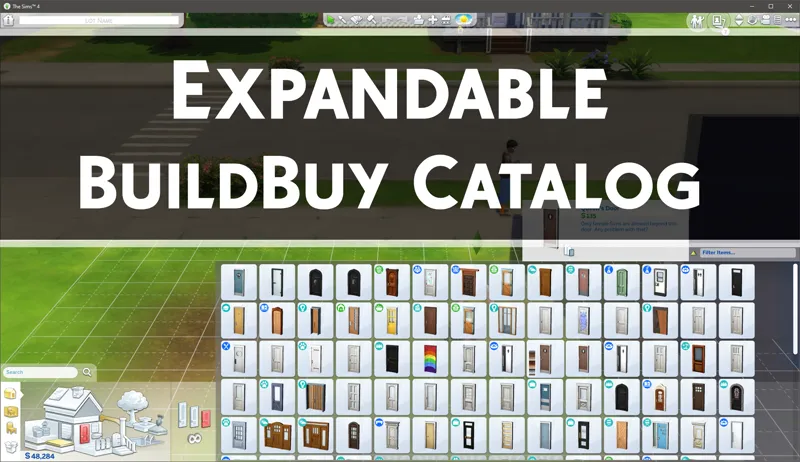
Expandable BuildBuy Catalog - Public Release
This is actually small piece of Project Raven. People saw it in my TOOL tutorial and it seemed to be in demand so I've decided to release early as a standalone mod. 🙂
Quick Start:
To use, simply hit the Tilde (~) key to toggle expansion.
If you don't have a tilde key or it's not working, you can use the 1 key instead (not the keypad).
Install Instructions:
Save the .package below to your mods folder.
Make sure mods are on in your gameplay options.
Thanks to all of my patrons, both existing and new, the support has been incredible and I can't say enough how much truly I appreciate it!
Comments (38)
Be giving notification. It said "The following UI Mods may have been responsible for your UI Exception. Make sure they are all updated, or removed if a working update is not available. If the mod is a multi-file mod, be sure to update or remove all files.
Sorry to bug you but, this is giving UI issues. Hopefully you can get to it soon.
Hey Tmex, is this updated for the new patch? When I open Build/Buy mode from manage worlds I can’t interact with anything on the screen. This is one of my favorite mods thanks so much for creating!!
Not yet, you can use BBB in the meantime as it includes the expandable catalog. Otherwise should have the update out soon
When I use this one in my Mac it deactivates the Build Buy one, don't know if this is a Mac problem, probably.
You should not use this or buildcam when using better buildbuy, they're included.
You are beyond genius 🙏🏾🙏🏾💙💙
Hello - does anyone know how to stop objects autocloning? Thanks
If it auto clones that's just how the object is designed. The mod doesn't change that setting
Hello, is your MTS terrain pack mod still supported? I need it to do the exteriors with the TOOL. Since the EA tool for modeling terrain, I no longer used it, on the exterior it would be effective following a case I had earlier. I loved this pack, thank you;)
It's discontinued but as far as I know, it should still work fine.
This.IS.The.Best!!! Thank you soooo much! Now, if only we could have a way to automatically filter all the non-custom content by default in CAS and inventory....sigh...if only. :)
Thank you so much for this!
Great mod! Thank you very much! :)
Thank you for this. This is something I've wanted for a long time.
I was so excited for this and then I downloaded it and started to do some build/buy...and then OMG!! I am seeing items I didn't KNOW existed! WHY, I don't know, but thank you so much for making this!!!
I just wanna say I appreciate you mods so so much. Thank you for making this game shine!
Your genius knows no bounds!!
OH .. no words (and for me that is quite unusual)! TY so much!
This is so wonderful, Thanks for this!
Thank you so much for this. I really appreciate it!
Hi, it doesn't seem to work on a french keyboard either. I'm on PC, and i tried the key just above TAB, since there is no tilde key (to get a tilde you must press Alt Gr + 2, i tried that too and it doesn't work, sadly)
Can you link me to a keyboard layout that matches yours please?
Given it a go, it doesn't seem to work for a UK keyboard. Changed to US keyboard in my Windows settings and it works then. Just a heads up in case you get other comments from UK users
It does work for UK, but the key may vary. I believe for a UK english keyboard it's wherever your "~" is located.
Thank you so much, been wanting this forever!!
This is a game changer. Couldn't wait, had to be a Patron. Thank you!
Thank you sooo much! I've been wanting this since the SIms 3!
Thank you TMexi for this fabulous mod, in Europe, AZERTY, it would be the é2 key ~ the third on the left on the same line below F1, again thanks, I place it and I test the key;)
Please don't forget my French translation of TOOL, that would be nice;)
Hey Twisted Mexi, this mod is incredible, but I think you forgot a small important detail. The shape of the keyboards, as well as the layout of the keys, can change from country to country, which means that the "~" Tilde key will not always be responsible for carrying out the action of expanding the catalog. Example: I use the Brazilian keyboard, and the tilde key is in the middle of the keyboard, next to the enter key. And my tilde key was not expanding the catalog. That's when I realized that the tilde key on an American keyboard is on the upper left of the keyboard. This key on my keyboard is represented by the commands: "and ', and and made the catalog expansion work. I think that this differentiation in relation to the keys, which can vary even more depending on the nationality of the keyboard, can end up resulting in a lot of confusion about how this mod works. I think it would be important if you changed the command to a universal key, which never changes regardless of the keyboard. Or use the combination of two keys to activate the mod, such as shift + some specific key. I think this is important feedback. =)
Thank you, I'll probably leave it as is for ergonomic reasons, but I'll make a note that it may be different. In code it's only labeled as Tilde so I didn't realize.
OMG!!! This has been so needed since forever!! THANK YOU!!! You've saved my eyes from strain.
So needed, thank you!
Thank you <3
Very nice! Thank you!
OMG THANK, THANK, THANK YOU
This is a game saver!!! Thank you so much!!! 🤗😙👍🌈