
Better BuildBuy v3.4.1: Business and Hobbies Hotfix
EDIT: V3.4.1
v3.4.1
Fixed color wheel UI for lights
Updated Filter pack order.
Fixed missing Small Business category not showing when it should.
v3.4 - Business and Hobbies Updates
Updated for compatibility with Business and Hobbies Patch
Updated Organized Debug for Business and Hobbies items.
Thank you to those who were patient.
🚨🚨🚨🚨🚨🚨🚨🚨🚨🚨🚨🚨🚨🚨🚨🚨🚨
🚨🚨🚨🚨🚨🚨🚨🚨🚨🚨🚨🚨🚨🚨🚨🚨🚨
YOU MUST REFRESH YOUR ORGANIZED DEBUG
REFRESH STEPS:
1. TURN IT OFF, RESTART GAME.
2. TURN IT ON, RESTART GAME.
🚨🚨🚨🚨🚨🚨🚨🚨🚨🚨🚨🚨🚨🚨🚨🚨🚨
🚨🚨🚨🚨🚨🚨🚨🚨🚨🚨🚨🚨🚨🚨🚨🚨🚨
====================================
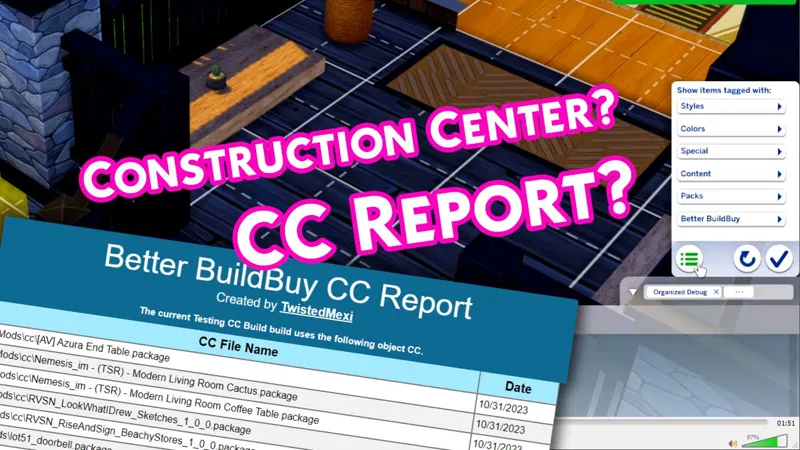
I've added a CC Report feature for easily sharing and assessing your CC builds. This is accessed via a new Construction Center button, which will grow with time to become your main point of access for Better BuildBuy's future settings, features, and help guides. Favorites have also received an improvement in behavior.
Added a Construction Center button to the filter panel. This will become the main hub for future Better BuildBuy features and options.
Added a CC Report option to the Construction Center menu, which will generate a list of all CC packages used in your current build.
The CC Report will open in your browser, and has an "Export Spreadsheet" option at the bottom, where you can add a column for links to the creators' CC pages.
Enhanced the favorites system so that favoriting a swatch variant won't require you to have that color selected in the filters in order to see the favorite. This was causing some players to mistakenly think the favorite hadn't been saved.
Color filters can still be used in favorites view to exclusively filter to the selected colors.
===GENERAL INFO===
🚨🚨🚨🚨🚨🚨🚨🚨🚨🚨🚨🚨🚨🚨🚨🚨🚨
🚨🚨🚨🚨🚨🚨🚨🚨🚨🚨🚨🚨🚨🚨🚨🚨🚨
YOU MUST REFRESH YOUR ORGANIZED DEBUG
REFRESH STEPS:
1. TURN IT OFF, RESTART GAME.
2. TURN IT ON, RESTART GAME.
🚨🚨🚨🚨🚨🚨🚨🚨🚨🚨🚨🚨🚨🚨🚨🚨🚨
🚨🚨🚨🚨🚨🚨🚨🚨🚨🚨🚨🚨🚨🚨🚨🚨🚨
New to Better BuildBuy? This video will help you get started quickly.
Ever wanted to be able to pin the objects you use the most?
Better BuildBuy now has a favorites category that allows you to do just that!
Here's a quick start, in addition to the tutorial video above.
Features:
Easily favorite objects with your mouse middle click (track pads can usually middle click with 3 finger tap or by pressing left and right buttons simultaneously)
Favorites will stay even between mod versions.
Debug and LiveEdit categories will automatically turn on the corresponding filter if it's not on when selected. This will avoid the "my debug is empty" issue.
Inventory automatically turns on the debug filter if it's not on when selected, due to the frequency that debug objects end up in inventory.
Added Feature Update Notifications
Favorites Quick Start:
Middle (wheel) click your mouse on an object to mark it as a favorite. You'll see a teal bookmark appear when favorited.
Go to Browse by Function and set the dropdown to Favorites to show all of your favorited items.
While in favorites, you can middle click to mark the object for removal from favorites. This is indicated by a small red bookmark.
Removal is confirmed when you leave favorites or leave build mode.
Notes:
When you favorite an item in a category that has "new item" markers, they will be removed temporarily. This is necessary because of how the catalog recycles cells for each object. The new object markers will return when you change categories.
This currently works only on objects and not build items like floors, wallpapers, etc.
I have plans to expand this feature in the future, but feel this is a perfect starting point.
====PRIOR UPDATES=====
v3.3 - Life & Death Patch Updates
Updated for compatibility with Life & Death Patch
Updated Organized Debug for Life & Death items.
Significantly optimized Favorites load time.
Fixed debug or swatchless objects missing from Favorites.
As a result of above, favorited non-primary swatches now only show in favorites if you turn on the color filters.
Fixed two scenarios that caused the CC Build Report to fail or get stuck.
v3.2.6 - 2/27/24 Patch Updates
Updated UI files for compatibility with the 2/27 patch.
Removed the Shopping Cart menu button because... well, I mean do I really need to explain why? Just no.
v2.11.4 UPDATE:
Fixed kit filters since EA has now separated kit filters natively.
v2.10 UPDATE:
Organized Debug updated for Growing Together's content.
Fixed a bug with the Skill bar icon not showing.
v2.9 UPDATE:
Updated the expandable catalog to support the room catalog. Access per the usual "~" or "1" key toggle.
v2.8 UPDATE
BuildBuy filters have been updated to include a select all in the following sections: Color, Style, Expansion Packs, Game Packs, Stuff Packs, Kits
Better BuildBuy now detects if a player has left the mods list in the main menu turned on while having a large amount of mods, which can cause much longer load times unnecessarily. It will explain and offer to turn the list off for you.
Removed non-buildbuy kit filters from filter panel.
Updated EA Desktop permission fix instructions.
v2.7.1 UPDATE: Anyone who has reinstalled TS4 using the new EA Desktop app may have ran into a UAC error when trying to turn on BBB's Organized Debug. This is due to EA Desktop's file permissions defaulting to read-only. v2.7.1 finally has an automatic fix for this, and BBB will fix the TS4 permissions on your behalf. If you have User Account Control turned on (the windows "are you sure?" messages), you'll be asked to allow "icacls.exe" to run. This is normal and is BBB attempting to repair your TS4 permissions for you. Click yes and BBB will be able to turn on Organized Debug without issue.
Originally designed for Create-A-World's Lighting Editor, the color wheel control for lighting is coming to Better BuildBuy.
It's still accessed via shift+clicking lights in build mode, but now the control includes complete control over the lighting color. For support with existing builds, the control still includes the EA preset swatches.
Yes, the lighting does share through the gallery.
No, the lighting does not make your build CC.
As always, if you experience any issues please come to discord.twistedmexi.com to report them.
New to Better BuildBuy? This video will help you get started quickly.
Public release now available!
=======PREVIOUS UPDATES=======
Welcome to BBB v2.5!
Two main changes - firstly, I've added MOO and Ignore Unlocks to the BBB options.
They can be found under the Organized Debug checkbox.
Secondly, my discontinued BuildBuy Deletion Fix mod has been renewed as part of BBB's features. For those unaware, this was a cheat that stopped BuildBuy from deleting anything, allowing you to make changes like wallpaper or modifying architecture without losing your objects. This is now an option in BBB's filter panel. Unlike the other options, it does not persist between sessions. This is intentional, as you should only turn it on while necessary and turn it back off immediately after. Undo may not work for anything you do with it on. You will also receive a pop-up when turning it on, reminding you of this. No, the pop-up is not negotiable, it's one extra click and is still much faster than typing the old cheat. Without it, our support team would be inundated with players asking why they can't delete objects.

Updates:
Added new "permission denied" error message for the few users who kept getting the desync message over and over, making the actual issue more clear to the user.
The two warning files inside the tmex-betterbuildbuy folder now delete automatically after first successful run, to reduce chances of player confusion
Added a MoveObjects toggle to the BBB filter options. Do NOT use the cheat anymore. Setting will persist.
Added an Ignore Unlocks toggle to the BBB filter options. Do NOT use the cheat anymore. Setting will persist.
Added BuildBuy Deletion Protection to BBB filter options. Setting will NOT persist, by design.
Updated light editor logic to allow cloning of rooms using shift.
=================
ORIGINAL BETTER BUILDBUY INFO
(This video will help you get started quickly.)
New Features:
Having Organized Debug on no longer causes your lot to be marked as CC. That means you no longer have to restart the game constantly.
A Light Editor has been added to build mode, with a dropdown for light selection. You can access it by shift+clicking any light.
Debug/LiveEdit Objects for packs you don't own will no longer appear in the catalog.
"Kit" pack filters have been split into their individual kits, so you can pick exactly which kit you want to see.
Added a "Desync" dialog message. There's a few occasions where Organized Debug can be left in a bad state, for example after deleting your resource.cfg. This new dialog will show when organized debug needs reset. If you get it, all you should need to do is restart your game once and then you can continue using it as you normally would.
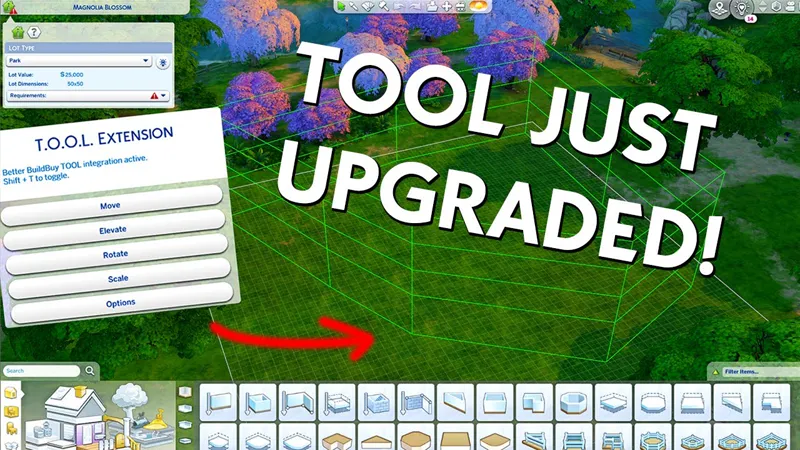
Did you know you can use TOOL in build mode if you're using Better BuildBuy? Grab TOOL here!
Better BuildBuy Quick-Start
You don't have to use Organized Debug for TOOL. Just don't check the filter.
Do NOT use debug or liveedit cheats. Use their respective filters instead.
Do NOT use MOO or Entitlement Cheats. Use their respective filters instead.
Do NOT install buildcam or expandable catalog separately. They're included in BBB.
Filters are different! Please don't ask where your CC went.
Filters work as follows: Hide Maxis - Hides all regular objects that aren't debug, liveedit, or cc. Debug - Shows debug objects, replaces the need for the debug cheat. LiveEdit - Shows LiveEdit objects, replaces the need for the liveedit cheat. Custom Content - Shows Custom Content objects. Off by default, be sure to check this if you want your CC visible. Filters stay set even when you close your game, so you'll only need to turn CC on once if desired.Press 1 (number row) to toggle catalog size.
Press Tab to activate Freecam mode in build.
If you'd like to use Organized Debug, open the game and open your buildbuy filters. Scroll to Better BuildBuy and select Organized Debug. You'll receive a pop-up and will be told to restart. After doing so, Organized Debug is active.
If you're completely new to BBB, I recommend watching my original tutorial.
Install Instructions
⚠ FOLLOW IT WORD FOR WORD. ⚠
1. Delete any existing copies you have for BBB.
2. Open the "TwistedMexi's Better BuildBuy v3.4.1 Official" zip and drag the "Tmex-BetterBuildBuy" folder inside to your mods root. (No subfolders!)
3. That's it! Don't restructure or move the files in any way NOTE: On Mac, .zip files may automatically be unzipped when downloaded. In that case, drag the newly downloaded folder to your mods.
Uninstall Instructions
Hate to see you go, but if you are, it's best if you do the following first:
1. Open your game with the mod installed.
2. Turn off Organized Debug in your filter panel.
3. Close your game.
4. You may now delete the mod.
This Better BuildBuy Update Will Have You Sharing More CC Builds. (YouTube)
Comments (50)
Long time BBB user here! Been modding and creating my own personal cc for 25 years. I recently had major issues with a lot of my tmex mods bc of CURSEFORGE. If you use curseforge and also enter in your own mods, you will have an error. If you do not remove the mod the way tmex instructs YOU WILL HAVE PROBLEMS WITH BBB.
Hi, there! BBB showed up on my LE, as well as TOOL and All Scenarios. I have the updated versions of all three in my folder.
Hello...I know you don't like it when folks complain here, but I have no other option. BBB isn't working for me either. I've been using it since day 1, have been playing the sims with mods and cc for 6 years and know how to work your mods and installation. I have performed all of the checks and balances and I also get the not installed correctly message. So, until this is fixed, I won't be using this fabulous, wonderful, life changing mod. Bummer!!
The mod works correctly on the current game version, otherwise I would be flooded with players saying it's broken. This instead indicates a conflicting mod if you're certain it's installed correctly and it's giving you that incorrect install popup. Usually it's the remove cart mod, which BBB already does. If that's not it, run a conflict scan from better exception's welcome menu. Beyond that, all troubleshootijg has to occur on discord.twistedmexi.com
Thank you so much!
Hey, so I can't get BBB to work. I've been using BBB for forever so know how to install it properly but I keep getting the same message - Incorrect Better BuildBuy Install. Never had this problem before. Any help would be appreciated.
Try repairing the game, repairing the Ea App, resetting Sims4, regenerating Resource.cfg, etc.
So the black color wheel was the thing that needed to be fixed. Thank you for the update.
Thank you for sharing these amazing mods! I was having trouble getting the latest version of BBB to work until I finally realized the exception report had been giving me the answer all along. I was so focused on what was broken I didn't notice what was missing. I had never heard of an MCCC panel and had no idea I needed one, but thanks to the report your mod provided I knew to google what it was and found an easy to follow YouTube video that got me straight. I never could have figured that out without your brilliant mods guidance. I thought I was going to have to buy the business & hobbies and Life & death expansion packs to get it working, but it works perfectly now with or without them. Thank you for making this old grandma's digital escape world run smoother.
This is wonderful! Thank you very much ! You're a life saver, building without this mod is a nightmare, like trying to build a house with one arm tied behind your back. I hope you're doing well and have a great Spring ! xx
😭😭😭 gastei dinheiro para nada
Eu já comprei para pagar todos os meses e não consigo entrar para jogar na Xbox
Hi there. I have sent a couple of messages asking for permission as I am not able to post anything in discord. I know you are busy so I thought I would leave a message here since I haven't been able to connect with you. I am getting the server trait/picker exception and I cannot figure it out. I hope you are well. Thank you!
Hi I have one more question, is there any conflicts with mccc, I don’t remember any in the past but like I said I want to be sure? Thank you in advance for always responding properly. 😊
No.
Thank you so much! Your mods are indispensable. We players need to be more grateful. I subbed (even though I'm poor 😅). Totally worth it!
Thanks so much for your hard work! You make the game way more fun.
can someone tell me, do I have to download T.O.O.L , Better pie menu, and expandable catalog sepreate from the Better build buy 3.4 or is it all now included. Please help?
TOOL and Better Pie Menu are separate mods and always will be. BBB has expandable catalog built in.
THANK YOU!!!!!!!!! you just made my day.
Thank you! You are appreciated!
Thank you! I appreciate everything you do. You are a hard worker and infinitely worth the wait during these incessant EA updates. Please. keep these kind voices in mind when you read the comments. As far as the others, they can get over it or die mad.
Thank you so much!
this is gonna sound pathetic but ive had a really shitty day at work and all i needed was to escape into sims for a few hours, when i saw you have updated BBB i almost shed a tear!! Thank You for all your work and time you put into making our gameplay better. i saulte you!!
Thank you so much! :)
Thank you so much for the update!
Thank you!
thanks for updating. I did as always, cleaned my thumbnail cache and dragged the "Tmex-BetterBuildBuy" folder to my mods folder. When I go to build/buy in game i get the popup "Incorrect Better BuildBuy Install!" and its not letting me use my filters. What am I doing wrong?
did you remove the old folder?
Thank you so much!!!
I hope that I am among the patient! Thank you so much for the update. I appreciate everything you do, and my game wouldn't be half as fun without your mods.
Thank you for the update! Appreciate it!
Thank you! Thank you! Thank you! ❤️❤️❤️ Sending virtual hugs and a fruit basket!!
Merci beaucoup !! Beaucoup !! Beaucoup !! Tes mods sont extraordinaires et je ne peux plus jouer sans eux. Ton travail est vraiment génial et tu ne manques jamais un rendez-vous. Merci !!!
Thank you so much. I really appreciate it :)
I felt lost without this patch!! You are my hero:-) THANK YOU!!!!!!!
Can't thank you enough!! I hate to play without this mod!!
Thank you so much. Hope all is well with you and take care.
Thank you so much!! I love this mod as I cannot play without it
Thank you so much for all your hard work, you rock!
Thank you SO SO SO Much!!!!
You are an icon, you are a legend, and you ARE the moment. Many thanks!
We appreciate you so much! Couldn't sim without you!!
You're the GOAT - thank you so much for all you do. 🤗🐐🤗
Thank you for updating despite your busy schedule. I'm very happy.
Thank you thank you thank you! It sounded like this most recent patch and game update was a BEAST to work with! I am elated to be able to build again without utter chaos. You continue to absolutely rock!
thank you thank you thank you!!!!🥹🩷🩷🩷🩷
It's crazy to me that I own a copy of a game that costs several hundred if not thousands of dollars to own all the content for at this point and yet it feels almost unplayable without the content you put out for it publically for free. Thank you for all the work you put in!!
This right here! Been playing this game since 2000. Twisted Mexi has definitely made the investment into Sims 4 feel less painful. I feel like myself and fellow simmers are in one big, protracted abusive relationship with EA. They continue to promise to fix their issues only to string us along with packs to distract us.
LOVE YOU SO BIG <3