



Smooth Moveset 1.2 UPDATE
Smooth Moveset 1.2 Update Notes
- Fixed unarmed condition
- Fixed non-combat bow unequip
- Added javelin moveset
-----------------------------------------------------------------------
Finally, the long work is finished.
It's a lot late because I made several mods in the middle, but I'm still satisfied.
Now, I will test it for a short period of time and upload it to the Nexus if there are no problems.
//////////////////[Mod Description]//////////////////////////////////////
Non-Combat Situation (No Enemies)
Taking out a weapon even if there are no enemies is the concept of preparing for combat
- When drawing a weapon, Take a combat idle and immediately switch to a non-combat idle.
- Use the same movement animation as non-combat idle
- If idle is renewed due to movement after equipping, it works only as non-combat idle
To summarize, you can only see combat idle once after equip, and after that, you can only see non-combat idle.
Combat situation (there is an enemy)
- When equipping, it maintains combat idle for 5 seconds and then switches to non-combat idle.
- Use the same movement animation as combat idle
- Even if the idle is renewed due to movement after equipping, it maintains the combat idle for 5 seconds and then converts to non-combat idle
-------------------------------------------
In the future, based on this smooth moveset, I plan to create an attack animation that matches the idle animation.
-------------------------------------------
How to install
required mod
Supported item mod
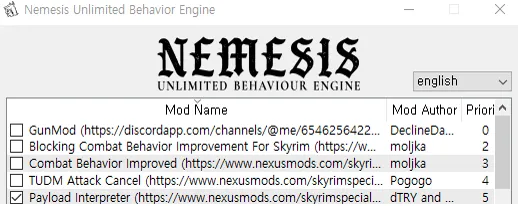
Open Nemesis
Check Payload Interpreter
Nemesis Run
Download
----------------------------------------------------------------------------------------------------
Comments (17)
What mod do you use to unequip shield to back, and is there a patch for belted quivers for this mod?
Simple Dual Sheath, The option for belted quivers is XPMSE
Thank you! Do I need to delete the older weapon type keyword from the anchor mod? And replace it with the giantsword keyword?
Existing keywords do not need to be deleted, just add new keywords.
Also how do you separate 2 hand sword animations and giant sword animations? My 2 hand sword and giant sword animations are the same.
https://smooths.tistory.com/17?category=478492 You can do this by adding the Giant Sword keyword to the items you use. There is a way to add keywords to the items at the bottom of the page.
How do I get that giant sword movement animation? Mine will hold with just one hand and not two.
Great animations! For your next attack animations update, will it use MCO as framework?
Yes, that's right.
does this work with or replace the previous combat / non combat mods etc?
Replace. You only need to use one of the two mods.
Is this already included in your For Honor in Skyrim MCO? The _conditions folders are the same
Just arrange this mod to overwrite the For Honor mod.
Nice. But the equip and unequip animation for greatsword and giant sword don't show, i got the standard one. Also where did you get the anchor mod for giant weapons?
It is automatically applied when a weapon set is installed in Anchor Patreon. In the next update, we will add a way to directly specify keywords.
Can we get a table for the file structure please?
Added to the text.