
EmuDeck 2.2.3 - CloudSync Health 2.0
Update: I dun goofed and forgot to push some backend code :facepalm: , now it should work as intended.
Hi everyone!
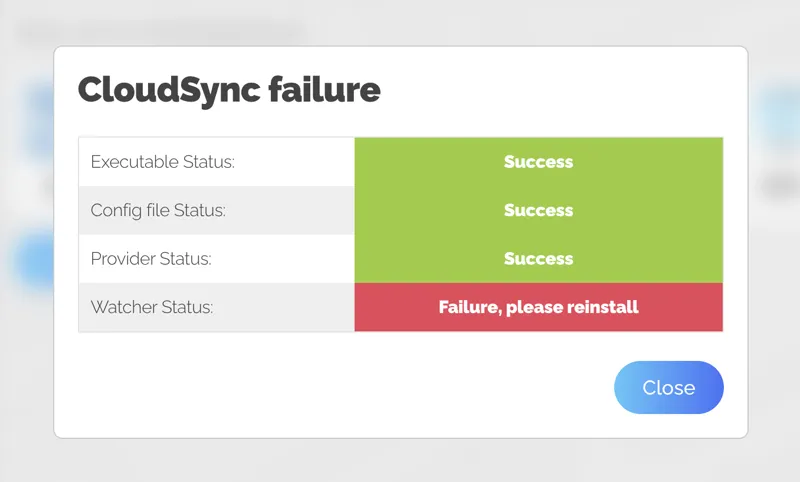
New update coming through! I've moved the CloudSync Health script inside of the App, so if you are having problems, now you can go into Cloud Saves -> Test CloudSync Health and after a few minutes it will give you a report with what's working and what's not, this is for both SteamOS/Linux and Windows.
Some other fixes:
SteamOS
- Disabled autoupdater ( temporary, it just needs more testing )
- Yuzu settings to work with up to 8 controllers out of the box ( YMMV depending on your controller brand)
- Added radial Menu to Left Touchpad on the Steam Deck, reset SRM settings to get it
- Added warning about Chrome dependency for setting up CloudSync.
Windows
- Emulators opening behind Steam fixed.
- Only detecting the C Drive fixed.
- Deleted BootMode .exe files, replaced by PowerShell scripts and a .bat file to appease our Antivirus overlords.
Both
- Mame2010 parser path fix, now points to the mame directory.
- Fixed uninstall button
Comments (27)
What does it mean when you get save not found? Would that be on local or cloud end?
Cloud Sync doesn’t work at all for me… my saves and states in Emudeck are never copied to the target cloud service (tested with OneDrive and SMB).
No me funcionan correctamente los controles, activo Steam Input, pongo la plantilla de emudeck para Xbox 360 en Steam, modo panel de control, como indica el tutorial, lo volvi a instalar varias veces emudeck y todos los emuladores, pero sigue sin tomar la configuracion correctamente. Tengo una Rog Ally anteriormente funcionaba perfecto. No se como solucionarlo si me dan una mano se agradece !!!
I've managed to set the game mode, but the volume buttons don't work
please post your issue on Discord :)
Is having the watcher fail normal? I am using chimeraOS and have reinstalled it many times but still get this error.
please post your issue on Discord :)
Thanks a lot for Your hard work ! Is there a reason, that the RetroAchievements Login only works with a Password containing only Numbers & Letters ?
some characters just broke powershell, I have to try to find a way of escaping those chars so they can work
Can you add Xenia to CloudSync?
should be already on cloudSync
Don’t know what happened but when I launch EmuDeck now, emulators aren’t being detected nor being reinstalled, cloudsync installation running through errors and I can’t seem to launch any game previously added to Steam. When trying a custom or quick reset, it’s stuck at collecting drives names.
Record a video of the issues and please post your issue on Discord :)
Hello, I can't activate the boot mode in windows, I restart the computer and it doesn't activate.
u need to go on windows defender and put exception on the folder, was happening with me but i put emudeck on exception and now its works just fine. Putting only the files dont work but when i put the entire folder works just fine. But i stoped to use because i dont like that windows power shell opening when i start windows this just break the 4th wall to me.
New update that just pushed fixed it for me. Tried on two machines on Windows with success.
It happened to me too. When I click on Test cloudsync health say: "CloudSync failure" why?
I've deleted all the comments that are like this one to clean up a bit the comments. But it's fixed now.
"cloudsync failed" After just installing it. I also can't log into 2 devices because it logs you out when you use the Patreaon code on the other. So if my Steam Deck runs out of batt, I need to relogin and configure on the Ally. I can't just sync and go,.
Dont use the code, log again.
"Deleted BootMode .exe files, replaced by PowerShell scripts and a .bat file to appease our Antivirus overlords." LAWL!! <3
Hi, is there a reason Powershell scripts on the Windows version are needed rather than just opening the applications themselves for things such as ES? Had several issues with Powershell pop ups being intermittent with the success of actually opening anything.
We use launchers to add extra functionality to the emulators, cloudSync it's an example.
I've not used my SD since several months, should I uninstall emudeck and reinstall everything or how can I update emudeck? Thank you for the help
It will automatically update Emudeck to the latest version on boot of Emudeck.
What radial menu did you add to the left trackpad?
Save State, Load State, Switch screens for DS and 3DS games