
MHWilds MOD FAQ
serve as a constant link for mod release pages, so that I manage similar issues and upate quickly
Read this first:
if you start to use mod recently or update REFramework recently and mod not working properly, use RERamework 01414, recent versions can't work properly in some PC.
After Arch-Tempered Arkveld update, a lot of mods broke again, please update your reframework and fluffy manager first:
https://fluffyquack.com/tools/modmanager.zip
https://github.com/praydog/REFramework-nightly/releases
don't download on nexusmods or from other links, links above are original release site and will always be latest.
Denuvo was cracked recently and some pirate version users came to ask me about mod issues, I must make it clear that I don't know whether mods can work on pirate game, I won't test or support or fix mods for pirate version.
Q: the mod won't work
A:I can't answer such vague questions, please decribe with more details, which mod, which option, what are all the mods you are using, what's the problem, how did you trigger it, and attach screenshots if you can.
if you can't find similar Q&A below, try MOD clean and reinstall first, that may solve some wierd issues
Recent FAQ:
Q: start to use mod recently/update REFramework recently, mod not working properly
A: use RERamework 01414, recent versions can't work properly in some PC
Q: can't launch game\black screen
A: this issue can be caused by following reasons:
if you have installed reframwork but it's window never show, also if you are using 2K/4K resolution monitor but game window stay black at left top of screen, that's a rare bug of game itself, try re-launch or reboot your PC
if reframework window shows, such issue is usually caused by outdated mods, first update you reframework to 01229+ from https://github.com/praydog/REFramework-nightly/releases , then check if mod version number shown in fluffy manager match mod page, make sure if you are using updated mods after 18th Feb, finally double check if you hve installed Ver.R basic teuture 1.05, that's essential for all Ver.R mods
sometimes the black screen may last a few seconds to 1 minutes due internet lag
Q: character disappear\leg can't show, or armor is bright green or black
A: this issue can be caused by various reasons, the root reason is lack some file for the armor, depend on what you forget to install, first do MOD clean and reinstall to avoid outdated files or wrong files lefted by incorrect install process, they may cause unpredicted issues.
check if you have installed Ver.R Basic Textures
if you use AIO pack, check if you have installed 0-basic files in each bundle list
some mods, for example Alma Ver.R, Gemma Ver.R and Artain Ver.R, need extra Basic Textures option enabled
Q: modded armor stay vanilla
A: double check you have enabled "loose file loader" in reframework, especially expierenced users who uninstalled reframework once, your loose file loader may be disabled. also make sure you close REF menu after enable loose file loader so that the setting will be saved. re-launch game to let loose file loader work properly.
also some user may mistake gamma armor as a different colored version of original armor, no, gamma sets are different armors, belong to Arch-Tempered Monsters that only appear in end game
Q: physics lost\not working
A: can be caused by following reasons:
if you have physics work at first but lost later, it's caused by wrong value setting in Female Body Slider parameters, when edit "XXX scale" parameters, always set 3 ratio values to same to avoid physcis lost.
if physics can't work since game launch, it's probably caused by a new setting called "animation quality" in Option menu, CPU sub menu, set it back to default if it's reduced
if you use physics option in AIO, always install them at last, and remember to reinstall them when you change corresponding armor options. don't change them while game running.
Q: head shrink, bald issue
A: check https://www.patreon.com/posts/head-shrink-bald-146559552
1. can't install or game crash questions:
Q: fatal D3D error
A: although install mods may increase the possibility of this error, the root reason is caused by capcom, you can try reduce graphic settings and reboot your PC to maybe avoid the error and wait for capcom future performence update.
Q: when install, Fluffy manager warn "Mods with multiple PAK's cannot be installed" or "PAK mods can currently only be installed as one PAK at a time"
A: the possible reason include:
1. you have old versions of same mod in your Fluffy\Games\MonsterHunterWilds\Mods folder, close fluffymanager, make sure old versions removed, then re-launch fluffy manager
2.you didn't put mod into correct path, fluffy manager can't read it properly. the correct path should be:
Fluffy\Games\MonsterHunterWilds\Mods\[mod name].zip,
don't unzip, once you put it into the correct path, you should be able to see preview image of the mod in fluffymanager
3.you have mutiple copies of the same mod, or you unziped it and leave both zip file and unziped folder in Fluffy\Games\MonsterHunterWilds\Mods folder, make sure there is only one.
Q: a red back ground warning saying "dear IMGUI ..." show up at launch
A: that's caused by some I don't know how conflict between latest reframework and script mods like Female BodySlider, just wait for them updateor use older version of reframework.
Q: when launch, I got a black screen\infinite loading, or error message "corrupted re_chunk_000.pak.sub_000.pak.patch_003.pak" at launch
A:that's because you are using outdated Fluffy Manager or reframework or other outdated mods, check MOD clean and reinstall
Q: mod cause crash or lag in main camp
A:that's probably casued by outdated MDF-XL, I met similar issue with old MDF-XL, and haven't met yet after update it.
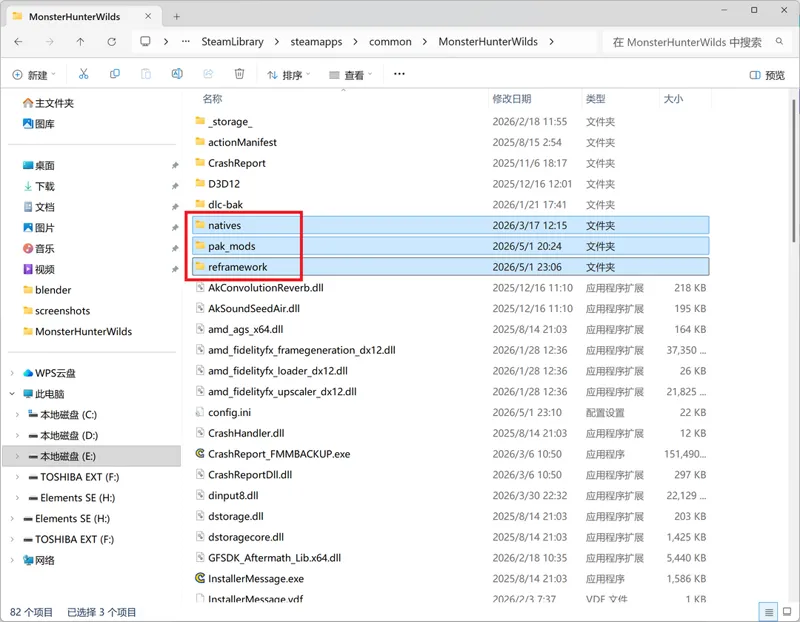
old mdf-xl may remain some outdated files in you game folder, check install tutorial part 9 about how to clean your game folder
2. mod display questions:
first of all, my mods only replace certain armors, make sure you are wearing it, for which armor was replaced, check mod description page
Q: some texture mods effect can't be remove
A:so far FLuffy Manager may not remove .pak files properly if you install and reinstall textures mods frequently, in that case, check MOD clean and reinstall about how to clean your game folder
Q: weird lines on nipple or penis
A: the possible reason include:
1. you didn't install basic textures properly, leg part may not show in the same time, install latest 1.05+ Ver.R Basic Textures first, https://www.nexusmods.com/monsterhunterwilds/mods/105
2. if you are using official High-res pack, and have muscle definition > 0, then it's a known issue and no solution yet, set muscle definition to 0 or uncheck the dlc in steam dlc manage menu to get ride of the issue.
3.you are using MHWs Tex Decompressor Tool or Texture Decompresion Removal, if so, before you use that mod, you should uninstall all mods, follow install tutorial part 9-3 to clean .pak files in your game folder, then use the tool or install the .pak of Texture Decompresion Removal first, then install other mods.
Q: leg/chest/helm won't dispalay
A: you didn't install latest Ver.R basic textures properly
https://www.nexusmods.com/monsterhunterwilds/mods/105 , get 1.05+
and remove old versions if you have
Q: body part become black
A:that's due to dismatch of material and model, possible reasons can be:
1.you didn't install essnetial options needed by the options you installed, i.e. my Ver.R mods addon options need you to enable an armor option(without addon in title) first, then the addon option.
2.could be caused by outdated mods, mods before TU2 may cause such issue.
Q: pubic hair\tattoo won't work, can't change color, can't glow
A: first of all you need to know that hair and tattoo only work on my Ver.R mods with version number 1.00+, won't work on other body shape or early versions.
1. to enable hair or tattoo, first enable "Ver.R basic textures", then in "Custom Addons" bundle install "2-pubic hair -on-" or "3- womb tattoo -on-", they can be enabled at the same time.
2. to change color using mdf-xl, finish step1, then enable "2-pubic hair white" or "3- womb tattoo white", you still need to install mdf-xl and edit in game
3. to enable tattoo glow, finish step1, then enable "3- womb tattoo glow", the brightness is not that strong, you need to confirm in tent or at night
Q: even with options enabled, still can't edit nipple color, tattoo color&glow, no mdf-xl menu
A:first of all, you need MDF-XL and scriptcore
mdf-xl may not work in character create menu, go into savedata to edit.
old mdf-xl may remain some outdated files in you game folder, check install tutorial part 9 about how to clean your game folder
more questions about mdf-xl, please turn to author
Q: there is a color difference seam around neck
A: if neck and face is brighter than body, it's usually caused by make up 16, the one that cover your face, edit it's height higher to jaw can hide the seam somehow.
or if you are using outdated Kawaii make up, there are color differences in old versions.
if neck is darker than body and face, it's usually caused by black neck option in Custom Addons, if uninstall the option can't solve the issue, that's because fluffy can't handle pak number sometime(please update fluffy manager to latest, should been fixed), try MOD clean and reinstall
3. other questions:
Q: can't connect server after install mods
A:not caused by my mods, I play with my mods all the time and haven't been blocked, capcom will ban users who use illegal quests, who cheat on time attack rank and users reported by a lot of other users.
Q: can't edit body ratio by female body slider
A: you need to install female body slider first, if still not working, there is a bug of FBS in charactor create menu and apperance menu, edit at other places(e.g. armor menu)
Q: can this mod be applied to other armors, will you do all armors
A:no, it can't, model replacement is different from FBS, can only be applied to one moded armor set, I will do as much as I can, but all armors is not practicable.
Q: I got a virus warn
A:no idea, at least nexumods passed virus check, I can gurantee there are no virus, your choice
Q: more slim\thicc body, large small size penis, areola, nipple...
A:use Female Body Slider, there are 3 preset in Ver.R basic files for you to choose, if not satisfied, edit by yourself.
Ver.R Body:https://www.nexusmods.com/monsterhunterwilds/mods/105
Female Body Slider: https://www.nexusmods.com/monsterhunterwilds/mods/2
Comments (4)
Hi, is there a way to save presets for the options we picked? I understand that we have to install a newer version after every major updates. It's just a little tedious to pick every options for every armor again, so I am wondering if there's a way to save our old options
For me pubic hair not working its just showing clean shave only, remaining all working great
So I have only the Ver.R and all of the armor mods installed and the physics work fine but their are no physics on the armor how do i fix that?
do i need to download something else or run something?