
MHWilds MOD Install tutorial
This post will update with game and tool updates, to serve as a constant install tutorial for my mod release pages.
update May 2nd 2026
with Denuvo cracked recently, some pirate game users came to ask me mod questions, I have to claim that my mods have only been tested on latest steam version, I can't and will not solve any mod issue for pirate game.
1. install reframework-nightly
link:https://github.com/praydog/REFramework-nightly/releases
download MHWILDS.zip from the latest release
(this is original release site, don't use files on nexusmods, it may be outdated)

drag dinput8.dll into your game folder, where you can loacte MonsterHunterWilds.exe, do not drag other files if don't use VR

if you don't know your game folder path, go to your steam, right click Monster Hunter Wilds,then click manage > browse local files

2. enable LooseFileLoader in reframework
launch game, in reframework menu, toggle LooseFileLoader sublist, then check "enable loose file loader", close reframework menu after that(close to save the setting)
finally quit game and launch again to refresh the setting, check if "enable loose file loader" is enabled since lauch, if not, game may not load some mod files

P.S. several users report their "enable loose file loader" won't stay enabled, if so, browse to your game folder, open "re2_fw_config.txt", find "LooseFileLoader_Enabled=false" then set false to true
3. install Fluffy Manager
downlaod Fluffy Manager:https://fluffyquack.com/tools/modmanager.zip
(this is original release site, don't use files on nexusmods, it may be outdated)
unzip the files anywhere as you like, then launch Modmanager.exe
roll the game title list and find "Monster Hunter Wilds"

then click "choose game folder",then "choose the game‘s excutable",loacte your MonsterHunterWilds.exe(same path in step 1), if you have never changed your steam install path, Fluffy Manager may detect your game path, in that case you can skip this step.

P.S. if you get the Warning:Download interrupted,that means you live in a restricted area, try a VPN。
4. install a simple mod
Download a mod, if you are new to nexusmods, download button is in the "FILES" tag, click "Manual Download"

put downloaded .zip mod files into the following path
[Fluffy Manager install path]\Games\MonsterHunterWilds\Mods
just keep .zip/rar untouched, don't unzip, if you have to unzip, make sure the modinfo.ini in mod can be located by the path
\Mods\[mod folder]\modinfo.ini, otherwise FLuffy can't read the mod properly
launch Fluffy Manager, click the mod title, if the grey square left to title slide right and turn white, means the mod is enabled

then launch game and enjoy. you don't have to launch through Fluffy Manager
P.S. if the mod doesn't show up in Fluffy manager, click Refresh mod list, always remember to refresh your mod list after you install, update or delete mod files.
5. install a mod bundle
if a mod have multiple options, they are usually managed into a sublist(bundle), there will be a grey square with "+" left to mod title, click the mod title to enter sublis

then install the options you prefer. beware that some options may rely on other options to work properly, check descriptions carefully and always install from list top to bottom

6.install Ver.R series mods
Ver.R mod is a skimpy armor series, I prepared some basic files for future Ver.R mods, it may be a bit of complicated to install it, but I assure you it can provide a lot of covenience and variety for future mods
Before we start, again please make sure you have installed latest Fluffy manager and Reframework(forgive me emphasize again, most bug reports are caused by this)
6-1 First of all, you need to download Ver.R Basic textures
https://www.nexusmods.com/monsterhunterwilds/mods/105?tab=files

put downloaded .zip into "Mods" folder of Fluffy Manager(don't unzip), then in Fluffy Manager, enable:Ver.R ---Basic Textures---
this option contain all the nessesary textures required by later Ver.R mods.

6-2 install a Ver.R mod
Ver.R ---Basic Textures--- won't change anything in game, you still need to downlaod a Ver.R mod, take Ver.R body inner2 AIO in the same download page as an example

put downloaded .zip into "Mods" folder of Fluffy Manager(don't unzip), then in Fluffy Manager, enable:Ver.R body inner2 > -0- basic files of this mod
every ver.R armor mod will have one such option, contain all the nessesary files for this mod, e.g. pfb files to make sure physics work, or json files for Female Body Slider.

then you can choose options you prefer to combine your own armor set, remember you can only choose one basic option for each part, otherwise only the later enabled option will work, and make sure you install from top to bottom to avoid wrong overwrite order.
sometimes fluffy manager may warn you an option may overwrite another option, it's normal, just go on click the option title.
6-3 about addon options
an addon option is an extra optional edit that can be applied to any basic armor option in same part, it can let certain part show or hide. when install, enable a basic armor option first(options without "addon" in title), then enable an addon option to overwrite the basic armor option. you need to re-enable it if you later change your basic armor option choice.
here is an example of how it looks in fluffy manager

7.install mod while game running
I personally don't recommend install mod while game running, some mods may not work instantly, some mods may casue glitch.
if you insist, you should first unequipe the armor or weapon the mod is going to replace, then go through a loading screen(e.g. teleport to another map), then equipe back the armor or weapon, if the mod doesn't work, quit game and try again.
8.Disable, Remove or Update mods
1. disable a mod
to disable a mod temporarily, luanch Fluffy Manager, find the mod title and click the mod title, let the white square slide to left and turn grey.
2. remove a mod
to completely remove a mod, first follow step 1 to dsiable it , then go to
[Fluffy Manager install path]\Games\MonsterHunterWilds\Mods
delete the .zip file(or unzipped folder) of that mod, then go back to Fluffy Manager, click Refresh mod list
3. update a mod
when you download a new version of a mod, don't install it immediately, old mod files left in Mods folder may cause some issues, follow step1 and step2 to completely remove the old version files, then install the new version.
some mod will use .pak format, fluffy manager can install such mods but can't remove them completely when you uninstall them, you can check the following part to clean your game folder.
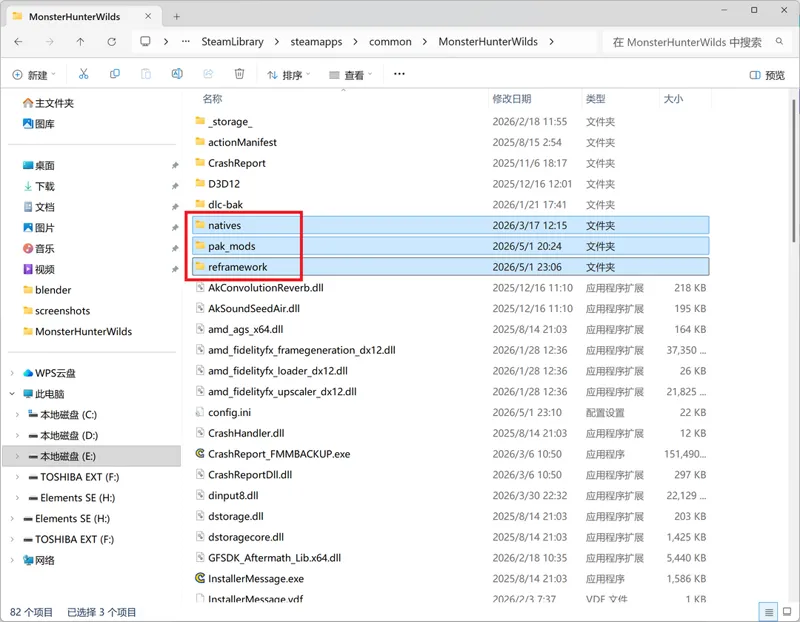
9.Clean Game Folder
now moved to this article
Comments (16)
heloo , this mod cant work on monter hunter wild Demo version right, it show missing some file , i have installed correctly
So I have only the Ver.R and all of the armor mods installed and the physics work fine but their are no physics on the armor how do i fix that? I have all of your wilds mods installed also i cant see the menu to change Gemma's Design
Update needed regarding installing REFramework: Later builds no longer provide game-specific zip files. You download REFramework.zip, regardless of game.
Dear author, your mod is frigging awesome, yet i cannot experience it. Many thanks for your work. I have game downloaded from fitgirl - no errors in file, all green. 30/03/25 modified pack. I have latest REframework and Fluffy Mod Manager. I check the basic textures and inner3 ver mod, install the base file and one form each category(arm,leg..). But the character is at regular vanilla body. At start of game - reframework initialisation throws yellow lines stating, missing files. Other mods like female body slide loads, inside tent, change appearance, the inner(3) for which i downloaded the mod form nexus page is actually inner2 clothes. I am unable to understand. When at this instant get the missing files as well. At times i try installing the components of mods, i see the vanishing of body,arm and legs, i actually install these components in inner3. In nexus found someone with same issue in posts, but not solved for him, i could not see anywhere. He is malfoy0713, post on 02/Apr/2026 What do you suggest to do?
this game changed many files and load methods in every title update, latest reframework and most mods only work for latest steam version
Hello, I'm having some trouble. I've installed the basic textures, the body inner 2 and the dahaad simple pack but my character is still in the regular base game armor. have I done something wrong? i can send a picture of my mod list if that would help?
the same issue
does this mod make the other armors fit this shape?
no,only the inner2, there will be more armor sets mod in the future
Sadly it seems like everytime I try to have reshade auto initialize, the game crashes on the capcom logo :(
The number of files encountered is over 800,000, is it right? It's endless.
i don't know, you may need to ask author of reframework about that. it sounds reasonable, that number is how many files game load from .pak pack
do we have to wait for the files all load up in order to installed the mod?
what do you mean load up? if you mean the jumping number in loose file loader, just ignore it and restart the game.
Thank you for the reminder 😍
Sadly the Beta Mods seem not to work, just a reminder to those who hope they would.