






Choose what your Wants download, down to the audio language
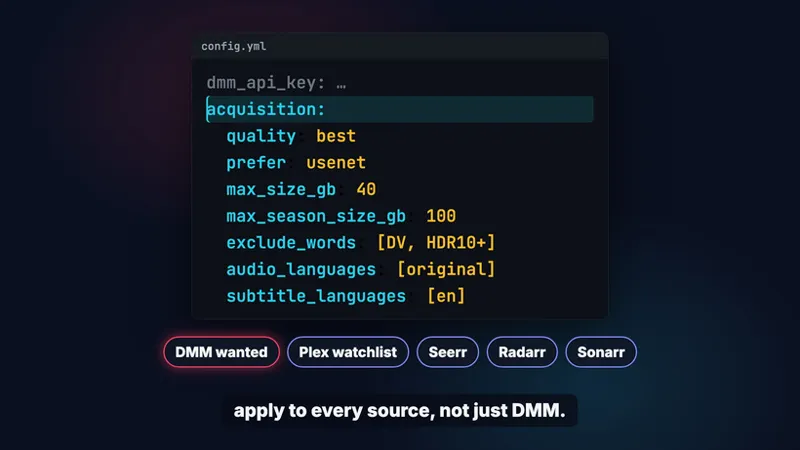
Pressing Want on DMM only puts the title on your list. Your zurg picks the release, using the acquisition: block in its config.yml, and those settings apply to every source, so the DMM wanted list, your Plex watchlist, Seerr, Radarr and Sonarr all follow them.
quality decides which resolution zurg tries first. best goes highest first, and 1080p moves 1080p to the front while still letting zurg take something else when there's no 1080p release. max_size_gb skips anything bigger, 40 GB for a film or an episode by default, and max_season_size_gb does the same for each season of a pack at 100 GB. prefer picks Usenet or cached torrents first. It's Usenet by default because an NZB doesn't use up a slot on your debrid account. exclude_words keeps out releases whose names carry words you never want, like DV or HDR10+.
New: audio_languages and subtitle_languages. zurg doesn't go by the release name for these, it reads the actual tracks. With your DMM API key set, it first checks the stream data DMM already holds for releases another zurg has analysed, so a torrent without your language is never added. After every grab it probes the file itself with ffprobe, and a grab without your language is taken back off your account and the next release is tried. Use language codes like en, de or ger, or original for the language the film was made in, which needs your DMM API key. Commentary tracks don't count as a dub, and a release whose tracks can't be read is still taken.
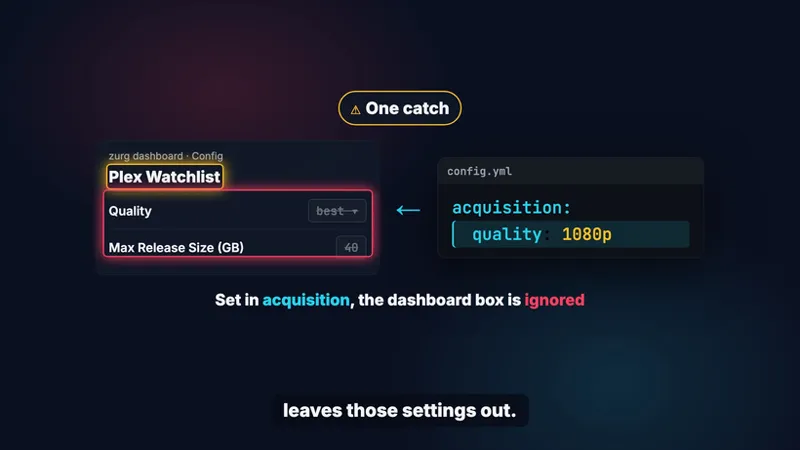
One catch: the Quality and Max Release Size boxes on zurg's dashboard belong to Plex Watchlist. They only count when the acquisition: block leaves those settings out, so set everything in acquisition: and leave the boxes alone.
New: films upgrade on their own. If zurg fetches a film below the resolution quality heads for, 2160p for best, the film stays on your list, and when a better copy comes out zurg fetches it and removes the one it fetched before. A copy you added yourself is kept. It's on by default and upgrades: false under acquisition: turns it off.
New: follow a Trakt or MDBList list. Paste the list's URL on https://debridmediamanager.com/wanted and press Follow, and every film and show on it is wanted. DMM reads the list again every six hours so what gets added later is wanted too. A title you remove stays removed and a title that leaves the list stays wanted. A Trakt watchlist works if the profile is public. For an IMDb, Letterboxd, Rotten Tomatoes or Plex watchlist, make an external list from it on MDBList and follow that.
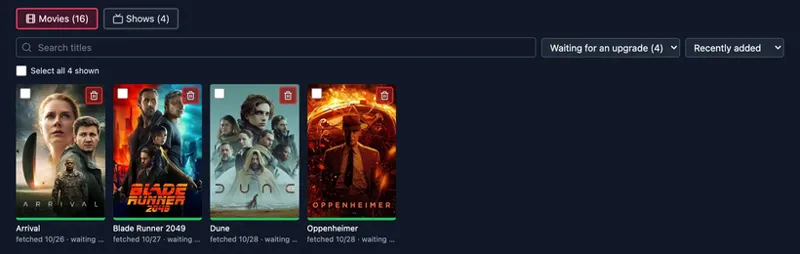
The wanted page itself is now Movies and Shows poster grids. You can search your titles, show only what's Not fetched yet, Fetched or Waiting for an upgrade, sort them, and select a bunch and remove them at once. Each title says when it was fetched, and hovering over that date shows the release zurg took.
Moving from Radarr or Sonarr? Import a backup zip on the same page and everything they're still searching for is added. Only the database inside the zip is uploaded and the app's API key stays on your computer. Following lists and importing are both in this guide: https://notes.debridmediamanager.com/zurg/guides/dmm-wanted/
The languages need a zurg nightly from 2026-10-26 or later and upgrades need one from 2026-10-30 or later. Every setting is in the guide: https://notes.debridmediamanager.com/zurg/guides/acquisition/
Send me feedback!
Comments (2)
Thanks for the language filters! One request from a Latin American household: Spanish has two dubs that matter a lot, Latino (es-419) and Castilian (es-ES), and right now zurg normalizes both to es (langcode.Normalize drops the region), so audio_languages: [es] can't tell them apart. Could zurg: keep the region when a track has it (es-419, es-MX, es-ES in the MKV IETF tag), and when it doesn't, read the track title ("Latino", "Español Latino", "LAT" vs "Castellano", "España"), since most releases only say it there; take an ordered preference instead of a filter, e.g. audio_languages: [es-419, es, original], so it goes Latino → Castilian → original instead of all-or-nothing; allow "audio OR subtitles", e.g. original audio is fine only if it has Spanish subs. Right now setting both requires both. With that, a lot of Latin American sponsors could drop their custom scripts.
Thanks Nico! All three are in the next nightly. audio_languages: [es-419, es] takes Latino first and Castilian when there's no Latino. ffprobe never passes the es-419 tag through, so zurg reads the dub from the track title (Latino, Castellano) and from the release name (Dual-Lat, LATINO) when the title says nothing. For the original audio with Spanish subs, add subtitle_languages: [es] and audio_or_subtitles: true. An upgrade to 4K also won't swap your Latino copy for a Castilian one.