




SERPENT 🐍 BETA 2
SERPENT BETA 2 // PLUGDATA-FX 0.9.3
SERPENT is a versatile all-in-one sidechain ducker, combining sample-accurate volume & sub ducking with intuitive bipolar ringmod sidechaining.
This plugdata patch is the result of Borrasca & Nasko combining their efforts to make their ideal sidechaining tool, which comes as a Patch in PLUGDATA, available as VST3, LV2, CLAP or AU.
FEATURES ✨
3 ducking methods: volume, sub, ring mod.
Real-time visual updates even without playback.
Audio triggering via a custom transient detection algorithm.
MIDI triggering option, disabling and overriding transient detection.
Adjustable lookahead pre-fade curve up to 10ms including latency compensation.
Bipolar ring mod sidechaining including waveshaping and symmetrical smoothing.
Easy to use MSEGs for volume & low shelf ducking, custom-made by Nasko.
gate mode for parallel sidechain ducking, preventing serial latency build-up.
Our low-shelf ducker uses a linear phase filter powered by a custom lowend FIR kernel generator, designed to efficiently isolate lowend & achieving -infdB sub ducking! This avoids any constant phase shift from band splitting found in classic crossover filters.
With the dedicated sub envelope, you get more control over the ducking shape than any conventional dynamic EQ.
Ring mod sidechaining, originally discovered by Borrasca, is equipped with extra control for shaping & taming the effect. These include:
Controls for adjusting RM sidechaining happening above & below the volume envelope.
a custom smoothing algorithm by Nasko.
shaping the RM signal with an inflator/deflator (waveshaper) for a
stronger & fuller or more subtle & tighter effect.
an envelope that scales the amount of RM sidechain across time
VOLUME DUCKING 🐍
The most basic function is the volume envelope, which you can shape with a 3-point curve editor.
Adjust its depth from the VOLUME dial below the curve editor.
You can set the sidechain waveform view to unipolar from the waveform icon on the right, which lets you shape the volume curve closely with the shape of the waveform.
The Length dial on the left sets how long the volume curve is, adjusting the waveforms length accordingly.
In MS MODE you adjust the length in milliseconds with a range of 10-800ms.
In SYNC MODE the length will be a subdivision of the project BPM, and the range will be from 1/128 to 1/2.
Note: the sync mode’s range is also limited to 10-800ms internally, which means that at some tempos the smaller or larger values might be off limits if they correspond to below 10ms or over 800ms.
SUB DUCKING 🐍
For low frequency ducking, there is a low shelf over at the SUB tab which has it’s own ducking curve.
The depth of the sub envelope can be set either from the SUB slider below the VOLUME dial, or the Depth dial in the SUB tab.
The main Length dial also adjusts the length of the sub envelope.
The ducking will follow the shape of the curve editor accurately, and the 10ms pre-fade is also applied to the sub envelope.
Pictured below is the result of the sub envelope only, applied to a DC offset (0hz) signal:
RM SIDECHAINING 🐍
Downwards RM⬇️
The simplest way to introduce RM sidechaining is adjusting the RM DEPTH dial, or the arrow-down icon below it (downwards RM).
If the volume envelope is in use, the downwards RM will take effect below the volume envelope, which is useful when you want the volume envelope to handle the transient without distortion, but RM to take over for the rest of the signal.
Upwards RM⬆️
The white arrow-up icon adjusts the “upwards RM” amount, which will only take effect above the volume envelope. This way you can fine-tune the RM effect in combination with the volume envelope even further!
Note: If no volume envelope is applied, upwards RM won't do anything.
CTRL + drag on Windows // Control ^ + drag on macOS toggles the main RM DEPTH knob to adjust upwards & downwards RM at the same time.
RM waveshaping & smoothing 🎛️
The bottom left icon from the RM controls pertains to the Shape amount, which applies a deflator at negative values to make the effect more subtle/tight, or an inflator (softclipper) at positive values to make the effect more intense/full.
The bottom right icon adds symmetrical smoothing to the RM signal.
With SERPENTs custom smoothing algorithm, in addition to adding release it also adds up to 10ms attack, without missing any samples like a naive attack would. This way you don’t lose out on headroom when summing the sidechain track with the current track even with smoothing.
RM ENVELOPE 🪥
In case you don’t want the RM sidechain effect to last as long as the sidechain audio itself, you can restrict it with a transient or MIDI triggered envelope.
Adjust the length of the RM envelope from the rightmost knob.
If set to the minimum (default) position, the RM envelope is disabled.
Double clicking resets the control to the minimum position.
Increasing the amount will begin to decrease the envelope’s length from 700ms down to 15ms.
Adjust the shape of the RM envelope from the slider below the dial, changing the relation of the hold & release stage.
The RM envelope also applies to the upwards RM effect, but by fading it into the volume envelope.
GLOBAL AMOUNT 👑:
With SERPENT Beta 2, we now offer a global scale control, which scales the amount of VOLUME, SUB & RM ducking!
This control can be DAW-automated, so that you can mix SERPENTs sidechaining in and out whenever you see fit.
GATE MODE ☯️
On the left edge of the curve editor is a 3-way toggle between ducking, gating, and polarity inverted gating.
The gate mode will simply turn the sidechain envelopes and RM upside down.
The polarity inverted gating does the same, but also inverts the polarity of the current track!
This feature would allow you to also perform ducking by mixing a Serpent instance parallel with the dry signal.
Stacking more instances in parallel would allow you to use different sidechain sources for each instance, for example kick & snare, but without adding up serial plugin latency.
All 3 ducking methods work with the gate modes, including the sub ducker because it is now linear phase!
SETTINGS ⚙️
Transient Sensitivity 🎯:
You can adjust the transient detection algorithm by adjusting the threshold from the Thres slider.
By turning on a sidechain bandpass filter, it will only listen to the frequencies let through by the filter to extract the transients the sidechain signal.
Pre-fade Curve Editor 🔬:
Serpent has 10ms of lookahead built in. It introduces a 10ms long pre-fade curve before the trigger, which applies to the volume & sub envelopes.
The curve’s length and position is adjustable within the 10ms confines, with a minimum length of 3ms:
Length (top half) moves the starting position of the curve between 10ms before the trigger and 3ms before the trigger. Length value displays the ms-time of pre-fade curve independent from potential hold time.
Hold (bottom half) moves the end position of the curve between 7ms before the trigger and 0ms before the trigger. The Hold value displays the time between the curve’s end point and the trigger and acts as silence between pre-fade and sidechaining envelope.
RM Stereo Link ⛓️💥:
This control adjusts the link amount of the RM effect on the left & right channels:
0% is completely stereo-unlinked, meaning that that the left and right channels get independent RM sidechaining.
100% (default) is completely stereo-linked, meaning that the left and right channels get the same exact RM sidechaining effect. In this case the maximum amplitudes between the left and right channels are always chosen for the response curve.
Note that 100% RM Stereo Link uses less CPU, as only one RM sidechain signal needs to be generated and processed.
MIDI triggering 🎹:
By turning on the MIDI icon, the transient detection algorithm will be turned off. The volume, sub and RM envelopes will only be triggered from MIDI notes sent to the plugin.
Note that to display the sidechain waveform or to use RM sidechaining, you should still route the sidechain track’s audio to Serpent’s sidechain input.
ROUTING 🪧
SERPENT can be triggered either by audio (transients) fed into the audio sidechain input, or MIDI notes.
The routing will vary depending on the DAW, but will be done the same way you’d audio- or MIDI trigger any other plugin.
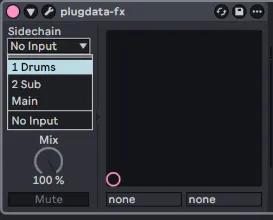
In Ableton Live, you would simply pick the desired sidechain audio track from plugdata-fx’s “Sidechain” menu.
To trigger with MIDI, you can do it in two ways. One is to route the sidechain MIDI track directly to the plugdata-fx instance.
Note that the MIDI button in Serpent needs to be on for MIDI triggering.
Another way is to use the External Instrument device, if you want to send one MIDI track to multiple SERPENT instances:
Words from Borrasca:
The process started from continuing off of where Borrasca Sidechainer left off, but with Nasko bringing his ideas and DSP & UI expertise aboard. Nasko really drove this thing home and was able to work on this full time thanks to his Patreon supporters. Serpent was in the works for over a year before the first beta, partly because I took months of time off due to work-related stress; Nasko was patient and returned to work on this as soon as I felt ready to continue too.
A special shoutout goes to the team behind plugdata and the maintainer Timothy Schoen. Both plugdata and Serpent are free, but we encourage supporting Timothy over at Github
HOW TO INSTALL:
INSTALL/UPDATE TO PLUGDATA 0.9.3 ➡️ plugdata - Download
DRAG AND DROP THE .PLUGDATA FILE INTO PLUGDATA ✅
DOWNLOAD PLUGDATA 0.9.3 (FREE)
BETA 2 🐍 CHANGELOG 📃:
GUI overhaul
Logo updated
Sub ducker converted from minimum phase to linear phase
Sub ducker max depth changed from -40dB to -infdB
Sub ducker now included in gate modes
Main “Length” parameter renamed to “Time”
Sync mode added to Time with Sync/MS toggle below Time knob
Time upper range increased from 600ms to 800ms
Global amount control added
RM waveshaper range extended to negative side with deflator curve
RM envelope usability improved:
Length and shape controls switched places
Length range inverted
Settings page overhauled
Rearranged and resized things
RM Stereo Link control added
Transient detector threshold & sidechain filter usability improved
Delay feature removed and replaced with pre-fade controls
PLEASE REPORT ANY BUGS OR ISSUES YOU MAY FIND 🔬
THANK YOU FOR YOUR FEEDBACK, BUG REPORTS & FEATURE REQUESTS DURING BETA 1!
You helped making Serpent even better! 🐍
FULL RELEASE HAPPENING VERY SOON! 🛫
Comments (8)
daaaaaamn this is craaaazy
How do you use it in fl studio with audio ?
Hey! Lmk if this helps: https://my.hidrive.com/lnk/TQ5xra1Jo
anyone having issues with it not working anymore? Reinstalled it and it passes audio but I don't see a waveform or hear the sidechain.
Hey! Which DAW are you using?
Hey im experiencing a bug with this I think where the side chain stops registering half way through my build up and then on my drop. not sure why but i sent you a clip on discord Nasko!
Wohooo 🥳
omg who's kitty is that in the settings page??? hes adorable! testing out the new wheels as we speak! will report back!