




SERPENT 🐍 BETA 1
POST-LAUNCH MACOS HOTFIX 💻⚠️
Fixed broken/scrambled controls on macOS - Please delete your current library install, then redownload and reinstall SERPENT!🐍
SERPENT BETA 1 // PLUGDATA-FX 0.9.3
SERPENT is a versatile all-in-one sidechain volume ducker, combining sample-accurate volume & low-shelf ducking with intuitive bipolar ringmod sidechaining.
This plugdata patch is the result of Borrasca & Nasko combining their efforts to make their ideal sidechaining tool, which comes as a VST3, LV2, CLAP or AU.
FEATURES ✨
3 ducking methods: volume, ring mod, low shelf.
Real-time visual updates even without playback.
Audio triggering via a custom transient detection algorithm.
MIDI triggering option, disabling and overriding transient detection.
10ms lookahead pre-fade curve including latency compensation.
Bipolar ring mod sidechaining including saturation and symmetrical smoothing.
Easy to use MSEGs for volume & low shelf ducking, custom-made by Nasko.
gate mode for parallel sidechain ducking, preventing serial latency build-up.
Our low-shelf ducker has more separation than a 6db/oct band split and can be considered a dynamic phase filter, avoiding constant phase shift found in classic Linkwitz-Riley crossover filters. With the dedicated sub envelope, you get more control over the ducking shape than any conventional dynamic EQ.
Ring mod sidechaining, originally discovered by Borrasca, is equipped with extra control for shaping & taming the effect. These include:
Controls for adjusting RM sidechaining happening above & below the volume envelope.
a custom smoothing algorithm by Nasko.
driving the sidechain signal into a soft clipper for a stronger effect
an envelope that scales the amount of RM sidechain across time
VOLUME DUCKING 🐍
The most basic function is the volume envelope, which you can shape with a 3-point curve editor.
Adjust its depth from the VOLUME dial below the curve editor.
You can set the sidechain waveform view to unipolar from the waveform icon on the right, which lets you shape the volume curve closely with the shape of the waveform.
The Length dial on the left sets how long the volume curve is, adjusting the waveforms length accordingly.
A 10ms pre-fade curve is automatically applied to the volume curve. Pictured below with Scyllascope by DsgDnb:
SUB DUCKING 🐍
For low frequency ducking, there is a low shelf over at the SUB tab which has it’s own ducking curve.
The depth of the sub envelope can be set either from the SUB slider below the VOLUME dial, or the Depth dial in the SUB tab.
The main Length dial also adjusts the length of the sub envelope.
The ducking will follow the shape of the curve editor accurately, and the 10ms pre-fade is also applied to the sub envelope.
Pictured below is the result of the sub envelope only, applied to a DC offset (0hz) signal:
RM SIDECHAINING 🐍
Downwards RM⬇️
The simplest way to introduce RM sidechaining is adjusting the RM DEPTH dial, or the arrow-down icon below it (downwards RM).
If the volume envelope is in use, the downwards RM will take effect below the volume envelope, which is useful when you want the volume envelope to handle the transient without distortion, but RM to take over for the rest of the signal.
Upwards RM⬆️
The white arrow-up icon adjusts the “upwards RM” amount, which will only take effect above the volume envelope. This way you can fine-tune the RM effect in combination with the volume envelope even further!
Note: If no volume envelope is applied, upwards RM won't do anything.
CTRL + drag on Windows // Control ^ + drag on macOS toggles the main RM DEPTH knob to adjust upwards & downwards RM at the same time.
RM drive & smoothing 🎛️
The bottom left icon from the RM controls pertains to the Drive amount in dB, which drives the RM signal against a soft clipper in order to make the effect more intense.
The bottom right icon adds symmetrical smoothing to the RM signal.
With SERPENTs custom smoothing algorithm, in addition to adding release it also adds attack, without missing any samples like a naive attack would. This way you don’t lose out on headroom when summing the sidechain track with the current track even with smoothing.
RM ENVELOPE 🪥
In case you don’t want the RM sidechain effect to last as long as the sidechain audio itself, you can restrict it with a transient or MIDI triggered envelope.
Adjust the length of the RM envelope from the RM Env slider (below the knob). If set to the maximum or double clicked, the RM envelope is disabled.
Adjusting the shape of the RM envelope changes the relation of the hold & release stage, and is done by adjusting the RM Env knob.
The RM envelope also applies to the upwards RM effect, but by fading it into the volume envelope.
GATE MODE ☯️
On the left edge of the curve editor is a 3-way toggle between ducking, gating, and polarity inverted gating.
The gate mode will simply turn the volume envelope and RM upside down.
The polarity inverted gating does the same, but also inverts the polarity of the current track!
This feature would allow you to also perform ducking by mixing a Serpent instance parallel with the dry signal.
Stacking more instances in parallel would allow you to use different sidechain sources for each instance, for example kick & snare, but without adding up serial plugin latency.
The RM effect will still work with the gate modes, but note that the low shelf ducking will be disabled.
SETTINGS ⚙️
Transient sensitivity 🎯:
You can adjust the transient detection algorithm by adjusting the sensitivity from the Sens dial.
By turning on a sidechain bandpass filter, it will only listen to the frequencies let through by the filter to extract the transients the sidechain signal.
MIDI triggering 🎹:
By turning on the MIDI icon, the transient detection algorithm will be turned off. The volume, sub and RM envelopes will only be triggered from MIDI notes sent to the plugin.
Note that to display the sidechain waveform or to use RM sidechaining, you should still route the sidechain track’s audio to Serpent’s sidechain input.
Delay ⏱️
The Delay dial will delay all triggered envelopes by up to 10ms, including the pre-fade curve.
This might not have a lot of use cases but we figured it would be good to still include it.
ROUTING 🪧
SERPENT can be triggered either by audio (transients) fed into the audio sidechain input, or MIDI notes.
The routing will vary depending on the DAW, but will be done the same way you’d audio- or MIDI trigger any other plugin.
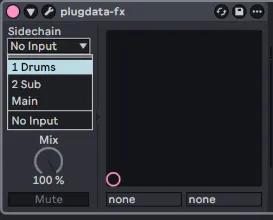
In Ableton Live, you would simply pick the desired sidechain audio track from plugdata-fx’s “Sidechain” menu.
To trigger with MIDI, you can do it in two ways. One is to route the sidechain MIDI track directly to the plugdata-fx instance.
Note that the MIDI button in Serpent needs to be on for MIDI triggering.
Another way is to use the External Instrument device, if you want to send one MIDI track to multiple SERPENT instances:
Words from Borrasca:
The process started from continuing off of where Borrasca Sidechainer left off, but with Nasko bringing his ideas and DSP & UI expertise aboard. Nasko really drove this thing home and was able to work on this full time thanks to his Patreon supporters. Serpent was in the works for over a year before the first beta, partly because I took months of time off due to work-related stress; Nasko was patient and returned to work on this as soon as I felt ready to continue too.
A special shoutout goes to the team behind plugdata and the maintainer Timothy Schoen. Both plugdata and Serpent are free, but we encourage supporting Timothy over at Github
HOW TO INSTALL:
INSTALL/UPDATE TO PLUGDATA 0.9.3 ➡️ plugdata - Download
DRAG AND DROP THE .PLUGDATA FILE INTO PLUGDATA ✅
DOWNLOAD PLUGDATA 0.9.3 (FREE)
KNOWN ISSUES/BUGS:
Black dots in Waveforms
Duplicating an opened instance of SERPENT in Ableton live will freeze the waveform updates of the cloned instance until the user hovers over the ui
Transient sensitivity and Bandpass filter visualization a bit busy
Filter and Midi blinking can get stuck in a loop with certain behavior
First few samples of RM Waveform tends to freak out when rm smoothing is engaged
Pressing shift while adjusting rm envelope controls can trigger jumps when the mouse hold is released and the cursor happens to hover over the other respective control.
GUI Lags in Reaper (Confirmed on Windows)
CTRL dragging RM dial doesn't work in combination with Shift Sens mode yet
Bypassed RM Env Curve is pure grey instead of tinted
We may possibly replace the trigger delay for a lookahead curve time adjustment
White line found in fft spectrum analyzer in settings tab
PLEASE REPORT ANY BUGS OR ISSUES YOU MAY FIND 🔬
Feel free to suggest changes and additions to current systems, as we may be able to take on a few until release! 🛫
Comments (48)
Absolutely incredible plugin with so many options! Probably the best sidechaining tool I've ever used. It's changed my music. I have a bug to report tho. I'm not sure if it's a plug data thing or serpent issue but I have to re launch serpent every time I open my project. And I'm unable to save presets. Is there anyway around this? 🙂 Thanks Nasko.
Hey! Are you using the latest version of plugdata? 0.9.3? with that version, serpent shouldn't be resetting! :)
This might be a me problem but I had an issue with this as well as your spectral compressor where the state of plugdata wasn't saved on exit. For example, I would change my settings and reload the project and none of them would save. I had to update my plugdata for this one and I'm pretty sure that caused it. Any ideas?
Hey! So you're on the latest plugdata 0.9.3 stable version now? that one should work with all the library-plugdata patches of mine! :)
Hello! Thank you for making this free 😄 I just encountered something I think is a bug so I wanted to report it: I was working on a project in Ableton Live 12.4.15b2 and sidechained to a snare that was using an instrument (midi) and if I put the snare on an offset (so instead of a downbeat on the second 1/8th) it wouldn't sidechain at all for some reason. Project was at 175 bpm if that matters. If I can provide any more information or anything let me know. Thank you again! 😄
Hey! Could you check the settings tab to see if serpent is detecting the transient? If there is a Snare + an offset the offset might get a lower trigger that's below the sensitivity! :)
This is genius. Putting both volume ducking and RingMod SideChain into one curve🔥 this will be the new standard Sidechain plugin
what is the proper way to set this up in parallel for a Kick sidechain input and Snare sidechain input?
i made a youtube livestream where i went over that over on my youtube channel! :) not sure about the exact timestamp tho!
Hi Nasko! Thanks for your hard work, I just wanted to see if I’m doing something wrong. So, I have some tracks routed to the sidechain track that contains serpent. So my bass buss and what not send audio to the sidechain track to get sidechained. Everything works great but then when I leave the project, Serpent is disabled and the previous setting I had are lost. No sound coming through the sidechain track, so I have to delete Serpent for the tracks routed to it can be audible. And any previous settings are lost. What can I do to prevent this from happening? I was enjoying it/: I have an m1 MacBook Pro later model with 16 gb ram and 1tb ssd
Hey! Are you using the latest version of plugdata? Also, when did you download serpent? the very first release version of beta 1 had an issue on macos, so re-downloading and deleting your current install may help!
ima having problem setting it up on Ableton.. is it supposed to be an instrument and not an FX? mine says plugdata not plugdata fx
Hey! Yes, you'd want to use Plugdata-fx, as Serpent is an audio effect! :) then do your sidechain routing the way you're used to!
This is so dope. How to sign up to get updates when uh, updates drop?
if you join as a free member you‘ll get email notifs! :)
not sure why but the serpent patch will not load
Hey! Are you on latest plugdata? and if so, try drag and dropping the .plugdata file into plugdata's window!
Yo I have a question about reducing the lookahead on your stream mentioned here https://youtu.be/ex_qnWYh5rY?t=4647. You said that it would introduce a nasty dc offset in the form of a click, wouldn't it be possible to utilize phase cancellation to null out the dc offset? PlugData will always have some latency, I believe you mentioned on stream that it's 64 samples, you could have a 64 sample lookahead that tries to find the dc offset using a transient detector then just invert the phase of a duplicate signal to cancel out the dc offset, so there wouldn't be a click leftover. I don't know if this is actually possible or if it would use a ton of cpu resources, but maybe it could work?
Hey! Unfortunately there's no way around this and actually, the lookahead ramp we use is exactly what fixes the dc offset. It's almost like aliasing in a sense, where audio samples change so quickly that conversion from digital to analog cannot keep up and cause audible clicking. It's a sort of necessary evil! We may introduce a stretch for the lookahead ramp, so you can reduce it to 5ms, but the 10ms latency will remain to support the ringmod symmetric smoothing filter!
holy... this makes the cleanest sidechain i've used. Props to you for making this masterpiece! tysm!
how do you route this into fl studio
There may be general tutorial on how to route for sidechaining in fl! those should work the same for pludata-fx/serpent! :)
Please give us more control over the lookahead, I would love up to 25MS and possibly the option to edit the lookahead curve
Downloaded! Thank you so much guys
Great plugin, it's sweet to have an all in one package like this! Would it be possible to have a 0 latency mode? And maybe an attack slider like the khs compactor to choose how much lookahead is applied to the curve. And a stereo amount slider for the ring mod portion would be awesome! Thank you!
0 latency sadly won't be possible without sacrificing the RM smoothing! we are considering letting people adjust the length of the lookahead ramp from 10-5ms though in exchange for removing the trigger delay! The stereo amount is an interesting point because serpent does a special comparison for left/right summing where the louder sample of the Left or Right channel wins it's place in the rm reduction signal, which is a bit more advanced than simple summing, but let me know what edge cases you're hitting with the current version of the RM in serpent! :)
Very nice all-in-one sidechain plugin. I especially love the fact that because of the 10ms pre smoothing, I get no clicks/pops. To achieve no pops/clicks with other sidechain plugins (like Duck2, Kickstart 2 etc), I have to make a curve at the end, but when there is no sidechain trigger, I get no audio because of the fade at the end so I still have to automate the plugin. This solves that issue, nice. Got some questions/suggestions: *Please make the "length" parameter possible in time divisions (164, 1/32 etc) and let the curves (and length itself) snap to time-divisions (sample accurate). It would be great if those time divisions are also visible and snappable in the curve UI. Shift + drag to temporary disable snap when turned on. *The downward ringmod parameter snaps to 100 as default value (by double clicking), this should be 0? *The RM Env on/off behaviour is weird: sometimes it turns on by dragging up, sometimes not. Sometimes it reacts to double click to turn off, sometimes not. *Make it possible to vertically zoom the audio sidechain input waveform. *There is a small UI gap between the round 'round knob' parameters at the bottom (length, volume etc) and the value display just underneath it. This causes a pauze in the display of the numerical value (because of the gap you don't hoover over the parameter anymore when moving the mouse from the round ui element to the value display box underneath), which can be disorienting. *It's only possible to drag the downward ringmod parameter value on the graphic representation, but not the upward ringmod parameter. It would be more logical if the right bottom half of the UI was for the downward and the other half of the UI for the upward. *Maybe make it possible to completely turn off the ring mod sections to reduce the latency? Thanks.
Aye! Glad to hear you're enjoying Serpent! Ty for the feedback! :) We'll take a look at all of these for beta 2!
what would having both the upward and downward at 100 do? would that be just a regular sidechain or is that only if they are both at 0%
that would result in full ringmod regardless of the volume envelopes shape or amount! :)
Great Plugin! I would also love to see a mutliband SC version :) I also have a question. What's the difference between plugdata and plugdata fx? (because both are working for me as a fx plugin)
Hey! Glad to hear you're enjoying serpent! We have some semi-multiband functionality if you use the low-shelf sub ducker on top of the main volume ducker! :) Plugdata is the instrument version and plugdata-fx the audio effect version, but some DAW's allow loading both! i recommend using the fx version!
Waited a long while for this one, i remember the first time you teased this idea in a livestream about a year or so ago. So hyped to use this in my projects now 🦑💕
🥳🥳🥳
Hi. I cannot get this to work. It wont allow me to drag and drop the file into Plugdata as instructed. What am I doing wrong?
Hey! Which version of plugdata do you have installed? 👀
this is so sick! i've been hoping for a sidechaining plugin like this and after messing around with it for a bit i'm really happy with it so far, it's a great blend between having a bunch of features while still being really easy/convenient to use. the only anomaly i've noticed so far is that (at least in FL Studio on Windows) the plugin will briefly stop the playback whenever i save a project as i'm playing it
Glad to hear you‘re liking it! :) will check this bug out soon!
Sick!
This looks amazing! I'm also on the multiband side like a few other peeps with RM only applying to the highs usually and mids+highs slightly different from each other, but if it wasn't for that, I'd switch my setup for sure!
Cool idea! For now, you could throw it into a band splitting host/rack, but i could totally see a high-shelf RM ducker doing a great job, as it would only cause phase shift when it‘s rm-ing! 👀
WOW WOW WOW , this is crazy, how did you manage to create such massive joint? now this is what i'm talking about, Kick and Bass said they officially married haha. Thank you bro Top Notch you did a great Job. Broooooooooooo the latency, this is where you actually nailed it, not pumping unrealistically and that right there a lot of producer will be happy with it trust me.
Glad to hear you're enjoying it! :) the default settings should be a good allrounder so take ur time w/ exploring all of it's features! 🥳
ITS HERE!!! man this is so sick. looks awesome too 🔥
You should add multiband side chaining or spectral side chaining in the future! As an option of course.
Serpent features a low-shelf ducker! :) should take care of most edge cases! Especially great for making sure the kicks' or snares' body doesn't layer with the lowend of your mix!
This plugin looks absolutely godly! Great job! 👏 🔥
Finallyyyyyyyyyy !! the best plugiiiiin!!!