

Airbnb Booking Manager Update [Gold & Silver]
In this week’s Feature, Fix, or Focus, we take last week’s Airbnb Booking Manager training.
Here's the list of updates I made for this training:
· Property Under Maintenance requested by Mbobo
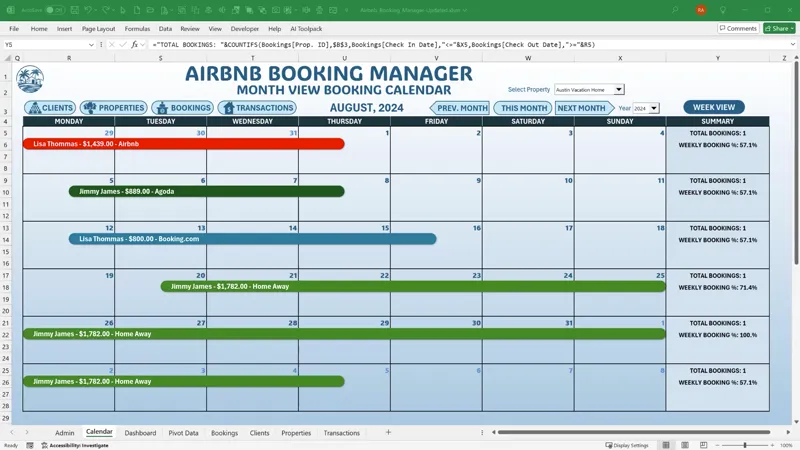
· Month View Schedule w/ Summary added by Randy Austin
· Full Dashboard Feature added by Randy Austin
· Month View - Weekly Summary added by Randy Austin
Please don’t forget to add your requests for your own Feature, Fix or Focus each week when I post a new video, right here on Patreon. Each week I will either add a new feature, fix a bug or an issue, or create another training with a special focus on any part, all based on your feedback and comments.
Comments (10)
Hello Randy, this temple is a great help to me especially I just started my BNB business and having a hard time managing it all. If I may, can I add additional features for this template and help me develop it if possible? Thank you!
Hi Lyn, thanks for your message and great to have you here. If you need help with this, I would be happy to refer this out to a qualified developer. Can you please email me all of your specifications in a detailed scope and I can forward it to a developer? Randy@ExcelForFreelancers.com Thanks again
Hi Randy, There is a missing Macro in the file. It is for the colorpicker. So I can't choose a color. How can I fix that? I found it. I rename the macro who set the color to Calendar_SetReferralColor. So it is ok now.
Hi Jan, thanks very much. I am glad you found it. IT is working fine. IN the Admin screen when a user selects in column C it will run the macro. I hope this helps and thanks so much.
Thank you very much for your help. I already knew the class you recommended. It would be interesting to take this Airbnb structure and create something for meeting rooms with the option of status (confirmed, cancelled, in process) Having an option for setting up the meeting room, equipment that the client has hired as well as the chosen coffee breaks. After all this, create a work order and commercial agreement with all the information contracted.
Thanks so much, some great ideas for sure. There is so much potential with this template no doubt.
Morning, this is an incredible project. I'm going to go through all your lessons to adapt it to a meeting room booking system. Maybe this isn't the right place for my questions. I have downloaded excel but when I try to enter the check-in, check-out or book date I get an error 13 with type mismatch how can I solve it? Taking advantage of the opportunity, how can I change the code so that I can book the same room in the morning and the same room in the afternoon? It would be important to me.
HI and thanks so much for your comment. It would be difficult to know the issue unless we see the bug. Can you please share it in our Excel For Freelancers Facebook Group here: http://bit.ly/groupexcel| We have 65,000 members to help. Also if you are doing a meeting room scheduler, please check out this series on a complete meeting scheduler https://www.youtube.com/playlist?list=PLIBeRriXvKzAuLr7vg8d9-Ysr2h6cD-o4 I hope this helps and thanks so much.
Thank you very much i thought this was included - if the dates for properties were booked, another booking shouldn't be possible on those dates or for that booking period. sorry for being late again, but isn't that necessary?
Hi and thanks yes this is an important feature, however there were so many features on this particular template that i wanted to add. This was one of the many features i was not able to get into the update.