
Gaming in VR at 60 fps
If you're here, reading this, it's likely that you already know how grandiose it is to play your favorite games in VR. Just to be there, inside the virtual world. To be able to crane your neck and peek behind a corner. Friend or foe? See and admire details that would never even register with your brain if you were playing on a flat screen.
And yet, if you're here reading this, it's also pretty likely that your favorite game is not in VR (at least officially), because publishers are so scared to invest in the sector, the poor things. I pity them. No, seriously, I do. I mean, it must be hard sitting on billions of dollars and giving up the opportunity of a lifetime, to be part of a revolution which is much greater than when movies transitioned from black and white to color, possibly deeper and more meaningful than the invention of movies themselves... just because you're so fixated on the bottom line that thinking of investing like 0.1% of your revenue only to build a market, without an immediate profit guarantee, has you running for the hills while mumbling "a fad... it's just a passing fad..."
But as you know, the number one item on my not-so-hidden agenda is "demolish any rationalization that can be used to resist the inevitable".
We already went a long way together with the rationalization "Aww, but I cannot possibly redesign my whole game to implement motion controls, they're so hard! Everything needs to be made grabbable and physics-responsive, all my costly animations for the thousands of actions that the main character can use to interact with the world will have to be redone or thrown away, don't even get me started on the nightmare which is to redesign the inventory, EVERYTHING in the game will need to be tested again..."
Ah, no. We proved that playing immersed, with exactly the same control scheme and interaction model as were built for the original 2D version, is perfectly feasible and greatly enjoyable.
What is the next wall of resistance that we need to break down?
Performance, or "you can select any frame rate for our game, as long as it's 60 fps"
When Oculus and Valve started the current iteration of VR, they boldly posited that every VR game should run at 90 fps. Well, that's kind of reasonable, methinks. Not so much harder than running at 60 fps as every other game does (erm, PC games at least: console versions still have a tendency to drag their feet at 30 fps).
But then, when the memo gets to the engineering team of a studio, their reply is that 90 fps is 50% more performance, or 33% shorter frame time. It takes months of work to shave down 5-10% of execution time from a well-optimized engine; 33% is a very big ask, they say. Also, since the time quantum in a Windows system is exactly 1 ms (Windows is not a true realtime operating system), and there are only 11 ms in a frame at 90 fps, there's really not much room left for maneuvering.
That's before you tell them that all of that will have to happen at the highest possible resolution that the engine supports, because everything in VR is life-sized and each pixel gets magnified and put under close scrutiny.
And before you tell them that actually there will be two full frames to render (one for each eye) in those meager 11 milliseconds of time. And no, don't even think of deep-pipelining the GPU, because latency is BAD!
As those of you who have been following me for some time know already well, I began to tackle this hairy issue since my GTA V mod by using Alternate Eye Rendering, which put simply means having the game draw only one eye in each frame time (so ideally in those 11 ms allowed by the headset refresh period). The other eye is reprojected, which means that the previous image for it gets rotated around the user's head in such a way as to simulate the relative orientation that the world would have had for the current frame when seen from the "stale" eye, if that eye view had in fact been drawn by the game engine.
That takes care of smoothing things out when you turn your physical head while in VR, and with a few extra engineering tricks (what you might have seen called "camera rotation compensation" or "yaw folding") you can also get a smooth rotation for the game camera with the gamepad right stick or mouse, as long as you're in first person.
But everything else is problematic. Strafing (whether it's your character that's doing it or other players or NPCs in the game), orbiting the camera around your avatar when playing in third person, moving your physical head from side to side, in general any kind of relative lateral motion between your eyes and the virtual objects you're looking at, all of that will trigger a psychovisual illusion caused by the rapid flashing of the low-persistency headset display, where it looks like the borders of objects get duplicated or triplicated. I simulated the effect, which happens in the viewer's brain so can't actually be captured on video, in my post from Oct 31: https://www.patreon.com/posts/74012973
This "ghosting" effect becomes worse as the game frame rate gets lower, because on average your vision will be hit by more flashes of the same repeated image.
If you manage to squeeze 90 fps from your game (drawing alternate eye views each time) the ghosting is barely noticeable, and you can get used to it and learn to "unsee" it in just a few minutes.
If the game runs at 70-80 fps, the ghosting is there but only annoying when NPCs move from side to side very close to you.
However (and that's the case for quite a few people), if your PC is not top-shelf and you can only get the game to run at the canonical 60 fps or even less, the ghosting starts to become an issue.
In fact, one question I get asked very frequently is: how come some native VR games render at around 60 fps and look very fluid with ASW for Oculus or motion smoothing for SteamVR, while your mods ghost like crazy when I hit 60 fps?
The difference, as Brian from Flat2VR never tires of explaining (thanks my friend <3) is that when native VR games, which are typically built using lower-complexity assets and dialing down quite a lot on the engine settings, say they're rendering at 60 fps, they mean 60 fps per eye, or 120 fps total. When a modded AAA game is rendering at 60 fps, it means 60 fps total, or 30 fps per eye. At 30 fps per eye, every existing reconstruction system (ASW, motion smoothing, etc.) breaks down completely and the game becomes unplayable.
Well, every existing system... until today.
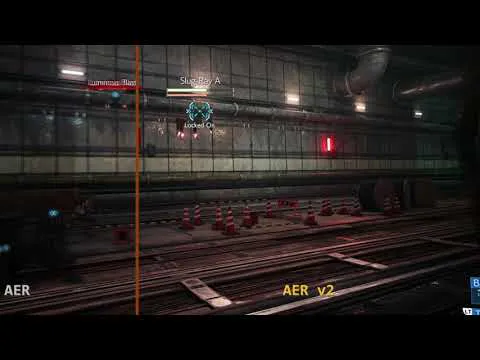
AER v2
I can finally announce that I have my prototype working, and I'm already beginning to give it out in beta testing. Depending on how many problems are found in the beta, I will publish the first release next week or the one after that.
It's been a monumental endeavor (I lost track of the sleepless nights, it's all become a blur), and it still needs lots of TLC. In particular, two crucial points still need to be addressed. As I mentioned in one of my previous posts, the tech is conceived to be fully autonomous and adaptive. In its final version, it will be able to automatically adapt to the characteristics of the game, the system you're running it on, and possibly even to the complexity of the scene that you're playing at a given moment, and work out on its own the best configuration to apply dynamically to maintain the illusion of full frame rate within the current constraints.
I'm just one guy though, and implementing and testing all of that will take several more weeks or months, while instead I'm itching to go back to modding games for us all to play (yes, I'd also like to find some time to play my own mods every now and then!).
So I will be taking an incremental approach, releasing or re-releasing one title each time with the new tech customized for it, and gradually adding in the new features as they become available.
The first title, which already WorksForMe(TM), is Final Fantasy VII Remake Intergrade. With the upcoming re-release for this beautiful game, under the "Advanced" section of the "R.E.A.L. VR" tab of the mod overlay, you will have access to two new rendering modes. They are simply called "1/2 rate" and "1/3 rate". Apart from that, you will of course still be able to fall back on the good old Alternate Eye Rendering mode (which will now be called Legacy AER) and on Mono. Mono's mostly to keep Brandon's happy []-D
Except for possible coding errors on my part, the two legacy modes should behave absolutely identically to how they always did. It adds a small maintenance cost to me of course, keeping the old behaviors in place, but I don't like pulling out options and choices from under my users' feet, even though we're in 2022 and it seems that everybody operating in software does that systematically and shamelessly.
But let's talk about the new things!
The "1/2 rate" and "1/3 rate" modes will try to lock the game frame rate to the respective frequency, so for instance if you're using a Quest 2 set to refresh at 90 Hz (the recommended rate for my mods), which means 180 fps when running at full rate and drawing both eyes each frame, the "1/2 rate" will cap the game at 90 fps or 180/2, while "1/3 rate" will cap the game at 60 fps or 180/3. To make another example, if you have a Valve Index set to 120 Hz, the caps will be at 240/2=120 fps and 240/3=80 fps respectively (always remember that the starting rate is double the frequency of the headset, because the headset needs both eye views refreshed on each tick).
It is important to avoid stuttering or missed frames that no other external limiters are competing to also tell the game how fast it should render, so as always with my mods you should keep V-Sync off and not use any third-party limiters like RivaTuner. The internal fps limiter of the game is fine as long as it's set to a frequency above or equal the one you're targeting, so for FF7R it's all good because its frame limiter defaults to 120 Hz.
(Side note: a few people asked how to remove this limitation for FF7R. Don't do that. The game can't render faster than that anyway, especially at VR resolutions, and I observed that if you remove the 120 fps cap something in the driver or the game itself panics and hard-limits the game to 60 fps synced to the monitor, which is way worse than where you started from).
The "1/2" and "1/3" fractions are also important to keep in mind because they represent how many of the frames sent to the headset are actually rendered by the game, as opposed to those which are being synthesized (interpolated) by my new implementation. So, with 1/3 rate, each eye will get one frame rendered by the actual game engine camera, then two frames interpolated by my tech, and then again one frame rendered and so on.
So, which one should you choose? "1/2 rate", normally meaning 90 fps, or "1/3 rate" for 60 fps? The answer is yours to give, in the sense that it depends on the power of your system and on what balance you prefer to strike in the triangle clarity/fluidity/latency.
If you need your game to be super-responsive, and your system does not have lots of GPU power under the hood, then choose 1/2 rate and lower the resolution, or the game graphics options, until the mod reports a stable 90 fps. If you prefer nicer eye candy and don't mind a few more milliseconds of latency, choose "1/3 rate" and you will have a lot more headroom to move your graphics knobs. And of course, if you are the lucky owner of an RTX 4090, choose "1/2 rate" with all the bells and whistles and enjoy your perfectly smooth and insanely detailed VR :-D
The new paradigm ("give your GPU some breathing room") and what to expect
When the tech is functioning properly, basically every frame rate (90 fps with "1/2 rate", 60 fps with "1/3 rate", and further upcoming modes that will have even stronger interpolation capabilities) will look and feel as you were playing a native VR game, i.e., there will be no ghosting and no juddery motion whatsoever, because the headset will always be fed a steady 180 fps stream of images. That magic will last as long as you're hitting the stipulated target, and that can only occur reliably if you have some GPU headroom left.
In other words: if you ask too much from your system, and your GPU usage hits, say, 97% or higher, your poor graphics card will no longer be capable of completing all its required tasks on time. Visible effects will be: motion in the virtual world beginning to appear juddery or jittery; the runtime mirror window, or even the headset itself, starting to lose frames; tracking problems; frame drops in the capture if you're recording or streaming, and so on and so forth.
If that only happens for a second or two, no problem, as you might've just hit a rough spot in the game: let it pass and keep on truckin'. But if that occurs too often or even constantly, it indicates that you need to choose a more conservative setting on the interpolation scale. For now as I mentioned the mod will expose two, but in my secret lab under the [REDACTED] of the [REDACTED], I had acceptable results going as low as "1/6 rate". That means the unheard-of possibility of gaming in VR while pumping out as little as 30 fps total!
For the moment though you'll able to access a minimum of 60 fps, so if you want perfectly smooth interpolation and your system is unable to keep up a steady 60 fps you'll need to lower the resolution, close other apps, reduce your graphics settings and so on (*cough* upgrade *cough*) until you have a steady fps meter.
Incidentally: some aspect of my framework are long overdue for a restyling. One of those is the framerate counter, which is usable but nothing to write home about. One of these days (or nights) I will rework it into a visualization that can tell you more about what is causing you to miss or drop frames.
And to answer an important question that quite a few of you posted in the comments and personal messages during these weeks: the new AER v2 tech will NOT leverage DLSS3, for two reasons of importance and one incidental. The incidental one being, DLSS3 was not publicly available when I started working on this, a problem which could have been avoided just by waiting a bit.
The two important reasons are: a. I didn't want to restrict the benefits of the revision to only users with the super-new, super-expensive last-gen cards, and b. I wanted the two technologies to be usable together, so when new games start to come out that can barely hit 60 fps with DLSS3 switched on (it's going to happen, as sure as the sun rises, and sooner than you think) my tech can still be added to save them ;-)
Bonus
As if this post wasn't long enough yet. Told ya you would soon regret the days when I was being silently productive ;-)
The new releases, starting from the FF7R reissue with AER v2, will finally sport the magical slider you always dreamed of and never dared to ask (just kidding, many of you asked!): I worked hard on it these last few days, despite the brain fog, and it finally came together just this morning. All the reprojection/filtering/interpolation passes will have built-in automatic sharpening, which will be fully controllable by the user.
Again, to clarify. This is not just post-processing sharpening, which kinda works but can never quite restore the detail that was lost during previous operations. On the contrary, all texture manipulations will be done in such a way as to preserve all the detail in the original rendered images, and if requested with a sort of "overdrive" that allows for a sharper image than provided by the game itself.
Happy VR'ing!
(I apologize for all the unanswered comments and personal messages these days, I have been feeling really unwell. I seem to be getting better though, so I hope to be able to catch up soon!)
Comments (59)
For Luke: Can AER1/4 be enabled? I know you have reasons for not including it, but perhaps for us super-nerds? I've got a date with the Pimax Super and she's really picky about PPD. Thankfully she doesn't care about artifacts.
PLEASE PIN THIS POST! I've wasted hours and hours trying to optimize to reduce ghosting and artifacts in Ghosts of Tsushima, all could have been saved if I'd found this post sooner. This is ESSENTIAL information imo. Please make it easier to find 🙏
I got an error message in the real config saying that that file is in a place where the game exe isn't there. that is wrong. I put it in the correct place where the game exe is located. It says" This folder does not seem to belong to any of the supported games. Please make sure that the mod zip archive is extracted to the very same folder where the main game executable is found, and not for example into a subfolder. Aborting RealConfig Press any key to continue...
Yo Derrick, can you please repost your question under a new Patron post so it is easily visible? Please also include what game you are trying to install the mod for :)
I currently think "Mono" works best for me, because it is the smoothest experience. In above text "Mono" rendering is not described. I know that my stereoscopic view is 30% of a standard reference. Many older games run on modern computers with a few hundred to a few thousand fps. For example try Quake 2 & do the benchmark on a 3090. Also, the Half-Life 2 mod could run with 3800x3800 pixels & the GPU was basically sleeping with 70Watt power drawn @ 90 Hz.
Would this be interesting stuff ? I for one, would easily invest in 2 graphic cards if it doubled the VR-show and see the best possible . Or is this totally unrelated to what you are doing ??
NVIDEA has some methods for using SL for VR https://www.youtube.com/watch?v=xaGK_ytNQfc and https://developer.nvidia.com/blog/vr-sli-accelerating-opengl-virtual-reality-multi-gpu-rendering/ and https://www.nvidia.com/en-us/geforce/forums/virtual-reality/11/244932/vr-sli-vr-sli-supported-games-list/
Luke,
Update to using a PCIe 4.0 GPU in a PCIe 3.0 motherboard. Confirmed, my FPS nearly doubled. With the 1080ti, I was getting 30-50fps using low graphics settings. Now with the RTX 4070, I get 60-80FPS. Im happy with the results for the RTX 4070 @ $600, as there are other VR games that I could not push the graphics settings on. Now I can increase textures, without loosing to much FPS. Before, I had to sacrifice quality for performance. Plus, I can hold off and building a new VR system from the ground up. Now I just need to figure out the lockfree_table capacity exceeded and, now I get errors in RealVR64.log stating that there is a missing XR_SPACE_VELOCITY_ANGULAR_VALID_BIT. For now, Im dealing with every 5 minute to 1 hour crashes as I climb past 275 hours riding horses in VR. Giddy up!
Well, after doing some extensive reading. Came to the conclusion and advice per tomshardware, that "Game support for Multi-card SLI or CrossFire setups has basically died." So after reviewing another article by pcguide101, for "Will RTX 30 and 40 Work in PCIe 3.0?".... I purchased a replacement GPU for my 1080ti with an RTX 4070. Even though I'll be running it in PCIe 3.0, it should nearly double my FPS. I used both tomshardware "GPU Benchmarks and Hierarchy 2023: Graphics Cards Ranked" and the pcguide101 article to come to this conclusion. So, for those that need to nearly double their fps, but not ready to spend 1,000 on a video card to replace their 5 year old video card, will hopefully find this info helpful to make a decision.
HMMM, an interesting experiment! Let us know how it goes :)
Hello. Has anyone used 2 NVIDIA GPU cards in SLI mode to double their FPS performance when using the R.E.A.L VR MOD? Would love to hear if there are any success stories or difficulties others have had if any, to get it to work with the VR mod. Thanks in advance.
I have the GTX 1080 Ti and I am still playing (REDACTED) game online using the R.E.A.L VR MOD v5.0.2, as its the only one that supports (REDACTED) game. I get a 'lockfree error' on start up, but I close at a certain point of loading. I play the game using Stereo AER for stereoscopic 3d viewing which provides the depth I need to feel immersed. Granted, it only works on low config, but I get gaming times anywhere from 15 minutes to 3 hours before it crashes the R.E.A.L VR. Easy enough, I re-start the R.E.A.L VR to hook back in and Im on my way. Even on low config, I can see impressive textures and can appreciate the art work that went into the game like the designer clocks and fireplaces. Any ways, I have 176 hours in the game, all using the RDR.Real VR MOD v5.0.2 and I love it! So, dont give up hope, some older systems can still work. For me, playing in pancake /flat-screen feels like my hands are tied behind me back. I only purchased the game and provided support here, because using the R.E.A.L VR MOD, is the only way I want to play the game!
Yeah, real shame some games are no longer supported :( Would have been awesome to have gotten an improved version of REAL for GTA.
Do you think gtx1060 can handle it?
Mmm... I don't know, it's a pretty underpowered card for AAA VR gaming. Which game would you try on it? Please don't say CP2077 :-)
Hm, all existing systems.... On my computer with new videoadapter Asus 4090 OC Resident Evil 2 with REFramework + mod with more detailed textures and all settings are maxed - works like a charm. No ghost effect. However FPS are around 40-60 there. But it works like I am phisycally there. So scary and so beautiful. The best game in VR I played (well, except Alyx). Did that guy do it differently?
Youre talking about Praydog, and yes they work a little differently. Textures for instance in my opinion dont load quite as efficiently, especially if you have your texture setting lower like 1gb-3gb. He said when he developed the mods he was using a 2080, which seems a little underpowered considering whats being done. I have to assume he doesnt use AER either judging by the smoothness of motion, but I cant figure out how he gets the results he gets on a 2080 without using AER. My guess goes back to how his textures load and the fidelity of them.
Can we use the 9.0.1 on Cyberpunk now, or is it only supported for FF7 and Grounded?
would also like to know if or when Cyberpunk will be able to run AER2 plz!
I didn't understand one thing, with the current AER my PC works at alternating 90 FPS per eye. With the AER2 1/2 it will continue to work at 90fps but instead of alternating between the two lenses will they be effective on both (reducing the current problems which however aren't bothering me particularly)? will the PC always work at 90 anyway? using 1/3 instead, will I be able to benefit from the power saved to go and increase the settings that I now kept on low?
Yes to both questions!
Hey Luke, have you thought about a free version of the MOD with support for some games, the oldest ones, so people can try it, to see if they like it, if they can handle AER, if their computer is good enougth ... I think that could bring new patreons.
Maybe next year I'll try to do something like that. It's not so easy though. It complicates support quite a lot, having two versions floating around, and also depending on how AER v2 is received it might not make a lot of sense to have a "demo" version showcasing the old technology instead of the new one. Not saying it can't be done, just that there are lots of factors to think about
Amazing Post. This is going to be awesome. Can’t wait to see how much of an effect this tech has on CP2077 when it makes it there. Thank you for all the hard work.
I am so very extremely excited about this!!! Mr Ross, i am late to the Patreon but both CP2077 and FF were amazing experiences!!! Massive props sir! — I can’t not ask, is there an ETA for this early access FF7R AERv2? — You see I didn’t finish the game yet and waited so long for this to come to PC, and now you came up with explosive news that would block me from continuing the game with Legacy AER
Sounds like a week or two from when he posted for FF7. Depends on how testing goes. Fingers crossed!
Playing through FF7 remake and yet again reminded just how great it is to be inside these AAA virtual worlds. I share your frustration that this hasn't been embraced by the gaming industry after 7 years of consumer grade VR. Thanks again for making this happen Luke. Quick question. I'm currently struggling with the real menu interactions in FF7. Double thumb stick has never worked for me but i can bring up the menu fine using the Pause key; however, mouse cursor is restricted to the top third of the screen, joystick interactions pass through to the game, and keyboard navigation doesn't work, so I'm currently unable to set Reshade options or change the camera mode as I'd like. Only happening in FF7 -other games are fine. Running latest real mod version on a i7/32G/3080 with a Quest 1(yep, witing for a worthwhile upgrade option :) ) headset. Problem persists over both Link cable and Virtual desktop connections. Any ideas? Thanks again for your work.
Yo Billy, you should be able to hold right or left(think it's left)bumper and then use the right and left triggers to move through the overlay tabs. Use the dpad to navigate through the current tab.
Doom 2016 and Doom Eternal would be neat too in VR. Wonder how god that fast gameplay transitions into VR.
@lukeross you should convert Postal 2 into VR! Older game, easy to run for most people and native FPS. It's a cult classic that might attract a lot of players!
The slider! I can't wait for the slider.
It is in fact quite a beautiful, luxurious slider. Actually it's such a nice slider that there will be two of them in the release version :-D
Sounds beautiful! This is the most daring and ambitious thing I've seen in Flat-to-VR, period. I had a few clarifications/questions I felt better to ask in the channel: It wasn't clear (to me) what the difference is between "AER at 90 fps" vs. "1/2" is though (with a 90hz HMD). If I understand correctly: you are rendering both eyes at the same time in your new modes? Is it the interpolation that's been added? So basically you've developed motion smoothing for AER? Or is it merely reprojection of the rendered pose (motion reprojection) between frames or does it also use frame prediction as with other motion smoothing? Does it work for canted displays (Pimax)? Should we expect DLSS3 to work with this new mode as soon as a title supports it?
Haha, so many questions! A few preliminary answers: - the eyes are still being rendered in interleaved fashion (forcing the same game time, despite popular belief, only increases the latency for the right eye); - yes, what I've done is roll my own version of ASW/motion smoothing for AER, with full frame interpolation; - it should be extendable to canted displays, but Pimax is such a tiny fraction of my user base that I can't afford to spend much time on their headsets; also, to be honest, it doesn't help any that they never fix the bugs that myself and other modders like mbucchia have long since reported to them. Quite the contrary, they introduced new regressions with recent versions of their software; - I don't use DLSS3 for AER v2, so it should be fully available for the game to use when it becomes ready.
Loving the VR Mods but having pretty bad issues with Cyberpunk. Is there a Discord I could join for help or something similar? Cheers.
Hey Flash! You can join the Flat2VR discord and ask for help in the Luke Ross section. You are probably more likely to get answers here though. Why not try both? What ails ya in Night City choom? I am headed to bed but will check back in the morning.
Is there like a wiki on explaining the tool. Like what each option does with examples? For now I am kinda just fiddling around but not really sure what I am doing.
Not that I am aware of currently. Thinking of trying to put some stuff together with Luke's permission. Maybe beginning of the year. Going to be busy here after Grounded, Spidey and AER2 start rolling out probably.
So, Flat2VR on Twitter posted this update and attached a picture of Insomniacs Spider-Man. Besides Grounded this is also coming too? Pleeeease be true. https://twitter.com/Flat2VR/status/1604637635812679680?s=20&t=bTx0azpdPX5CmxQ2OTCWnQ
Spiderman Remaster should be swinging our way by the end of the year according to Luke's previous post. He has not been feeling well so could be some delay but he has not retracted that ETA yet. I also am very much looking forward to Spidey!
I wonder if there's some sneaky way Luke could allow us to indirectly enable aer 2 in GTAV an the other blacklisted Rockstar games.
I love the flat to VR Modders! You folks are keeping PCVR alive and thriving imo.
Waiting for playing The Witcher 3 next gen!
Thanks a lot! Kind of sounds like the magic RTX thing nvidia has out (portal rtx beeing a demo of that) just for VR. And I am also amazed that so many companies are scared to go VR, lucky we got you! Edit : it makes me wonder, if this could also replace some lesser optimized VR implementations? Would it work on Games like DCS instead of the "native" support? Would be interesting to see how it could benefit.
Try not to burn out, thanks. I get my best ideas while not working - so in fact, I'm more productive when working, less.
Can't wait to give it a go, thanks for all you do Luke. I'll give a bump to Cyberpunk being the next game up!
I agree, Cyberpunk seems like the most popular of Luke's mods so hopefully it's high up on the list. Probably depends on how much TLC it needs to get it working well.
Wow - I wish I could really understand half of what you wrote lol Amazing work and as always the extra effort, even if you're beaten down. but seriously, you should open LUKE's VR ACADEMY, and take on some students to assist you with all the work. Super complex stuff with amazing simple to understand outcome for the users Qn: with my newly gained reign over the FPS (4090) and my Quest 2, I set the headset to 120Hz, Render Resolution to 1.4x (3936x1984) in the Quest PC App and fire up FF7 , with max settings I get full 120.2 FPS in the overlay display at VR resolution of 2976x2976. Runs like butter. Now you recommend 'rolling back' to 90Hz for your mods? and using AER 2 with 1/2 ? Or can I leave the current settings at 120Hz and apply your new version and see what happens.. I think real test will be in the visuals as from theory text above I cant make out whats the best set up. Forget the motion controls. Waste of time. Even games like Half Life still struggle a bit with perfect implementation of grapping things and all. who cares. Games you convert are never meant to be played with motion controls, so dont waste time or thoughts. Controller is so much better and immersive without the stupid struggle to pick up a can awkwardly and toss it away. Good you abandoned that.
Sounds like, as long as you can maintain 120fps steadily you should be able to pick 120hz at 1/2 and you will get a 240 fps like VR experience. It will obviously depend on how performance heavy the game is. Cyperpunk you may want to go down to 90hz at 1/2 and pumping up resolution, settings and some RT. If you want to go absolutely crazy with the settings and RT you could even go 90hz 1/3 for 60fps which should still feel more like 120fps native VR but you get all the looks.
Sick, i am excited to dive in to cyberpunk using aer2.
I may even do another VR run of CP2077 That game in vr (with a few mods) left a permanent mark on my soul.
Can you name some of those?
Beautiful and exciting wall of text! Looking forward to doing the fps limbo. How low can you go! If I am going to have a subset of Luke Ross gamers named after me the Monos doesn't really strike my fancy. The World Scalers seems more appropriate :) The new slider sounds awesome.
Thanks for your hard work and detailed insights! Always a pleasure to read 🙏🏽
Sleeps for the weak and that you are not Luke however we do worry about your health although seems like your on a mission and are passionate and I get that so keep going. Thankyou
Awesome potential, thank you for all your hard work and explanations!
I am very exited to see AER V2 in action. Thanks for the insights!
Nice to know AERv2 is almost ready to launch. I'll read tomorrow everything, the bed is calling me now ... And sleep a little more, that's good for the body defenses