
Let's do the Space Warp again!
Hey friends, I'm sorry if lately things have been a bit quiet here on the release front ;-)
As you know, I've been working on a few new titles. One of them, which might or might not have swinging from skyscrapers as its awesome map traversal mechanic, gave me the insane urge to return to the drawing table and see whether Alternate Eye Rendering could be made even better. If you already know all about AER and/or want to cut to the chase, please skip to the "What's cooking" section below; otherwise keep reading for some background information that you might find interesting.
My current AER implementation
Just a bit of context for new Patrons and people who just played my mods without giving too much thought to the technical aspects. I mostly specialize on making modern, open-world titles playable in VR from start to finish, with full immersion in the 3D virtual environment. That means that on your typical 90 Hz headset, since both eyes need to be drawn at each headset refresh, the game engine will need to pump out 180 fps. That is already beyond the realm of possibility for many current titles unless you have a beast of a PC, and yet it gets even worse, because in VR you need much higher resolutions, due to the greater field of view and the fact that the pixel structure is hugely magnified by the lenses in front of your eyes.
To quantify, games begin to look good in VR starting from 2160x2160 pixels (I typically employ square-ish aspect ratios, because for most headsets the horizontal and vertical FOV are comparable, and rendering a 16:9 image would just mean wasting previous GPU cycles on drawing invisible bars to the left and right of your field of view). And to get a nice, sharp image, you'll probably want to go up to 2736x2736 or even higher. The total number of pixels in a 2736x2736 image is comparable to that of a 4K image, about 8 megapixels.
So, to achieve "native" VR quality, you would need to make the game render at 180 fps with a resolution comparable to 4K. Most modern open-world titles will never reach that kind of performance on current consumer hardware (although the RTX 4090 coupled with a last-gen CPU might change that, but for now only a small minority of my Patrons has access to that kind of GPU power).
For the above reasons, I employ Alternate Eye Rendering in all my mods. At every game engine tick, only one eye is actually rendered, while the other is reprojected from its last image. The next frame will draw the other eye (that's where the "alternate" comes from) and reproject the previous image, so for example: frame 1 = render L; frame 2 = render R and reproject L from 1; frame 3 = again render L and reproject R from 2; and so on.
Such a stratagem halves the performance requirements imposed on the game engine, bringing it down to a more reasonable (but still quite hard to meet with older cards and newer games) 90 fps at 4K-ish resolution. The rest I do with some additional tricks, which allow you to play smoothly in VR even if the game cannot hit 90 fps reliably.
Suggested frame rates for AER
Speaking of not hitting 90 fps, many of you have been wondering about the "ideal" frame rates that they need to target to play in VR with my mods. That's somewhat subjective, so there is no clear-cut answer, but assuming that your headset refreshes at 90 Hz, I can give you a few figures that reflect my personal preferences. Note that the default refresh rate of the Quest 2 is 72 Hz, but at least for my mods it is strongly recommended to set it at 90 Hz.
Please keep in mind that these numbers are meant to be compared to the internal fps counter that the mod provides: if you use third-party utilities that measure the VR frame rate, they might not understand the mechanism I use and wrongly show you that you're running at a constant 90 fps, while in fact you're not. So always use the mod overlay to properly measure frame rate.
If you have really powerful hardware, and/or the game engine is old enough that you can reach at least 140 fps, maybe with occasional dips down to 120 fps, then go ahead and choose "R.E.A.L." from the "Render Mode" menu in the overlay, and enjoy an experience which is basically identical to that of a native VR title.
Otherwise (Render Mode setting to its default, i.e., "Stereo (AER)") the fps ranges are as follows:
solid 90 fps: great subjective quality, with barely perceptible ghosting that can be made to look almost like a traditional motion blur if your headset can be set to 120 Hz refresh without making your system unstable (it's possible with the Valve Index for instance);
at least 70-80 fps: very good subjective quality, with some ghosting particularly while strafing and/or when NPCs very close to you move from side to side. This is the "sweet spot" range that I usually recommend: it can be reached with most titles and most GPUs by dialing the in-game resolution up or down according to how much the game is taxing your system;
at least 50-60 fps: acceptable subjective quality, with some judder and ghosting that becomes more visible and starts to get annoying for some people. If the game only occasionally dips to this frame rate range, that might be OK, but I would not recommend doing an entire playthrough in this conditions. It might be preferable to lower the resolution or the graphics options, and/or to use DLSS, until you get up to at least 70 fps;
less than 50 fps, with dips under half the headset refresh frequency (so 45 Hz for a 90 Hz VR unit): that's a range you never want to be in. You will experience judder, jittering, bad tracking, plenty of ghosting, and/or an unrestrainable urge to go to Reddit/YouTube comment sections and publicly announce that my mods are crappy ^_^ While that might be true, you definitely don't want to play in those conditions. Run RealConfig again, don't push the game settings up (for example I get a lot of people trying and failing to play with ray tracing on: that will only cause you grief! Leave the settings as RealConfig presets them), and perhaps lower the resolution and/or use DLSS so that you get away from the 40-50 fps "danger zone".
What's cooking
While the image ghosting associated with Alternate Eye Rendering is definitely tolerable, and most people learn to "unsee" it after just a few minutes of gameplay (especially when following the common-sense recommendations that you can find in the previous "Suggested frame rates for AER" section of this post), it would be awesome to be able to get rid of the ghosting for good.
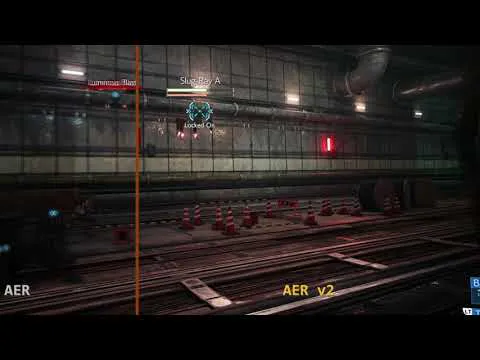
That's what I've been working on lately. I'm not 100% sure that the effort will succeed, and it's probably going to take at least another month of work before even a raw prototype can be released, but I'm beginning to feel confident enough that at least some improvement can be obtained, so I took some time to make a video that can show you more or less what I'm talking about.
Please note that the video is completely simulated. While I made it to resemble as closely as possible the final effect that you should get in your headset, the nature of the "ghosting" caused by AER is such that it cannot be captured on video. It's purely a subjective phenomenon, essentially an optical illusion that your brain creates when the image for one eye flashes twice on the low-persistence headset display. Our vision system evolved with natural images where motion is continuous and there is no stroboscopic effect, so when confronted with AER it wrongly decodes the double-strobed reprojected images as though the border of objects were fuzzy and duplicated.
On the left side of the video, I faked that effect by creating a low-frame-rate render where each frame is the blending of two successive images. Again, it's a simulation, but at least to me it looks close enough to the effect you get with AER, especially when your fps are a bit on the low side. On the right portion of the screen I made an offline recreation of what should be possible if I succeed with this crazy project, which I rather imaginatively called "AER v2" ;-)
You will see that it's by no means perfect: if you pause the video or slow it down a lot, especially when crazy stuff is going on rather close to the camera, the objects in the scene will look badly distorted. However (such is the magic of the human vision system), when played at normal speed, the distorted images will blend together in a way that makes everything look sharper and more natural!
What to expect
If I succeed, my mods will be essentially free from ghosting, as you can see from the simulated rendering in the video. This will automatically backport and apply to all of my Patreon conversions, not just future titles!
However, due to technical reasons, this will most likely only work with NVIDIA cards. There is a small chance that I could extend it to AMD GPUs, but it's not under my control and I would need some "insider" help (if any you knows anyone working in a technical capacity at AMD, or if any AMD developer liaison happens to be reading this, please get in touch with me!)
Also, the quality might not be the same that you can see from the video, at least initially. It might turn out to be even better in time, or fail miserably... It's not a solved problem in literature, so think of this as a research effort: it can be awesome, but no guarantees.
This was a long post, but a status update was kind of overdue :-) Happy Halloween!!!
Comments (59)
Playing FF - Luke the quick link D-Pad shortcut set up for combat - genius! Actually really enjoying this game. The scenery is really top. Fired up my Quest 2 now in 120Hz mode , paired with the 4090 = Badass.
Some of the creatures looked spectacular! I very much enjoyed my playthrough. There of course were other things that stood out *cough*Scarlet mods*cough*.
Thx for all the answers! I'll find a way to reduce it to a minimum
Remember to use the reply button to keep things organized. You are welcome :)
Hi, please help if change the render mode: AER / REAL, i feel nothing changes and i still get ghosting. Any idea why it takes no effect ?
What kind of fps are you getting while playing(not paused)? Do you mean jittering or shimmering around objects or actual trails left behind things when they move?
5900X 4090 I'm experiencing "stutter" when I'm moving, but if I move my mouse I can see the game is being rendered quite smoothly. I wonder why. ASW and Mobile ASW is off in my Quest 2. Highly playable if it wasn't for that :)
What fps are you getting while the game is actively running(not paused)?
i hope he can fix the ghosting!That would be a big step !
Hello there how is the AER version 2 coming along?
I asked him this question recently as well. He said he has made some progress but it is a lot of work for one person. No indications that it will not work though yet, so that is a plus :)
Looks awsome! Cant wait to try it!
Hmm its a great game but not a massive fan of gow tbh
Here's hoping luke is indeed working on both right now. Whtever he does, dudes a legend anyway
Look at the beggining of this post: "As you know, I've been working on a few new titles. One of them, which might or might not have swinging from skyscrapers as its awesome map traversal mechanic" You don't want God of War ?
Yes ive just seen bearded benjo's video and he reckons luke is working on spiderman vr currently. If luke does release it soon and a game like uncharted in vr... then thats two huge triple A games. And if ther very good vr conversions, then i think it could turn into a potential game changer for videogames
Beardo Benjo included Spiderman in the list of VR games/mods releasing in november in his video, he made a very optimistic lecture of this post ...
it isn't working properly on virtual desktop? I use pico4. an afterimage appears in the right screen. so screen is jittering
They are hopefully (I think) working on a fix for pico 4 and VD. It is an issue related to the pico 4 specifically.
Spiderman Remastered is 43% off on cdkeys right now. Just make sure its available where you live. I am in US.
what game resolution and what adapt resolution setting in r.e.a.l. vr mod?
Hey bud, please use the reply button if you are posting on the same subject/message. Keeps things organized :)
Just got my 4090 and achieving solid 180fps with R.E.A.L. rendering! I fixed my original problem of having DLSS turned on which gave me bad lag. I'm still experimenting with settings for best PQ
DLSS causing lag ???? never had that .... it did the opposite for me... i have a 3090ti and have DLSS on performance
yes I also noticed the double hud when weapon is drawn not there all the time just after a while and sometimes randomly goes away. and I also noticed it's also picked up when recording that the hud is doubled in the one eye
If you want to try this mod and see if it helps, that would be awesome. I have it installed and it didn't break anything but I don't play Cyberpunk much right now. Would be nice to know if it helps at all. https://www.nexusmods.com/cyberpunk2077/mods/2648?tab=files
you can fix the crosseyed effect when you change the resolution in Cyberpunk menu. Makes two changes : one to reset the cross effect and the second to set your favorite resolution. Hope it helps. I use the scan to see if its fixed or if its buged
Yes, that will fix it temporarily but it still happens once in a while. They are essentially already doing that when they turn DLSS or FSR off and on again. I am not aware of a long term solution yet. Thanks for pitching in :)
When playing CP2077 and using either in game DLSS or FSR the weapon hud will eventually bug out and render both eyes simultaneously giving it a double image “crosseyed” look. I’m on Nvidia with the newest driver. Turning it off and back on fixes it but wanted to see if you were aware or there was a known permanent fix
Not aware of a solid fix for this yet. Happens sometimes to me also. Just in case, make sure you have all the syncs off, A-Z but mostly Vsync :) Also make sure you are using the latest version of the mod 8.2
Luke, that's great news! Especially, after I tried Elden Ring mod again after getting 4090 on board and getting not single extra frame, and still getting 60s in Limgrave . I know, 7700k is too old for such CPU heavy game. Nevertheless, it's quite common to get under 70 fps with VR mods, which causes heavy ghosting. Despite I'm used to 3D/VR "brain discomfort", that's too much to accept. That's why I am very happy to see possible improvement.
Fingers crossed! I really hope I can pull this off, although it's quite complicated and many things could still go wrong
When you say - when you start with a flat game you now have to render two frames instead of one - thats where my question comes in. Isn't also true that you need to render two frames instead of one for a native VR game? So why do "most" pcvr games run smooth at 90fps and most flat to VR games aren't able to? (my generic guess/answer is that native VR games must just have some awesome optimization techniques built in that flat to VR do not)
Please reply to the original messages instead of making new posts, keeps things more organized for others. Native VR games probably do have more optimizations because they already run both eyes at 70-120hz. pcvr games are already running both eyes at 90fps for a total of 180. They are doing it at the same time though without the reprojection. I don't know enough to say there are no other factors or that they don't have any specialized way of making this less taxing, but they are specially optimized or made around the fact that they have to render two views at 90fps simultaneously.
On one hand I understand this -"So, to achieve "native" VR quality, you would need to make the game render at 180 fps with a resolution comparable to 4K" as well as the resulting reasoning for AER. On the other hand, what ARE native VR games doing differently that they don't need to render at 180 fps? (or is Luke suggesting they do as well?) They still need to display a different image angle in each eye at 90 fps each eye to be comfortable don't they? Or is there something else going on in native VR?
AER is only rendering one eye at a time, while reprojecting the last frame for the other eye. Instead of updated both frames for both eyes, the engine is only generating a single new frame for one eye. "for example: frame 1 = render L; frame 2 = render R and reproject L from 1; frame 3 = again render L and reproject R from 2; and so on." Basically he is adding in the reprojection of the last frame.
On another note, who is excited about the upcoming Pimax Crystal headset? looks promising on paper .. Today is Pimax Crystal Launch Event ..
I am honestly happy with my G2, with the exception of the controllers. Hardware wise, I am most looking forward to a more powerful gpu and haptic gloves.
Wow what a difference - the AER v2 looks so much better! Incredible the visual difference - I am all for it. Amazing how you push yourself to the next levels aiming to provide us with the best possible quality of gaming experience. We are pretty much all happy how things are and you still making the cake sweeter - top notch! Speaking of open-world titles - I keep putting one of my favorite games UNCHARTED! (which got me into VR not so long ago really) in front of your eyes and deeper into your subconsciousness so you have no other choice but make it in VR ! haha.. pretty much after Spidey - for the long xmas holidays! (no time pressure) lol
Looking forward to this
Oh boy if this works then CP77 will get even better!!!!
If it works all of Videogamedom shall rejoice! Well, maybe just the tiny town of Lukatamia in the republic of VR shall rejoice. Ok, it may just be you, me and a few others doing all the rejoicing. But, there shall be rejoicing! Maybe an alcoholic beverage as well?
Can you do MSFS 2020?
What you mean with MSFS 2020? This already has native VR support.
Great!
Hey Luke, do you think it would be possible to make your mod compatible for the brand new horror game "SCORN"? Take a look, it is really worth it. Thanks
Scorn works great with Praydog's upcoming Unreal Engine VR Injector Mod in full 6DOF VR, so definitely look out for that https://youtu.be/lFmKMmzS-Rs
Oh, I most definitely approve of the experiments! Exciting stuff. You ghost bustin mad scientist you :) I should probably go to bed now, before I get too goofy.
This is perhaps one of the most exciting things to possibly come out for Luke mods! REALLY really hope you can get it working Luke, amazing work so far! ❤
Thank you Brian, fingers crossed!!!
Lets hope the ”non-swinging” game is more down to earth, set, say a couple of hundred years back in time, where men wear pony-tails with pride and the sword does the talking.
Monkey Island?
When everything is quiet I imagine you are so concentrated working 16h a day, you don't have time for social media :P Good Luck with AER 2.0. I guess the ghosting on spiderman was more noticeable than in the rest of MODs.
Your guess is indeed correct. The combination of third-person camera, fast and wide motion, and frequent abrupt changes of direction is a worst-case scenario for AER!
Just as long as you don't get rid of ghosting in real life. It is Halloween! Wait, please tell me you are dressing up as a ghost buster!! Also, I wonder how Tifa feels about you reposting her only fans content?
Haha, that's true, weird coincidence about the ghost-thing []-D
Dude this is fantastic news!
Hey Dr Greg, 3 minutes reaction time!! Not bad at all <3
That's amazing, well done! Can't wait to try this :-)