

How to setup the R.E.A.L. VR framework for a game
General notes
There is only one archive (.zip file) to download, which will work with all the supported games. However, since I don't want my software to be doing any potentially dangerous stuff to your computer, like installing a service that always runs with admin privileges or using tricks like global hooking, you will need to perform a separate installation for each game you own that you want to play in VR.
The quick setup instructions are in the following section, and the download links are below at the end of this post. I decided (together with the wonderful community who supports me and my efforts) to make my framework free for everyone, so from now on you will always find a public link here. However, if you choose to actively support me by subscribing to the "VR friend" tier, you will also get an early access version that contains all the latest features and allows you to try each game that I add to the VR compatibility list as soon as it's available.
Newly added games will move out of early access, and become playable with the R.E.A.L. VR free public release, about 3 months and no longer than 6 months from the date of their first appearance in the list, depending on the complexity and popularity of each title, how often it gets patched by the developers, and so on.
You'll notice that the versioning system has changed. Since I now have two separate versions to maintain, and they will be released with independent schedules, it would be very hard to keep track of what games the software is actually compatible with if I kept using the traditional <major.minor.revision> numbering. So from here on out the version number will simply encode the release date, with an additional revision in case I need to ship something like a hotfix in the same day. The revision number will be odd for public releases and even for early access.
So for example an early access (EA) release published on March 9, 2026 will get version number 2603.9.2, which breaks down to: 26 for year 2026, 03 for March, 9 for the day of the month, and 2 (even number) for EA.
Setup
First of all, before you try using the R.E.A.L. framework to play a game in VR, make sure that you have run the game at least once flat, i.e., on your 2D monitor. That will make it easier to detect any installation problems with the game itself (e.g., hardware or software incompatibilities, crashes to desktop, etc.), and just as importantly it will create the game configuration folders, without which the R.E.A.L. framework later wouldn't be able to automatically set the graphics options to values suitable for VR.
Download the .zip archive from the link below. If you are a "VR friend" active supporter you should always prefer the early access link, as it will have all the latest bells and whistles and it will already include everything from the free public version.
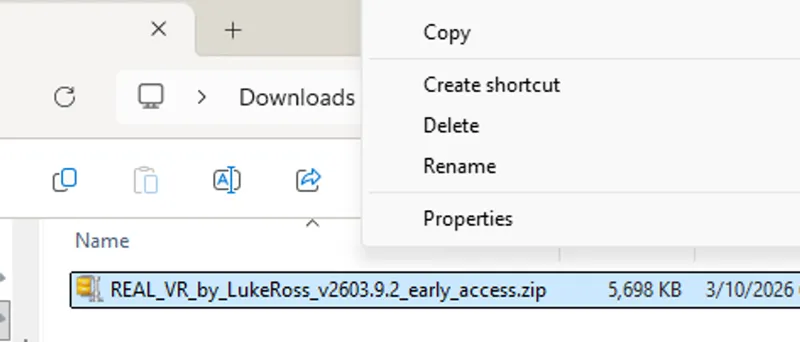
Go to the folder where you downloaded the file (typically your Downloads folder if you didn't change your browser's default settings). [If the .zip file extension is not visible, I recommend that you configure your Windows installation to show file extensions. It's really easy to do (see here), and generally speaking it might save you from a lot of trouble including common phishing attempts.]
Right-click on the .zip file.
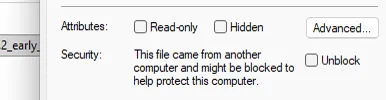
Select "Properties", then tick the "Unblock" checkbox and confirm with OK.
Unblocking the file will get rid of the "Unknown Publisher" prompt when you run the installer later.
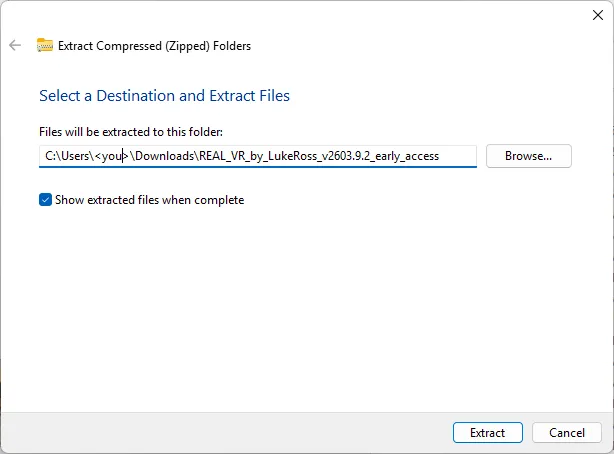
Right-click on the file again and this time choose "Extract All".
You will get a window like this: make sure that "Show extracted files when complete" is ticked and press "Extract".
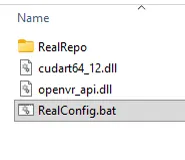
A new window will pop up, showing a folder with the following contents:
Drag all the contents to the folder containing the main executable for your game. The path for that folder will of course vary, according to which title you're installing the R.E.A.L. VR framework for and which store you bought the original game from.
Just for the sake of example: if the game you want to play in VR is https://store.steampowered.com/app/243470/Watch_Dogs/ and you installed it from Steam without changing your default library paths, the folder where you need to put the files will be "C:\Program Files (x86)\Steam\steamapps\common\Watch_Dogs\bin".
Be mindful about two things:
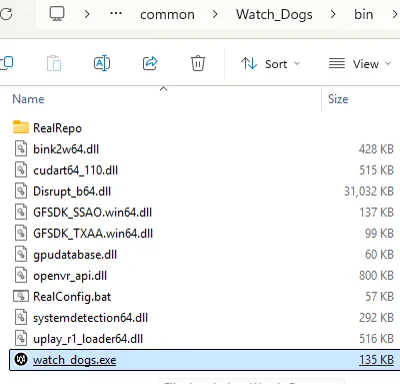
The folder must be the one where the game executable is found, which might be different from the game's root folder. In the example above, the game root folder is "...\common\Watch_Dogs", but the R.E.A.L. VR files need to go in the "...\common\Watch_Dogs\bin" folder, where "watch_dogs.exe" is.
Do not put the R.E.A.L. VR files into another subfolder. RealRepo and the other 3 loose files need to be at the same level as the game executable ("watch_dogs.exe" in the example) and NOT in a deeper "REAL_VR_by_LukeRoss_v2603.9.2_early_access" subfolder.
Still referring to the example, the folder containing the game executable should now look like this:
IMPORTANT: at this point you must run RealConfig, i.e., double-click on RealConfig.bat in the game folder. If you omit this step, R.E.A.L. VR will not work because it won't be able to attach to the game. The same is true if you're simply updating to a newer release; if you don't run RealConfig after overwriting the R.E.A.L. VR files with the new ones, the next time you start the game you'll still be using the previous version.
When you run RealConfig, you should get a UAC prompt to which you must respond "Yes" (the prompt will not be there if you disabled UAC on your system, an operation I don't recommend). Do not attempt to run RealConfig as Admin, as that will mess up the automatic detection of the game's configuration file locations. Just double-click on RealConfig.bat: it will ask for elevation on its own when it's ready.
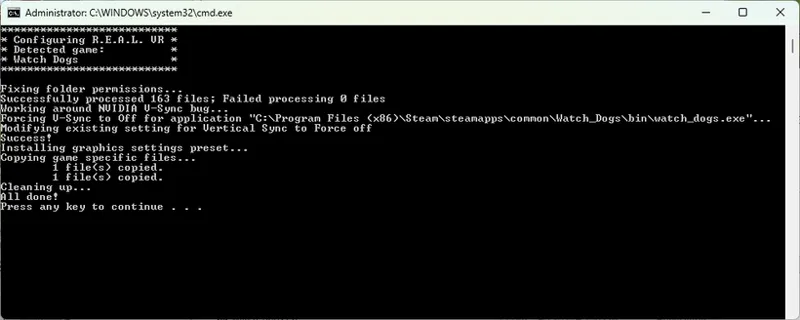
If everything went well, you should get a command prompt window like this:
Confirm by pressing a key and you're done :-D
[Note that this is the only step where my software needs to elevate. For the sake of total transparency, I always restricted the admin-level operations to just RealConfig.bat, which being a DOS-style batch file is completely open source and very easy for any human developer or AI out there to inspect and validate. I have faith in myself (up to a point), but I don't think anyone should blindly trust a random guy on the Internet like me with a bunch of closed-source operations that require administrative privileges.]
The next time you start the game, it will automatically launch in VR. Again, let the R.E.A.L. VR software do its thing. Don't use SteamVR Theater Screen, or run the game from SteamVR itself, or in any other way try to force the game to enter VR. Just launch the game normally as you would when playing flat.
Active subscribers can get lots of further help, including detailed lists of preferred game settings, optimization hints, gameplay notes, instructions regarding special controls I implemented for VR, and personalized support, simply by referring to the INFO posts that are linked in the Welcome page.
Uninstalling the R.E.A.L. VR software
I know, I know, I'm sorry. I always wanted to create an automatic uninstaller for my framework and never got around to it. It's shameful. Somebody even wrote a LukeRossCleaner tool to make up for my shortcomings.
I promise I'll try to make an easy uninstaller at some point in the near future. For the moment however, you can either use the third-party cleaner or follow these instructions:
In the game executable folder, rename RealRepo to RealRepo_ and dxgi.dll (if present) to dxgi_.dll; note the underscores at the end. That will prevent my software from attaching.
To undo the graphics options changes made by RealConfig, find the game's configuration files location (PcGamingWiki has that information for every existing game) and restore the _ori files that RealConfig created as a backup. Example: if your game config gets written to a file called "GameUserSettings.ini", check that a file "GameUserSettings_ori.ini" exists; then, if it does, remove the current "GameUserSettings.ini" and copy "GameUserSettings_ori.ini" to "GameUserSettings.ini".
Use nvidiaProfileInspector to restore the driver profile for the game to its NVIDIA defaults. This will remove the "Vertical Sync = Force off" setting which is needed in VR to ensure smooth frame rate in windowed mode.
You don't need to delete any of the other files installed with R.E.A.L., as they won't interfere with the normal operation of the game.
If you change your mind and want VR back (yes son, I do understand: it was just a momentary lapse of reason ^_^) you only need to rename RealRepo_ to RealRepo and run RealConfig again.
But yes. It's shameful. I need to make an uninstaller already.
Public (free) version download
At the bottom of this post.
Early access version download
Here [Active Patreon members only].

Comments (98)
Is Crimson desert supported on public version?
No
Vdxr in vd occulus runtime in mod was what auto always selected . Connection via dedicated modem. I haven't tried usb cable though. I'll gather and post the file.
Still stuck in flat mode!! . I'm using virtual desktop which works fine for everything else. But I just don't know what to do. Everything in the mod responds ( although at times it drops the controller and realVr is displayed undercover cursor). But mostly it works as expected. Should I send the log file?
You are using VDXR in VD and Oculus runtime? Are you using the new cable method they added? If you could put a copy of your RealVR64.log file on pastebin.com and post a link here, that might help.
Thanks for the help. Got mod loaded and running but I cant get any stereo 3d, how to proceed?
Did you get it figured out?
I have the patreon version, is the mod up to date with the latest crimson desert update? I tried following your instructions but when i open Crimson desert the game freezes istantly without booting up.
It was broken by the last update to the game again. Will have to wait for a fix or roll back the game if you have it on Steam.
Dead space works but I'm still in third person anyone know what I'm doing wrong here?
You need to activate the gamepad shortcut in the DS2023 tab of the REAL overlay :) It is not first person by default because it is a 3rd person game.
Ive tried all the starting possibilities: I start my q3 then start CD from steam and it doesn't respond. I restart q3 and then start virtual desktop. Then I start steam vr from vd and try to launch game from steam and game doesn't respond. I restart q3 vd and then start cd from steam going directly to steam via vd and my pc and game doesn't respond. It just gives a black screen . What do I do to get game to start?
No SteamVR, you need to use Oculus runtime with VD. VDXR in the streamer app and Oculus runtime. Have your Q3 connected and running, then you launch the game from your Steam library as if playing flat.
CRIMSON Desert: I don't know how to start the game now! All instructions followed, installation of supporters version installed correctly. I have a Quest 3 and virtual desktop if that's useful. Now what?
any clue why when i go to start avatar it shows a box at the top of my screen and only the bottom of the actual screen is showing and then it crashes? it has real vr initiated i can see part of the menu and i have a real vr cursor
I'll link my vid for setup instructions. Make sure your settings are correct and no Frame Gen on. https://www.patreon.com/realvr/posts/video-tutorial-119915037 Have you made any changes to the game anywhere else, like DLSS swapper or Nvidia App? I don't remember this game having any issues with Steam Input, but you could try disabling it, or enabling it if it is not currently.
Is Cyberpunk 2077 no longer supported?
Correct, no longer supported after the DMCA.
Jai suivis le tuto a la lettre mais config.bat ne trouve pas le jeu et j'ai fais plusieur jeux de la liste hogward et cyberpunk
What error do you get when you run the config file?
I am having trouble with DOOM (2016). I am unzipping in the games installation folder with the two exes (DOOMx64, DOOMx64vk) but when i run the bat file it says no supported game found
DOOM 2016 is still in Early Access and not included in the public version yet. If you are using the public version, that is why :)
Geht das auch mit Linux Bazzite?
Unfortunately, it is not compatible with Linux.
This page is the only page I found that contains a link to EA version download, very useful for every patron: https://www.patreon.com/realvr/posts/early-access-152734106 - If anyone finds this link on any other page, let me know. To download EA version you need to: 1) Click on the pinned Welcome post to open https://www.patreon.com/realvr/posts/welcome-152405833 2) Scroll down to "Download and Setup instructions" 3) Click the "here" link to open https://www.patreon.com/realvr/posts/how-to-setup-r-e-152405468 4) Scroll aaaall the way down to "Early access version download" 5) Click the "here" link to open https://www.patreon.com/realvr/posts/early-access-152734106 6) Click the attachment to finally download the file. Is this some kind of a dark pattern? Why can't a link to this page be present in the pinned Welcome post, and also in every post about VR framework for a game in Early Access - including this one. Peferably at the top. Even GamertagVR had trouble finding the download link to the paid version and had to ask where is it in the comments. I download a new version every few weeks - every time I need to look for it again (I know, I should have bookmarked it :) )
Im having a BLAST. Only thing missing for me right now is Wolfenstein 2 THe new Colossus and THE EVIL WITHIN. ID DIE FOR THE EVIL WITHHIN lol
Someone did Wolfenstein 2 years ago. No clue what state it is in currently. I think it was Helifax....
Does this free version work ok with cyberpunk? If so is there a version of cyberpunk that works best or can I just use the latest version? Cyberpunk is truly the one game I want to be fully immersed in in VR. There are others I want to play in VR but I've put off playing cyberpunk until I am certain it will be 100% playable in vr. Any tips and tricks for the perfect visual playthrough on a rtx3070 will be great fully appreciated. It's not the most suited GPU but so far my VR experiences with it have been outstanding.
Cyberpunk isn't supported at all after the DMCA unfortunately. There is a new VR conversion out there now though :) with motion controls too. I think it is still a bit rough, but it seems to be getting worked on and improved regularly.
Still never got to even try cyberpunk once in VR with it actually working properly :(
Does this work on GTA 5?
No.
Well it does not work, the VR is waaaaay off and it's so wide my eyes look like a ping pongs after geting shot in the head by a shorgun, also the VR controllers don't work in Farcry 5. What do i need to do?
Did you end up figuring things out? Luke doesn't implement motion controls; gamepad is recommended but mouse and keyboard can work too.
If I run as administrator - ERROR: R.E.A.L. VR installation files not found. When unzipping the archive, please make sure to overwrite existing files and to use folder names (preserve the zip folder structure). Aborting RealConfig
Sorry for missing this. Don't run as admin, just double click and it will ask to elevate.
I runing RealConfig (CP 2077) ERROR: This folder does not seem to belong to any of the supported games. Please make sure that the zip archive is extracted to the very same folder where the main game executable is found, and not for example into a subfolder. Aborting RealConfig.
It was removed after the DMCA. No longer supported unfortunately.
You got a lot of bad press but im glad to see you turn it around. Sadly as of right now i can't use your amazing Stuff since i switched to Linux and me not being a genius, setting up VR to work seems like a challenge. Id be glad to be back to support you once i figure it out.
Hey Luke , can i modify your old versión app REAL VR only for me ...for example a banned versión REAL VR with last drives with the best support dlss availible (im sorry by My Bad English )
this no longer supports bg3?
The public version does not. That would be in the Early Access version still.
I followed the instructions, but the public version hasn't worked with my version of Elden Ring. Should I delete my entire ER folder, then reinstall it with the mod?
When you say "my version" what does that mean exactly? 😂 It should work with the latest version on Steam for example. Do you have other mods installed? If you put a copy of your RealVR64.log file on pastebin.com and drop a link here, I'll take a look.
Indi isnt working with this
Could we have some clear explanation/setup of this whole confusing mess about OpenXR/OpenVR(Legacy)/.., and how it relates with Steam VR (with screen grabs if possible)? I'm using PSVR2 in Steam (you launch first the Playstation PSVR2 steam app), and today DS2 would not launch in VR properly, I'd get a OculusDebugTool window that pops up with some errors... never noticed it before and I don't get why it's even there. I haven't changed anything in SteamVR (says "Current OpenXR Runtime: Steam VR" and REAL has "VR Renderer = OpenXR"). I know some directions have been repeatedly peppered in various comments, but Patreon is so god awful to organize posts in a meaningful/logical way and search anything, it's what's causing the most frustration when troubleshooting REAL VR. You guys should have a proper wiki where setup info and latest status with known issues, etc (in general and for all games) is easily accessible and totally ditch those Patreon posts with comments... again, it's really too painful and a quite a mess (of course maybe it's all on me for not being a Patreon "power user" or something, haha).
Definitely do not use OpenVR(Legacy). For PSVR2, you will want to set SteamVR as your OpenXR runtime and then use OpenXR runtime specifically. If Auto in the REAL overlay main tab does not end up using OpenXR, you will need to pick it specifically from the dropdown at the top. OpenVR is considered not compatible because it will not allow you to use some of the framework stuff like fov optimizations. Just use OpenXR runtime. Are you using the latest version of the framework? From the Early Access post?
the maximal resolution by crimson desert is like 28 ppd, is there no higher resolution? i am used for example by kingdome come delivarence to 37 ppd
You can put a custom resolution in the user_engine_option_save.xml file in: AppData\Local\Pearl Abyss\CD\save Just look for this line in there. As you can see I have it set to 4500x4500 (on Varjo Aero) Of course, be careful about performance. This game can get pretty inconsistent with the framerate already, especially in cities. Which will cause upscaling issues and sometimes the game might start popping in and out of 2d.
hi i get an error trying final fantasy remake. when i start it gives me a fatal error. when i start ff7 remake with vr turned of it starts normally.
Try disabling Steam Input. If you put a copy of your RealVR64.log file on pastebin and post a link here, I can take a look.
Its soon the second month after the first public release version and I am starting to wonder how this story continues? Will there be updates regular or randomly, or should I see the public version more like a feature limited demo version of the paid one, that will not change anymore?
It will get updated every 3-6 months or so theoretically. For instance, Crimson Desert just got framework support so it will move to the free version in 3-6 months. So, the version will get updated when an EA game moves to free. I'm guessing BG3 and Days Gone will be the first to move over at some point.
Maybe this pinned post could contain a link to the free version of the VR Framework? It would make it much easier to find it. https://www.patreon.com/posts/welcome-152405833
"It's shameful. I need to make an uninstaller already." Someone already did :D https://github.com/Yelodress/LukeRossCleaner
Looks like it is pretty complete as well :) Though I haven't tried it.
WHAT AM I DOING WRONG IN CYBERPUNK 2077 D:\SteamLibrary\steamapps\common\Cyberpunk 2077\bin\x64 ERROR: This folder does not seem to belong to any of the supported games. Please make sure that the zip archive is extracted to the very same folder where the main game executable is found, and not for example into a subfolder. Aborting RealConfig Press any key to continue . . . REAL_VR_by_LukeRoss_v2603.24.2_early_access
You aren't doing anything wrong. That game is not supported currently anymore after the DMCA.
Hi all, really been enjoying KCD2 and has been fantastic experience so far with the exception of some immersion breaking distance foliage pop in and flicker. Is there any solution at all to fix this as I have tried numerous CFG fixes and mods to no avail. On the surface it seems like an easy fix with some distance draw settings but I am stumped. What confuses me is that i have seen videos of VR gameplay without this pop in. I have 5090 and all settings are ultra. Not game breaking but still annoying. Anyone here with similar issues?
I haven't seen anyone come up with a solution yet, unfortunately. I think it is better or worse in some areas of the game.
Dear Luke, The public (free) version doesn't include cp2077? Never again?
I'm trying to play Avatar Frontiers of Pandora and the view keeps blinking.
What headset? How is it connected if not DisplayPort?
Hello, can the next version of the VR mod add EA's F1 2021? I really need it!
So I tried Hogwards Legacy from Epic version and found a bug in the .bat setup. It might be common knowledge or not but there should not be a space in "HogwartsLegacy" line 920. Otherwise it would not finish setting the files up.
Yeah, it is known. I can add it to the bug tracker now though 😉 Should be an easy fix.
I could not get this to work with Stray nor Far Cry: Primal through steam. I was able to configure Stray and it does do a VR mode when I run it through SteamLink in the VR App, but then I get this really short sighted version of the game that looks double-vision unless I close one eye, and I can't really control the prompts inside it. There's even a warning that I can't run it through Steam Link?
Far Cry: Primal does not start up any more, or says that it is running and nothing pops up.
First time using this today. Its been very user friendly and bug free on the first game I tried. Since the game in tutorial (Watchdogs) was used and I had it installed I experimented with it and got pleasing results. I've already played through this with HelixVision and also did some tests with Geo11. All really good experiences. Of course HelixVision and Geo11 are pretty different systems. But also VR. I have only one question so far. How do I run OVR with R.E.A.L. VR? This is probably one of my most uncompromising needs. I cant handle bright physical HMD lighting. Or what is the best method to change the brightness of your HMD alongside R.E.A.L. VR? Google results are mixed. This is for G2 WMR W10.
Not sure if OVR works with REAL at this point, I haven't tried using it in years. Are you running it through SteamVR? Have you tried changing brightness in the game settings? You can also use Reshade with the REAL framework, but it is based on an older version, so a lot of newer shaders won't work. Have you looked into updating to Windows 11 and using the Oasis driver for the G2? Makes it a Steam Native headset. I don't know if performance is better or worse overall, as I haven't gone back and tried using the G2 with WMR again, but the Oasis driver worked really well for me when I tried it. It also adds display controls for it :)
Good luck Luke with this new system!! You deserve it. Please consider to add Kingdom Come Deliverance 1 to your work and complete the saga. Thanks!!!
I agree. KCD1 would be a great addition.
Dear Luke! This version does not include cp2077, nor does early access. Now, wasn't it said that the free version could include it??
It could, but I'm not surprised Luke Does not want to risk another DMCA from CDPR. Even if the mod is free, they still have every right to DMCA it, if they so please. Probably same with Ghostrunner. GTAV, RDR2, and Mafia: Defintive Edition are not restored for the same reason.
Glad your back. Valve should give you a code for ganes so ppl get a small discount and you get a small commission. I personally purchased like 6games just to play in VR. Also even bought a New PC after seeing ppl play like GTA5 and Cyberpunk 2077 in VR.
i love you luke ross <3 i hope we'll have cp2077 back since cdprojekt is "fine"' with free mods, you wont get another dmca from them, even others games from them if you use this 3/6 months early access period you should also be fine, but you are the captain of this VR ship so you decide at the end of the day :D
Is cyberpunk not supported anymore?
Not for now. Non-DMCA games and getting things back up take priority.
Bonjour les mods vont fonctionner avec les casque pimax super?
People do have compatibility issues with Pimax. But I have gotten most of them working with a Pimax Crystal Light. Others have gotten them working with a super. You need to have the Meta Link app installed on your system, so it ends up using Oculus compatibility mode. PimaxXR doesn't work currently. You can kind of get it to work if you use 1/2 rendering mode, but it will still be kind of jittery. Any other rendering mode will be a mess with OpenXR on Pimax.
Please, help make AMD cards work well with an updated step by step guide! Now is the time that there are so many AMD people and the whole Internet is talking about you. Be the king that made AMD work well with your RVR! Pleeeeaaaase!
Love the new framework. Time for my injection.
....could you (@LukeRoss) roughly estimate the chances of a Witcher 3 R.E.A.L VR framework (=NOT mod)? (i don't know anything about the technical bottlenecks and the actual demand, so 0% wouldn't surprise me! xD)
I would guess that is super unlikely any time soon. Honestly, I would just not count on it. As much as I would love that to happen as well 😁
....could you (@LukeRoss) roughly estimate the chances of a Witcher 3 R.E.A.L VR framework (=NOT mod)?
🎉🎉🎉
I’m certain you’ll gain even more support moving forward.
Hey, I was wondering if the change from mod to FRAMEWORK means that titles taken down under DMCA strikes like cyberpunk will regain functionality or access? I sadly only figured out about your awesome work from the cyberpunk community DAYS before the strike :( and i have been eager to play in some way since.
Will Cyberpunk still be supported?
My suggestion is to take distribution of the mods off patreon also. This way a DMCA notice does not go to pateron (which handles your payments and subs). Tekknoparrot is a good example of this. It manages to know who has paid access so there must be an api you can use. Perhaps a quick windows app can be made to install the mods and enable beta versions based on that access. If a DMCA note comes in, it doesn't hurt or involve your payment system at all just how you distribute the stuff, which can be changed or controlled by you otherwise. I'd be happy to assist.
Welcome back (and thank you 👊)
I have an active membership and the links are redacted...
They're not redacted, I still have to finish testing then I'll upload <3
So, as usual ;)
We'll see 🙃
I’m with everyone else, so happy you’re back! You make gaming better, period Luke. Thanks!
He's back!
Hell yeah!