
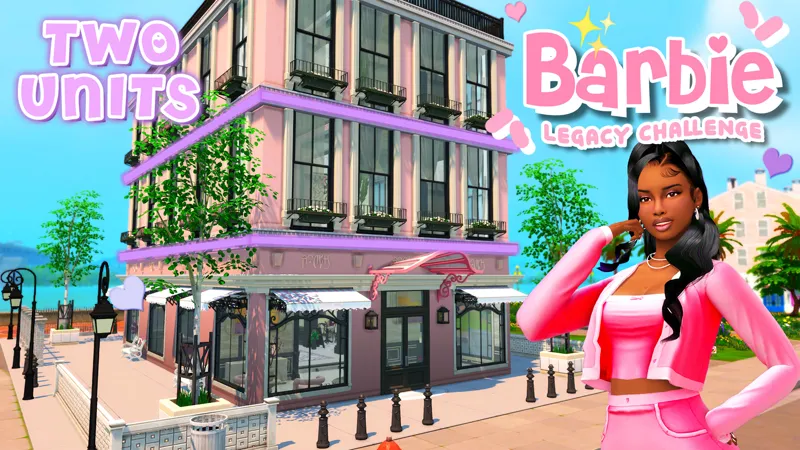



Barbie City Condos // Two 1BR, 1BA Condos// Barbie Legacy
Public release 07/28/2024
Update July 18, 2024- I finally figured out the problem. I added the additonal texture files so all of the CC will show properly in game. I've never had this issue before so it def took some extra time to fix the issue. Thank you so much for your patience! Please Re-download the file and add or include all of the new CC in the folder labeled -REQUIRED CC-
-----------------------------------------------------------------------------------------------------------------
Update July 17, 2024 - I’ve been getting reports of the doors and windows missing and showing ???. I’ve been trying to troubleshoot on my end to see what’s going on but I am stumped. For now , you can download the windows here. For the first floor windows, you need The Sims 4 Get Famous. Please let me know if downloading the sets down below fix the issue.
Windows Set
SOHO 3- https://www.curseforge.com/sims4/build-buy/soho-part-3
SOHO 4- https://www.curseforge.com/sims4/build-buy/soho-part-4-exterior
Hey hey hey! I am finally done this build! Blush Condo Homes is complete! Getting ready for generation two for the Barbie Legacy Challenge, I wanted to make a new build in the city for Business Barbie! The entry level has a lobby and FUNCTIONAL cafe bistro! The building has elevators to both condos!
You can check out the speed build of this build here --> ✨
About the Build
This build was built on a 30x20 lot in San Sequoia but you can place it anywhere! This lot is set as a regular residential lot! For the homes to function as condos/apartments, you need The Sims 4 For Rent. You will need to load into the lot and set it as a residential rental and assign the rooms to an apartment!
Please note, when you place the lot, you may receive a message saying items have been replaced or deleted. That is due to the chair update or other mods like wonderfulwhims or Basemental, or in game pictures!
✨I recommend you save all of my CC in one folder from my builds to avoid duplicates!✨
✨MODS I USED - CLICK TO DOWNLAOD✨
RVSN - Easy Peasy Light System
SYB Lift Elevator (Classic-Animated) + REQUIRED RVSN Uplifting Elevator Mod
How to Install Manually - Do Not Use CurseForge to Put into your Mods Folder
Download the .ZIP file
Locate your Sims 4 folder i.e Documents>Electronics Arts>The Sims4
Open the "CC" and "Mods" folder in the .ZIP file and add the cc to your mods folder
Open the "Tray Files" in the .ZIP file and add the files to your tray folder
And that's it! When you open your game, go to the gallery and you should see the build in your library.
BUT DEE GURLL, I don't see it! Make sure you select "show custom content" on the left panel of the gallery and you should see it!
Thank you again for pledging! I hope you enjoy the build!
Remember to stay beautiful, stay lovely and have a grand, grand day!
FIXED ✨DOWNLOAD✨
Public release 07/28/2024
Comments (15)
Hey Dee, I love all of your work especially your builds. will you please consider uploading Janae's salon to Patreon @ some point in the future, I would be so happy to have in my game. Thank you for all you do.
Okay so I downloaded the SOHO sets and I also went in and did some batch fixes in the Sims studio and that seem to fix the windows cause it might have been missing something from the set before. However the door is still broken (which I replaced) and there are some other things missing. You might have to add a link to the door as well. Thanks
Okay great! I’ve been working with a friend to test the build and I believe it’s a file that has the texture of the objects. I will have to find the file and include it. I will keep you updated! Also thank you for working with me
I downloaded your build but it had ??? all over the windows and doors? So I dont know what to do with it? I downloaded everything thats required I dont know why it looks like this? Can you help?
No im not running directX 11 I think im still on DirectX 9
You press the windows key and r and it pops up then you type dxdiag and run and it tells you i would send you a picture but i cant on the post
Do you own The Sims 4 Get Famous? The first floor windows are from Sims 4 Get Famous and the others are cc
thank you love your channel by the way
i checked its directx 12
How did you find that? To my knowledge the latest you can run on is direct x11. It has been stated that direct x11 affects custom content. A lot of people are still running on direct x 9 to avoid issues with custom content and mods
NO I DON'T THINK SO
I would double check that for sure. A lot of doors abd windows are affected by direct x11. I haven’t had any other reports of the windows and doors not working. If that doesn’t fix, you may have the windows and doors already in and they aren’t batch fixed. To fix them, you can use sims 4 studio and run the batch fix to fix windows and doors. Also if you have basemental installed make sure it’s up to date. Your game should be on the latest update as well.
THE WINDOWS AND DOORS ARE SHOWING UP BROKE AND THE DISH WASHER AND KITCHEN SINK I REPLACED THEM JUST WANTED TO LET YOU KNOW.
Are you running on direct x 11?
Adorable