
Introducing CFDB tool
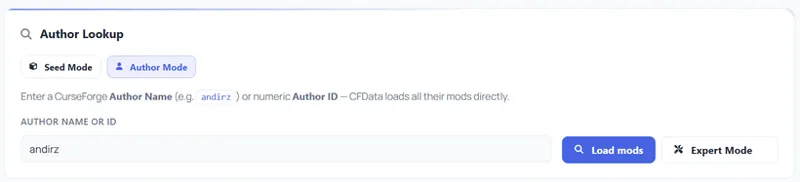
UPDATE: CFDB now also supports Author Mode — just enter an author's CurseForge username (e.g. andirz) directly, no project ID or project slug needed.
Hey everyone!
I've been quietly building something new on andirz.com and it's finally ready for testing. Meet CFDB: CurseForge DataBank — a browser-based tool designed to make working with CurseForge mods a whole lot easier.
What is CFDB?
CFDB lets you look up all mods from any CurseForge author in one go.
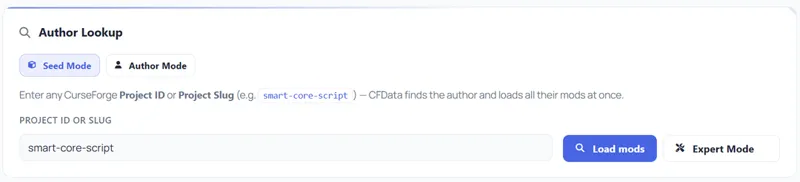
Use Seed Mode to enter any Project ID or Slug from one of their mods — CFDB finds the author automatically.
Or switch to Author Mode and enter the author's username or numeric ID directly.
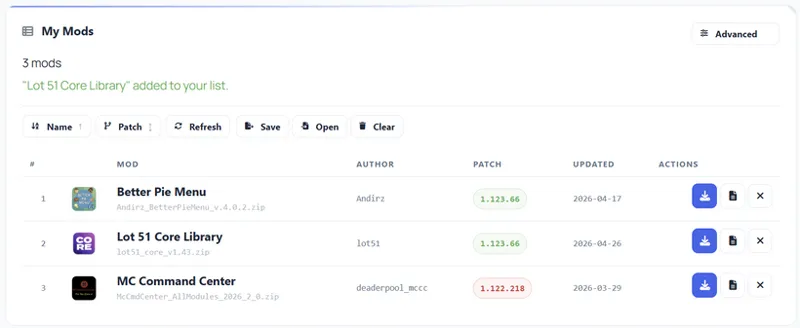
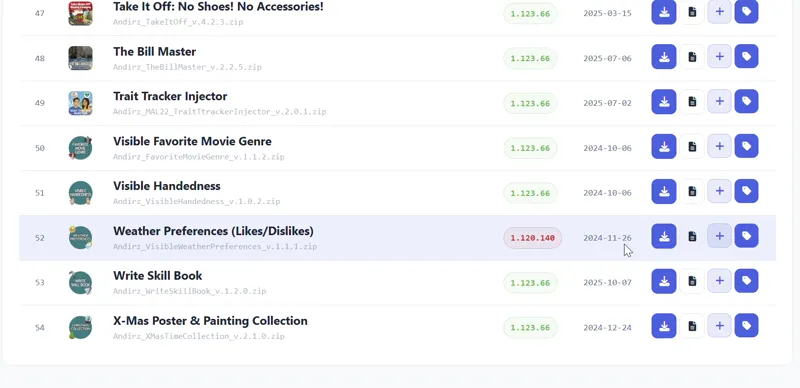
Either way, CFDB loads their entire mod library with patch status, file names, upload dates, and download links all in one table. No more clicking through endless CurseForge pages.
What you can do with it:
Seed Mode — Enter any mod ID or slug, CFDB finds the author and loads their full library instantly.
Author Mode — Enter an author name (e.g. andirz) or numeric author ID directly — no mod needed.
Patch Status — See at a glance which mods are up to date and which are outdated (green = current, red = outdated).
My List — Build your own personal watchlist across different authors. Refresh all with one click to check for updates.
Bookmarklet — Install a one-click bookmark that adds any mod directly from a CurseForge page to your list.
My List — Your Personal Mod Watchlist
If you follow multiple mod authors, My List is for you. It's your own personal tracking list that lives in your browser. No more opening five different CurseForge pages. Everything is displayed in a compact table: mod name, file name, latest patch version, last update date, and a direct download link — all visible at a glance without opening CurseForge.
You can also install the Bookmarklet: drag it to your bookmarks bar once, and from then on you can add any mod directly from its CurseForge page without even opening CFDB first.
Export your list as a JSON file to back it up or share it with a friend. Import it on another device and you're back where you left off.
Expert Mode — For Creators
This one is for mod authors. A new patch drops — and now you have 30, 40, 50 mods that all need their version label updated. Normally that means opening every single mod on CurseForge, editing the file, saving, moving on. It takes forever.
Expert Mode solves that. Open your mod list in CFDB, enter your CurseForge API token, set the target patch version — and patch every mod with one click per row. All your mods updated in a few minutes instead of an hour of clicking through CurseForge pages.
You'll need a CurseForge API token to use it — you can generate one for free at legacy.curseforge.com/account/api-tokens. If you're not sure how it all works, check the CFDB Help page — everything is explained there.
Testing Phase — You're Invited!
CFDB is currently in testing, and I want your feedback. During the testing phase, everything is free for all followers — including Expert Mode. You just need to follow my Patreon page for free to get in.
A login is always going to be required — CFDB talks to the CurseForge API on every request, and leaving it completely open would put unnecessary load on their servers. A free follow is the minimum, and that's intentional.
After the testing phase, if usage stays reasonable, access will remain open to all followers. But if request numbers grow significantly, access may be restricted to active supporters. I'll be transparent about that if and when it happens. For now — try everything, break things, and let me know what you find.
How to Access
CFDB requires a Patreon login — this isn't about paywall, it's about keeping out bots and protecting the CurseForge servers from automated abuse. A free follow is enough to get in.
Log in with your Patreon account and you're good to go.
Feedback Welcome
This is an early version. If something breaks, looks wrong, or could work better — please let me know in the comments or on Discord. Every report helps.
Thanks for being here — you're literally the reason this exists. 💙
— Andirz
Comments (11)
Is it possible to just give the tool my mod folder path, let it scan it and then show me which mods in the folder are outdated?
At the moment, it is not set up that way. I plan to add something eventually; if the community uses this tool, I will, of course, expand it.
Do you need an account with CF to use this?
I don't know. xD Give it a try and tell me if it works.
Freaking awesome!
this is absolutely amazing!! I am a spreadsheet nerd and have a rather large, multi-paged spreadsheet to keep track of my mods by type, but this, this is amazing! I can't wait to get in there and try everything out! Thanks for sharing your creation 💜
If you feel something is missing here, feel free to suggest improvements.
How incredible! Well done :)
This is amazing 😍 I want to try it right away!!
What a great tool, congrats!
This is exceptional! Thank you so much