


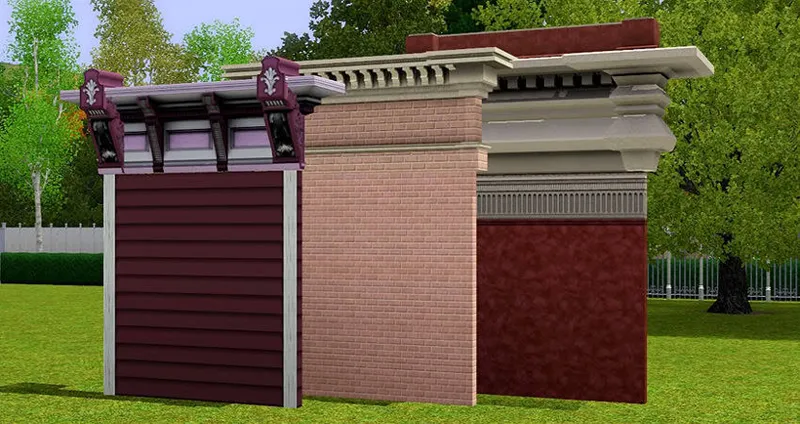
Revision of the all ModularBuild system for compatibility with Apex Radiance
Well, who would have thought I’d be coming back to this topic around this time of year! After the incredible transformation my friend managed to achieve in The Sims 3 and its entire lighting system, one thing became very clear to me: Our future worlds can finally have street lamps again!
But, of course, this is still The Sims 3, so naturally we created another problem.
When I first started the ModularBuild system with cornices and architectural moldings, it was based on placing individual pieces. It was very time-consuming, expensive in terms of recoloring, and tedious to work with. Building something beautiful took a lot of time, and as development progressed, this approach also proved problematic from a performance standpoint. I was using lamps as the base objects, which meant that each script had to be loaded even when there was no actual light.
Then I adopted a more intuitive, practical, and efficient approach: I turned these pieces into fences.
Now, clicking and dragging allowed you to build quickly and with much better performance! The L-shaped connection pieces for corners were separate objects from the fences, which could be placed along the sides to ensure a perfect meeting between the elements.
And that brings us to the current problem, something I never imagined we would have to consider:
Recently, Luiz managed to fix an old problem with the game's nighttime lighting. The fix greatly improved the overall lighting, but it also revealed an inconsistency: pieces belonging to different systems were now receiving light at different intensities.
In practice, this meant that a structure built with fences, posts, and connection pieces could look visually "broken."
The Problem
My first idea was to turn practically all of the modular pieces back into individual objects. BUT, I thought about the time cost involved. Since I have already used this approach in the past, I know how tedious it can be.
It would solve the visual side of the problem, but it would create another one: building larger structures would become much more labor-intensive.
Instead of simply: click → drag → build
the player would have to position every single segment individually.
And one of the things I want to preserve in ModularBuild is precisely the feeling that you are building a structure, rather than assembling a collection of individual objects one by one.
So I tested another option!
The Solution: Turning the Corner Piece into a Fence
The solution ended up being surprisingly simple. The corner piece will also become a fence, but one designed to occupy only a single tile.
This means the player will be able to:
Select the regular fence and drag it to create the main sections.
Select the corner fence, which will now be placed RIGHT NEXT TO the main fence, making it even faster to find the correct piece.
Drag it across a single tile.
Continue building normally.
The corner piece now becomes part of the same lighting and behavioral system as the fences.
And the main advantage here, beyond the visual aspect, is that the connection piece sits right next to the main piece in the catalog, making it much easier to find when you're building.
It Isn't the "Perfect" System
Technically, it would be more elegant if the corner could simply exist within the fence system itself. However, I was never able to make that work perfectly without affecting the main design of the fence.
Awesims managed to achieve something similar, but if you pay close attention, the corner connection always has a larger piece that overlaps the corners. When we're talking about ornamentation and cornices, having larger pieces covering the corners can end up breaking the visual design we have in mind.
So while Awesims achieved an impressive result here, it is something I couldn't reproduce without compromising the aesthetics of the corners on our cornices. (It is worth noting that for the pieces designed by Awesims, the result is incredible.)
The problem is that The Sims 3's fence system doesn't allow connection points to be rotated in the way I would need to make this work properly. I could try to create a more generic solution to work around this limitation, but that would mean compromising exactly what I consider most important: the appearance of the architecture.
But There Is One More Problem...
Now that we have a new lighting system, this will essentially require me to rework many of our older sets. And that comes with a cost.
Changing these pieces can affect buildings that were previously constructed using older versions of them. If the corner piece is no longer an object but becomes a different type of fence, it is very likely that players will have to choose between keeping the previous version or adopting the new approach.
To mitigate these problems, I am considering keeping both an old version and a new version available on the download page.
This way, buildings that have already been created with the current version can remain intact, while new buildings and worlds can adopt the latest sets and benefit from a more consistent lighting system.
I'd really like to know what you think about this approach.
I believe that from this point forward, we are going to build houses, lots, and worlds while thinking about lighting in ways we simply didn't have to consider before, when the nighttime lighting problem was affecting us.
It makes sense to me. Does it make sense to you?