
🎲 Ctrl + Space and Go: Smarter Progress in Common Phrases
Last week I introduced a new feature in Playphrase:
you can now explore Common Phrases in a more dynamic way.
Hit the 🎲 Dice button — get a random phrase.
Press Ctrl + Space — instantly jump to the next one.
Simple. Fast. Slightly addictive.
I’ve been using it myself for a week… and then I realized something.
I had no idea:
Have I already played all the phrases on this page?
Should I move to the next page?
Did I miss something?
And if I reload the page… is my progress gone?
So I upgraded it.
📚 Now Playphrase Knows Where You Are
Each Common Phrases page contains 20 phrases.
When you start going through them:
Playphrase tracks which phrases you’ve played
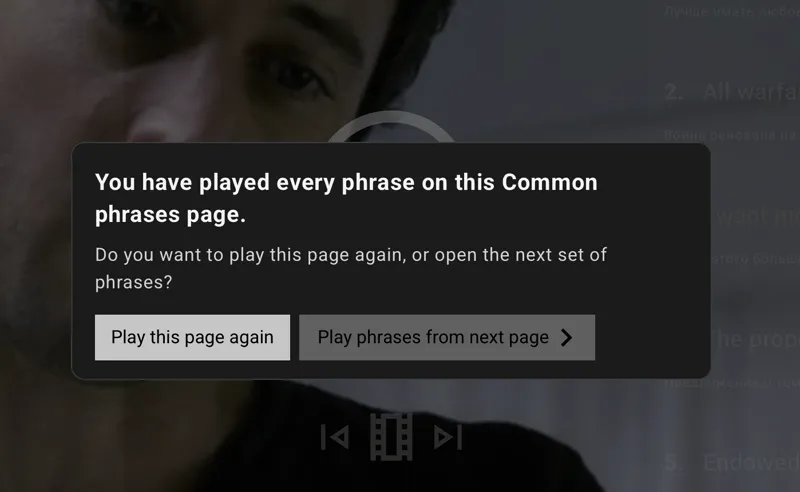
When you’ve gone through all 20, a clean popup appears:
“You have played every phrase on this Common phrases page.
Do you want to play this page again, or open the next set of phrases?”
And you get two options:
▶️ Play this page again
⏭ Play phrases from next page
No guessing.
No mental counting.
No “Wait… did I already hear this one?”
🔁 Your Progress Is Saved
This is the important part.
If you reload the page, close the browser, or come back tomorrow —
your progress stays.
You continue exactly where you left off.
(Unlike your memory after your third coffee.)
🎯 Why This Matters
Common Phrases isn’t just a list.
It’s concentrated, high-frequency, real-world English.
Now you can:
Choose your level (C1? C2?)
Filter by emotion
Show only idioms
Show only questions
And just move forward — phrase by phrase
Ctrl + Space → listen → repeat → next.
It becomes a rhythm.
A training mode.
Less friction. More exposure. More retention.
🧠 A Small Discovery
After using this myself, I noticed something interesting.
When you feel progress, you learn differently.
There’s momentum.
There’s closure.
There’s that satisfying “page completed” moment.
And momentum is everything in language learning.
Try it out.
Open Common Phrases.
Set your filters.
Press Ctrl + Space.
And just keep moving.
Let’s roll 🎬