





AGLS v1.9 Informations (15.05.2026)
Hi everyone. In this post, I would like to share some information regarding the new version of the AGLS project.
I am still actively working on the update and have also made several decisions that significantly change the project’s existing structure.
Version v1.9 adds the ability for both HumansAI and CompanionAI to use Melee Combat. This is the main focus of the new release, although there are also several important changes related to the player character itself.
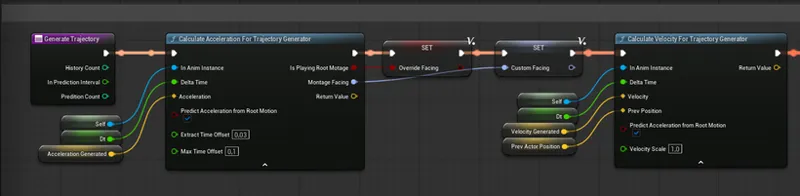
One of these changes was the creation of a new AnimInstance class. Up until now, since the very beginning of AGLS, this role was handled by ALS_AnimBP. Currently, I am rebuilding the animation logic from scratch as a new asset called AGLS_PlayerAnimBP, designed with a much stronger focus on a C++ driven architecture (Mainly for declarating variables and functions).
The main reason for this decision was that the current Motion Matching implementation was still far from ideal when compared to the GASP project. Unfortunately, I spent around two weeks trying to understand and match the quality of GASP, without fully understanding why it works so well with the UEFN character while producing noticeably more inaccuracies on other skeletons. Initially, I thought improving this would only take a few days At the moment, the movement feel should already be better, although it still should not be compared directly to GASP, even when using the exact same animations.
It is also worth mentioning that LongmireLocomotion did an incredible job combining Mover + Chooser + BlendStack + State Machine. This combination creates nearly perfect movement, but it is also extremely complex. Even using the Motion Matching node alone already produces excellent results, but manually feeding animations into BlendStack can sometimes generate even better outcomes, despite being highly experimental.
From a technical perspective, migrating the AGLS project fully to Mover is far too complicated because of the project’s extensive underlying code structure. Because of that, I tried to work around these limitations.
For this purpose, I created a new C++ component responsible for controlling CharacterMovementComponent values. Previously, the system worked similarly to ALSv4, where a single DataTable stored all movement parameters for the capsule movement logic. The new system functions in a similar way, but instead of using one DataTable, it now relies on DataAssets containing the required values.
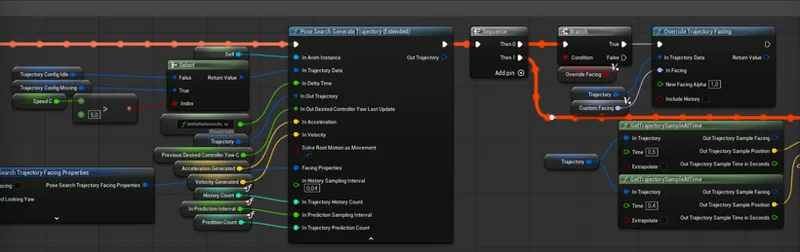
I also created an additional function library related to trajectory generation. The extended functions make it possible to generate trajectories directly from Root Motion animations. This means that, for example, when a Montage animation with Root Motion is played, the animation itself takes control over capsule movement. Normally, no trajectory would be generated in such a case, causing Motion Matching to play idle animations despite actual movement happening. These additional functions partially solve this issue, allowing leg movement from PoseSearch to blend correctly with Montage animations.
To summarize — unfortunately, I lost a significant amount of time working on Motion Matching, and at this point I still cannot say whether I will remain with ALS_AnimBP or fully complete the new solution It may be somewhat disappointing that AGLS v1.9 will not introduce a huge number of entirely new gameplay mechanics, but considering the deeper technical changes, the update is still quite substantial.
UPDATE 28.05
The new AnimInstance for the player controller is now practically complete. I still need to test everything as a whole. I think the final result should be significantly better, and the code should be more readable :)
However, I still need to make major changes to the animation structure for Human AI. With the tools already prepared, this should take no more than a few days. I will also try to improve PoseSearch-related performance in the context of AI.
I have also implemented an additional system intended to reduce the number of active PoseSearchDatabases kept in memory. Systems such as Covering, Stairs Walk, or Crawling are usually used less frequently during gameplay. For this reason, their databases are stored as Soft References in the Chooser.
The appropriate DataAssets store and organize which PSDs correspond to the current movement mode. When the databases become relevant, they are loaded asynchronously.
This solution is highly experimental and may ultimately not be very effective for very large animation databases, because their loading time could noticeably affect FPS for a short moment. However, it is worth remembering that the Async Load algorithm is significantly more efficient in a packaged build.
When can you expect the new update files?
It’s difficult for me to say precisely, as the project is still quite messy and many changes are unfinished. I’d like to complete everything sometime between May 30th and 31th.
Thank you to everyone supporting me. I hope my work has helped you learn Unreal Engine or develop your own game.
Best regards JakubWComments (23)
im a free member. how can i get the agls v2? if i just upgrade my membership for 1 month, can i able to get that?
Hi Jakub, Thank you for your transparency regarding the recent Motion Matching tests and your replies to the community. Your observation that even with a 100% code match, the UE4 skeleton produces noticeably more inaccuracies compared to the UEFN character is the exact technical smoking gun. You asked if anyone has successfully built PoseSearch from scratch on a legacy skeleton and achieved the same smoothness as GASP. The industry consensus among developers pushing modern animation pipelines is overwhelmingly: No, because the underlying mathematics of the engine are actively rigged against you. I wanted to share a deeper technical breakdown of exactly why you are hitting this brick wall, and why your custom solutions—like manually generating trajectories in C++—are unfortunately fighting a losing battle against the engine's core physics right now in UE5, completely separate from whatever happens in the future with UE6. 1. THE TRAJECTORY DATA AND VECTOR PROBLEM Motion Matching is fundamentally data-driven; it does not just look at animation clips, it relies heavily on character trajectory history, predictive acceleration vectors, and past bone orientation. Epic built the modern Trajectory Component and plugins like Mover explicitly to feed this predictive data into PoseSearch out-of-the-box. The UEFN/GASP standard (88 bones) features specific structural alignments and bone orientations designed to cleanly output these velocity vectors. When you force these systems to read a legacy UE4 skeleton, you are introducing a fundamental data mismatch. Every time you introduce a layer of remapping or active IK translation to a predictive, data-heavy system, you create mathematical drift and micro-latencies. The inaccuracies and lack of smoothness you are experiencing aren't a failure of your animations or your C++ logic; they are the literal byproduct of that drift. 2. THE DANGER OF OVER-ENGINEERING SYMPTOMS In your reply, you mentioned writing a custom C++ function library to generate trajectories from Root Motion montages so PoseSearch doesn't break and drop into idle poses. While that is an impressive programming feat, it highlights the exact trap of the UE4 skeleton: you are spending weeks over-engineering complex workarounds to treat the symptoms of an outdated bone hierarchy, rather than leveraging the engine's native power. Similarly, using Soft References in the Chooser to asynchronously load and unload PoseSearchDatabases (like stairs or crawling) to protect memory is highly experimental and risks introducing frame-rate hiccups. If the project were built on a unified, modern bone standard, the engine would naturally optimize the data payload, preventing you from having to rely on fragile streaming hacks that could threaten your users' packaged FPS. 3. WHY THIS MATTERS TODAY (EVEN IF YOU IGNORE UE6) You might feel that the long-term roadmap toward Unreal Engine 6 or cross-game compatibility isn't relevant to AGLS, and that your focus is strictly on mastering the current engine. However, the architectural friction you are fighting is a permanent constraint of Unreal Engine 5. Epic Games has completely frozen feature updates for legacy movement and legacy skeletons. The cutting-edge animation toolset inside UE5—Mover, Chooser, BlendStack, and PoseSearch—was developed as a cohesive ecosystem built around a singular trajectory standard. By trying to manually backport these native UE5 systems to a UE4 bone structure, you aren't just maintaining backward compatibility; you are fighting a losing battle against UE5's native math. It is why you spent two weeks hitting a wall on something that should have taken days. 4. NAVIGATING THE CREATOR DILEMMA You explicitly noted that you implemented your AbilitySystem back in the UE4 era, and that you are dragging around years of architectural debt because AGLS is a project through which you are learning. I completely understand and respect that "Patreon Paradox"—you have a loyal, long-term user base with multi-year projects locked into the UE4 skeleton, and you want to maintain universal compatibility for them. But universal compatibility is becoming a heavy anchor that slows down your own learning and development. Have you considered establishing a hard split in the project—perhaps locking a stable, legacy branch for UE4 users, while allowing the main branch of AGLS to pivot entirely to the modern UEFN/GASP standard? It would stop you from wasting time reinventing trajectory systems, allow you to cleanly adopt plugins like Mover without breaking your legacy code, and finally unlock the flawless smoothness you are looking for right now in UE5. Thank you for all the incredible work you do, and for keeping your Patreon a place where we can dive into these deep technical discussions!
Hi. Thank you for such a comprehensive message. You clearly have a great deal of knowledge in this area, and I really admire that. I'll try to respond to the points and information you shared. As you pointed out, the UE4 skeleton itself may indeed be the root of the problem. I spent an incredibly long time working on Motion Matching, and in the end I came to the conclusion that both the smoothness and the overall quality of Motion Matching are heavily tied to a specific skeleton. After reading your message, I'm even more convinced that this is actually the case, and trying to work around it would probably be dump. That said, I think this is a significant limitation of the Motion Matching approach. Depending on a specific skeleton is not, in my opinion, the direction Epic Games should be taking. Not everyone wants to use Epic's bone hierarchy or even their particular Skeletal Mesh assets. From a technical standpoint, I still don't fully understand why this limitation exists. For example, if I were to retarget the entire GASP project to a different bone hierarchy, would that automatically result in poorer Pose Search quality? And what about developers who want to use Motion Matching for characters that don't even have a humanoid body structure, such as monsters? I completely understand the benefits of tighter integration between Pose Search and Mover. However, AGLS has to remain based on CharacterMovementComponent because the project has simply grown too large and complex to migrate to a different movement framework. I'm fully aware that it isn't realistic to keep building on a skeleton that dates back to the very first UE4 releases. That mannequin has a rather caricature-like bone structure by today's standards. At this point, I think AGLS 2.0 will probably be the final version of the project. My plan is to start something completely new from scratch, built around more modern technologies, including GASP. Now that I have much more experience, I may be able to carry over some parts of AGLS while rebuilding others entirely. I might even choose a completely different type of gameplay - not necessarily a shooter, but perhaps something in a different genre. It's still too early to say, but I do feel that significant changes are necessary. As for Unreal Engine 6, I'm not particularly concerned about it yet. What interests me the most in future engine versions is the development of the Unreal Animation Framework (UAF). I believe that's something Unreal Engine has needed for a long time, since the current Animation Blueprint system feels quite outdated. By the time UE6 arrives, it's also possible that AI will be able to accomplish in a few minutes tasks that currently take me months to complete. AI development is progressing rapidly, and it's becoming increasingly difficult to predict where it will ultimately lead. Epic Games also seems to be moving strongly in that direction. What the final outcome will be remains to be seen. Once again, thank you for taking the time to write such a thoughtful message. Best regards.
Sorry if this is a dumb question. but is there a cover behind walls function? couldn't seem to find it.
What day will this update be released?
notice?
"Hi, I'd like to ask a question. Do you use the UEFN skeleton or the UE4 Mannequin for GASP animations? I retargeted them for the UE4 Mannequin, but the animations don't seem to be working very well."
:(
Waiting for updates :- D
Incredable 👏👏
Hi Jakub! Thanks heaps and love your work! Been using your project for months now and its great! I was just hoping for a quick as there's been a few people needing the same guidance with the Hand IK. Been looking everywhere and cannot find how to configure it. Looked in weapon's skeleton but no change to MannyBP in game. Thanks heaps!
Hi, amazing work Jakub! Curious if wall climbing (Breath of the Wild style) is on the roadmap?
Mover is great for full custom move sets, but just replacing cmc your rebuilding stuff, cmc already does, Ai, nav, root motion etc. are you thinking of adding custom movement? Parkour, Wall running, ?
Hi. I’m not currently planning to integrate Mover instead of CMC. Although it offers some interesting features, it requires a lot of manual configuration and is highly experimental. As for whether I plan to add something like Wall Running, I don’t have any plans for that at the moment. I’m still focused on improving the core movement, such as walking, crouching, covering, and so on.
There is a full C++ version of GASPALS on github you could use for reference, although it's CMC not Mover
Hi. That’s true. Unfortunately, in my case, it doesn’t change much. GASPALS is still based directly on the GASP project — mainly by using the ready-made Motion Matching setup for the UEFN skeleton. I have to implement this from scratch, while of course using the GASP animations after retargeting and applying a similar approach to Pose Search handling. However, I have the impression that even if everything matched 100% — meaning the entire character and Anim Instance used the exact same code — the result would still be different. Unfortunately, I don’t understand why it works so well on the UEFN skeleton, while with the UE4 skeleton there are noticeably more inaccuracies. Motion Matching in general is difficult to control because of the amount of data and the number of possible configuration parameters. In my case, I also have to rely on custom solutions, such as generating trajectories myself. I’ve tried many different configurations and a lot of Pose Search tuning, but at the moment the result is still not as smooth. I’m not comparing BlendStack to the Motion Matching node here — only Motion Matching itself. That said, I think what I’ve managed to achieve so far is significantly better than the previous movement system in AGLS, although finishing the whole thing will still take me some time.
I’d like to suggest an idea that will allow you to add Motion Matching; you may already know that there’s a free combined version of GASP and ALS ( https://github.com/PolygonHive/GASPALS ), but the AI Combat and many other features you’ve added to AGLS aren’t included in this project—it’s a fairly simple project. However, adding or removing features from such a large-scale project isn’t easy at all, because as the project grows, it becomes more complex, and the main reason for this is the variables. The communication between Blueprints becomes very complex. There is a solution to prevent this complexity: using the GAS Companion plugin ( https://www.fab.com/listings/72e2bc50-658e-43cd-bd40-535f46d2f113 ). If you watch this video ( https://www.youtube.com/watch?v=lXuaN7aXqx4 ) , you’ll see just how easy it is to add or remove elements. There’s also the Gameplay Blueprint Attributes plugin from the same company ( https://www.fab.com/listings/a7de98c4-51f5-4c4a-8dbc-52aff9d14e40 ), which allows you to easily define as many Ability Attributes as you need. Ultimately, if your project lacks Gas, it’s far from being modular, and without motion matching, it remains quite shallow. By using these two plugins, you can take your project to the next level. Why don’t I recommend adding Gas using C++? Because it unnecessarily complicates the project and wastes time; besides, it’s already very difficult for anyone other than you to add or remove features from the project in its current state. That’s precisely why the emergence of a modular, high-level framework that allows for easy editing is my.
Hi, Thanks for the information. The ALS integration with GASP is available for download, but in my case, that is not the source of the problem. The issue is that I have the impression Motion Matching only works properly with the UEFN skeleton. I don’t know if anyone has tried implementing PoseSearch from scratch for a different skeleton and achieved the same smoothness as in GASP. I have to implement it from scratch, while of course using the GASP animations after retargeting and applying a similar approach to Pose Search. However, I feel that even if everything matched 100% — meaning the whole character and Anim Instance used the exact same code — the result would still be different. Unfortunately, I don’t understand why it works so well with UEFN, while with the UE4 skeleton there are noticeably more inaccuracies. Motion Matching is generally difficult to control because of the amount of data and the number of possible configuration parameters. In my case, I also need to rely on custom solutions, such as generating trajectories myself. I’ve tried many different configurations and Pose Search tuning, but at the moment the result is still not as smooth. I’m not comparing BlendStack to the Motion Matching node here — only Motion Matching itself. Still, I think what I’ve achieved so far is significantly better than the previous movement system in AGLS, although finishing everything will still take me some time. You mentioned a few interesting plugins, such as GAS Companion and Gameplay Blueprint Attributes. The first one does indeed offer some interesting possibilities — I wasn’t aware of it before — but integrating it into AGLS right now would be too complex. AGLS is currently a heavily C++-based project, with its own custom assets and systems extending the engine’s default tools, such as AbilitySystem, GameplayTasks, and EQS. Attributes would make the code cleaner for values such as HealthPoints — AGLS currently handles this mostly through a Blueprint interface. I implemented the AbilitySystem back when it was still heavily limited by the engine, since that was during the UE4 period. Later, I stayed with this approach because of the project’s already expanded structure. Even so, I try to maintain some kind of organized code structure. I often use components for specific systems, avoid direct references to Blueprint classes, implement interactions as AbilityBlueprints, store them as SoftReferences, and so on. I agree that a lot of code could definitely be cleaned up, but AGLS is still a project through which I’m learning Unreal Engine. As for Gameplay Blueprint Attributes, I wouldn’t be able to use it because it is paid content and also seems quite complex to me.
Hi Jakub! Thanks for the info! Very complex work done here. Regarding movement update, you are aiming the right direction with anim bp update. Maybe this will somehow lead to the optimisation of the characters. There are some bugs about movement in the project and I’m wondering if you could cover them: 1. AI characters are now very heavy and your LOD optimisation for them seems to be not so good. If I place 10 NPCs on the already dense level they will eat up to 10 fps which is huge. Can this be improved somehow? Maybe by replacing anim bps or ticks with distance? 2. I’ve noticed some inappropriate animations while jumping to the ledge from running or walking state: chooser selects correct animation but plays it on incorrect start time. With this bug the character while jumping towards ledge is playing ‘running’ animation in the air. Guess it’s all about timing of the selected montage. Thanks for your work!
I’ll try to do something about it. However, in the context of AI, there are many potential optimization-related areas to consider. Above all, there are many different methods and tricks specifically related to AI optimization. Let’s start with the character class itself. Here, for example, the CharacterMovementComponent and TickEvent can be quite heavy. CMC updates the simulation based on physics equations and also uses optimization-related values such as SubStepTime, MaxSimulationTimeStep, and MaxSimIterations. For characters that are far away from the player, it may be worth considering changing these values. Next, there is TickEvent, whose DeltaTime could also be modified. MeshComponent also allows its DeltaTime to be changed. If the mesh dt = 1/60, then the Anim Graph update will be around 60 FPS. For higher LODs, this could be reduced to 30 FPS or even 15 FPS. You can also adjust Bounds, Render Static, and many other parameters. Optimization of PoseSearchDatabases is another topic. In theory, if fewer animations are provided, finding the pose should be faster. I’m currently considering creating separate PS_Databases for AI, along with separate normalization. This should have some impact on PoseSearch performance. With a larger number of AI instances, optimization techniques such as Animation Budget Allocator are also used. Another very important aspect is the AI controller itself. I didn’t design it for a large number of instances, although I think I used some interesting optimization techniques there, such as Custom Tick Delegates. And of course, the most important topic is Blueprint vs C++. If the entire controller were implemented in C++, the result would be much more efficient. Finished Blueprint code is often rewritten into C++ because that code is processed much faster. Overall, I’ll try to improve something, but I can’t promise that these changes will significantly affect performance. I’ll also mention that the AnimInstance class (Animation Blueprint) is generally not very well optimized. The engine developers are aware of this, which is why they are developing a completely new animation system — UAF (Unreal Animation Framework). It is a completely different tool, but currently it is not suitable for production. I think it is being developed due to The Witcher 4, and it will probably be released sometime around UE6.0.
exelent
Thank you JAKUB
yesss❤️