


AGLS v1.4.2 - Unreal Engine 5.6 Support
A new engine version, numbered 5.6, was recently released. By default, opening the project by converting it from UE5.5 to UE5.6 is not possible, as the C++ code won’t compile. That’s why I’ve prepared ready-to-use plugins for this engine version.
Here’s a short guide on how to convert the AGLS project to version 5.6:
Launch the UE5.6 Editor
Select the option to open the AGLS v1.4 UE5.5 project. At this point, the engine will ask whether to create a copy and convert the assets to the newer version. Choose one of the available options
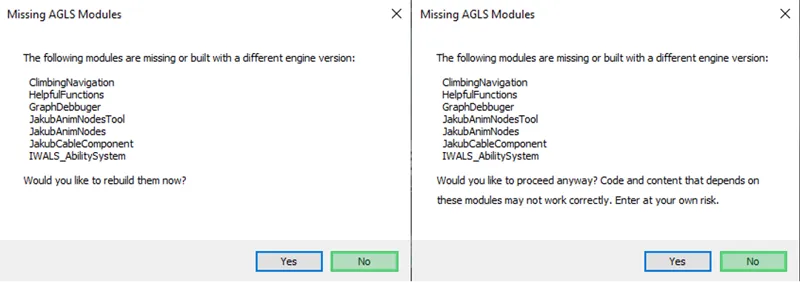
After this process, a message will appear saying that the C++ code needs to be recompiled. Select "No," and for the second window, also select "No." The editor will then close.
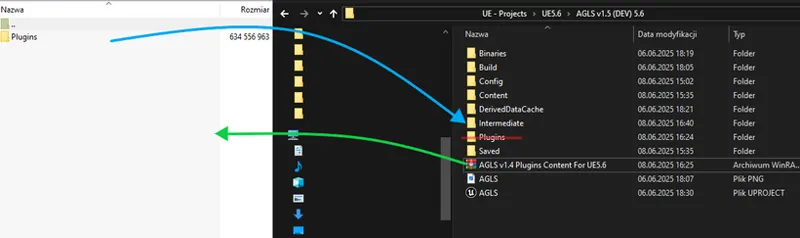
After downloading the plugins for UE5.6, go to the project folder. Delete the entire Plugins folder and replace it with the one from the file named 'AGLS v1.4 Plugins Content For UE5.6'.
Upon restarting the engine and selecting the project, the warnings about plugins content should disappear, and the editor should open the project successfully.
Please note that regardless of the engine version, AGLS can only be launched for a PC with Windows system.
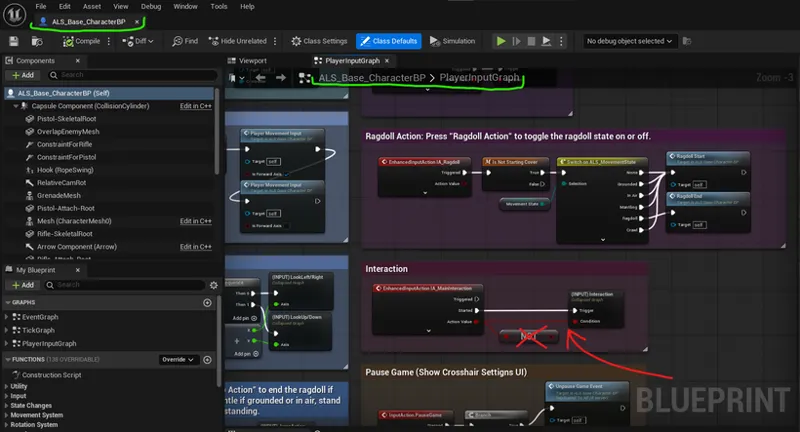
Additionally, I would like to point out that this is not full support for the AGLS project for this engine version. Not everything has been tested for correctly operation. Nevertheless, in the UE5.6 version, the project packaging was successful. For now, I will mention a very simple bug that requires correction in order to be able to interact with items:
The plugin folder can be downloaded from this post:
UE 5.5 - AdventureGameLocomotionSystem V1.4.2 | (Project Files)
I’ll also mention that, without making any changes to the project, I haven’t noticed any performance improvement between UE5.5 and UE5.6. Epic Games stated that they introduced many optimization-related changes, but I’m not sure whether those updates will have any impact on AGLS.
Comments (39)
hey i just downloaded the project 1.6.1 ans when i open it it is just a defalt project cane any help me?
Hi. It's hard to say what might be causing this. This is the first time I've heard of such a problem. But usually, downloading, unpacking the files, running the appropriate engine version, and selecting the project should work.
Hi Jakub, is it possible to import your project into my existing project?
hi jacub i keep running in to errors if i play the demo my other projects work fin if i don't use your project. is this i known thing for you and are you working on a fix i use the 5.6 version. it happens when i loade the enemy's and the green player. if you got any qwestions i wil hear back from you
its to bad that i cant see you work.. after dowanload the file and updated as above i got alot of error its related to tags and the hand c .. i have already put the photo in discord
Hi Jakub, I've updated the plugins folder to get AGLS working with 5.6, but this interaction bug thing confuses me. Can you explain what to do better?
Unfortunately, I don't think I understand everything correctly. Is your problem that you can't enable the interaction option (key 'E') in version 5.6? If so, I've presented a solution in this post. Simply just disconnect 'NOT' node for the IA_Interaction event.
Do you have any plans of adding multiplayer support?
Yes, this would be huge. I have been waiting for UE 5.6 support and also replication. (Replication for multiplayer support).
Hi, will the next version be 5.6 native?
The new version, v1.5, was created by default on UE5.5. However, I will also prepare a project files for the engine version 5.6.
Hello! Is there any plans to make this awesome system replicated?
Unfortunately not. Currently, I still have no plans to implement replication in the AGLS project.
Hello! I'm a subscriber, but so far I haven't found where I can access the project. Tell me where I can access the WALS project.
IWALS is an older project. I'm currently only developing a project called AGLS. However, if you're interested in the older version (more similar to AdvancedLocomotionSystemV4), you can download it from my Patreon posts. The latest version is: https://www.patreon.com/posts/ue5-2-5-3-5-4-3-103356686
Really great project, thanks for the interaction bug fix tip!
Project getting crashed when exiting vechicle
I would love to get AGLS but only after there is full support for Unreal Engine 5.6. Please when is 1.4.3 coming out? Is it ever coming out or is 1.4.2 all we are getting for 5.6? Thank you for the beautiful job
Hi Jakub. What is the current status of AGLS? What's the next update going to contain and when will it release? Hope all is going well!
Hi. I'm currently working on a newer version. I think the files should be released between August 3rd and August 5th. The update will focus on adding crawling, improved overlay animations, adding more features to the Backpack, and a Wheeled Overlay Menu.
I was previously a patron and had access to AGLS, but I lost my files due to a hardware issue. I no longer have proof of membership (like a receipt), but I still have screenshots of the AGLS folder structure and files on my PC before they were deleted. Could you please help me recover the files? I’d really appreciate your understanding.
Hey Jakub where do I go to get what I need to download everything? I literally can’t find it when I did I don’t think it worked so just deleted everything but I really want to dive in. Can I get some help?
Anyone know which membership would be the best to grab the kit? I would love to start jumping in, messing around with it and hopefully create a game. UE 5.6.
Hello, thanks a lot for this product, everything is ok with product, but, can anyone help me with one kind of problem? And the problem is with box, in this system when I change the texture on one box, every box takes this texture, how can I have for example 50 boxes with different textures??? Thanks a lot, I really need to solve this!!
You have the box in the files called box, anything you change about the box in the scene changes all the boxes, So duplicate the box asset in the file so it will become box1, and then edit box1 and it will be changed only for the boxes under box1 asset.
Hi.. Mr.. Jakub.W.. This is very nice.. I would like to get this..... I m use... UE5.. One year How can I get this
Is it possible to migrate this to an existing project?
hello, why procedural boxes or splines (foliages) block the pick items? any solution?
I did the above everything is working except picking up weapons and items (backpack can be picked up) you know what causes this?
Hi Jacub. Hope it can support XBOX controller
You can follow any tutorial how to add controller support.
Hi, are we allowed to use this project for commercial use??
I have the same question i guess
Also retargeting to UE5 skeleton is got broken at 5.6(( Hands in wrong places now(
In this case, I’m not sure if it’s possible to recreate the same mechanism as in UE5.5. In UE5.6, IK Retarget is now based on something called an "Op Profile." In the previous engine version, it was possible to change the parameters of an IK Retarget Asset during gameplay, which allowed for dynamic adjustment of hand positions. Currently, in UE5.6, I don’t see any way to do that. Maybe it's much more complicated now. If there's no way to bypass this, it would be a big change for the downside for UE5.6.
I will be starting a new project soon. Will the Project File for UE5.6 release soon?
It's hard to say. In my case, UE5.6 has few advantages over UE5.5. One of the more interesting new features for me is the improvement of State Tree and Motion Matching Interaction. Another interesting aspect of UE5.6 may be supposedly improved performance, but it's hard to verify at the moment. More tests would have to be done. So currently I'm still working in version 5.5, and UE5.6 is currently treated as testing new features.
Thanks for this. I think both the fast geo streaming and the new anim framework they mentioned are plugins that need to be enabled (and are still experimental?). Anyway, it will be interesting to see what impact the anim changes might have on the project long term.
Epic Games has introduced a new animation programming framework called the Unreal Animation Framework (UAF). I’ve spent some time exploring it, and at this point, I don’t think it’s ready for practical use. Epic presented it as the future approach for designing animation locomotion systems. They themselves mentioned that it may only become truly usable in UE6.0. In my opinion, animation systems are a core part of the engine, and their optimization should have been done a long time ago. However, since Epic is now collaborating with CD Projekt, maybe that will speed things up — though I can’t say for sure. I’m also not entirely sure what exactly was improved in RHI – Parallel Rendering, as I was under the impression that this aspect had already been introduced in UE5.5. So, aside from a few enhancements like State Tree and Motion Matching Interactions, not much has changed for me compared to UE5.5. That said, I do realize that more time will need to be spent with UE5.6 to fully understand and evaluate it.